
Overview
The Action Hook Field is a flexible tool that allows you to insert custom PHP code at specific positions within a form, without collecting user input. It serves as a placeholder for dynamic content, custom functionalities, or third-party integrations.
Key Features
- Custom PHP Execution: Run custom WordPress actions within the form.
- Position Anywhere: Place hooks at any location within the form.
- Full Context Access: Access field ID and settings in your callback function.
- WordPress Native: Integrates with WordPress action/filter system.
- Developer-Friendly: Works with standard WordPress development patterns.
Use Cases
Dynamic Legal Text
Display legal disclaimers or consent texts, which can be updated site-wide without modifying the form itself.
Personalized Content
Show content based on user login status or specific membership levels.
Third-Party Widgets
Embed external widgets like chat tools or tracking pixels.
Time-Based Offers
Display promotional messages based on the time of day or special events.
A/B Testing Elements
Insert elements for A/B testing or analytics tracking.
How to Add an Action Hook Field
Step 1: Add the Field to Your Form
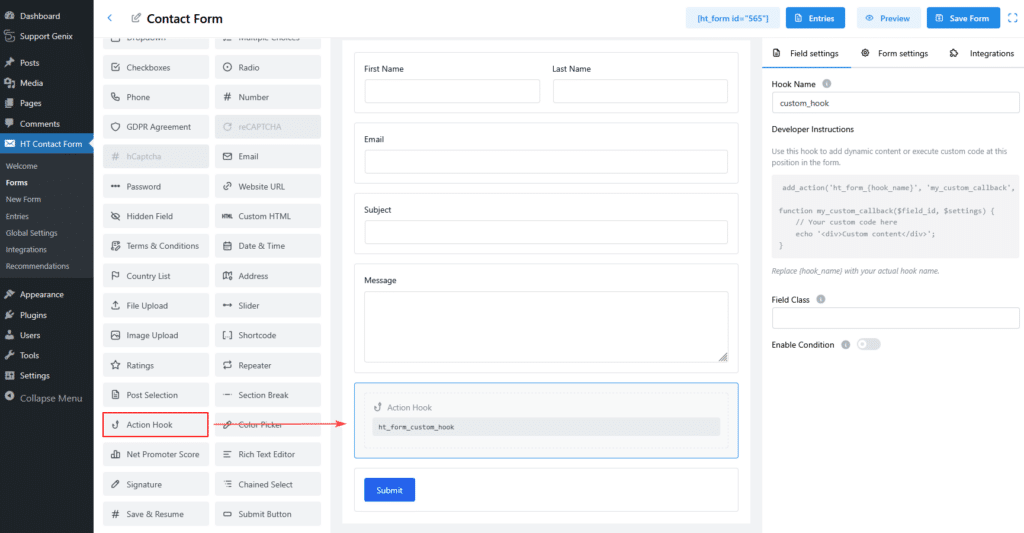
- Navigate to HT Contact Form → Forms in the WordPress admin panel.
- Edit an existing form or create a new one.
- In the Form Builder, find Action Hook in the element panel.
- Drag and drop the field into your form.
Step 2: Configure the Hook
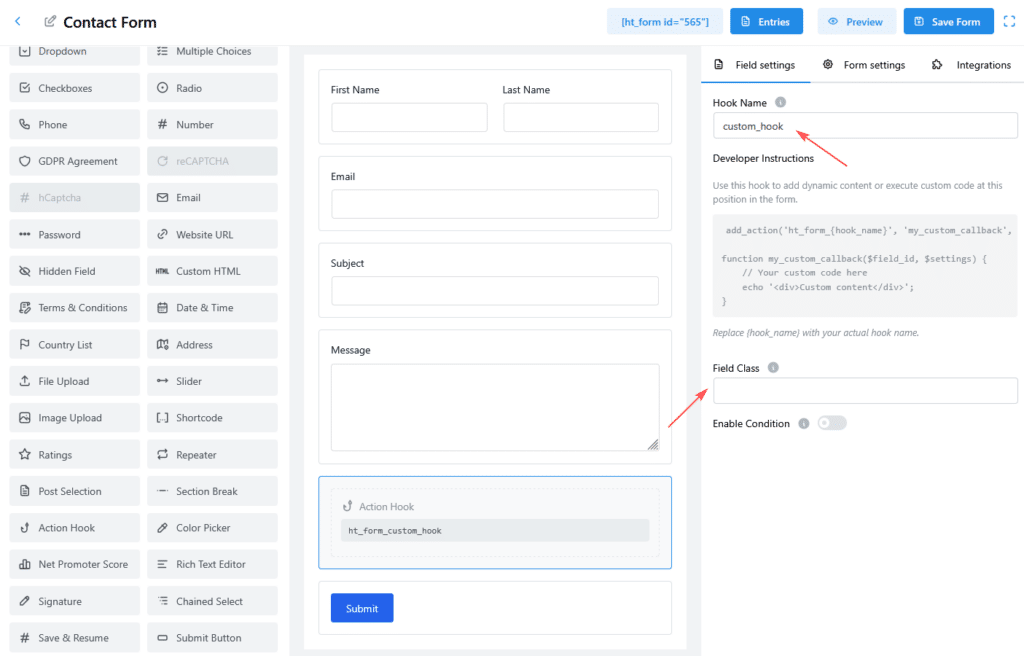
Hook Name
- Purpose: Defines the name of your WordPress action hook.
- Example: A hook named
consent_textbecomesht_form_consent_text.
Field Class
- Purpose: Apply custom CSS styling.
- Example:
legal-section,custom-hook.
Implementing the Action Hook
Basic Example
Add this code to your theme’s functions.php or a custom plugin:
add_action('ht_form_your_hook_name', 'my_callback_function', 10, 2);

function my_callback_function($field_id, $settings) {
    echo '<div class="custom-content">Your custom content here</div>';
}
Callback Parameters
Your callback function receives these parameters:
- $field_id: The unique ID of the field instance.
- $settings: Configuration settings from the form builder.
Example Implementations
Example 1: Legal Disclaimer
Scenario: Show legal links for privacy policy and terms of service.
PHP Implementation:
add_action('ht_form_legal_disclaimer', 'display_legal_disclaimer', 10, 2);

function display_legal_disclaimer($field_id, $settings) {
    $privacy_url = get_privacy_policy_url();
    $terms_url = get_permalink(get_page_by_path('terms-of-service'));

    echo '<div class="legal-disclaimer">';
    echo '<p>By submitting, you agree to our <a href="' . esc_url($privacy_url) . '">Privacy Policy</a> and <a href="' . esc_url($terms_url) . '">Terms of Service</a>.</p>';
    echo '</div>';
}
Example 2: Dynamic Greeting
Scenario: Display a personalized greeting based on the user’s login status.
PHP Implementation:
add_action('ht_form_user_greeting', 'display_user_greeting', 10, 2);

function display_user_greeting($field_id, $settings) {
    if (is_user_logged_in()) {
        $user = wp_get_current_user();
        echo '<div class="user-greeting">Welcome back, ' . esc_html($user->display_name) . '!</div>';
    } else {
        echo '<div class="user-greeting">Please <a href="' . wp_login_url() . '">log in</a> for a faster experience.</div>';
    }
}
Security Best Practices
Escape Output
Always escape any data before displaying it:
// Correct
echo '<p>' . esc_html($user_input) . '</p>';
Validate Data
Always validate data before use:
if (!isset($settings['option'])) {
    return;
}
$safe_value = sanitize_text_field($settings['option']);
Performance Considerations
Keep Callbacks Lightweight
Avoid heavy operations during form render:
// Correct: Simple content
function efficient_callback($field_id, $settings) {
    echo '<p>Simple content here</p>';
}

// Incorrect: Avoid heavy queries on each form load
function slow_callback($field_id, $settings) {
    $posts = get_posts(['posts_per_page' => -1]);
}
Use Caching for Expensive Operations
Cache content for expensive operations:
$content = get_transient('hook_content_cache');
if (!$content) {
    $content = expensive_query();
    set_transient('hook_content_cache', $content, HOUR_IN_SECONDS);
}
echo $content;
Debugging Tips
Check if the Hook is Firing
Add the following to verify the hook execution:
add_action('ht_form_your_hook_name', function($field_id, $settings) {
    echo '<!-- Hook fired with ID: ' . esc_html($field_id) . ' -->';
}, 10, 2);
Troubleshooting
Hook Not Executing
Check for:
- Hook name mismatches (ensure
ht_form_{hook_name}). - Callback function errors.
- Action priority issues.
Styles Not Applying
Ensure CSS is loaded properly, and verify class names.
Conclusion
The Action Hook Field is an essential tool for developers looking to add dynamic content, custom functionality, or third-party integrations in their forms without collecting data. By following best practices for security, performance, and debugging, you can easily extend your forms with additional features using WordPress’s powerful action hook system.