
The Dropdown Field in HT Contact Forms allows users to select one option from a list.
It is a great choice for conserving space on the form and simplifying multiple-choice inputs.
Dropdown Field Settings:
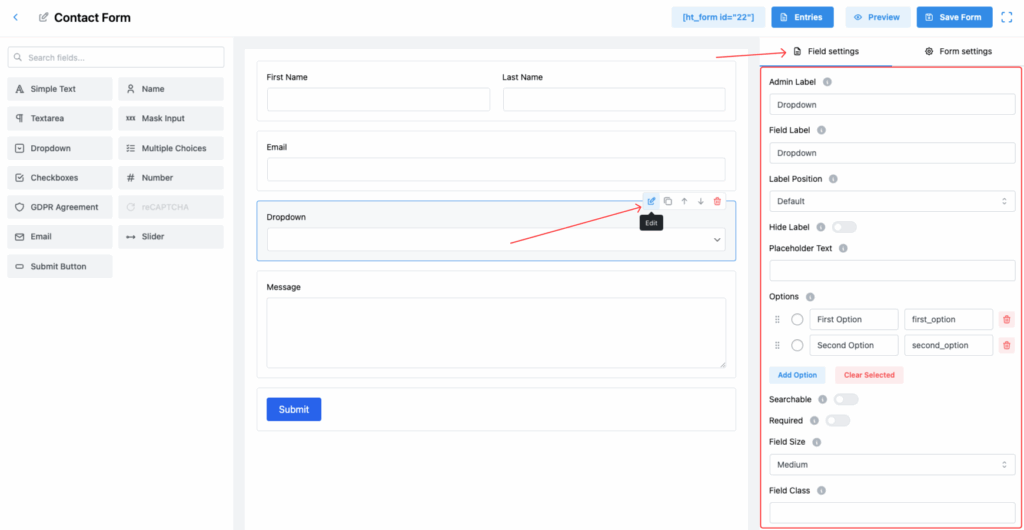
1. Admin Label
The internal label used only for admin reference while managing forms and entries.
2. Field Label
The label that will be displayed to users on the form, guiding them to make a selection.
3. Label Position
Control where the label appears relative to the dropdown. Options:
- Default
- Left
- Top
- Right
- Bottom
4. Hide Label
Toggle this setting to hide the label from being displayed on the front-end.
5. Placeholder Text
Provide a placeholder that appears before any option is selected.
✅ Useful for guiding users, e.g., “Please select an option.”
6. Options
Manage the list of selectable options:
- Add multiple options manually.
- Edit option labels and their corresponding values.
- Reorder options by dragging.
- Delete options if needed.
✅ Example:
- First Option (value:
first_option) - Second Option (value:
second_option)
7. Searchable
Enable this to allow users to search within the dropdown options.
✅ Useful for forms with a large number of choices.
8. Required
Enable this toggle to make selection mandatory before form submission.
9. Field Size
Adjust the dropdown size to match your form layout. Options:
- Small
- Medium (Default)
- Large
10. Field Class
Specify a custom CSS class for the dropdown field for advanced styling purposes.
11. Help Message
Provide additional instructions or tips for the field to help users make their selection.
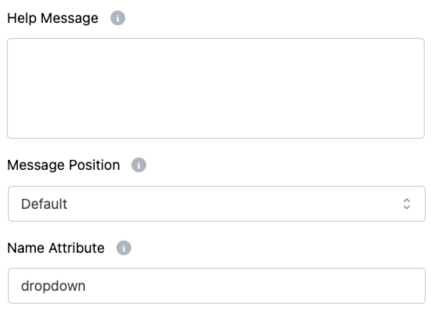
12. Message Position
Decide where the Help Message should appear:
- Default
- Next to Label as Tooltip
- Below Input Element
13. Name Attribute
Set a unique name attribute for the field, important for backend form data submission and processing.
Important Note:
📌 In the Dropdown Field, Max Text Length is not applicable because users choose from predefined options, not by typing manually.
Tip:
Use the Searchable feature if you expect long option lists. It improves user experience and makes selections faster! 🔍