
The GDPR Agreement Field in HT Contact Forms is specially designed to help you comply with data protection regulations like GDPR.
It allows you to request and record user consent for storing and processing their personal information.
This field ensures your form is legally compliant when collecting user data.
GDPR Agreement Field Settings:
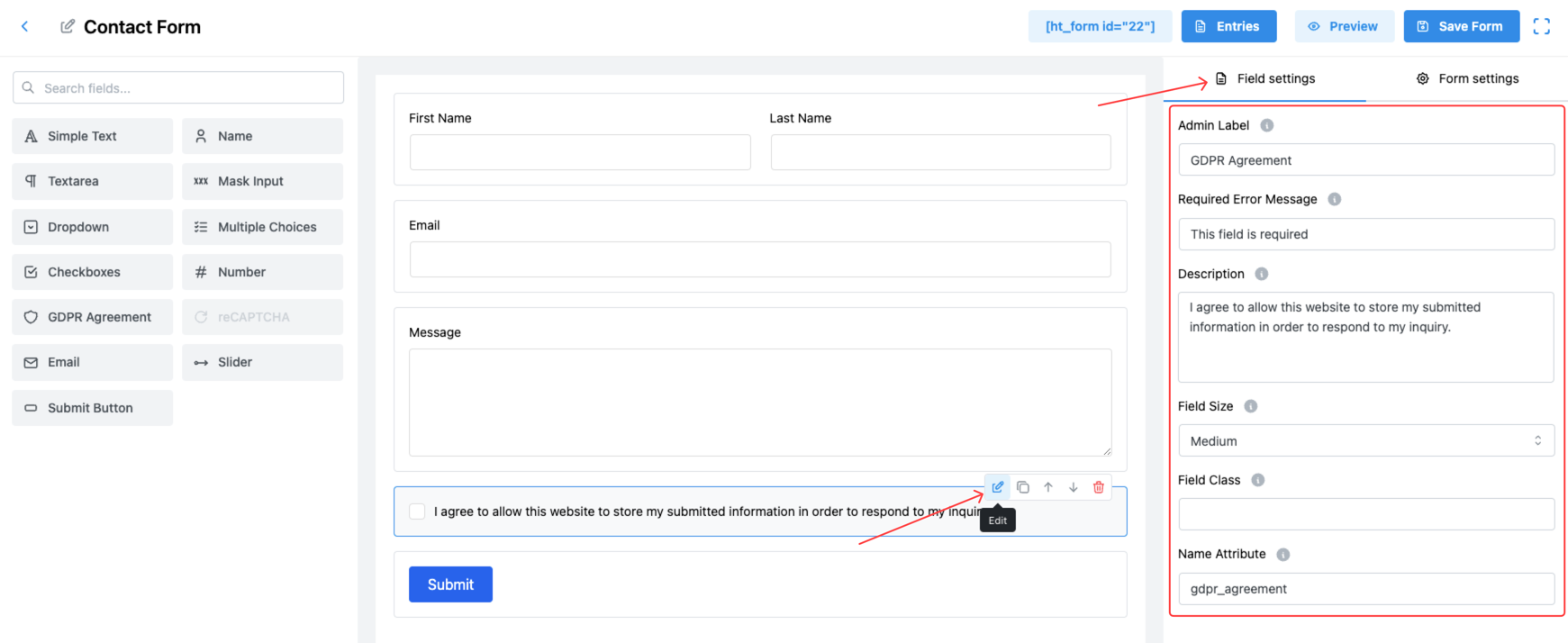
1. Admin Label
Internal label visible only to form administrators, used for easy management of the field in the backend.
2. Required Error Message
Customize the error message that users will see if they attempt to submit the form without agreeing.
✅ Example: “This field is required.”
3. Description
Enter the full text that users must agree to.
✅ Example:
“I agree to allow this website to store my submitted information in order to respond to my inquiry.”
📝 The description should clearly explain why you are collecting the user’s information and how you plan to use it.
4. Field Size
Adjust the display size of the GDPR field to match your form design:
- Small
- Medium (Default)
- Large
Choose a size that fits naturally with your other form fields.
5. Field Class
Add a custom CSS class if you need to style the GDPR checkbox differently using your theme’s CSS.
6. Name Attribute
Set a unique name attribute for the GDPR field, which is important for identifying the user’s consent status when the form is submitted.
✅ Example: gdpr_agreement
Important Notes:
📌 The GDPR Agreement field is usually required by default to ensure legal compliance.
📌 Users must manually check the agreement checkbox before they can submit the form.
Tip:
Keep your GDPR description simple, clear, and transparent. Avoid using complicated legal language to ensure users easily understand what they are agreeing to! ✅