
The Contact Form Signature Field in HT Contact Form allows you to collect handwritten digital signatures directly through WordPress forms. Users can sign using a mouse, touch screen, or stylus, making it ideal for agreements, consent forms, approvals, and confirmations.
This guide explains how to add, configure, and use the Contact Form Signature Field step by step.
What Is the Contact Form Signature Field
The Contact Form Signature Field provides an interactive canvas where users can draw their signature naturally. Once the form is submitted, the signature is saved as an image and stored securely in WordPress.
Key Benefits
- Collect digital signatures online
- Works on desktop, tablet, and mobile devices
- No third-party service required
- Secure image storage in WordPress
- Easy drag-and-drop setup
Common Use Cases for Contact Form Signature Field
You can use the Contact Form Signature Field for:
- Service agreements and contracts
- Consent and permission forms
- Delivery confirmation forms
- Job application verification
- Authorization and approval documents
- Warranty and registration forms
How to Add Contact Form Signature Field in HT Contact Form
Step 1: Open the Form Builder
- Go to WordPress Dashboard → HT Form → Forms
- Create a new form or edit an existing one
Step 2: Add the Signature Field
- Locate Signature in the form elements panel
- Drag and drop it into your form layout

Contact Form Signature Field Settings Explained
Admin Label
Used for internal identification in the admin panel only.
Example: Customer Signature
Field Label
Displayed above the signature canvas on the frontend.
Example: Please Sign Below

Canvas Settings in Contact Form Signature Field
Canvas Width
- Default value:
0(responsive) - Automatically adjusts to container width
- Recommended for mobile-friendly forms
Canvas Height
- Default value:
200px - Recommended range:
150px – 200px

Pen and Background Settings
Pen Color
Defines the color of the signature ink.
Best practice: Use dark colors for better visibility.
Pen Width
Controls the thickness of the signature stroke.
Recommended value: 2 for natural handwriting.
Background Color
Sets the canvas background color.
Tip: Light gray improves visibility on white pages.

Clear Button Options
Show Clear Button
Allows users to clear the canvas and re-sign.
Clear Button Text
You can customize the button label, such as:
- Clear Signature
- Start Over
- Reset

Making Contact Form Signature Field Required
Enable the Required option if the signature must be submitted.
- The form cannot be submitted without a signature
- Empty canvas fails validation
- Any drawn input passes validation
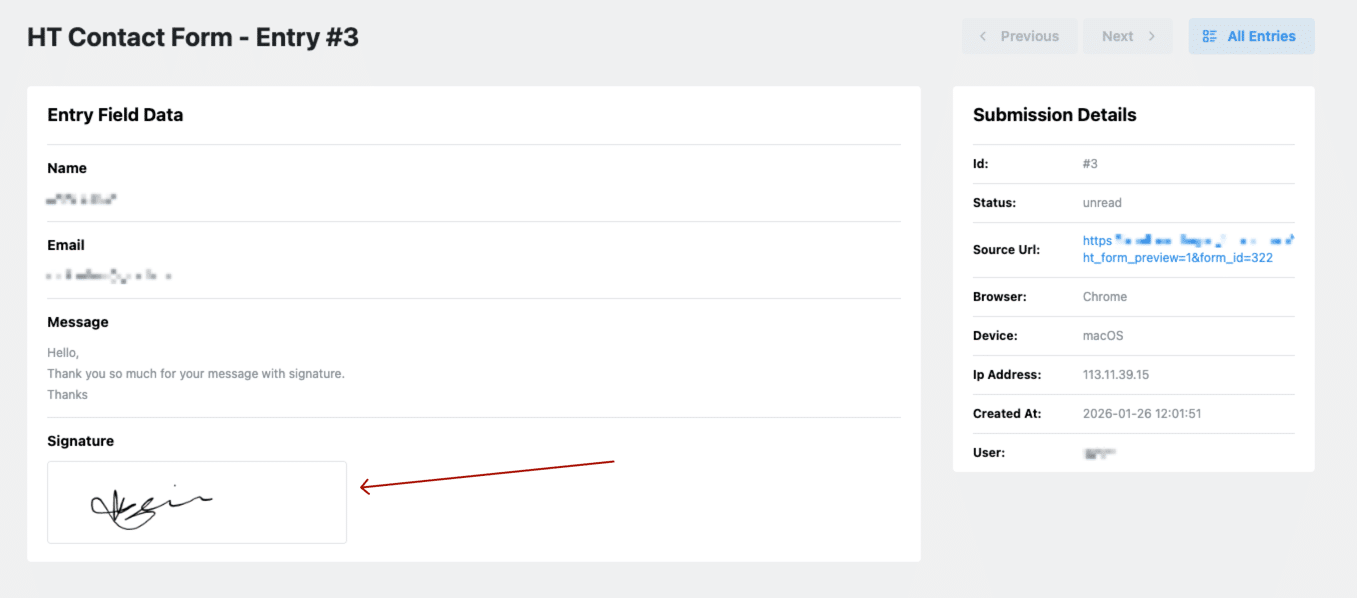
Viewing Submitted Signatures
Viewing in Form Entries
- Signatures appear as images
- Click to view full size
- Download option available
Using Contact Form Signature Field in Email Notifications
- Signature is sent as a PNG image
- Can be attached or embedded in emails
- Use the signature field smart tag in notifications

How Contact Form Signature Field Stores Data
- Signature is saved as a PNG image
- Stored securely in WordPress Media Library
- Entry stores the image URL
- Lightweight file size for performance
Mobile and Touch Device Support
The Contact Form Signature Field works smoothly on:
- Smartphones
- Tablets
- Touchscreen laptops
- Stylus devices
Scrolling is automatically disabled while signing to ensure accuracy.

Best Practices for Contact Form Signature Field
- Use clear signing instructions
- Keep canvas responsive
- Always enable clear button
- Combine with consent or agreement text
- Test on mobile devices
Accessibility and Legal Notes
- Use clear, descriptive labels
- Add consent checkboxes when required
- Check local electronic signature laws before legal use
Frequently Asked Questions
Is the Contact Form Signature Field legally valid?
Electronic signatures are accepted in many regions. Always verify local regulations before legal use.
Can I customize the signature appearance?
Yes. You can customize pen color, pen width, background color, and canvas size.
Where are signatures stored?
Signatures are stored as image files in the WordPress Media Library.