
How to Showcase Brand Logo in WordPress: A Complete Guide

Adding a WordPress logo carousel plugin to your site is a handy marketing tool. It helps promote your brand and showcases products or services. The widget enables you to feature logos or brand images that easily capture attention.
The best logo showcase plugin WordPress users recommend offers extensive customization options. Creating an effective logo showcase section on a WordPress site improves brand credibility.
This makes your website look more professional and builds trust with your audience. It is also a great way to spread awareness about your business or services. A brand widget boosts your site’s visual appeal and overall user experience.
The WordPress brand logo showcase feature helps establish professional credibility instantly. Many businesses use a display logo carousel in WordPress for rotating client testimonials. Adding brand logos in WordPress has become increasingly simple.
In this blog, we’ll walk you through the steps on how to showcase brand logo in WordPress using an easy-to-use brand logo widget. Follow along and learn how you can do it in a few simple steps.
Key Takeaways
- Learn to establish professional credibility through effective logo showcasing techniques.
- Discover how to implement logo displays without coding using HT Mega.
- Master multiple layout styles to present logos for different purposes.
- Learn how to ensure your logo showcase works perfectly on mobile devices.
- Explore customization options for creating interactive logo display effects.
What is a Brand Widget and How Does It Work
Brand widgets are a modern way to incorporate the power of branding into web applications and web pages. With the Elementor Brand widget in HT Mega, you can easily create a recognizable identity for your products and services.
Add a professional touch to any web page by showcasing your brand logo with this unique feature!
A WordPress logo slider plugin allows smooth transitions between multiple brand images. Showcasing client logos in WordPress feature builds trust with potential customers. The Modern Logo Grid WordPress plugin offers multiple attractive layout designs.
Brand widgets are highly customizable and allow developers to add dynamic elements across websites.
They make it easy to enhance functionality without losing the company’s original brand identity.
Brand logo widgets are designed with the user in mind. Input fields can be customized to meet specific needs. This includes adding images, links, and even text overlays. This intuitive interface enables you to create the perfect branding solution quickly.
How to Add a Brand Widget to Your WordPress Site
Adding a brand widget to your WordPress site is easier than ever with HT Mega Plugin. Add Brand logos anywhere on your pages with just a few clicks, and no coding knowledge is required.
Its simple drag-and-drop interface makes it easy to customize their look, giving you the ability to create unique brand logos for your business.
Implementing a responsive logo display on WordPress ensures visibility across all device types and sizes. The WordPress logo carousel widget maintains brand consistency throughout your entire site. Popular Elementor logo showcase addons provide drag-and-drop customization capabilities.
This step-by-step guide will provide you with the t to create a one-of-a-kind WordPress site, complete with an eye-catching brand logo widget. Follow these easy instructions and watch your unique website come alive!
Step 1: How to Enable Brands
Displaying brand logos on WordPress websites helps build visitor trust. The WordPress company logo showcases functionality, establishes industry connections, and professional affiliations.
To activate the Brands widget, navigate to your WordPress Dashboard > HTMega Addons> Settings > Elements and switch this feature ON from the list of available elements.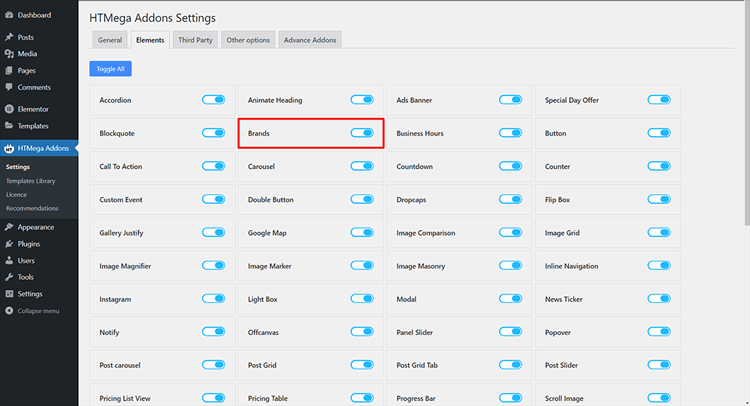
Step 2: How to use the Brands Widget
Create a page from your WordPress Dashboard, then select Elementor to edit it according to your own requirements.
To add the Brand widget to your page template, search for “Brands” and locate the widget with an HT badge. Then, simply drag and drop it onto the desired Page Template location.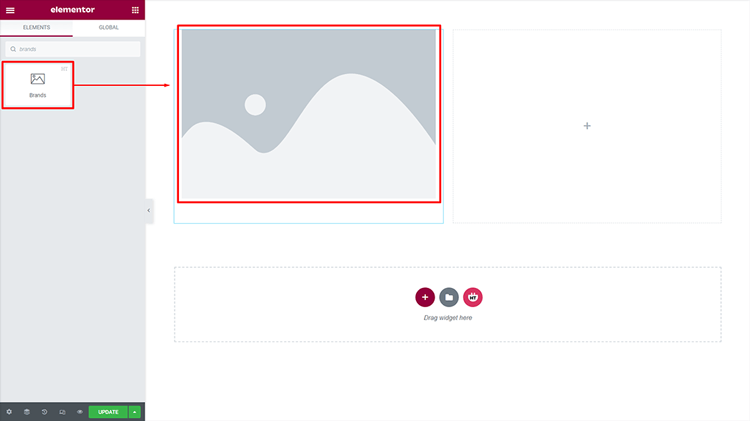
Step 3: How to customize the Brands Widget
Content :
With seven distinct Brand styles available, you can select the style that best fits your needs.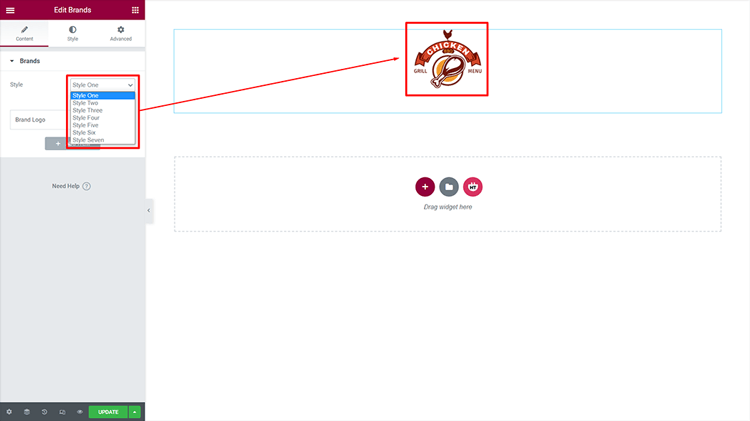
Brands:
Customize the Title according to your needs! You can personalize the Partner Logo to fit your needs. You can adjust the image size as per your needs.
As your needs evolve, you can easily and quickly change the “Read More” link. To make a fresh Brand Logo, simply click the “Add more” button! The ‘Add Multiple Logos’ WordPress functionality supports bulk image importing capabilities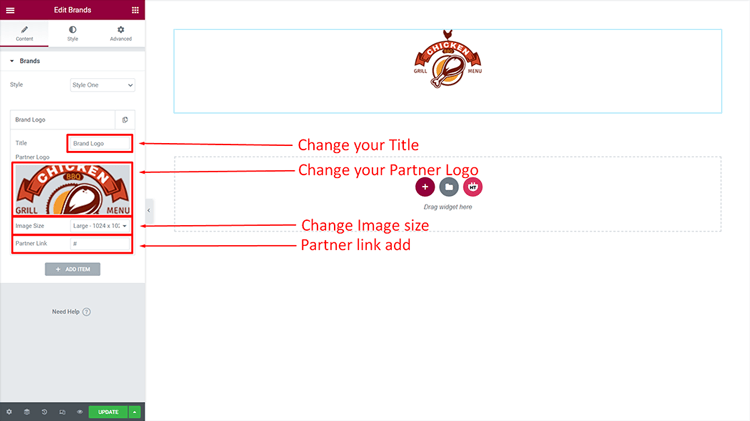
How to customize the Brands style
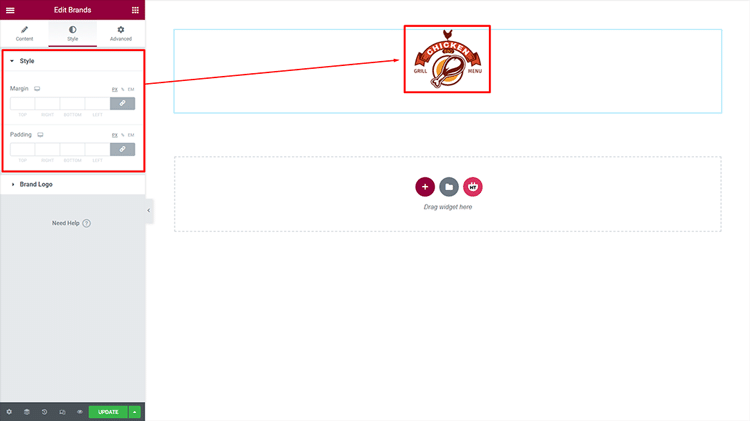
You have the freedom to customize the style of your Style however you desire! You have the freedom to personalize the style of your Brand Logo, however, you want.
HT Mega Elementor Addons
The ultimate Elementor page builder addons to build stunning websites.
Frequently Asked Questions
Q: What is a Brand widget?
A: WordPress Brand widget is an extension of HT Mega Plugin, that allows you to add a linkable brand logo to your WordPress website with ease. It helps in promoting and reinforcing the brand identity of any WordPress site.
Q: Is the Brand widget easy to use?
A: Yes, the Brand widget is extremely user-friendly and easy to set up. All you need to do is install the HT Mega Plugin and add the Brand widget from its library. You can then customize your brand logo as per your needs.
Q: How can a Brand widget help me?
A: A brand widget offers an easy way to promote and strengthen your WordPress site’s identity. It adds a clickable logo that links back to your homepage, boosting brand visibility easily. With just a few simple clicks, it helps create a clean and professional website look.
Q: Can I customize the layout of the Brand widget?
A: Yes, most Brand widgets allow layout customization, including logo size, spacing, and alignment. You can also control hover effects and link settings for each brand image.
Q: Does the Brand widget affect website performance?
A: If optimized images are used, the WordPress logo gallery plugin has minimal impact on site speed. Use caching and lazy loading to ensure performance remains smooth and fast.
Q: Is the Brand widget mobile responsive?
A: Most modern WordPress logo showcase widgets are designed to be fully responsive on all devices. They adjust the layout automatically to ensure brand logos display cleanly on mobile and desktop.
Final Thoughts
In short, showcasing a brand logo in WordPress is crucial for brand recognition. It helps establish a strong online presence that builds trust and credibility among your visitors.
Utilizing the Elementor brand widget is a straightforward and effective method to display logos. This tool ensures your logo looks both visually appealing and fully functional across the website.
With its customizable options, you can choose from a variety of layouts and designs to perfectly showcase your brand’s personality and style.
By implementing these simple steps, you can easily add your brand logo to your WordPress website and enhance your overall branding strategy. A responsive logo slider WordPress solution adapts perfectly to mobile devices.
So don’t hesitate to take advantage of the Elementor brand widget and start showcasing your brand logo today!