WooCommerce Subscription Dunning: How to Build a Complete Automated Recovery Strategy

Quick Answer: WooCommerce subscription dunning is the automated process of recovering failed subscription payments through smart payment retries, targeted email sequences, and a self-service customer portal. A properly configured dunning system recovers 55–80% of failed payments automatically, compared to just 15–25% with basic retry logic. This guide walks you through building a complete dunning strategy for WooCommerce in 6 steps.
WooCommerce subscription dunning is an automated system that prevents failed payments from resulting in permanent customer loss, yet most WooCommerce stores run without it, leaking thousands in recoverable revenue every month.
Every month, subscription revenue quietly disappears, not because customers want to leave, but because a card expired, a bank flagged a charge, or a payment token became stale.
The subscription renews silently in the backend, fails silently, and the customer never even knows their access is at risk. This is involuntary churn — and industry data shows that payment failures cost subscription businesses $129 billion in lost revenue globally in 2025, with 50% of all subscription churn directly tied to failed card payments.
The alarming part? 80% of these failures have nothing to do with customer intent; they want to stay subscribed. This guide explains exactly how WooCommerce subscription dunning works, how to build a dunning sequence that outperforms basic retry logic, and which tools automate the process most effectively for WooCommerce stores in 2026.
Table of Contents
What Is WooCommerce Subscription Dunning?
Dunning management is the automated process of recovering failed subscription payments through smart payment retries, targeted customer communication, and intelligent escalation workflows.
The term originates from 17th-century commercial practice (“dunning” meant sending increasingly urgent payment reminders), but today it refers to a fully automated system that handles recovery without manual intervention.
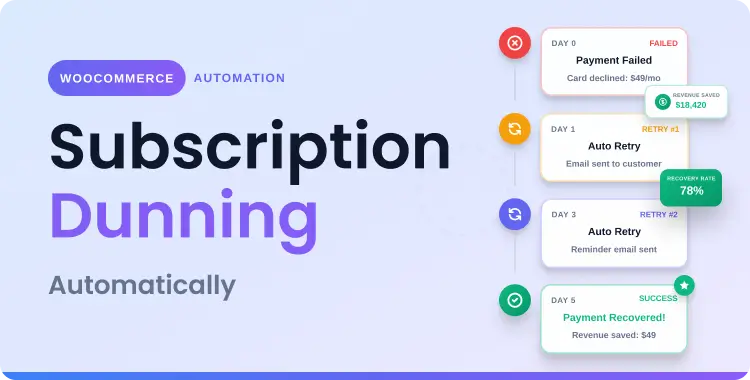
In the WooCommerce context, dunning activates the moment a scheduled renewal payment fails. Instead of immediately canceling the subscription or leaving the account in “on-hold” status indefinitely, a dunning system:
- Retries the payment on an optimized schedule
- Emails the customer with clear, urgent messaging
- Provides a self-service portal for customers to update their payment method
- Escalates progressively if early retries fail
The difference between stores that have dunning configured and those that don’t is often $10,000–$50,000/month in retained recurring revenue — and for most WooCommerce stores, it requires no manual work once properly set up.
💡 This guide covers dunning, the recovery layer for payments that were attempted and declined.
If your WooCommerce renewals are not being created at all (cron, webhook, or token issues), that is a technical problem covered separately: Complete WooCommerce Subscription Troubleshooting Checklist
Why This Is Different from Fixing a Broken Renewal
It’s important to distinguish dunning from troubleshooting. If your WooCommerce cron jobs are broken, your webhooks are misconfigured, or your gateway tokens are corrupted, those are technical failures that prevent renewals from ever being attempted. Dunning, by contrast, is the recovery layer that activates after a payment attempt has been made and legitimately declined by the bank or card issuer. Dunning doesn’t fix broken infrastructure — it maximizes recovery from the payment failures that will always occur in any healthy subscription business.
Before building a dunning strategy, it helps to know which failure type you’re dealing with soft declines respond well to automated retries, while hard declines require customer outreach.
For a full breakdown of each failure cause and how to identify them: Why WooCommerce Subscription Payments Fail: Identify the Cause
Basic Retry vs. Smart WooCommerce Subscription Dunning: What’s the Difference?
This is the most important distinction every WooCommerce store owner needs to understand. There are two fundamentally different approaches to failed payment recovery:Metric Basic Retry Logic Smart Dunning Overall recovery rate 15–25% 55–80% Soft decline recovery 25–35% 70–90% Hard decline recovery (via outreach) 5–10% 25–40% Time to recovery 5–7 days (fixed) 1–14 days (optimized) Customer experience Generic Personalized Channels used Payment retry only Retry + email + SMS + portal Intelligence Fixed schedule AI-optimized timing
Basic retry logic, including WooCommerce Subscriptions’ native retry system, operates entirely at the payment layer. It retries the charge on a fixed schedule (e.g., after 12 hours, then 3 days, then 7 days) regardless of the failure reason, customer history, or bank behavior. This approach recovers a fraction of what’s possible because it ignores context entirely.
Smart dunning orchestrates recovery across multiple channels simultaneously. AI-powered systems analyze decline codes, issuing bank behavior, customer value, and historical patterns to determine the optimal retry timing for each individual failed payment. Meanwhile, a parallel email (and sometimes SMS) sequence communicates with the customer to prompt payment method updates for hard declines that automated retries alone cannot resolve.
For a subscription business with $1M in monthly recurring revenue and a 10% payment failure rate, the math is stark:
- Basic retry recovery (20%): $20,000 recovered/month
- Smart dunning recovery (65%): $65,000 recovered/month
- Monthly uplift: $45,000 → $540,000 additional annual revenue
How to Build a WooCommerce Subscription Dunning Strategy
Step 1: Enable the Native Retry System (Baseline)
WooCommerce Subscriptions includes a built-in Failed Recurring Payment Retry System, but it is off by default. To enable it:
- Go to WooCommerce > Settings > Subscriptions
- Scroll to the Miscellaneous section
- Tick Enable Automatic Retry
- Save changes
Once enabled, WooCommerce applies a set of Retry Rules, each rule defining the retry interval, the subscription status during the retry window, and whether to email the customer or store owner. The default rules attempt recovery over approximately 7 days with up to 5 retry attempts.
This is a good starting point, but it represents basic retry logic. For stores serious about revenue recovery, this is the floor, not the ceiling.
Step 2: Configure a Smart Retry Schedule
The timing of your retry attempts significantly affects recovery rates. Research shows that many successful recoveries happen 7–14 days after the initial failure — particularly for insufficient funds cases, where customers may need to wait for a paycheck or pay down their card balance.
Recommended retry schedule:
- Attempt 1: 1 day after initial failure (catches quick bank resolution)
- Attempt 2: 3 days after failure (captures early-week banking cycles)
- Attempt 3: 7 days after failure (allows for pay-cycle recovery)
- Attempt 4: 14 days after failure (final automated attempt, maximum window)
- Attempt 5: 21 days after failure (last-chance retry before escalation)
Advanced plugins like Recurio allow you to configure 2–5 retry attempts across 1–7 day windows with full control over each interval. This configurable dunning, combined with 7 pre-built dunning email templates, is what separates enterprise-grade recovery from default WooCommerce behavior.
Step 3: Build Your Dunning Email Sequence
Payment retries handle soft declines automatically. For hard declines, especially expired cards, customer communication is essential. A well-structured dunning email sequence is the bridge between automated retries and human action.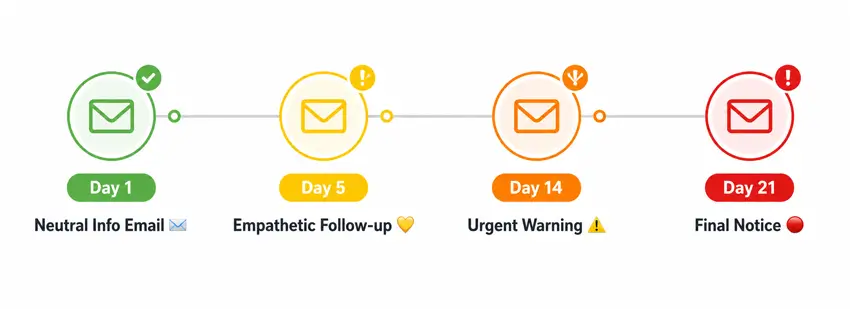
The proven industry cadence is 3–4 emails over a 28-day period, spaced to be helpful without overwhelming the customer. Here is an effective WooCommerce subscription dunning email framework:
Email 1 — Day 1 (Neutral, Informational)
Subject: “Your payment didn’t go through — here’s what to do”
Tone: Calm, helpful. No blame. Explain that the payment failed and provide a clear link to update their payment method. Mention that their subscription is still active during a grace period.
Email 2 — Day 5 (Empathetic, Slightly Urgent)
Subject: “Action needed: Update your payment details”
Tone: Understanding. Acknowledge that card changes happen. Use account-level personalization (subscription name, amount, next retry date). Repeat the payment update link prominently.
Email 3 — Day 14 (Urgent)
Subject: “Your subscription will be paused in 7 days”
Tone: Clear urgency. Provide a countdown to suspension. Use phrases like “time is running out” or “last chance to keep access” — without scare tactics. Offer an alternative payment method option.
Email 4 — Day 21 (Final Notice)
Subject: “Final notice: Your subscription ends tomorrow”
Tone: Firm but respectful. State clearly that access will be canceled unless payment is updated today. Include a direct CTA button.
Key email best practices:
- Use account-level language – mention their subscription plan name, billing amount, and exact days until suspension
- Vary the tone across emails – repeating the same message causes email fatigue
- Include a frictionless self-service link that lets customers update their payment method in one click, no login required
- Optimize subject lines for urgency without resorting to spam-trigger words
- Ensure all emails are mobile-optimized, as most customers read payment failure emails on their phones
Step 4: Implement Pre-Dunning Notifications
The most powerful dunning tactic is the one that prevents payment failure from happening at all. Pre-dunning, also called proactive billing alerts, notifies customers when their stored card is about to expire, before the renewal attempt, giving them time to update their details.
Enabling pre-dunning can prevent 30–50% of hard declines before they occur. This is especially impactful because hard declines are the failures most resistant to automated retry logic.
Pre-dunning setup for WooCommerce:
- WooCommerce Subscriptions natively supports Email Reminders — go to WooCommerce > Settings > Emails and enable “Subscription Auto Renewal Reminder.”
- Set reminders to send 3, 7, and 14 days before renewal (enter comma-separated values like
14,7,3) - Use an advanced plugin like Recurio or FunnelKit Automations for richer segmentation and timing control.
Step 5: Add Account Updater Services
Many modern payment gateways, including Stripe and PayPal, offer Account Updater services that automatically refresh expired or replaced card details without any customer action.
When a bank issues a customer a new card (due to expiry or fraud replacement), the network can automatically push the updated card information to merchants enrolled in the Account Updater program.
Enabling Account Updater via your WooCommerce payment gateway eliminates a significant portion of hard declines automatically. Check your gateway’s documentation for enrollment options, as this is often a setting within the gateway dashboard rather than WooCommerce itself.
Step 6: Provide a Frictionless Self-Service Customer Portal
For customers who need to manually update their payment method, friction is the enemy of recovery. Every additional click, login wall, or form field reduces the likelihood of completion.
A well-designed customer subscription portal should allow subscribers to:
- Update their payment method in 1–2 clicks
- View their subscription status and next renewal date
- Download invoices without contacting support
- Pause rather than cancel (reducing voluntary churn simultaneously)
Common WooCommerce Dunning Mistakes to Avoid
Mistake 1: Relying Solely on Native WooCommerce Retry Logic
WooCommerce Subscriptions’ built-in retry system has a fixed schedule, limited email customization, and no cross-channel communication. Stores that rely only on native retry logic are leaving the majority of recoverable revenue on the table. Basic retries recover just 15–25% vs. the 55–80% achievable with smart dunning.
Mistake 2: Sending Too Many Emails Too Quickly
Sending daily dunning emails feels proactive, but actually damages recovery rates. Customers who feel spammed are more likely to mark emails as spam or click the unsubscribe link, eliminating your ability to reach them at all. The industry-proven cadence is 3–4 emails over 28 days, spaced to feel helpful rather than harassing.
Mistake 3: Using Generic, Impersonal Messaging
Mass dunning emails that don’t reference the customer’s subscription name, billing amount, or next retry date perform significantly worse than personalized messages. Account-level personalization is one of the highest-impact improvements you can make to your dunning email sequence.
Mistake 4: Canceling Subscriptions Too Quickly
Many WooCommerce store owners configure their system to cancel subscriptions after the first or second failed payment, which permanently destroys the subscriber relationship.
Grace periods (keeping the subscription on-hold rather than canceled during the dunning window) give customers time to resolve the issue and return. WooCommerce’s native retry system keeps subscriptions “on-hold” by default, but some plugins or configurations cancel immediately.
Mistake 5: Not Measuring Recovery Rates
You cannot optimize what you don’t measure. Track these metrics in your WooCommerce subscription analytics:
- Payment failure rate: % of renewals that fail on the first attempt
- Recovery rate: % of failed payments successfully recovered
- Revenue recovered: Monthly dollar value rescued by dunning
- Average time to recovery: How many days between failure and successful charge
- Dunning email open and click rates: Which emails in the sequence perform best
WooCommerce Subscriptions includes a Failed Payment Retry Report that shows recovered revenue and average retry attempts. Advanced plugins like Recurio surface this data in a real-time analytics dashboard alongside MRR and churn metrics.
Mistake 6: Skipping Pre-Dunning and Only Reacting to Failures
Most stores focus entirely on post-failure recovery, retries and emails after a payment has already declined. But the highest-leverage dunning tactic is pre-dunning: notifying customers before their card expires or before a known high-risk renewal.
For stores where 30–40% of failures come from expired cards, pre-dunning alone can eliminate a third of all involuntary churn before it happens. Step 4 of this guide covers the exact setup for WooCommerce.
WooCommerce Subscription Dunning: Tool Comparison
| Feature | WooCommerce Subscriptions (Native) | Recurio Pro |
|---|---|---|
| Retry attempts | Up to 5 (fixed rules) | 2–5 (fully configurable) |
| Retry intervals | Fixed (12hr, 1d, 3d…) | 1–7 day windows (custom) |
| Dunning emails | Basic templates (manual setup) | 7 pre-built templates |
| Pre-dunning alerts | Yes (via Email Reminders add-on) | Yes (built-in) |
| Customer portal | Basic My Account integration | Dedicated, modern portal |
| Analytics dashboard | Retry report only | Full MRR, churn, LTV reporting |
| Free tier available | No | Yes |
| Smart/AI retry logic | No | Configurable smart logic |
For most WooCommerce stores, Recurio offers the strongest combination of dunning features, modern architecture, and value — particularly its free tier and the configurable retry logic that out-of-the-box WooCommerce Subscriptions cannot match.
Note: This table compares dunning-specific features only. For a full comparison of subscription management capabilities (plan switching, analytics, customer portal)
Frequently Asked Questions
What is dunning in WooCommerce subscriptions?
WooCommerce subscription dunning is the automated process of recovering failed subscription payments through smart payment retries and targeted customer emails. When a renewal fails, the dunning system retries the charge on an optimized schedule while notifying the customer to update their payment method — recovering up to 80% of failed payments automatically.
How do I enable automatic payment retry in WooCommerce Subscriptions?
Go to WooCommerce > Settings > Subscriptions > Miscellaneous and tick “Enable Automatic Retry”. This activates built-in retry rules that attempt recovery up to 5 times over 7 days. For custom intervals, dunning emails, and a customer portal, use a dedicated plugin like Recurio.
How many dunning emails should I send?
Send 3–4 dunning emails over a 28-day window. Space them progressively — start calm and informational, escalate to urgent by the final email. Sending too many too quickly causes spam complaints and email fatigue, which destroys your ability to reach the customer at all.
What is the difference between soft and hard declines?
Soft declines are temporary failures — insufficient funds, bank holds — that resolve automatically with a retry. Hard declines are permanent — expired or blocked cards — and require the customer to manually update their payment method. Smart dunning systems treat each failure type differently for maximum recovery.
Can dunning hurt the customer relationship?
No, when messaging is empathetic and personalized, dunning improves the relationship by proactively alerting customers to payment issues. Subscribers recovered through dunning stay on average 7 more months after recovery. The key is clear, helpful communication — not aggressive or accusatory messaging.
What is the difference between WooCommerce subscription dunning and the renewal failed fix?
WooCommerce subscription dunning is the complete strategy — the system you build to handle all failed payments, including retry schedules, email sequences, pre-dunning alerts, and customer portals. A “renewal failed fix” is what you do when you discover an individual payment has already failed.
Dunning is the ongoing infrastructure; the fix is the immediate response. Ideally, you have both: a dunning system that handles failures automatically, and a clear process for investigating specific failures when they occur.
How long should a WooCommerce dunning sequence run before canceling?
The industry standard is 21–28 days from the first failure before canceling a subscription. This allows for 3–5 retry attempts and 3–4 dunning emails across multiple customer touchpoints. For high-ticket subscriptions (over $50/month), extending to 28 days is recommended. For low-ticket subscriptions (under $15/month), a 10–14 day window may be more appropriate.
Conclusion
WooCommerce subscription dunning is not a “nice to have” — it is the single highest-ROI retention system available to any subscription store. The math is unambiguous: 68% of subscription churn is involuntary and payment-driven, and smart dunning recovers the majority of it automatically.
The gap between basic WooCommerce retry logic (15–25% recovery) and a properly configured dunning system (55–80% recovery) represents tens of thousands of dollars in annual recurring revenue for most stores. Every month you operate without smart dunning in place is a month of preventable revenue loss compounding silently in the background.
Complete the dunning picture with these related guides:
👉 Identify which failure type you have first: Why WooCommerce Subscription Payments Fail
👉 Step-by-step fix for a payment that’s already failed: WooCommerce Subscription Renewal Failed Fix
👉 Fix technical issues (cron, webhook, token): Complete Troubleshooting Checklist