How to Pause WooCommerce Subscriptions to Reduce Churn

If your WooCommerce subscription store is losing customers, the reason is often not what you think. Many subscribers do not cancel because they dislike your product — they cancel because they need a temporary break, and you have not given them one.
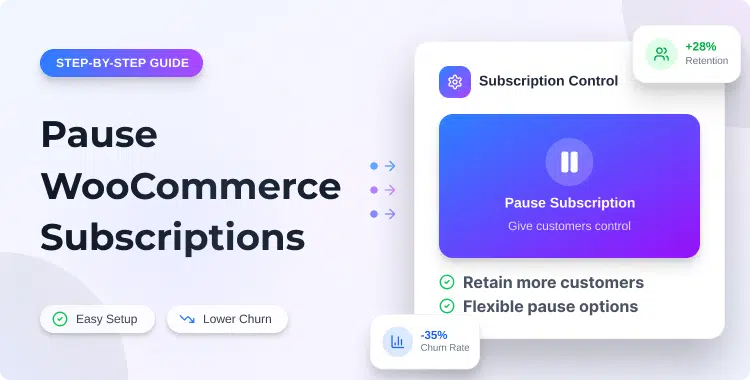
Offering the option to pause WooCommerce subscriptions solves that problem directly. Instead of forcing a binary choice between staying active or canceling permanently, a pause option gives subscribers a middle path. They pause, come back when they are ready, and your recurring revenue stays intact.
This guide explains what the pause option means, how it differs from canceling or suspending, when to offer it, and how to implement it inside WooCommerce.
Table of Contents
TL;DR: Why Pausing Subscriptions Reduces Churn
- A pause option gives customers flexibility without forcing a permanent decision
- It reduces cancellations caused by temporary issues like budget pressure, travel, or product overstock
- It keeps the subscriber relationship active while they take a short break
- Customers who can self-manage pauses are less likely to cancel out of frustration
- It gives you a window to re-engage paused subscribers before they fully disengage
- Plugins like Recurio provide a self-service customer portal with pause, resume, analytics, and payment recovery tools built in
What Does It Mean to Pause WooCommerce Subscriptions?
Pausing a WooCommerce subscription means temporarily stopping renewal billing, product access, or shipments until the customer chooses to resume. The subscription relationship stays intact — it simply sits on hold for a defined or open-ended period.
The exact behavior depends on your plugin and store configuration. Some setups stop billing but keep access active. Others pause both billing and access. For physical subscription boxes, pausing typically stops the next shipment and the associated renewal charge.
If you are new to WooCommerce recurring billing, it helps to first understand how to set up WooCommerce subscriptions for recurring revenue success before building a pause and resume workflow on top of it.
Common Terms Used for Subscription Pausing
Different tools use different languages. Here is what each term typically means:
- Pause — a temporary hold with the intent to resume
- Suspend — often admin-controlled, or triggered automatically by a payment failure
- Hold — similar to pause; sometimes used interchangeably
- Skip — skips one billing cycle or delivery without pausing the full subscription
- Freeze — stops all subscription activity temporarily
- Resume — reactivates a paused or suspended subscription
Before you offer a pause option, define clearly what it means for your customers. Does billing stop? Does access continue? How long can they pause, and how do they resume? Clear answers up front prevent confusion and reduce support tickets later.
Pause vs Cancel vs Suspend: What Is the Difference?
This is one of the most common points of confusion for both store owners and subscribers. Here is a straightforward comparison:Action Who Initiates Effect on Billing Effect on Relationship Intent Pause Customer or admin Stops temporarily Stays active Temporary break, plans to return Cancel Customer or admin Stops permanently Ends the subscription Permanent exit Suspend Usually admin Stops temporarily Active but locked Payment issue or review hold Skip Customer Skips one cycle Stays fully active Delay one renewal or shipment Resume Customer or admin Restarts billing Reactivates Returns from pause or suspend
For churn reduction, pause is almost always better than pushing customers directly to cancel. When the only options are “stay” or “leave,” many customers will leave. A pause gives them a third option that keeps them in your ecosystem.
Why Customers Cancel WooCommerce Subscriptions
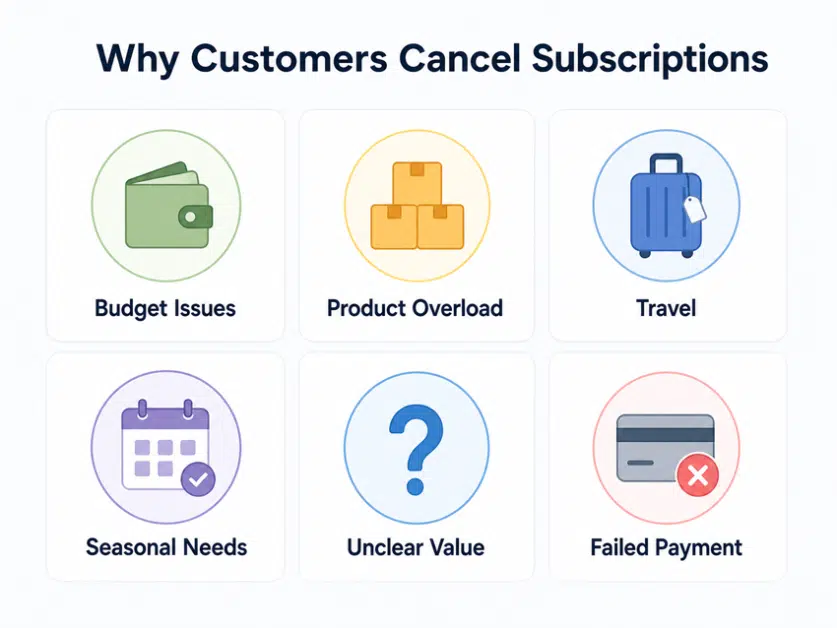
Before you can reduce churn, you need to understand why customers cancel. Most cancellations are not driven by dissatisfaction with the product itself — they are driven by timing, friction, and a lack of flexibility.
Common reasons customers cancel WooCommerce subscriptions:
- Temporary budget pressure — a month where they need to cut expenses
- Product overload — subscription boxes building up, content going unconsumed
- Travel or time away — they will not be home for the next shipment, or have no time to use the product
- Seasonal usage — the product is only relevant during part of the year
- Unclear value — they have lost the habit of using the product and forgotten why they subscribed
- Failed payments — automatic cancellation after an unexpected payment failure
- No self-service options — pausing or changing the plan requires emailing support, which feels like too much effort
- Feeling trapped — no easy way to adjust, skip, or modify without canceling entirely
Most of these reasons are temporary. A customer who cancels because of a tight month is not a lost customer — they are a paused customer who did not have a pause button.
How a Pause Option Helps Reduce Churn
A pause option works by reframing the decision a subscriber has to make. Without it, the question is:
“Should I stay or cancel?”
With it, the question becomes:
“Should I stay, or do I just need a short break?”
That shift matters more than it looks. When you surface a pause option — inside the subscription portal, in a cancellation flow, or in a retention email — many customers who would have canceled will pause instead.
Here is what that does for your business:
- Protects recurring revenue by converting potential cancellations into temporary pauses
- Keeps the subscriber relationship alive — a paused customer is far easier to win back than a canceled one
- Reduces emotional friction — customers feel respected and in control rather than trapped
- Opens a re-engagement window — you can send reminder or win-back emails before the pause period ends
- Reduces support load — customers who can self-manage pauses do not need to contact your team
- Lowers refund pressure — customers who feel in control are less likely to request refunds
- Supports retention and win-back campaigns — paused subscribers are warm leads for reactivation
A pause option will not prevent every cancellation. Customers who have genuinely decided to move on will cancel regardless. But for customers facing temporary issues, a pause option can preserve the relationship at no additional cost to you.
When Should You Offer a Pause Option?
A pause option delivers the most value in specific situations. Consider offering it when:
- Subscription box customers have too much inventory; they want the product, but need a gap month
- Course or membership users need a temporary break, a busy season, travel, or a low-engagement period
- Customers are traveling for an extended period, especially relevant for physical product subscriptions
- Users face a short-term financial issue, and they plan to return when cash flow improves
- Seasonal customers only need the product during part of the year, such as fitness, gardening, or seasonal food products
- Customers are undecided, not ready to cancel, but not actively using the product right now
- Customers want to delay their next renewal, without leaving the subscription entirely
Practical example:
A customer subscribes to a monthly supplement box. Their last two boxes are still unopened. They open the cancellation page — but what they actually need is one more month to work through what they have. Without a pause option, they cancel. With a pause option, they pause for 30 days and resume the following month. You keep the subscriber. They keep the product they wanted.
How to Pause WooCommerce Subscriptions
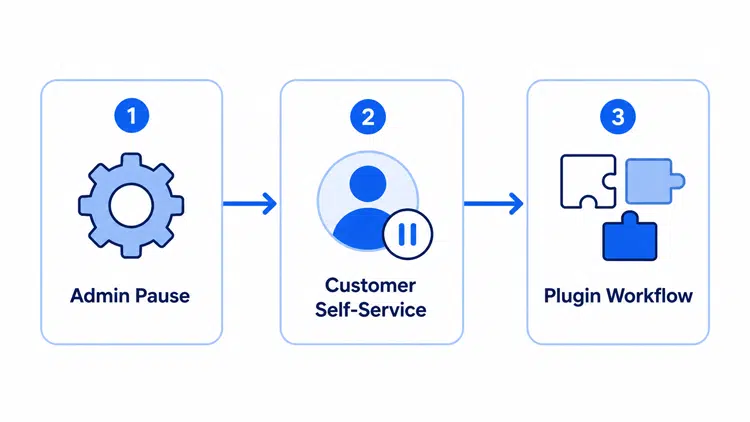
There are three main approaches to offering a pause option in WooCommerce.
A. Manual Admin Pause
A store admin manually updates a subscription status from the WooCommerce dashboard. This gives full control and requires no additional plugin features beyond standard subscription management.
Best for: Very small stores with a low subscription volume. This approach does not scale — it adds manual work for every pause request and creates a support dependency.
B. Customer Self-Service Pause
Customers access a subscription portal from their My Account page and pause their subscription directly — no support ticket required.
This is the most effective approach for churn reduction because it makes the pause option visible, accessible, and frictionless. Customers who feel in control are less likely to force a cancellation just to escape a subscription they cannot easily manage.
Best for: Stores that want to reduce support pressure and improve the subscriber experience at the same time.
C. Plugin-Based Pause and Resume Workflow
A dedicated WooCommerce subscription plugin manages the full pause and resume lifecycle automatically — handling billing suspension, renewal date recalculation, customer notifications, and status tracking without manual intervention.
This removes operational complexity from the store owner, ensures billing behaves correctly during and after a pause, and makes the feature scalable across your entire subscriber base.
This is where a tool like Recurio fits naturally.
How Recurio Helps You Pause WooCommerce Subscriptions
Recurio is a WooCommerce subscription management plugin built to handle the full subscription lifecycle — including pause, resume, billing, notifications, and analytics — from a single dashboard.
Here is what it offers that is directly relevant to reducing churn through pause:
Self-Service Customer Portal
Recurio adds a customer-facing subscription portal to your WooCommerce store. You can deploy it as a standalone page using the [recurio_portal] shortcode, or embed it directly into the WooCommerce My Account tab — no custom development needed.
Inside the portal, customers can:
- Pause their subscription — stops the next renewal and recalculates the next payment date on resume
- Resume their subscription — reactivates billing from where it left off
- Cancel their subscription — available as a transparent option alongside pause
- Update billing and shipping address — no support ticket required
- Update their payment method — customers can switch cards directly from their account
Store owners can control which actions are visible to customers through the Portal Permissions settings. This means you can enable pause and resume while keeping other actions admin-only.
Automated Email Notifications
Recurio sends automatic emails for every key subscription event, keeping customers informed without any manual effort:
- Pause confirmation email (FREE)
- Resume confirmation email (FREE)
- Renewal reminder email (FREE)
- Payment failed notification (FREE)
- Pause reactivation reminder (PRO)
- Smart dunning campaign emails (PRO)
- Win-back campaign emails for paused or lapsed subscribers (PRO)
Analytics and Churn Reporting
The Recurio analytics dashboard gives you a real-time view of your subscription business health:
- MRR, ARR, active subscribers, and total revenue
- Churn rate and ARPU (Average Revenue Per User)
- Customer Lifetime Value (LTV)
- Churn Analysis Chart — tracks churn trends over time with visual bar and line charts
- Cohort Analysis — groups subscribers by signup month and tracks retention and churn cohort by cohort
- Customer Segmentation — segments your subscriber base for targeted follow-up
- Revenue by Product reports — break down performance across your subscription products
Payment Retry and Dunning
Failed payments are one of the most common causes of involuntary churn. Recurio handles this with:
- 1 automatic retry attempt on a fixed 3-day interval (FREE)
- 2–5 configurable retry attempts with custom intervals of 1–7 days (PRO)
- Smart dunning campaign emails triggered by payment failure (PRO)
- Grace period after payment failure before subscription is suspended (PRO)
Together, these features let WooCommerce store owners offer a complete pause and resume experience — with the analytics to measure whether it is actually reducing churn over time.
Best Practices for Offering Subscription Pause Options
Getting the pause feature live is only part of the job. How you design and communicate the pause experience shapes whether it actually reduces churn.
- Make the pause option easy to find — surface it clearly in the subscription portal, not buried inside account settings
- Explain exactly what happens during the pause — does billing stop? Does access continue? When does the subscription resume?
- Let customers choose a pause duration — offering 30, 60, or 90-day options gives them more control and reduces uncertainty
- Send a confirmation email immediately — customers need to know the pause was successfully registered
- Send a reminder email before the pause ends — give subscribers 7 days notice so they can extend the pause or prepare for the renewal
- Track paused subscriptions separately from active and canceled — paused subscribers behave differently and need different follow-up
- Do not hide the cancel option — using pause as a mechanism to block cancellation is a dark pattern; it erodes trust and generates chargebacks
- Monitor your resume rate closely — if paused customers rarely come back, the pause feature is functioning more like a delayed cancellation than a retention tool
- Offer downgrade and skip options alongside pause — give subscribers a range of flexibility tools, not just one binary choice
Common Mistakes to Avoid
Even well-intentioned pause features can backfire if implemented poorly:
- Making pause harder to find than cancel — if canceling is easier, customers will cancel
- Not explaining billing changes clearly — customers who see an unexpected charge after a pause will dispute it
- Pausing access while still charging the customer — this creates immediate refund requests and damages trust
- Skipping resume reminder emails — customers who forget they paused will be surprised by the renewal charge
- Offering unlimited pause durations with no policy — set a maximum pause duration and communicate it clearly
- Not tracking which paused customers actually resume — without this data, you cannot improve your retention workflow
- Using pause as a forced retention screen — if a customer wants to cancel, let them; do not bury the cancel button behind a mandatory pause flow
- Not testing the customer portal — a broken pause button is worse than having no pause option at all
- Leaving pause behavior undefined — always document and communicate what happens to access, shipping, and billing during a pause period
Does Every WooCommerce Store Need a Pause Option?
No — and that is worth being honest about. A pause option delivers the most value for stores where temporary usage gaps are common and natural.
It is most useful for:
- Subscription boxes — physical product overstock is one of the most common cancellation triggers
- Membership sites — users who are traveling, busy, or in a low-engagement phase
- Online course platforms — learners who fall behind and feel pressure to cancel rather than catch up
- Wellness and fitness subscriptions — life events and seasonal patterns make temporary breaks common
- Coaching and service programs — ongoing programs regularly get interrupted by real-life events
- Replenishment and refill products — customers naturally need gap months as inventory builds up
- SaaS-style WooCommerce digital products — users in a low-usage period who plan to return
A pause option is less valuable for services where access must stay continuous, where pausing creates operational or fulfillment issues, or where the product has no natural usage gap. If your subscribers either use the product consistently or do not need it at all, a pause feature adds limited value.
How to Measure Whether Pause Reduces Churn?
The goal of a pause feature is not to increase the number of pauses. The goal is to increase the number of pauses that convert back into active subscriptions. Track these metrics to assess whether the feature is working:
- Pause rate — what percentage of subscribers choose to pause instead of cancel?
- Resume rate — what percentage of paused subscribers return to active status?
- Overall churn rate — has it decreased since you introduced the pause option?
- Cancellation rate — are fewer customers reaching the cancel confirmation step?
- MRR impact — how does revenue recovered through resumed subscriptions compare to revenue deferred by pauses?
- Customer lifetime value — are paused-then-resumed subscribers staying longer than average?
- Support ticket volume — has pause-related support traffic decreased with self-service options?
- Failed payment recovery rate — how many payment-triggered cancellations are being avoided through dunning?
For a full view of these numbers in one place, explore the subscription analytics for WooCommerce options available for store owners.
A high pause rate with a low resume rate is a warning sign. It often means customers are using pause as a softer exit — pausing because canceling feels awkward, but never actually coming back. Monitor this ratio and respond with re-engagement emails before pause periods end.
Frequently Asked Questions
Can you pause WooCommerce subscriptions?
Yes. You can pause subscriptions manually from the WooCommerce admin, or let customers self-pause through a portal. Plugins like Recurio include a built-in pause and resume option with no support ticket needed.
What is the difference between pausing and canceling a WooCommerce subscription?
Pausing is a temporary stop — billing halts, but the subscription stays active. Canceling ends the relationship permanently. Pause keeps the door open for the customer to return; cancel closes it.
Does pausing a subscription reduce churn?
Yes, for customers who cancel due to temporary reasons. A pause option gives them a break instead of forcing an exit. It will not retain customers who have genuinely decided to leave.
Should customers be allowed to pause subscriptions themselves?
Yes, wherever possible. Self-service pause reduces support tickets and removes friction. If customers have to email to pause, many will just cancel instead.
What happens to billing when a WooCommerce subscription is paused?
Billing stops for the duration of the pause. The renewal date extends to cover the paused period. Always communicate this clearly in your pause confirmation email.
Which WooCommerce plugin can help with subscription pause and resume options?
Recurio is a WooCommerce subscription plugin with a self-service customer portal, pause and resume tools, automated emails, and a real-time analytics dashboard. Core features are free forever — no credit card required.
Is a pause option better than offering a discount to prevent cancellations?
They solve different problems. A discount handles price objections. A pause handles timing and flexibility objections. The strongest retention strategy uses both, depending on why the customer wants to leave.
Conclusion
Offering the option to pause WooCommerce subscriptions is one of the most practical and underused tools for reducing churn. Most cancellations are not permanent decisions — they are reactions to temporary problems. A pause option interrupts that reaction and gives customers a reason to stay connected even when they are not actively using your product.
The best retention strategy does not always mean keeping customers fully active. Sometimes, giving subscribers a simple break keeps them longer than any discount would.
If you want to implement pause and resume workflows without adding complexity or support overhead, Recurio gives WooCommerce stores a self-service customer portal, churn analytics, automated notifications, and payment recovery tools — with 17 core features available free forever.
Want to give customers more control over their WooCommerce subscriptions? Explore Recurio to manage pause and resume workflows, track churn, recover failed payments, and improve your recurring revenue — no credit card required.