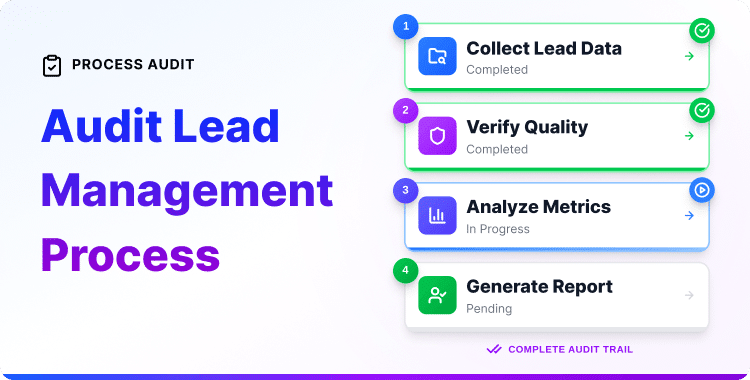
Audit Lead Management Process: A Step-by-Step Guide

You’re putting real effort into attracting visitors and getting them to fill out forms. But somewhere between that first contact and an actual sale, things go quiet.
That’s rarely a traffic problem. More often, it’s a process problem.
Most businesses lose leads not because they failed to attract them, but because their audit lead management process reveals invisible gaps they never knew existed. A form that doesn’t sync to the CRM. A follow-up sequence that quietly stopped working. Leads assigned to no one. Response times are stretching into days without anyone realizing it.
Research from LeadAngel shows that companies responding to a new lead within 5 minutes are dramatically more likely to make contact than those waiting 30 minutes or longer. The sobering part? Most businesses cannot tell you what their current response time is because nothing is tracking it.
That’s exactly what a structured audit lead management process helps you fix. It gives you an honest, structured look at what’s actually happening in your pipeline — and a clear path to improving it.
Quick-Answer Summary: Running an audit lead management process means reviewing every step from how leads enter your system to how they’re followed up, tracked, and converted. A proper audit covers your forms, CRM data, lead routing, response time, follow-up sequences, and pipeline conversion rates. Most businesses that run this audit for the first time find 2–3 serious gaps that are costing them customers without any visible warning sign
What an Audit Lead Management Actually Covers
An audit isn’t a vague review session. It’s a structured check across five specific areas of your lead system:
- Lead capture: How and where leads enter your system
- CRM data quality: Whether stored data is accurate, complete, and actually usable
- Lead routing: Whether leads reach the right person at the right time
- Follow-up sequences: Whether leads are being nurtured consistently after they arrive
- Conversion tracking: Whether you can see where leads drop off and understand why
A gap in any one of these areas puts a hole in your entire pipeline. The goal here is to find those holes and close them before they cost you more customers.
The 7-Step Lead Capture and Management Audit
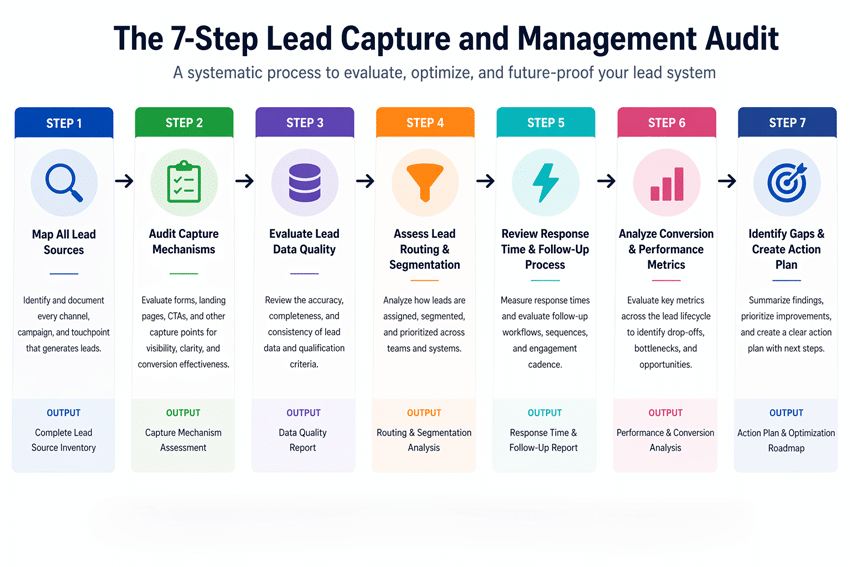
Work through these steps in order. Each one uncovers a different layer of how your lead system is actually performing.
Step 1 – Map Every Lead Source You’re Currently Using
This is your starting point. Before you can fix anything, you need a complete picture of where leads come from.
List every active source:
- WordPress contact and inquiry forms
- Landing pages tied to ads or campaigns
- Social media lead forms
- Live chat tools
- WooCommerce checkout or account registration
- Referral links or partner channels
- Email newsletter sign-ups
- Webinar or event registrations
Then answer one question for each source: Does this lead flow automatically into your CRM — or does someone have to move it manually?
If paid social ads are one of your lead sources, also verify that your Facebook Pixel is firing accurately.
Inaccurate pixel data means your CRM shows leads from ‘Social’ that your ad platform can’t account for creating a gap between what you’re spending and what you’re capturing. Pixelavo handles Facebook Pixel and server-side tracking for WordPress, so your lead source data stays reliable.
Step 2 — Review Every Lead Capture Form
Forms are where most lead loss happens — and most businesses never test them after the initial setup.
Work through each active form and check:
- Is it connected directly to your CRM? Where does a submission actually go right now? Don’t assume — verify.
- Are you capturing the right fields? Three to five fields is the sweet spot for most business inquiry forms. More than that, and submission rates drop. Fewer and you lack the context needed to qualify the lead properly.
- Does a confirmation email fire immediately after submission? Test it yourself. Many businesses discover their confirmation emails stopped working months ago without anyone noticing.
- Does the form work properly on mobile? Submit a test entry from your phone. A form that breaks or feels clunky on mobile is losing a large share of potential leads.
- Are you tracking form conversion rates? Without tracking, you have no way to know whether your forms are performing well or quietly failing. HT Easy GA4 connects Google Analytics to your WordPress site so every form submission is recorded as a trackable event, giving you the data you need to make this call confidently.
If testing reveals that your forms aren’t connecting to your CRM properly, rebuilding them with HT Contact Form gives you clean, reliable integration from the start. Already using Contact Form 7? CF7 Extensions adds the integration controls and conditional logic needed to fix most connection problems without switching tools.
Step 3 – Check Your CRM Data Quality
Open your CRM and take an honest look — not just the clean, recent leads at the top. Scroll through the full database.
CRM data degrades faster than most people expect. Here’s what to look for:
Duplicate records — the same contact appearing twice or more, often with different information in each entry. Duplicates skew your reports and confuse automations that depend on clean data.
Missing critical fields — leads with no source tag, no assigned owner, or no usable contact information. These records are effectively dead weight in your pipeline.
Stagnant lead statuses — leads sitting in “New” or “Contacted” for weeks without any movement. This usually signals a follow-up problem or an inconsistent data entry habit.
Inconsistent field values — one team member logs the source as “Facebook Ad,” another writes “FB,” another writes “Social.” These look like three separate sources in your reports, but they’re one. That inconsistency quietly breaks your analytics.
Unreliable CRM data produces unreliable reports — and unreliable reports lead to poor decisions. Set clear field standards, share them with your team, and make a monthly data review part of your routine.
Step 4 – Audit Your Lead Routing and Assignment Rules
When a new lead enters your system, what happens next? Who gets it, and how quickly?
If your honest answer is “it depends” or “whoever checks the inbox,” that’s a routing problem worth taking seriously.
Effective lead routing means:
- Every new lead is assigned to a specific owner automatically — based on territory, product interest, source, or team capacity
- No lead sits unassigned for more than a few hours
- Assignment rules are documented and consistent, not dependent on who happens to be online
When routing is manual, it tends to be slow and uneven. High-value leads get claimed quickly while others wait. Conversion rates suffer quietly across the board.
Check your CRM for automated assignment rules. If they don’t exist, build them. If they do exist, verify they’re still working — assignment rules often break silently when team members are added or removed from the system.
Step 5 – Measure Your Actual Lead Response Time
This is the step most businesses skip entirely — and it tends to be the one with the most direct impact on revenue.
Speed matters more than most people expect. Research from LeadAngel consistently shows that the window between a lead arriving and making first contact is one of the strongest predictors of whether that lead converts. The longer the wait, the lower the odds — and the more time a competitor has to step in.
To measure where you currently stand:
- Pull 20–30 recent leads from your CRM
- Note the exact timestamp when each lead entered the system
- Find the timestamp of the first outreach — email, call, or message
- Calculate the gap for each lead and find the average
If that data isn’t available in your CRM, that’s your finding. Your system isn’t tracking response time, which means no one is accountable for improving it.
The practical fix is a combination of CRM notifications — so the assigned team member is alerted the moment a lead arrives, and an automated first-touch email that goes out immediately while the human follow-up is being prepared.
Step 6 – Evaluate Your Follow-Up Sequences
A lead that doesn’t convert immediately isn’t a lost lead. It’s a lead that needs consistent nurturing until the timing is right. Sales research broadly agrees that most prospects require multiple touchpoints before they’re ready to make a decision.
Audit your current sequences by working through these questions:
- Are automated email sequences set up for new leads? If yes, are they actually triggering? When did you last test them?
- How many touchpoints does your sequence include? A sequence that stops after two emails often goes quiet at exactly the point a lead was warming up.
- Are sequences personalized by lead type? A lead from a paid ad has a different intent than a referral from a trusted partner. Generic sequences underserve both.
- What happens when a sequence ends? Is the lead flagged for manual follow-up, moved to a nurture list, or simply forgotten?
To check whether your sequences are actually working, submit a test lead and follow it through the entire sequence step by step. Most businesses find at least one sequence that’s stalled or misconfigured.
Step 7 – Analyze Lead-to-Conversion Rates by Pipeline Stage
This is where your audit becomes a direct look at revenue performance.
Pull your pipeline data and examine each stage:
- How many leads enter Stage 1?
- What percentage moves from Stage 1 to Stage 2?
- At which stage do most leads stall or drop off?
- What is your overall lead-to-customer conversion rate?
A sharp drop at a specific stage points to something specific breaking there. If 60% of leads stall between “Proposal Sent” and “Decision Made,” that’s a signal — either follow-up is too slow at that stage, leads aren’t being qualified properly before reaching it, or the proposal itself needs work.
Also, take a moment to check whether your pipeline stages still reflect how your team actually sells. Most businesses set up stages at launch and never revisit them. If your real process has three steps but your CRM shows six stages, your pipeline data is unreliable, and your team has probably stopped trusting it.
Common Problems This Audit Reveals
After working through all seven steps, most businesses find a version of the same issues:
No lead source tracking. Leads arrive in the CRM with no tag showing where they came from. Without this, there’s no way to know which channels deserve more investment and which should be scaled back.
Inconsistent CRM field usage. Different team members enter data in different formats. Automations that rely on consistent field values fail silently as a result.
Automations that no one tested. Sequences were built once and assumed to be running. Many aren’t, and the leads that should be receiving them are going cold.
Analytics that no one reviews. Dashboards exist, but without a regular review schedule, problems accumulate for months before anyone notices.
No lead qualification criteria. Every lead is treated the same, regardless of fit or intent. Sales time gets spent on poor-quality prospects while high-intent leads wait too long for attention.
None of this is unusual. These patterns are the natural result of building a lead system gradually — without ever stepping back to evaluate how all the pieces work together.
Fix vs. Rebuild – How to Decide
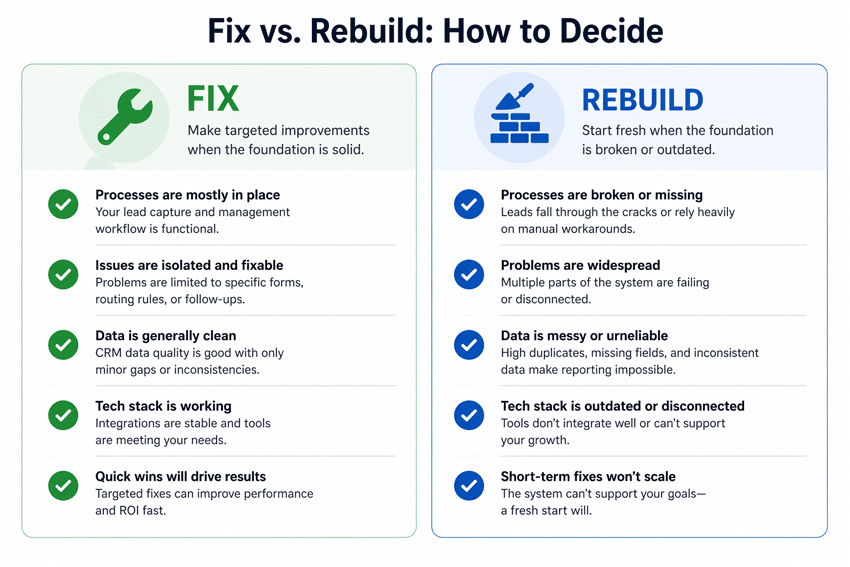
Once your audit is complete, you’ll have a clear list of gaps. The key decision is whether to fix what’s there or rebuild from a cleaner foundation.
Fix in place when:
- Your CRM structure is solid, but the data has become messy over time
- Automations are set up but haven’t been tested or updated recently
- Forms exist, but connect to the wrong destination
- Response time is slow, but CRM notifications can realistically solve it
- Your team has a process, but follows it inconsistently
These are execution gaps, not structural failures. Clean the data, test the automations, align the team, and the system will perform significantly better.
Rebuild when:
- Leads are scattered across multiple disconnected tools with no central CRM
- No sales pipeline exists — leads are being tracked in a spreadsheet or inbox
- Your team has no consistent process for handling new leads
- You cannot produce a reliable report on any lead metric
A rebuild doesn’t mean losing everything you’ve built. It means choosing the right foundation, setting up a clean process, and migrating existing leads into a system that actually supports growth.
If you’re building that foundation and want a practical framework for the full lead generation side of the equation, the guide on effective tips for lead generation using WordPress CRM tools covers the broader strategy that your audit results should feed into.
Audit Lead Management Process Checklist
A quick reference to confirm you’ve covered every area:
- All lead sources documented and verified
- Every active form is tested and confirmed to be CRM-connected
- CRM reviewed for duplicates, missing fields, and stale records
- Lead routing rules verified or created from scratch
- Response time measured across a sample of recent leads
- All follow-up sequences tested end-to-end
- Pipeline stage conversion rates pulled and reviewed
- Action list created: fix items vs. rebuild items
How Often Should You Run This Audit?
Once per quarter is a reasonable baseline for most growing businesses. Beyond that, run it immediately whenever you:
- Add a new lead source or form
- Change your CRM setup or switch tools
- Add or remove team members who handle leads
- Notice a drop in conversion rates without an obvious cause
Small problems in lead systems tend to compound quietly. A quarterly audit keeps them manageable before they become expensive.
Frequently Asked Questions
How often should you audit your lead capture process?
At a minimum, once per quarter. Run it immediately after any significant change – new forms, new team members, new tools, or a noticeable drop in conversion rates. Problems in lead systems tend to start small and grow quietly over time.
What tools do you need to audit lead management in WordPress?
You need access to your WordPress CRM for pipeline and automation review, your form plugin to verify integrations, and an analytics tool to check form conversion rates and traffic sources. No specialist audit tool is required; the data you need already exists in your current setup. The gap is usually that no one has looked at it all together in one sitting.
Once your audit is complete and gaps are fixed, tools like HashBar can help you capture more leads at the top of the funnel through targeted announcement bars and popups without adding complexity to the pipeline you just cleaned up.
What is a healthy lead response time benchmark?
Under 5 minutes is the target for high-intent leads, particularly those from paid ads or direct inquiry forms. For lower-intent leads like newsletter sign-ups, an automated email within minutes paired with a human follow-up within a few hours works well. Beyond 24 hours, your odds of meaningful engagement drop sharply.
How do you know if your CRM data is unreliable?
Four clear signals: duplicate contacts with conflicting information, key fields blank on most records, lead statuses unchanged for weeks, and verbal reports from your team that don’t match what the CRM shows. Any one of these is a warning sign. All four together mean your CRM data can’t reliably support decisions or automations.
What is the difference between lead capture and lead management?
Lead capture is the process of collecting a prospect’s contact information through forms, landing pages, or other entry points. Lead management is everything that happens after: storing the data correctly, assigning the lead, following up, tracking progress through the pipeline, and converting or closing the opportunity. Both need to work together. Strong capture with weak management loses the lead after it arrives. Strong management with weak capture means quality leads never enter the system in the first place.
Final Word: Next Steps
If your audit lead management process uncovered gaps in how your forms connect to your CRM, this guide on creating lead forms in WordPress CRM walks you through setting that up correctly — it’s one of the highest-impact fixes most businesses can make quickly.
If you’re questioning whether your current CRM is actually the right tool for where your business is heading, this guide on choosing the right WordPress CRM helps you evaluate that clearly.
And if you want to go further and build a complete, optimized lead generation system — not just patch the gaps this audit found — explore the full range of WordPress CRM and lead tools available from HasThemes.