Why You Haven’t Found the Right WordPress CRM Yet: What to Look for in 2026

Quick Answer: Finding the right WordPress CRM is difficult because CRM plugins vary widely in automation, integrations, email capabilities, performance requirements, and scalability. Instead of comparing feature counts alone, evaluate how each CRM handles contact management, segmentation, email delivery, automation, integrations, data ownership, and your expected contact volume.

Newer tools such as Kelune CRM also combine CRM and email marketing features directly inside WordPress, reducing the need for multiple platforms.
Choosing the right WordPress CRM can be harder than it first appears. Two plugins may both promise contact management, automation, and email marketing, yet differ significantly in how they store data, integrate with other WordPress tools, handle campaigns, and scale as your contact list grows.
According to research from New Breed, 95% of companies acknowledge operational gaps in their current CRM systems, and the frustration often stems from a fundamental mismatch between what WordPress CRM plugins can deliver and what modern businesses actually need.
The challenge in 2026 is no longer simply finding a WordPress CRM plugin. It is finding one that matches your actual workflow without adding unnecessary tools, maintenance, or complexity.
In this guide, we’ll look at why WordPress CRM options can be difficult to compare, which features matter most, when a self-hosted CRM makes sense, and how newer tools such as Kelune CRM fit into the current WordPress CRM landscape.
Table of Contents
What Is a WordPress CRM?

A WordPress CRM is a customer relationship management system that works within or connects closely with WordPress. Depending on the plugin, it can store contacts, organize leads, track interactions, run email campaigns, automate follow-ups, and connect customer data with forms, memberships, ecommerce tools, or other WordPress plugins.
Why Choosing the Right WordPress CRM Is Difficult
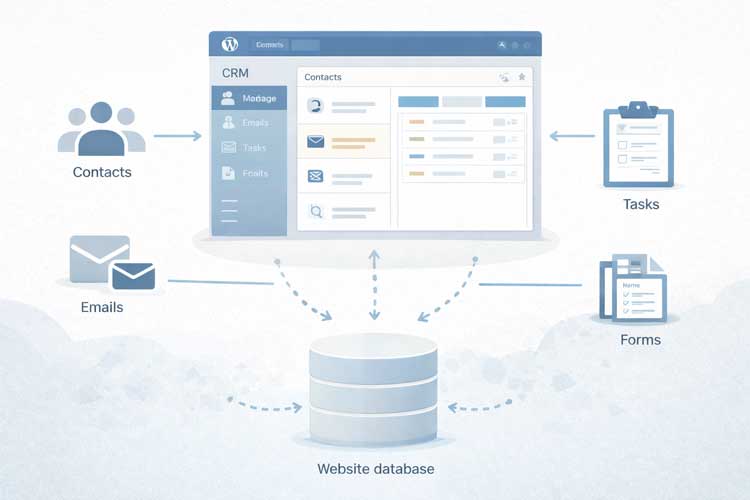
If you’ve spent hours comparing plugin feature lists and still aren’t sure which WordPress CRM fits your business, you’re not alone. The difficulty isn’t that WordPress CRM plugins are broadly immature — it’s that they solve very different problems.
Some are lightweight contact organizers built for freelancers. Others combine contact management with email marketing and automation. Still others act as connectors to external sales CRMs.
A CRM plugin might excel at contact management inside your WordPress dashboard but offer only basic email sending, while another bundles a drag-and-drop email builder, campaign scheduling, and visual automation directly into the same self-hosted CRM.
Understanding these differences — rather than counting feature checkboxes — is what actually helps you pick the right tool.
7 Reasons You May Not Have Found the Right WordPress CRM Yet
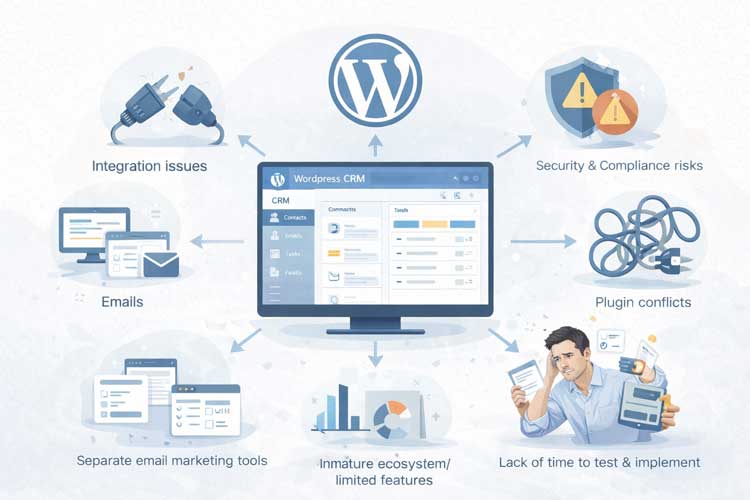
#1: WordPress CRM Plugins Serve Very Different Use Cases
Many buyers assume “WordPress CRM” describes one category of software, but it actually spans several distinct product types:
- CRM-only tools that focus purely on contacts, notes, and activity timelines.
- Marketing CRMs that combine contact management with email campaigns and automation.
- Sales CRMs built around deal pipelines and sales tracking.
- WooCommerce-specific CRMs designed around order and customer data from an online store.
- External SaaS connectors that sync WordPress form or store data into a separate cloud CRM.
- All-in-one WordPress CRM tools that try to cover contacts, campaigns, and automation in a single self-hosted plugin.
If you compare a contact-only plugin against an all-in-one marketing CRM without knowing which category you actually need, the comparison will feel confusing — not because the plugins are bad, but because they’re solving different problems.
#2: CRM and Email Marketing Capabilities Vary Widely
It’s a common assumption that WordPress CRM plugins can’t handle email marketing and that you’ll always need a separate platform like Mailchimp or ActiveCampaign. That was truer of older, contact-only CRM plugins, but it’s no longer a fair generalization for the category as a whole. Some lightweight CRM plugins really do only manage contacts and hand off email to another tool. Others now build campaign sending, templates, and automation directly into the CRM.
Newer WordPress CRMs Are Combining CRM and Email Marketing
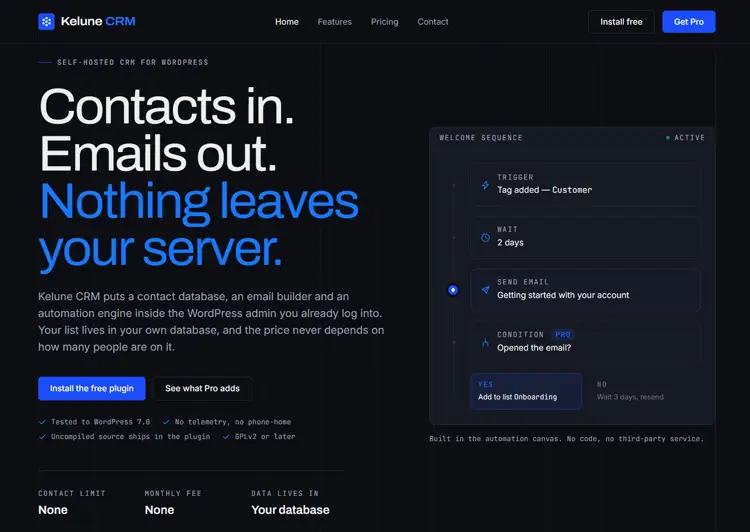
Some newer WordPress CRM plugins reduce the need to manage separate CRM and email-marketing platforms. Kelune CRM, for example, combines contact management, lists and tags, custom fields, email campaigns, a drag-and-drop email builder, email engagement tracking, and visual automation within WordPress.
It can send through SMTP, Amazon SES, Mailgun, SendGrid, or the site’s existing WordPress mail setup, and it also supports incoming webhooks, double opt-in, and CSV/Excel contact import.
Advanced segmentation, branching automation, smart links, and campaign A/B testing are available through its separate Kelune CRM Pro add-on rather than the free version. For businesses that prefer a self-hosted approach and want customer data and marketing workflows managed from WordPress, this type of integrated CRM is worth evaluating.
Explore Kelune CRM on WordPress.org →
If you’re also comparing dedicated email tools for your store, see our guide on WooCommerce email marketing plugins and our overview of WordPress email marketing services.
#3: Self-Hosted CRM Gives You More Data Control and More Responsibility
A self-hosted CRM stores customer data on your own WordPress site rather than a vendor’s servers, which gives you more direct control over where that data lives. But that control comes with responsibility: WordPress security, backups, hosting, access controls, email-provider configuration, and consent/compliance implementation remain the site owner’s job rather than a vendor’s.
Kelune CRM is a useful factual example here: according to its WordPress.org listing, CRM data is stored in custom tables inside the site’s own WordPress database, and the plugin works offline by default.
It contacts external services only when you explicitly enable and configure one; it only contacts an external service (an email provider or Gravatar) after you explicitly enable and configure one. That’s a meaningful data-ownership advantage, but it doesn’t automatically make a site compliant with any regulation.
Self-hosting can provide greater control over data location, but compliance depends on your configuration, policies, processing activities, and applicable law.
For regulatory requirements, consult official data-protection guidance and qualified legal advice rather than relying solely on plugin documentation.
#4. Every CRM Adds Maintenance Requirements
Adding any plugin — CRM or otherwise — means it needs to be kept updated, monitored for compatibility, and checked periodically against your hosting environment. Rather than relying on generic percentages for plugin conflict risk or performance impact (numbers that vary enormously by hosting, plugin quality, and site complexity), evaluate these factors directly before choosing a CRM:
- WordPress version compatibility
- PHP version requirements
- Update history and changelog activity
- Support responsiveness and documentation
- Database design (custom tables vs. post-meta storage)
- Background job/cron behavior
- Campaign queue and sending behavior (for CRMs with email features)
- Hosting requirements
- Backup and export capabilities
For reference, Kelune CRM’s WordPress.org listing states a PHP 8.1+ requirement and documents its database structure and update changelog directly the kind of information worth checking for any CRM plugin you’re evaluating.
#5: Integration Depth Varies by CRM
Integration quality is one of the most common frustration points, but “WordPress CRM integrations are weak” is too broad a claim. It helps to think about three separate integration layers:
- Native integrations — built directly into the CRM (e.g., WooCommerce order sync, form-plugin connections).
- WordPress ecosystem integrations — connections with forms, membership plugins, LMS tools, or page builders.
- Webhooks/API integrations — used to move data to or from external systems programmatically.
Kelune CRM’s free version currently includes incoming webhooks, letting external systems create or update contacts and manage tags/lists. Whatever CRM you consider, verify directly whether the specific tools your business relies on are supported natively, through the ecosystem, or only via webhooks/Zapier-style connectors — don’t assume based on the plugin’s category alone.
If lead capture is a priority, our guide on creating lead forms in WordPress CRM walks through connecting forms to a CRM plugin step by step.
#6: CRM Workloads Can Affect Server Resources – Test Before Scaling
A WordPress CRM plugin does add server workload: contact tables grow, campaign sending queues process in the background, automation steps run on triggers, and reporting queries read from the database. Whether performance issues become noticeable depends heavily on your hosting resources, contact volume, and activity logged per contact.
As a result, there is no single universal percentage slowdown that applies to “WordPress CRM plugins” as a category. Any older article featuring an isolated benchmark number without disclosed methodology should be treated with caution.
Instead of taking a slowdown percentage on faith, run a practical checklist before scaling a WordPress CRM on your site:
- Baseline your site speed with tools like Lighthouse or GTmetrix before installing.
- Re-test after installation and again after importing your real contact volume.
- Check how campaigns are queued and sent (immediately vs. background cron).
- Confirm whether reporting/analytics screens run heavy queries on page load.
- Monitor server resource usage (CPU/memory) during a bulk import or large campaign send.
- Ask your host whether your plan supports database-intensive plugins.
Google’s page-experience guidance is a useful general reference point for why site speed matters for both users and rankings (Google Search Central).
#7: Migration and Setup Require Planning
Implementation timelines for a CRM depend on too many variables to state as a fixed number of weeks — the honest answer is “it depends,” specifically on:
- Number of existing contacts and how clean that data is
- Complexity of custom fields and tagging structure you need
- Number of automation workflows you plan to build
- Email provider configuration (SMTP, SES, Mailgun, SendGrid, etc.)
- Integrations required with forms, WooCommerce, or other tools
- Size of your team and how much training is needed
Rather than promising a specific timeline, use a setup checklist: audit your existing contact sources, remove duplicates, decide on your tagging/list structure, configure your chosen email provider, build one automation at a time, and test with a small contact segment before a full rollout.
What Should You Look for in a WordPress CRM in 2026?
Use this framework instead of comparing raw feature counts:
- Contact management: Custom fields, activity timelines, notes.
- Lists, tags and custom fields: How flexibly you can organize and segment contacts.
- Email campaigns: Whether campaign sending is built in or requires a separate tool.
- Segmentation: Static lists/tags vs. dynamic, rule-based segments.
- Marketing automation: Simple triggers vs. branching, condition-based workflows.
- Email delivery options: SMTP, transactional API providers (SES, Mailgun, SendGrid), or the default WordPress mailer.
- Tracking and reporting: Open/click tracking, campaign stats, exportable logs.
- Integrations and webhooks: Native connections, ecosystem plugins, and incoming/outgoing webhooks.
- Import and export: CSV/Excel import, and how easily you can export your data if you switch tools later.
- Data ownership: Where contact and campaign data is stored, and what leaves your site.
- Scalability and maintenance: Update frequency, support activity, and database design.
WordPress CRM vs SaaS CRM
| Requirement | Basic CRM | Marketing CRM | SaaS CRM |
|---|---|---|---|
| Contact management | Usually | Yes | Yes |
| Email campaigns | Sometimes | Usually | Usually |
| Automation | Limited to advanced, depending on plugin | Usually | Usually |
| Data stored on WordPress site | Usually, for native plugins | Usually | No |
| External integrations | Varies | Varies | Usually broader |
| Hosting responsibility | Site owner | Site owner | Vendor |
| Subscription required | Varies (often free or one-time) | Varies | Usually |
| Best for | Simple contact workflows | CRM + marketing workflows in one place | Teams needing a broad SaaS ecosystem |
When an All-in-One WordPress CRM Makes Sense
Example: a small WordPress service business. A consultant has around 1,500 contacts, a newsletter list, website inquiries, and a few basic follow-up sequences, with no dedicated sales department.
- Traditional setup: WordPress form → separate CRM → separate email-marketing tool → connector/Zapier to keep them in sync.
- Integrated WordPress CRM setup: WordPress → CRM captures the contact → tag/list applied → campaign or automation triggers, all inside one dashboard.
The traditional setup can make sense when a business needs deep sales-pipeline features, advanced third-party integrations, or an established SaaS ecosystem. The integrated setup tends to fit smaller contact volumes, simpler workflows, and businesses that would rather avoid syncing two separate platforms.
To learn more about the practical upside of consolidating contact and sales workflows, see our article on improving sales with a WordPress CRM.
Where Kelune CRM Fits
Kelune CRM may be worth considering if you want:
- CRM data stored inside your own WordPress database
- Contact organization with tags, lists, and custom fields
- Email campaigns and a drag-and-drop builder without a separate dashboard
- Visual, trigger-based automation
- A choice of email providers (SMTP, Amazon SES, Mailgun, SendGrid, or the default WordPress mailer)
- CSV/Excel contact import
- A free-to-Pro upgrade path if you later need dynamic segmentation or branching automation
Not enough evidence yet for:
- Enterprise-scale contact database performance
- Long-term reliability and update track record
- A broad third-party integration ecosystem
- A large, established customer-support history
As of this update, Kelune CRM’s WordPress.org listing shows it as a newly released plugin with limited install history and no public reviews yet, worth noting plainly rather than treating it as an established category leader.
WordPress CRM Options to Consider by Use Case
| Need | CRM to investigate |
|---|---|
| CRM + built-in email marketing | Kelune CRM, FluentCRM |
| Marketing automation ecosystem | Groundhogg, FluentCRM |
| Freelancers/client management | Jetpack CRM |
| ERP-style business management | WP ERP |
| External CRM connection | WP Fusion |
| SaaS CRM ecosystem | HubSpot |
Pricing and feature sets for third-party plugins change frequently — verify current details directly on each vendor’s site before making a decision.
A Practical Checklist Before Installing a CRM
- Define which CRM category you actually need (contact-only, marketing CRM, sales CRM, or SaaS connector).
- List every existing tool the CRM needs to work with (forms, WooCommerce, email provider, etc.).
- Check PHP and WordPress version requirements against your hosting environment.
- Review the plugin’s update history and support activity on WordPress.org.
- Confirm where contact and campaign data is stored.
- Test email deliverability with your chosen provider (SMTP, SES, Mailgun, SendGrid, or default WordPress mail).
- Run a site-speed baseline before and after installation.
- Import a small sample of contacts first, not your full list.
- Confirm backup/export options in case you need to migrate later.
- Clarify which features are free vs. part of a paid add-on.
Frequently Asked Questions
Q: What is a WordPress CRM?
A: A WordPress CRM is a system that manages customer or contact data from within or alongside WordPress. Depending on the plugin, it can handle contact records, lead tracking, email campaigns, and automation.
Q: Is there a CRM that works entirely inside WordPress?
A: Yes — self-hosted CRM plugins like Kelune CRM store contact and campaign data in the site’s own WordPress database, as opposed to external CRM connectors that sync data to a separate cloud platform.
Q: Can a WordPress CRM send email campaigns?
A: Some can. Capabilities differ significantly by plugin: basic CRM plugins may only manage contacts, while marketing-focused CRMs — Kelune CRM among current examples — include campaign sending, templates, and automation.
Q: Can a WordPress CRM replace Mailchimp or another email marketing service?
A: Sometimes, depending on your segmentation, deliverability, automation, and reporting needs. Businesses with simple workflows may find an integrated CRM sufficient; those needing advanced deliverability infrastructure or large-scale sending may still prefer a dedicated email platform.
Q: Where does a WordPress CRM store customer data?
A: It depends on the plugin’s architecture. Native, self-hosted plugins typically use the WordPress database (Kelune CRM, for example, uses custom tables in your own database); always verify this for the specific plugin you’re considering.
Q: Does a WordPress CRM slow down a website?
A: Not automatically. Server impact depends on contact volume, campaign sending behavior, background automation jobs, and your hosting resources — test before and after installation rather than assuming a fixed slowdown.
Q: What should I look for before choosing a WordPress CRM?
A: Evaluate contact management, segmentation, email delivery, automation depth, integrations, data ownership, and scalability rather than comparing raw feature counts alone.
Q: Is a self-hosted WordPress CRM better than a SaaS CRM?
A: Neither is universally better. Self-hosted CRMs offer more direct data control and often lower ongoing cost; SaaS CRMs typically offer broader integrations and vendor-managed infrastructure. The right choice depends on your contact volume, compliance needs, and team structure.
Conclusion
The reason you haven’t found the right WordPress CRM yet usually isn’t a shortage of options; it’s that CRM plugins differ more than most buyers expect, and comparing them by feature count alone hides those differences.
Choose based on your actual workflow: how you manage contacts, whether you need built-in email and automation, how much integration depth you require, and how much ongoing maintenance you’re prepared to take on.
If you prefer to manage contacts, campaigns, and automation from WordPress, you can explore Kelune CRM’s free WordPress plugin on WordPress.org.