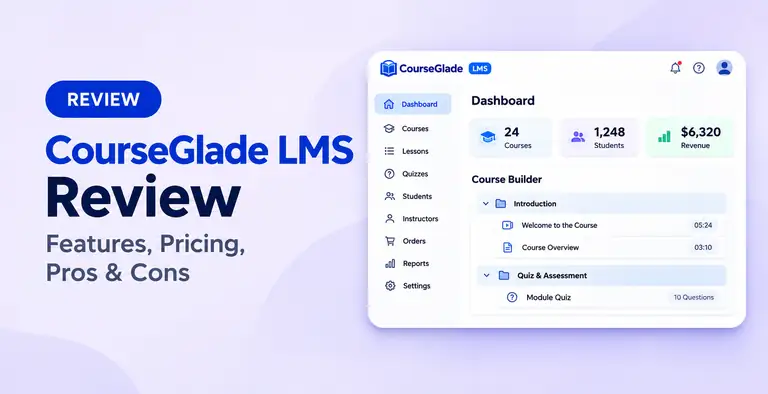
CourseGlade LMS Review: Features, Pricing, Pros & Cons

Quick Answer: CourseGlade LMS is a WordPress plugin for building and selling online courses. The free version includes a drag-and-drop builder, eight quiz types, multiple instructors, and Stripe or WooCommerce payments. Certificates, drip content, subscriptions, and live classes need Pro add-ons. It suits small course businesses, but it is a young plugin.
Choosing a WordPress LMS is not only about the feature list on a pricing page. You also need to weigh payments, the student experience, ongoing costs, and how mature the product is.
Demand for online learning keeps growing. In its August 2026 report, Ken Research valued the global e-learning market at about $370 billion in 2025 and projects about $622 billion by 2031. Other firms use different definitions and publish different totals, so treat the number as a direction, not a precise figure.
CourseGlade LMS takes an all-in-one approach. Its free plugin covers course creation, quizzes, instructors, payments, and student management. Advanced tools sit in Pro. This review covers what it includes, what it costs, where it works well, and the limits you should know before you build a real course business on it.
Table of Contents
What Is CourseGlade LMS?

CourseGlade LMS is a learning management system (LMS) plugin for WordPress. An LMS is software that lets you create courses, enrol students, track progress, and take payments.
You install it like any plugin. After that, you build courses from your WordPress dashboard. Your students learn on your own site, not on a hosted platform.
That difference matters. Hosted tools like Teachable or Thinkific charge monthly fees and keep your student data on their servers. A WordPress LMS gives you more control. It also gives you more responsibility for hosting, updates, and backups.
How This Review Was Done
This review is based on the plugin’s public listing, its full changelog, its documentation pages, its official pricing pages, and public user feedback. It is not a six-month stress test. Where a point needs your own testing, the article says so.
Current facts at the time of writing:
- Latest version: 1.2.3
- Requires WordPress 6.4 or higher and PHP 7.4 or higher
- Tested up to WordPress 7.1.3
- First released in 2026, with frequent updates since
CourseGlade LMS Features
Here is what the free plugin includes, grouped by what you actually do with it.
Course Builder
The builder uses drag and drop. You arrange sections, lessons, and quizzes in one curriculum screen.
You also get:
- Course categories, tags, and difficulty levels
- A course catalog with search, category filters, and pagination
- Filters for category, level, and price on the course grid
- Sorting by most popular, top rated, or price
Lessons and Media
Lessons support more than text. You can add video from YouTube, Vimeo, or your own files. You can also add audio lessons.
One detail stands out. All video sources share one player. The lesson marks itself complete when the video ends. Audio works the same way. This saves students from clicking a complete button after every lesson.
Quizzes
CourseGlade supports eight question types:
- Multiple choice
- Single choice
- True or false
- Fill in the blank
- Matching
- Ordering
- Short answer
- Essay
That range is wide for a free plugin. Essay and short answer questions need manual grading, so plan time for that if your course uses them.
Learning Experience for Students
Students get a distraction-free learning mode with a curriculum drawer and progress tracking. They also get:
- A student dashboard with progress and a wishlist
- Course reviews and discussion boards
- Q&A threads with helpful votes and a best answer
- Printable invoices for each order
Payments and Selling
The free version supports four gateways:
- Stripe
- WooCommerce
- Manual payment
- Free enrolment for zero-price courses
You can also create coupons and discounts. Email notifications cover enrolments, orders, course completion, and instructor applications.
You do not need WooCommerce. It is one option for stores that already sell through it and want courses in the same cart and order history. If you run a store, our guide to WooCommerce SEO explains how to help those course pages get found.
Instructors and Students
CourseGlade works for single creators and for marketplaces with many teachers.
- Invite instructors or let people apply through a become-an-instructor form
- Approve applications from the admin area
- Set commission rates and manage withdrawal requests
- Give each instructor a public profile page
- Use custom roles with detailed capabilities
Admin and Operations
The admin screen is built with React. You get reports on courses, students, and orders. A setup checklist on the dashboard shows what is left to configure.
Other useful tools include maintenance mode, settings export and import, shortcodes for course grids and checkout pages, and translation support. The plugin also works with block themes.
What the Pro Add-Ons Add
Pro is a separate plugin. Its add-ons turn on one at a time, so you only run what you need.
Selling and growth
- Subscriptions and memberships with trials, renewals, and cancellations
- Course bundles
- Bulk enrolment, including CSV import
- Social login
Teaching and grading
- Certificates with verifiable certificate numbers
- Assignments with file uploads and instructor feedback
- Content drip by schedule or enrolment date
- Gradebook
- Leaderboard and gamification
Live learning
- Live classes with attendance tracking
- Zoom and Google Meet connections, per instructor
- Google Classroom roster sync
Operations
- AI Studio, which drafts course content from a brief (you bring your own API key)
- Advanced reports and advanced email campaigns
- Content import and export between sites
- White label branding
The key point: the free plugin works fully on its own. But if you want certificates or drip content, you need Pro.
Free vs Pro at a Glance
| Feature | Free plugin | With Pro |
|---|---|---|
| Drag-and-drop course builder | Included | Included |
| 8 quiz question types | Included | Included |
| Multi-instructor tools and commissions | Included | Included |
| Stripe checkout | Included | Included |
| WooCommerce integration | Included | Included |
| Coupons and discounts | Included | Included |
| Certificates | Not included | Included |
| Assignments and gradebook | Not included | Included |
| Content drip | Not included | Included |
| Subscriptions and memberships | Not included | Included |
| Live classes (Zoom, Google Meet) | Not included | Included |
| AI Studio (bring your own API key) | Not included | Included |
| Advanced reports | Not included | Included |
| Course content import and export | Not included | Included |
CourseGlade LMS Pricing
Here is how pricing works.Option Price Sites Notes Free plugin $0 Unlimited Core LMS from the WordPress.org directory Pro, annual $99 per year 1 15 add-ons, AI Studio, Import & Export, updates, priority support Pro, lifetime $299 one-time 1 Same Pro features on a lifetime license AppSumo lifetime deal From $59 one-time 1 to 100, by tier Lifetime access, 60-day refund window
Larger Pro licenses cost more. The vendor comparison page lists $199 per year or $599 lifetime for 5 sites, and $399 per year or $1,199 lifetime for 25 sites.
At the time of this review, the AppSumo deal starts at $59 for one site. Higher tiers cost $149 for 5 sites, $299 for 25 sites, and $589 for 100 sites. The plan table lists certificates, assignments, content drip, gradebook, and bundles. It does not list live classes or AI Studio, so check what your tier includes before you buy. Prices change often, so confirm on the current listings.
How It Compares on Cost
Many WordPress LMS plugins charge yearly. For example, Tutor LMS lists its Individual annual plan at $199 per year, although promotional discounts can lower the checkout price. Its lifetime option for one site is listed at $499.
A one-time price can look cheap. Still, ask three questions before you buy:
- Does the license cover updates and support for life, or for a limited period?
- How many sites can you use it on?
- Which add-ons do you need, and are they all in your plan?
Payment processors still take their own fees. Stripe charges apply to every sale.
CourseGlade LMS Pros
- One plugin covers many needs. Quizzes, payments, instructors, and reports ship together. Fewer add-ons can mean fewer compatibility checks.
- Strong free version. Eight quiz types, Stripe, and multi-instructor tools are in the free plugin.
- Works with any theme. It ships its own front-end templates and supports block themes.
- WooCommerce is optional. You can sell with Stripe alone or use your existing store.
- Active development. The changelog shows regular releases, from a front-end redesign to a rebuilt student dashboard.
- Visible security work. Release notes describe permission fixes, login throttling, and a review of escaping and sanitising against WordPress coding standards.
- Positive early feedback. The one public review on WordPress.org praises the support team. One review is too few to draw firm conclusions.
CourseGlade LMS Cons
- It is new. The plugin directory shows a small install base and only one review. You have little community history to lean on.
- Key features sit behind Pro. Certificates, drip content, assignments, and subscriptions are not in the free plugin.
- Early versions received security fixes. Version 1.0.1 tightened REST API permissions, addressed quiz answer exposure and other access-control issues, and added login throttling. Later releases document further sanitising and escaping reviews. As with any LMS that handles user and payment data, keep the plugin updated and test major updates on staging.
- Content migration needs Pro. Free export and import moves settings only. Courses, lessons, and quizzes need the Pro import and export feature.
- Fewer built-in payment gateways. The free plugin supports Stripe, WooCommerce, manual payment, and free enrolment. PayPal is not a built-in gateway. If you need it, check whether your WooCommerce setup can handle course checkout before you commit.
- Standards support is unclear. The public feature list does not mention SCORM or xAPI. If you must import corporate training packages, confirm support first.
- Few third-party tutorials. You will rely mostly on official documentation and support.
Who Should Use CourseGlade LMS?
It fits you if you:
- Sell courses as a solo creator, coach, or small team
- Run a WooCommerce store and want training content next to your products
- Want to start free and add features later
- Need multiple instructors with payouts
Skip it, or test it hard first, if you:
- Need SCORM or enterprise compliance reporting
- Want a plugin with years of third-party add-ons and tutorials
- Plan a very large site on day one without testing performance
Realistic Use Case: A WooCommerce Store Adds Product Training
Imagine a store that sells home espresso machines. Support keeps getting the same questions about descaling and grinding.
The owner could use CourseGlade like this:
- Build a free course called Getting Started With Your Espresso Machine, using short video lessons.
- Add a quiz with true or false and matching questions to check understanding.
- Build a paid course on latte art and sell it through the existing WooCommerce checkout.
- Offer the free course after purchase to cut support tickets.
- Later, turn on Pro certificates for the paid course.
This is a sample scenario, not a customer case study. It shows how one plugin can serve both support and sales.
How to Get Started in Five Steps
- Install CourseGlade LMS from the Plugins screen and activate it.
- Open the CourseGlade menu and follow the setup checklist.
- Go to Settings, then Payments, and connect Stripe or enable WooCommerce.
- Build your first course in the drag-and-drop builder and add one quiz.
- Enrol a test student, buy the course with a test payment, and walk through the full student journey.
Test on a staging site first. This is good practice for any LMS.
CourseGlade vs Other WordPress LMS Plugins
CourseGlade competes with plugins that have far larger user bases. If you want to compare, read our guides on Tutor LMS Elementor addons and the LearnDash LMS plugin.
Use this checklist for any LMS comparison:
- Payment gateways you need
- Quiz types and grading options
- Certificates and drip content in your plan
- Multi-instructor and payout tools
- License terms and number of sites
- Update history and support quality
If you are also planning your site design, see these online learning website templates.
Frequently Asked Questions
Is CourseGlade LMS free?
Yes, the core plugin is free in the WordPress plugin directory. It includes the course builder, quizzes, student and instructor tools, and four payment options. Advanced features like certificates and subscriptions need the separate Pro plugin.
How much does CourseGlade LMS Pro cost?
Pro costs $99 per year for one site, or $299 one time for a lifetime license on one site, according to the official website at the time of writing. A separate AppSumo lifetime deal starts at $59. Prices change, so check the current listings.
Do I need WooCommerce to use CourseGlade LMS?
No. Stripe, manual payment, and free enrolment work without WooCommerce. WooCommerce is optional, and it helps stores that want courses in the same cart and order history.
Does CourseGlade LMS support multiple instructors?
Yes. You can invite instructors or accept applications. You can also set commission rates and manage withdrawal requests from the admin area.
Does CourseGlade LMS issue certificates?
Certificates are a Pro add-on. They are issued automatically on completion, support custom templates, and carry verifiable certificate numbers.
Can I sell subscriptions or memberships?
Yes, through the Pro Subscriptions and Memberships add-on. You can sell recurring access to one course, a category, or your whole catalog, with trials, renewals, and cancellations.
Is CourseGlade LMS a good alternative to Teachable or Thinkific?
It can be, if you want to own your site and avoid per-seat fees. You will manage hosting and updates yourself, which hosted platforms handle for you.
Final Verdict: Is CourseGlade LMS Worth It?
CourseGlade LMS is worth testing if you want a broad, WordPress-native LMS without monthly platform fees. The free version includes eight quiz types, multi-instructor tools, Stripe payments, WooCommerce support, and reports. Some LMS buyers would otherwise expect to evaluate those in paid plans.
The trade-off is maturity. It is a young product with limited public feedback. Install it on a staging site, run a full student and payment test, and check the Pro license terms before you commit.
Choose CourseGlade if you want a WordPress-native LMS with a capable free core, built-in payments, quizzes, and multi-instructor management.
Look elsewhere, or test carefully first, if you need a mature third-party ecosystem, SCORM or xAPI workflows, or years of established community documentation.
Start small. Build one course. Then decide if it deserves your whole business.