Debut Shopify Theme in 2026: Should You Still Use It?

Quick Answer
The Debut Shopify Theme is no longer available in the Shopify Theme Store as of Shopify 2.0. If you are currently running a store on Debut, it can still function, but you cannot install it fresh on any new store. For merchants launching today, newer themes like Dawn or Horizon are the recommended paths forward.
Note: As of Shopify 2.0, the Debut theme is no longer available for new installations in the Shopify Theme Store. The Debut Shopify Theme was once one of the easiest ways to launch a clean Shopify storefront. It gave new merchants a simple layout, basic product presentation, and a beginner-friendly setup without requiring heavy design or development work.
But Shopify theme expectations have changed. Today, store owners usually need more flexible sections, stronger mobile shopping experiences, richer product storytelling, and easier page-level customization. That is why the real question is not whether Debut was useful in the past. The better question is whether it still gives your store the right foundation in 2026.
For some existing stores, Debut may still be fine in the short term. If your store is stable, your catalog is simple, and you are not planning major design changes, there is no need to rush into a risky migration. But if you are building a new store, refreshing your brand, or trying to improve merchandising flexibility, a newer Shopify theme is usually the safer long-term choice.

Bring your ideas to life for $1/month
The future of business is yours to shape. Sign up for a free trial and enjoy 3 months of Shopify for $1/month on select plans.
Table of Contents
What Is the Debut Shopify Theme?
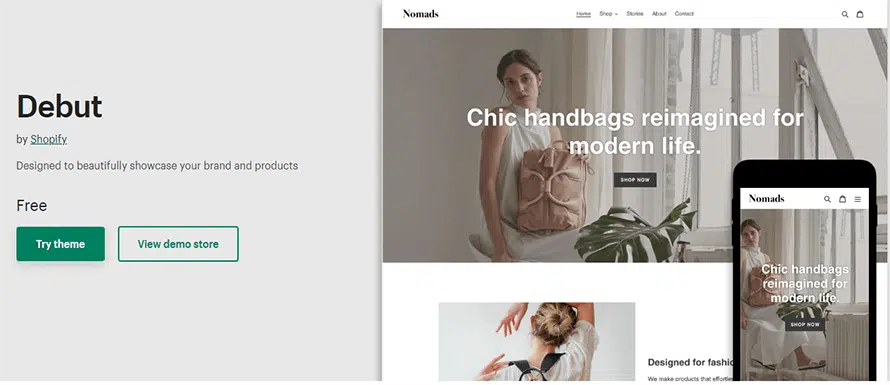
The Debut Shopify Theme was one of Shopify’s original free themes and became the default starting point for thousands of early merchants. It was built for Shopify 1.0, meaning it uses Liquid-based templates rather than the newer JSON template architecture introduced with Shopify Online Store 2.0.
Debut was known for:
- A clean, minimal storefront layout
- Simple homepage sections including a slideshow, promotional banners, and featured collections
- Basic product and collection presentation
- Predictive search and basic product filtering
- Pickup availability notifications
- Customer testimonials section
- Home page video embedding via YouTube or Vimeo
- A low learning curve — ideal for beginners with no coding experience
Its biggest strength was simplicity. You could install the theme, add products, adjust basic settings, and go live without any technical background. That same simplicity, however, is also its core limitation in 2026.
Is Debut Still Relevant in 2026?
No — Debut has been discontinued from the Shopify Theme Store.
When Shopify launched Online Store 2.0 and the Dawn theme as its new flagship, Debut was quietly removed from new installations. Stores that were already running on Debut can continue to use it, but:
- It cannot be freshly installed on any new Shopify store.
- It no longer receives feature updates from Shopify.
- It is built on Shopify 1.0’s older Liquid template system, not the current JSON template architecture.
- It does not support the advanced theme editor features available in Shopify 2.0 and beyond.
This is a critical distinction many merchants still searching for “Debut Shopify theme” do not realize. If you are landing on this page looking to start with Debut, you will need to choose a different theme entirely.
Is Debut Still Relevant in 2026?
Debut is still a relevant search topic because millions of stores were built on it, and those merchants are now asking: Should I stay, migrate, or switch entirely? That search intent is very different from “I want to use Debut today.”
Shopify’s current theme direction has moved well past Debut:
- Dawn (2021) replaced Debut as Shopify’s default free theme
- Horizon (2025) is now Shopify’s newest flagship theme, built on a component-driven, block-first architecture with built-in AI editing tools.
- Horizon supports up to 8-level nested blocks, industry-specific presets, and AI-generated layout suggestions — none of which Debut can match.
For merchants currently on Debut, the question is not capability — it is future fit.
Should You Still Use Debut?
You Can Keep Debut If
Keeping Debut makes sense when your store is already working, and you have no immediate need for redesign or flexibility improvements.
You can stay on Debut short-term if:
- Your store is stable and converting at an acceptable rate
- Your product catalog is small and simple
- Your team rarely changes layouts or adds new sections
- You do not run frequent campaigns or seasonal landing pages
- You want to avoid the risk of a theme migration right now
- Your current design still fits your brand
Recommended approach: Keep Debut, monitor performance, and plan a migration only when there is a clear business reason, such as a rebranding, major catalog expansion, or drop in mobile conversion.
You Should Switch Themes If
A newer theme is usually a better option if your store needs more flexibility or if you are starting fresh.
You should consider switching if:
- You are launching a new Shopify store in 2026
- You need more control over product, collection, and landing pages
- You often run campaigns or seasonal promotions
- Your team wants to edit pages without developer help
- Your current Debut setup needs too many workarounds
- Your mobile shopping experience feels outdated
- You are planning long-term growth or rebranding
The more your store depends on content updates, product storytelling, and conversion-focused layouts, the more valuable a modern Shopify theme becomes.
Main Features Debut Was Known For
Debut became popular because it offered practical basics for small stores and new merchants. It was not built to be the most advanced theme. It was built to help merchants get online with less friction.
Common features included:
- Simple homepage layout
- Slideshow section
- Product image and product detail display
- Collection presentation
- Promotional content sections
- Basic navigation structure
- Beginner-friendly theme settings
- Pickup availability display
- Basic predictive search
- Customer testimonials section
- Home page video support (YouTube or Vimeo)
These features can still be enough for a simple store. For example, a small catalog with a few product categories may not need complex filtering, multiple landing page templates, or advanced merchandising features.
But for modern ecommerce growth, basic features are often not enough. Customers expect fast mobile browsing, clear product discovery, rich product pages, trust-building content, and a checkout path with minimal friction. Your theme should support that experience without requiring constant manual fixes.
Debut Shopify Theme Image Sizes
If you are still running a store on Debut, using the right image dimensions keeps your storefront looking sharp across all devices. Here are the recommended sizes for each section:Image Type Recommended Size Aspect Ratio Product images 2,048 × 2,048 px 1:1 square (minimum 800×800 for zoom) Slideshow / hero banner 1,920 × 1,080 px 16:9 widescreen Collection images 1,024 × 1,024 px 1:1 square Blog post featured image 2,400 × 1,600 px 3:2 landscape Promotional banner 1,920 × 600 px Wide strip format Logo Up to 450 × 200 px Varies by brand
Shopify supports images up to 5,000 × 5,000 pixels with a maximum file size of 20 MB. Using consistent aspect ratios across your product grids and collection pages keeps the layout clean and prevents any awkward cropping in the theme display.
For product images specifically, a 1:1 square ratio is the safest choice because it works well across the product detail page, collection grid, and cart thumbnail without any additional cropping adjustments.
Limitations of Debut in 2026
Debut’s main weakness is not that it cannot run a store. Its weakness is that it may slow down how easily your store can evolve.
Key limitations include:
Legacy Theme Foundation
Debut comes from an older Shopify theme generation and runs on Shopify 1.0’s Liquid-based template system. That means it does not support JSON templates, which are the foundation of Shopify’s current theme architecture. As a result, it may not offer the same editing flexibility, app block support, or developer workflow as modern themes built for Shopify Online Store 2.0.
Less Flexible Page Building
Modern Shopify stores often need custom templates for product pages, collections, landing pages, and campaigns. In the debut, sections are mostly limited to the homepage. Debut can feel restrictive when your team wants to build different page experiences without custom development.
More Manual Customization
As your needs grow, you may need more code edits, app workarounds, or developer support to achieve layouts that newer themes handle more naturally. Simple tasks like adding a trust badge section to a product page or building a campaign landing page can require developer time on Debut that would be drag-and-drop work on a newer theme.
Weaker Long-Term Fit for Growing Stores
A simple store may not notice limitations immediately. But as you add more products, campaigns, content blocks, and merchandising goals, the theme foundation matters more. Debut was designed for simple catalogs, not for stores that evolve quickly.
Modern UX Expectations
Customers now expect smooth mobile navigation, strong visual hierarchy, product media, trust signals, and quick product discovery. If your Debut setup feels dated compared to competitors, the theme may be affecting how users experience your brand and your overall conversion rate.
Debut vs Newer Shopify Theme Architecture
The architectural gap between Debut and modern Shopify themes is significant and worth understanding before deciding whether to migrate.
The practical takeaway is simple: Debut can still serve a small existing store, but newer Shopify themes are usually better for merchants who want more control and a stronger growth foundation.
Debut vs. Dawn: What Changed?
Dawn replaced Debut as Shopify’s default free theme and represents a meaningful upgrade in architecture, speed, and flexibility.
Key differences:
- Speed: Dawn removes unused scripts and code, making it approximately 35% faster than Debut.
- Sections on all pages: Dawn supports flexible sections on product pages, collection pages, and all custom pages — not just the homepage
- Theme editor: Dawn’s editor is built for Shopify 2.0, supporting app blocks, metafields, and visual drag-and-drop editing without code.
- Product media: Dawn is designed to showcase product images and media more prominently than Debut’s basic layout.
- Future support: Dawn continues to receive updates; Debut does not.
Choose Dawn if you want a modern, free starting point that aligns with Shopify’s current ecosystem. It is particularly good for merchants who want a clean, product-first design without immediately paying for a premium theme.
Debut vs. Horizon: Shopify’s Newest Direction
Horizon is Shopify’s newest flagship theme, introduced in Shopify’s Summer 2025 Edition. It represents the next generation beyond Dawn and is the current recommended starting point for new stores.
What makes Horizon different:
- Block-first design: Pages are built with reusable blocks rather than fixed sections, giving merchants total design freedom across all page types
- 10 industry-specific presets: Horizon includes presets for fashion (Ritual), home goods (Dwell), food (Savor), skincare (Atelier), and more — each ready to convert by default
- AI-assisted editing: Built-in AI suggests layout changes and can generate custom blocks without code
- Better performance and SEO: Optimized structure for faster load times and search engine visibility.
- Unified updates: All Horizon-based themes receive consistent updates from Shopify
If you are building a new Shopify store in 2026 and starting from scratch Horizon is the recommended starting point over both Debut and Dawn.
Debutify vs Debut: What Is the Difference?
Many people searching for the Debut Shopify Theme are actually looking for Debutify, a separate, third-party theme that is completely unrelated to Shopify’s official Debut theme.
The name similarity causes a lot of confusion. Here is what you need to know:Shopify Debut Debutify Made by Shopify (official) Third-party (launched 2019) Availability Discontinued — legacy stores only Actively available Pricing Was free Free tier + paid plans from ~$29/month Target user General merchants, beginners Dropshippers, conversion-focused stores Built-in tools Basic Shopify features 50–70+ conversion widgets built-in AI features None AI-powered theme builder and layout tools App dependency May need apps for advanced features Designed to reduce app overhead
Debutify is an actively developed premium theme built specifically around conversion optimization. It includes built-in trust badges, countdown timers, product upsell prompts, a sticky add-to-cart bar, and a bundle builder — all without needing separate Shopify apps. It is a strong option for dropshippers and merchants who want a conversion-ready setup out of the box.
If Debutify is what you were looking for, it has nothing to do with Shopify’s discontinued Debut theme beyond a similar name.
Watch the Video About Debut Shopify Theme
Debut Shopify Theme Alternatives
The best Debut alternative depends on your store type, catalog size, brand style, and editing workflow. Do not choose a theme only because it looks attractive in a demo. Choose one that supports how your team will actually sell, update, and scale.
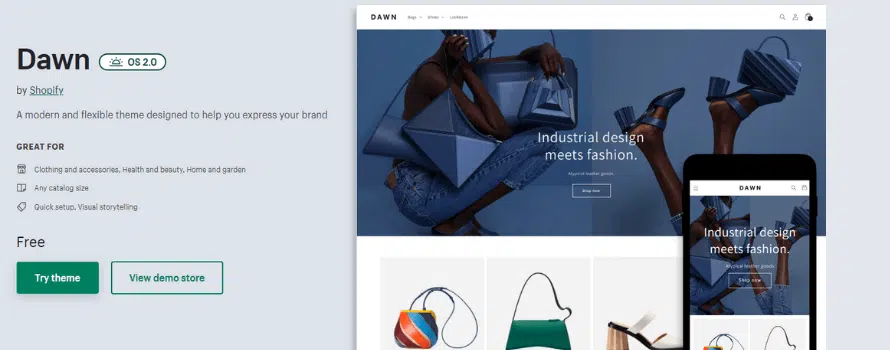
Dawn Shopify Theme
Best for: Merchants who want a free, modern Shopify starting point.
Dawn is a strong option when you want a clean theme that puts product visuals first. It works well for merchants who need a modern foundation without immediately buying a premium theme.
Consider Dawn if you are launching a new store, testing a redesign, or moving away from an older theme and want to stay close to Shopify’s current ecosystem.
Check before choosing: Make sure Dawn has the exact merchandising, navigation, filtering, and conversion features your store needs. Some stores may still need a premium theme or extra customization.
Mavon Shopify Theme

Best for: Stores that want a modern, polished design with more visual flexibility.
Mavon Shopify Theme can be a good option if you want a more premium storefront style than a basic starter theme. It may suit merchants who need a stronger homepage presentation, product-focused sections, and a more conversion-oriented layout.
With optimized mobile design and lightning-fast speed, this theme provides the ultimate user experience. Featuring advanced features such as color swatches, a quick view, and a mega menu, Mavon makes it easy for your customers to find exactly what they’re looking for.
Check before choosing: Verify the latest price, included sections, support quality, update history, and Shopify compatibility before publishing final recommendations.
Horizon Shopify Theme
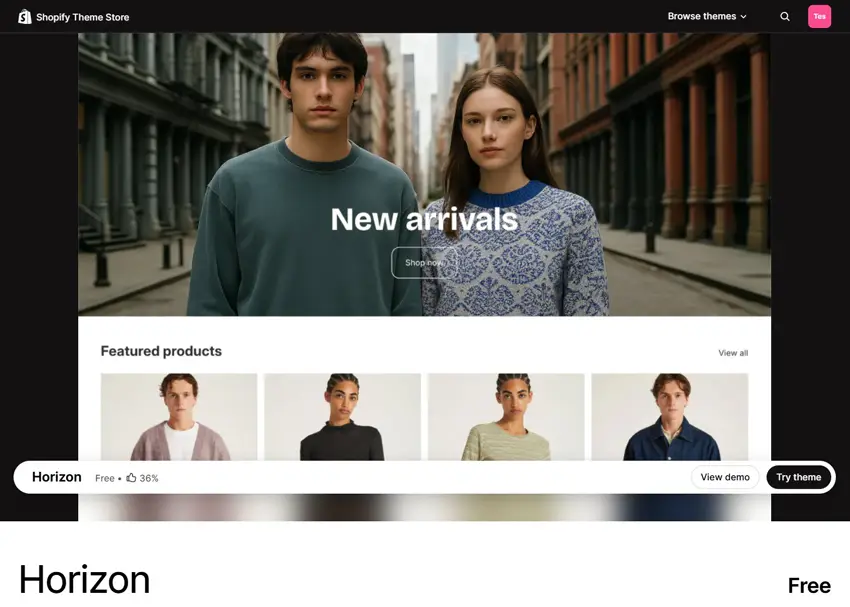
Best for: Merchants building new stores who want the most flexible free Shopify foundation available in 2026.
Horizon is Shopify’s newest theme and offers block-first design, AI layout tools, and 10 niche-specific presets. If you are starting from scratch or planning a full redesign, Horizon gives you more control and better long-term scalability than any previous free Shopify theme.
Check before choosing: Some advanced variant and wishlist features may still require apps, but Horizon’s overall architecture is the strongest free option currently available.
Grow Your eCommerce Business with Valuable Resources, Tools, and Lead Magnets
- Bring your ideas to life for $1/month
- One platform that lets you sell wherever your customers are—online
- Create a beautiful eCommerce website
- Start for free, then enjoy $1/month for 3 months
- Build your own website in a few steps
- Create a website in minutes easily, secure method
- Turn what you love into what you sell
- Discover the Shopify Point of Sale
- AI Based Business Name Generator
Lezada – Multipurpose Shopify Theme
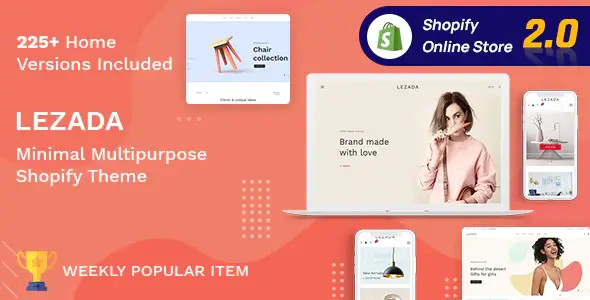
Best for: Multipurpose stores that need several layout options.
Lezada Shopify theme is suitable for merchants who want a broader design direction and more layout variation. It can work for stores that sell across different categories or need multiple homepages and product presentation styles.
This Shopify theme offers 225+ homepage variations, letting you create a Shopify store for any niche you want. This makes it useful when you want more design flexibility than a minimal theme but still need a structured theme-based setup. Plus, it has tons of modern and useful features and is updated to the latest version of Shopify.
Check before choosing: Confirm current Shopify compatibility, demo quality, performance, and whether the theme includes only the layouts your store will actually use.
LeArts – Handmade Shop Shopify Theme
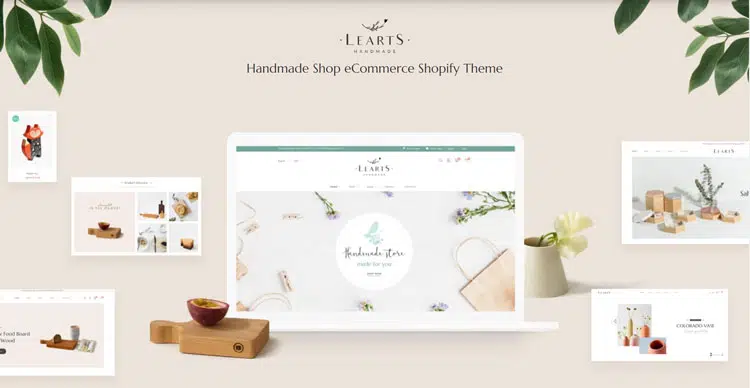
Best for: Handmade, craft, creative, or boutique-style products.
LeArts is a better fit when the brand feels matter as much as the product listing structure. It can support stores that need a softer, more visual, creative presentation instead of a generic ecommerce layout.
With its modern, sleek design, LeArts is sure to catch your customers’ eye and keep them engaged with your products. And with easy-to-use customization options, you can tailor the theme to fit your brand perfectly.
But LeArts isn’t just about aesthetics. It’s also optimized for SEO, so you can rest assured that your website will rank high in search engine results pages. Plus, it’s fully responsive, so your customers can shop from any device without any issues.
Check before choosing: Review mobile behavior, product page structure, image handling, and update history before recommending it in the final WordPress version.
Corano – Jewelry Store Shopify Theme
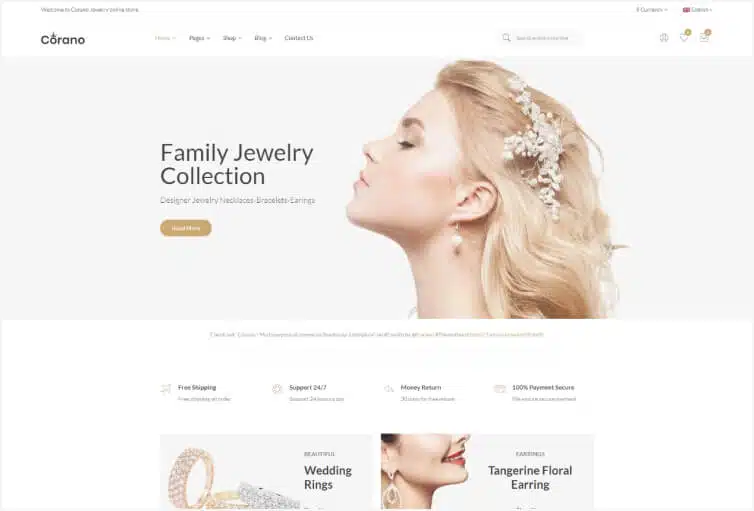
Best for: Jewelry, accessories, and product-detail-focused stores.
Corano can be useful for niche stores where product visuals, details, and trust signals matter. If your products need close-up presentation, organized collections, and a refined storefront style, it may be worth comparing.
With 8 homepage variations, including an RTL version, and all the essential eCommerce elements, Corano offers a unique and stylish design that is sure to elevate your online store.
Additionally, Corano features an Ajax pop-up cart, quick view, and product zoom to enhance the shopping experience of your customers. If you’re looking for an alternative to the Debut Shopify Theme, the Corano Jewelry Store Shopify Theme is a great option.
Check before choosing: Verify current theme support, filtering options, product media features, mobile UX, and compatibility before publishing specific claims.
Premium Shopify Themes Bundle

We have a special bundle of premium Shopify themes that are suitable for a variety of niches. Our Shopify themes are of excellent quality and have been created in accordance with current industry standards.
How to Choose a Shopify Theme Today
Use a requirements-first approach before replacing Debut. A theme that looks good in a demo may not be the right choice for your real store.
Before choosing a Shopify theme, ask:
- How many products and collections do you have?
- Do customers need filters, search, or advanced navigation?
- Do you rely on product videos, lifestyle images, or detailed product media?
- Will your team create landing pages or campaign sections often?
- Can non-technical users update key pages easily?
- Does the theme support your mobile shopping experience?
- Is the theme actively maintained?
- Does the theme include support documentation?
- Will you need paid apps to fill feature gaps?
- Does the theme fit your store for the next 12–24 months?
A good theme should reduce future work, not just help you launch today.
Migration Checklist Before Switching from Debut
Before moving away from Debut, review your current setup carefully. A theme switch can improve flexibility, but it can also affect layout, tracking, apps, and user experience if done carelessly.
Use this checklist:
- Back up or duplicate your current theme.
- Review your current homepage, product page, collection page, cart, and blog layouts.
- List all custom code, app blocks, tracking scripts, and theme edits.
- Compare your current design with the new theme preview.
- Check mobile layout before desktop polish.
- Test navigation, product filters, product media, and cart flow.
- Review SEO elements such as headings, title tags, internal links, and structured content.
- Test speed and user experience after setup.
- Keep the old theme available until the new version is reviewed.
- Launch the new theme only after checking key pages and conversion paths.
Theme migration should be planned, not rushed. If your current store is performing well, schedule the migration during a lower-risk period.
Watch the Video about Debut Shopify Theme
Frequently Asked Questions
What is the Debut Shopify Theme?
The Debut Shopify Theme is an older free Shopify theme that became popular because it was simple, clean, and easy for beginners to use when launching a basic online store. It was built on Shopify 1.0’s Liquid template system and served as Shopify’s default theme before being replaced by Dawn.
Is Debut still available in 2026?
No. Debut has been discontinued and is no longer available for new installations in the Shopify Theme Store. Stores already running on Debut can continue using it, but no new stores can install it.
Is Debut still good for Shopify stores in 2026?
Debut can still work for simple existing stores that are already stable. But it is not the right choice for new Shopify stores in 2026. Newer themes offer better architecture, faster performance, and stronger long-term flexibility.
What replaced the Debut Shopify Theme?
Dawn replaced Debut as Shopify’s default free theme when Online Store 2.0 launched. Horizon is now Shopify’s newest flagship theme (2025) and is the recommended starting point for stores building fresh today.
Is Debutify the same as the Debut theme?
No. Debutify is a completely separate third-party theme with no official connection to Shopify’s Debut theme. Debutify is an actively maintained, conversion-focused theme designed for dropshippers and merchants who want built-in upsell and trust widgets without relying on multiple apps.
Can I keep using Debut if my store already runs on it?
Yes. If your store is stable, your catalog is simple, and the theme still supports your business needs, you can keep Debut short-term. Plan a migration only when there is a clear reason such as a rebranding, catalog expansion, or drop in mobile conversions.
What are the biggest limitations of Debut?
The biggest limitations are its older Shopify 1.0 architecture, sections limited to the homepage only, less flexible page customization, more manual work for advanced changes, and the fact that it no longer receives updates from Shopify.
What is the best free Shopify theme in 2026?
Horizon is the most modern free Shopify theme available in 2026, with block-first architecture, AI editing tools, and 10 industry-specific presets. Dawn is also a solid option for merchants who want a proven, simpler free baseline.
What is the best alternative to Debut for premium themes?
Mavon and Lezada are strong premium alternatives offering modern design, full Shopify 2.0 compatibility, and strong support. For conversion-first stores and dropshippers, Debutify offers 50+ built-in widgets with no coding required.
When should I migrate from Debut?
Migrate when Debut starts limiting your content workflow, product presentation, mobile UX, or growth plans. A planned redesign or brand refresh is usually the best migration moment rather than an urgent last-minute change.
Conclusion
The Debut Shopify Theme still has value for simple existing stores, especially when stability matters more than redesign flexibility. If your store is already working well, you do not need to change themes immediately.
But for most new stores and growth-focused merchants in 2026, Debut is no longer available or the right default choice. Newer Shopify themes, whether free options like Dawn and Horizon or premium themes like Mavon and Lezada, offer a better path for flexible editing, richer product presentation, and long-term store development.
The smartest approach is to compare your current setup with modern alternatives before making a decision. If Debut still supports your store goals, keep it while planning ahead. If it slows down your merchandising, content updates, or mobile experience, start testing newer Shopify themes and migrate with a clear checklist.