
Elementor Page Not Found Widget

If you’re looking for a way to add custom 404 content to the web page, the Elementor Page not found widget is the perfect solution.
This widget helps you create and customize 404 pages in WordPress that will keep your visitors informed and improve their experience on your website.
A well-designed 404 page can turn a potentially frustrating moment into an opportunity to guide users back to valuable content.
With the Elementor Page Not Found widget, you can easily customize the look and feel of your error pages to match your brand identity.
Whether you want to add humor, helpful navigation links, or a search bar, this tool gives you the flexibility to create an engaging 404 page that reduces bounce rates when visitors encounter broken links.
So if you’re wondering how to create and set up a 404 page with Elementor, you’ve come to the right place. Let’s explore this powerful widget and learn how to make the most of your WordPress Elementor 404 page.
What is 404 Content
A 404 page appears when a requested page doesn’t exist on your website. When users try to access unavailable pages, they see a “404: Not Found” error. This happens when links are broken or pages have been removed.
The Elementor Page Not Found Widget helps keep visitors informed about these errors. It offers various templates for creating custom 404 pages that match your site’s style. A well-designed 404 page prevents visitors from leaving your site immediately.
This Elementor Widget guides lost visitors back to useful content on your website. It transforms a potential exit point into an opportunity for continued engagement.
Why Use Elementor Page Not Found Widget
If you’re looking for a better way to handle 404 pages on your website, Elementor Page not Found widget is the perfect solution.
The Elementor Page Not Found Widget offers an excellent solution for handling 404 pages. It transforms these error pages into valuable touchpoints for your website visitors.
Some visitors will inevitably encounter 404 pages on your site. Standard error pages can frustrate users and cause them to leave. With this Elementor Widget, you can create and edit custom 404 page content.
You can add helpful navigation, search options, and engaging visuals to your pages. When someone lands on a broken link, they’ll understand what happened. The widget provides clear directions to help visitors find what they need.
A well-designed 404 page reduces bounce rates and improves user experience. It maintains your brand’s voice even when displaying error messages. The Elementor Page Not Found Widget makes this customization process simple and intuitive.
Elementor Page Not Found Widget by HT Mega
There are many Elementor page not found widgets for WordPress available. HT Mega is a popular plugin that offers one.
The HT Mega offers a perfect solution for customizing 404 pages. It displays helpful content when browsers can’t find the requested pages. The widget comes with four amazing pre-designed style options.
With four different layout styles to choose from, you can create a page that looks and feels just the way you want it. You can also insert an image, set the size, and add a title for the page.
The two-button options-the contact button and back button allow you to further personalize the elementor 404 page template not found page. You can add text and a link for each button, as well as select icons for each.
With four different layout styles to choose from, you can create a page that looks and feels just the way you want it. You can also insert an image, set the size, and add a title for the page.
Style One: It features a clean, minimal design with a “Back To Home” button. It shows “Opps! Page not found” with a simple navigation option. This style works well for professional and corporate websites.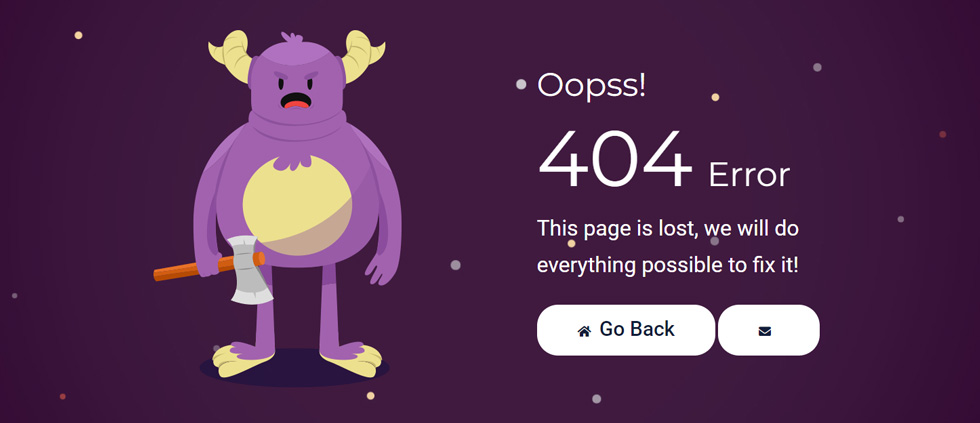
Style Two: It includes a bold “404 Error” message with “Oopss!” text. It offers a “Go Back” button to help visitors return to previous pages. This style combines visual impact with practical navigation assistance.
Style Three: It focuses on conversion with “Page not found” and marketing text. It displays “Stop missing out on prospects” to engage lost visitors. This style turns errors into potential business opportunities.
Style Four: It uses humor with “Opps…..! looks like this page has been stolen by an alien.” It provides both “BACK TO HOME” and “CONTACT US” buttons for navigation. This playful approach lightens the mood when visitors encounter missing pages.
If you want to learn more, check “How to use an 404 Widget of HTMega Addons“
With HT Mega’s widget, you can easily edit text, buttons, colors, and layouts. Each style can be customized to match your website’s branding and tone. The widget makes error pages into valuable touchpoints in your user experience.
Pricing Plan: HT Mega Addons
Check the pricing table for HT Mega Addons.Personal Developer Growth 1 Website: $49/Yearly 5 Websites: $79/Yearly 999 Websites: $99/Yearly 1 Website: $99/One time 5 Websites: $149/One time 999 Websites: $199/One time Buy Now or Check Pricing Plan Buy Now or Check Pricing Plan Buy Now or Check Pricing Plan
Watch the video about Elementor Page Not Found Widget
Conclusion
The Elementor Page Not Found Widget transforms how you handle missing pages on WordPress sites. It converts potential frustration points into helpful navigation opportunities for your visitors.
When users encounter 404 errors, they need clear guidance to continue their journey. This widget displays informative content when pages can’t be found. It offers multiple design styles to match your site’s personality.
Creating an effective 404 page is essential for user experience and retention. The Elementor Page Not Found Widget makes this process simple and intuitive. You can customize every aspect of your error pages without coding knowledge.
A well-designed 404 page keeps visitors on your site instead of leaving. It provides useful navigation options and maintains your brand voice. The widget’s flexibility allows for creative solutions to technical problems.
Whether you choose HT Mega’s solution or another option, implementing custom 404 pages improves your site. Your visitors will appreciate the thoughtful experience even when things go wrong. Start creating your custom 404 page with Elementor today!