

Vuexy Admin Dashboard Template Review: Features, Frameworks, Pricing & Use Cases

Quick Answer: Vuexy is a premium admin dashboard template for developers building SaaS platforms, CRM systems, ecommerce backends, and other web applications. It supports Vue, Nuxt, Next.js, HTML, Laravel, Django, and ASP.NET. The package includes ready-made dashboards, applications, customizable layouts, and framework-specific components. The Regular License costs $39 on ThemeForest.
The Vuexy admin dashboard template is a premium dashboard UI built for developers. It comes from PIXINVENT and sells on ThemeForest. Today it covers seven main stacks: Vue, Nuxt, Next.js, HTML, Laravel, Django, and ASP.NET.
Older reviews, including our 2023 version, called Vuexy a Vue, React, and Angular template. That is no longer correct. The Angular version and the older React (Vite) version were deprecated in 2023, and the current React offering uses Next.js. This updated review shows what Vuexy includes today, what each version uses, what it costs, and who should buy it.
How We Reviewed Vuexy
We reviewed Vuexy’s official ThemeForest listing and its public changelog in November 2026. We also compared both with our own 2023 article.
We have not tested every framework version ourselves. Prices and versions change, so confirm them on the product page before you buy.
What Is the Vuexy Admin Dashboard Template?

Vuexy is an admin template made for developers. It gives you ready-made layouts, pages, apps, and UI components. You use them as the front-end base of a web application.
Vuexy is not a framework, and it is not a finished product. You still build your own logic and data layer.
The changelog shows a first release in February 2019. The product page now shows more than 30,000 sales and a rating of about 4.9 stars. The latest changelog entry is v10.12.0, dated September 30, 2026, and ThemeForest shows a last-update date of October 2, 2026.
Which Frameworks Does Vuexy Support?
Vuexy is sold as one product with several versions. Each version uses a different stack. This table shows what each one uses today.Version Main stack Notes Vue Vue 3, Vuetify, Vite, Pinia Updated in v10.10.0 Vue + Laravel Vue 3, Vuetify, Laravel as an API Vue handles the login flow and routing. Laravel is used only as the API Nuxt Nuxt 4, Vuetify Nuxt 4.2.0 in v10.10.0 Next.js Next.js 16, React 19, MUI 7, Tailwind CSS 4 v10.11.0 had breaking changes HTML Bootstrap 5.3.8 Starter kit available HTML + Laravel Laravel 13, Bootstrap 5.3.8 Needs PHP 8.3 or above. Jetstream works with this version only Django Django 5.2.17, Bootstrap 5.3.8 Python backend ASP.NET .NET 10, Bootstrap 5.3.8 ASP.NET and ASP.NET MVC
Node.js 24 or above is required for the HTML, HTML + Laravel, Django, and ASP.NET versions only. The product page also says versions differ because each framework has different components. Open the demo of your version before you buy.
How to Choose the Right Vuexy Version
Pick the version that matches your stack.
- Vue developer: Choose Vue. See our guide to the best Vue.js templates for more context.
- Nuxt or server-rendered Vue: Choose Nuxt.
- React developer: Choose Next.js. There is no separate React version now.
- PHP team: Choose HTML + Laravel. Choose Vue + Laravel if you want a Vue front end.
- Python team: Choose Django.
- Microsoft stack: Choose ASP.NET.
- No framework: Choose HTML. Our list of HTML dashboard templates shows other options.
Example: Choosing Vuexy for a SaaS Admin Panel
This is a planning scenario, not a test result. Suppose you are building a subscription management platform with a Next.js front end. The Next.js version can supply dashboard layouts, tables, navigation, and UI components. That cuts the interface work you build from scratch.
You still build subscription billing, database operations, authentication, and other backend logic yourself. Vuexy gives you the interface foundation. It is not a finished SaaS system.
If your users pay for the product, read the license section below first.
Buyer Checklist
- Stack: Pick the version that matches your framework.
- Apps and components: Open the demo and confirm the apps you need exist in that version.
- Environment: Check the Node.js, PHP, .NET, or Python requirements of your version.
- License: Choose Regular if users are not charged. Choose Extended if they are.
- Support: Six months are included. Plan for renewal if you need more.
Mistakes to Avoid
- Buying without opening the demo of your exact version.
- Mixing up the two Laravel versions. HTML + Laravel is a Laravel app with Bootstrap pages. Vue + Laravel uses Laravel only as an API, and Vue builds the front end.
- Opening the HTML version straight from your drive. The template uses AJAX, so run it from a local server with http://.
- Skipping the Node.js 24 requirement for the HTML, Laravel, Django, and ASP.NET versions, or the PHP 8.3 requirement for HTML + Laravel.
Key Features of Vuexy
Dashboards and Ready-Made Pages
The product page lists five niche dashboards. The changelog names ecommerce, academy, and logistics dashboards. Vuexy also ships front pages: landing, pricing, payment, checkout, and help center pages.
Built-In Customizer
The product page promises unlimited color options. The changelog adds live primary-color changes through the customizer. This is documented for the HTML, Laravel, ASP.NET, and Django versions. The Vue version also got a redesigned customizer in v9.9.0. This lets you preview your brand colors quickly.
Dark and Semi-Dark Layouts
The product page lists dark and semi-dark layout options. These change the look of your app. They do not add new functions.
Responsive Layouts
Vuexy layouts adapt to desktop, tablet, and mobile screens. This matters for admin panels that your team opens on different devices.
Search, Bookmarks, and Navigation
The product page lists fuzzy search, bookmarks, and a floating navigation bar. These help users move through large admin panels faster.
Cards, Charts, and Components
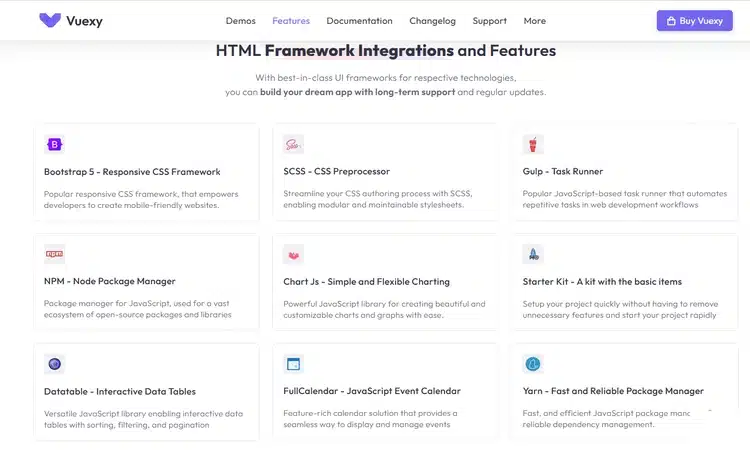
Vuexy includes advanced cards and charts. Available components differ by version. Check the demo for the exact one you need.
Starter Kits and Documentation
The product page marks Vuexy as well documented. The HTML version also has a starter kit with minimal assets. This gives you a clean base without demo content.
What Apps Come With Vuexy?
The product page lists 10 ready-made apps. Here is what each one is useful for.App Useful for Email Inbox and message screens Chat In-app messaging Calendar Scheduling and events Kanban Project and task boards eCommerce Store admin: products, orders, customers, reviews Academy Course dashboards and course pages Logistics Fleet dashboards Invoice Billing and invoice screens User User lists and profiles Roles & Permissions Access control for teams
Vuexy also includes front pages. The application examples and included components may vary by framework version. Review the relevant demo to confirm availability.
What Can You Build With Vuexy?
The product page lists these use cases:
- SaaS platforms
- Project management apps
- Ecommerce backends
- CRM systems
- Analytics apps
- Banking apps
- Education apps
- Fitness apps
In each case, Vuexy supplies the interface. Your team supplies the product logic and data.
What’s New in Vuexy?
The latest release is v10.12.0, dated September 30, 2026. The public changelog lists the details.
- v10.12.0 (September 30, 2026): The HTML, HTML + Laravel, Django, and ASP.NET versions moved to Bootstrap 5.3.8. Laravel moved to version 13, Django to 5.2.17, and ASP.NET to .NET 10. Node.js 24 or above is now required for these versions, and PHP 8.3 or above for HTML + Laravel. Fixes cover the horizontal menu, PDF export, and the DataTables export menu.
- Earlier releases: In November 2025, the Next.js version moved to Next.js 16, React 19, MUI 7, and Tailwind CSS 4, and the Vue and Nuxt versions got updated Vue, Vuetify, and Vite. In December 2025, Next.js dependencies were updated to fix security issues.
Vuexy Pros and Cons
Pros
- Many stacks: Teams can stay on Vue, Next.js, Laravel, Django, or .NET instead of switching stacks for the interface.
- Ready-made screens: The product page lists five dashboards and 10 apps. Common screens such as email, chat, calendar, kanban, and invoices already exist.
- Ongoing updates: Updates are free for life. The changelog shows releases through September 2026, including framework upgrades.
- Easy branding: The customizer and dark and semi-dark layouts let you match your brand. Live color changes are documented for four versions.
- Documentation: ThemeForest marks it well documented. The HTML version also has a starter kit, so you can begin without demo content.
Cons
- Versions differ: The product page warns that components differ by framework. A feature you see in one demo may not exist in another.
- Breaking changes: The Next.js 16, React 19, MUI 7, and Tailwind CSS 4 update was marked as breaking. Existing projects need a planned upgrade.
- Limited support window: Six months of support are included. After that, you need to pay to extend it.
- Environment rules: The HTML, Laravel, Django, and ASP.NET versions need Node.js 24 or above. HTML + Laravel also needs PHP 8.3 or above.
- Developer skills needed: The product is built for developers. It is not a no-code tool.
Who Should Use Vuexy?
Vuexy Is Best For
- SaaS and product teams that need an admin UI fast
- Agencies that build dashboards for clients on different stacks
- Vue, Nuxt, Next.js, Laravel, Django, and .NET developers
Vuexy May Not Be the Right Fit For
- People who want a no-code dashboard builder
- Teams that expect a finished SaaS backend
- Beginners with no front-end or back-end experience
- Projects that only need a simple static website
Vuexy Pricing and License
Vuexy sells on ThemeForest. Prices were checked in November 2026. The listed price includes the item price and a buyer fee. It excludes tax.License Price Use Regular $39 One end product that end users are not charged for Extended $799 One end product that end users can be charged for
Regular License
The Regular License costs $39. You or one client can use it in a single end product. Users of that product must not be charged.
Extended License
The Extended License costs $799. You or one client can use it in a single end product. Users can be charged. It is generally intended for a single end product that charges its users, such as a paid SaaS. Read Envato’s standard license terms to confirm how they apply to your business model.
The product page lists a quality check by Envato, free future updates, and six months of support from PIXINVENT. Updates last for life. Support does not. You can pay to extend support to 12 months. Prices can change, so check the ThemeForest product page before you buy.
Vuexy Alternatives
Vuexy covers many stacks. If your project only uses React, a React-only template can be a lighter choice. Our guide to React dashboard templates lists more options. The two templates below are React-only, so compare their update dates before you decide.Template Stack Includes Last update Price Best for Doar React 18, TypeScript, Redux, Styled Components 4 dashboards, 5 apps April 26, 2023 $24 React teams that want a flat, light UI Stor React 18, TypeScript, Tailwind CSS, React Context 5 dashboards, apps such as chat, contacts, file manager, calendar December 21, 2022 $12 React and Tailwind projects Vuexy (for comparison) Seven main stacks 5 dashboards, 10 apps October 2, 2026 $39 Teams that need several stacks or frequent updates
Why Choose Vuexy Over a React-Only Template?
Choose Vuexy if you may use more than one stack, want regular framework upgrades, or need apps such as Kanban, Academy, Logistics, and Roles & Permissions.
Choose a React-only template if you only use React and want a smaller, cheaper base.
Doar and Stor are built on React 18, while the Vuexy Next.js version uses React 19. Check that either one works with the React version you plan to use.
Frequently Asked Questions
What is Vuexy?
Vuexy is a premium admin dashboard template for developers. It provides dashboards, apps, and UI components in several frameworks.
Is Vuexy built with Vue.js?
The Vue, Vue + Laravel, and Nuxt versions use Vue 3 and Vuetify. Other versions use different stacks.
Does Vuexy support React or Next.js?
Yes, through the Next.js version. It uses Next.js 16, React 19, MUI, and Tailwind CSS. The older React (Vite) version was deprecated in 2023.
Does Vuexy support Angular?
No. The Angular version was deprecated in January 2023, and the current product does not list it.
Does Vuexy support Laravel?
Yes. There are an HTML + Laravel version and a Vue + Laravel version.
Does Vuexy support Django and ASP.NET?
Yes. The Django version uses Django 5.2. The ASP.NET version uses .NET 10.
Is Vuexy suitable for SaaS applications?
Yes, as a UI base. The product page lists SaaS platforms as a use case. You still build the backend logic. If users pay for your product, read the license terms before you choose a license.
Does Vuexy include dark mode?
Yes. The product page lists dark and semi-dark layout options.
Does Vuexy include lifetime updates?
Yes. Every purchase includes free updates for life. Six months of support are included, and you can pay to extend it.
Is the Vuexy Admin Dashboard Template Worth It?
The Vuexy admin dashboard template is best for developers who want a mature admin UI across several stacks. It saves time on layouts, apps, and common components.
Its main strength is the range of versions. The main consideration is that features and dependencies differ between framework versions, so buyers should review the matching demo and technical requirements.
If you build with Vue, Next.js, Laravel, Django, or .NET and need an admin UI fast, Vuexy is a strong fit. If you want a no-code tool or a finished SaaS, it is not.
Want to compare more options? Read our guides to Bootstrap admin templates and other popular admin dashboard templates. You can also read our Metronic theme review or browse our React templates.
Watch the video about Vuexy Admin Dashboard Template