Why You Haven’t Found The Right WordPress CRM Yet: 7 Honest Reasons

Finding the perfect customer relationship management solution for your WordPress site feels like searching for a needle in a haystack. You’ve scrolled through dozens of plugin reviews, compared feature lists until your eyes glaze over, and still, something doesn’t quite add up.
According to research from New Breed, 95% of companies acknowledge operational gaps in their current CRM systems, and the frustration often stems from a fundamental mismatch between what WordPress CRM plugins can deliver and what modern businesses actually need.
For WordPress users specifically, the challenge is amplified because the ecosystem exists in a peculiar middle ground powerful enough to be tempting, yet constrained enough to be frustrating.
This isn’t a failure on your part. In fact, your hesitation might be the smartest business decision you make. Why? Because the reasons you haven’t found the right WordPress CRM plugin yet are legitimate, systemic, and worth understanding before you commit resources to another tool that might disappoint you.
The WordPress CRM Paradox
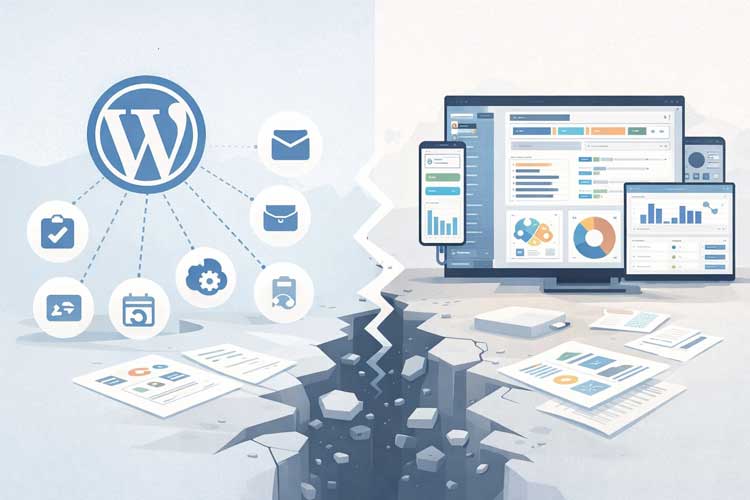
WordPress powers 43.6% of all websites on the internet, and its extensibility is legendary. Yet when it comes to CRM functionality, users frequently encounter a disconnect: the plugins exist, they’re often affordable, but they rarely feel like complete solutions.
This creates a confusing marketplace where 87% of organizations struggle with misalignment between sales, marketing, and customer experience teams, often because their tools aren’t communicating properly.
Whether you’re managing leads for a small consulting business, running an e-commerce operation, or juggling multiple client relationships as an agency, the frustration is real. You need customer data organized, accessible, and automated.
But you also need it to work seamlessly within WordPress without slowing down your site or creating security nightmares. Let’s explore the seven honest reasons why you haven’t found the right WordPress CRM yet, and what you can actually do about it.
Understanding WordPress CRM Systems
Before we dive into why the search feels so difficult, let’s establish what we’re actually talking about.
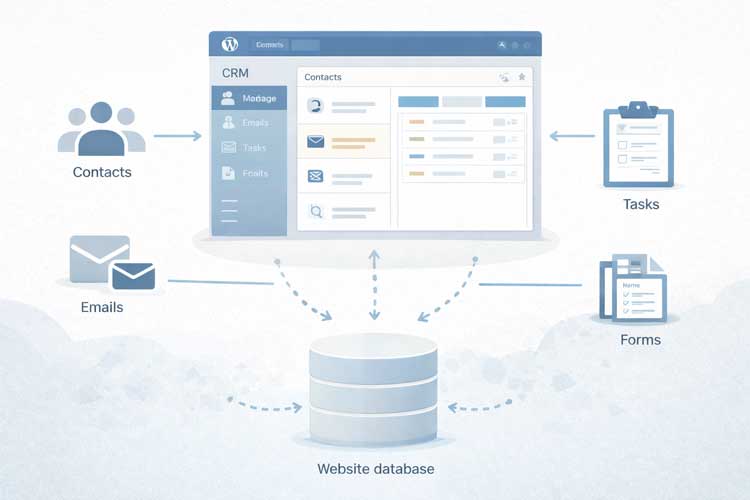
A WordPress CRM is a plugin-based customer relationship management system that integrates directly into your WordPress dashboard. Unlike SaaS platforms like HubSpot or Salesforce that operate independently, WordPress CRM plugins store your customer data within your own website’s database, offering complete control and elimination of recurring subscription fees.
These plugins typically handle:
- Contact and company management with custom fields
- Lead tracking and sales pipelines for visualizing deal progress
- Email integration to log communications
- Task and activity logging to maintain interaction history
- Basic automation and segmentation for targeted outreach
- Contact forms and lead capture directly on your site
The appeal is straightforward: consolidate your CRM and content management into a single platform, reduce software subscription costs, and maintain data sovereignty. The reality, however, is considerably more complex.
The Market Context
The WordPress CRM marketplace is unique because it exists in the shadow of enterprise solutions. Salesforce, ActiveCampaign, and HubSpot have dominated CRM conversations for years. WordPress CRM plugins are relative newcomers, only gaining serious traction in the past 5-7 years, which means the ecosystem is still maturing and fragmented.
The 7 Honest Reasons Why You Haven’t Found The Right WordPress CRM Yet
#1: The WordPress CRM Marketplace Is Still In Its Infancy
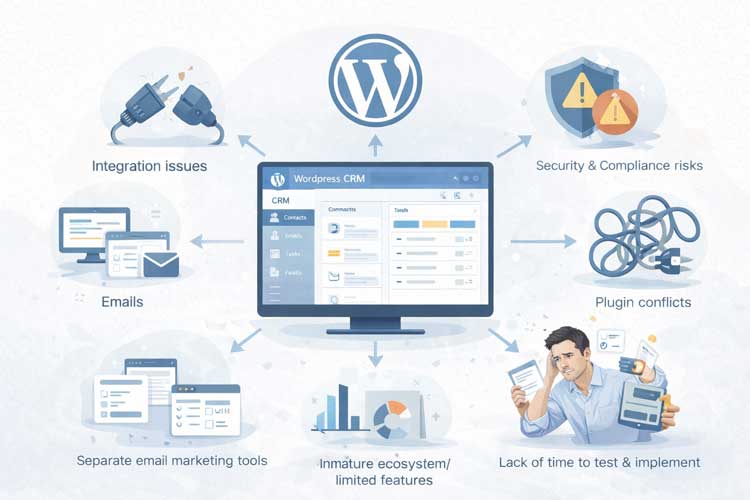
Unlike dedicated CRM platforms with 15+ years of development history, the WordPress CRM plugin ecosystem remains immature. While plugins like WP CRM System have made progress, the depth of functionality pales in comparison to industry-standard solutions.
According to HubSpot’s CRM report, users report that 50% of CRM implementations fail to meet initial expectations due to feature gaps and integration limitations. For WordPress specifically, this figure is likely higher because:
- Development resources are split across competing platforms
- Plugin developers operate on smaller budgets than dedicated CRM companies
- Feature parity with enterprise solutions is a multi-year effort
- Community-driven development moves more slowly than venture-backed alternatives
If you’re accustomed to modern CRM software, WordPress CRM plugins feel dated by comparison. The interface is utilitarian rather than intuitive. Workflow automation is basic. And the ecosystem lacks the third-party integrations that make professional CRM systems indispensable.
The real cost: You’ll spend significant time configuring workarounds for native shortcomings, which defeats the purpose of a “plug-and-play” solution.
#2: You’ll Still Need Another Email Marketing System
Here’s what nobody tells you clearly: WordPress CRM plugins do not replace email marketing automation tools. Even the most robust options (like HubSpot’s WordPress integration) handle email differently than dedicated email platforms.
WordPress CRM email capabilities typically include:
- Basic email send functionality
- Limited template customization
- No sophisticated segmentation
- Weak deliverability optimization
- No multi-variant testing
Most serious businesses need a separate email marketing automation platform, whether that’s Mailchimp, ConvertKit, or ActiveCampaign. This means:
- Data duplication across two systems
- Integration complexity (often unreliable syncing)
- Double training efforts for team members
- Separate billing for two tools, you expected one to replace
According to Statista’s research on CRM adoption, 87% of high-performing teams maintain separate email and CRM systems because the requirements diverge too significantly to unify them practically.
The real cost: You’ll pay for two subscriptions and spend 8-12 hours per month managing data sync between systems instead of having one integrated solution.
#3: Security and Data Privacy Compliance Falls On You
WordPress CRM plugins shift critical security responsibilities directly onto your shoulders. Unlike SaaS platforms with dedicated security teams, enterprise-grade encryption, and compliance certifications:
You are responsible for:
- Server security updates (which can break plugins)
- Database encryption implementation
- GDPR/CCPA compliance configurations
- User access controls and password policies
- Backup encryption and secure storage
- Vendor security audits (if you integrate third-party tools)
According to HubSpot’s research on data privacy, 23% of companies report manual data entry errors and security gaps directly attributable to managing customer data on their own servers rather than using vendor-managed infrastructure.
WordPress CRM plugins don’t provide the compliance documentation or audit trails that regulated industries require. A healthcare provider managing HIPAA compliance or a financial services firm managing PCI-DSS requirements would find WordPress CRM fundamentally inadequate and potentially risky from a liability perspective.
The real cost: One security breach costs $4.5 million on average (IBM Security Cost of a Breach Report), plus regulatory fines, notification expenses, and reputational damage.
#4: Managing One More WordPress Plugin
Every WordPress plugin represents technical debt. Each plugin:
- Requires regular updates
- Can conflict with other plugins (create incompatibilities)
- May introduce performance degradation
- Needs ongoing compatibility monitoring
- Adds complexity to your backup and recovery processes
The WordPress plugin landscape is notoriously fragmented. A CRM plugin that worked perfectly in version 6.2 might break when you upgrade to 6.4. Inactive plugins can introduce security vulnerabilities. And “abandoned” plugins—those with no updates for 2+ years- are common even among major plugin categories.
According to WordPress Hosting report, the average WordPress site runs 8-12 plugins. Adding a CRM plugin means:
- 45 minutes per month on average spent on plugin updates
- 15-30% risk of a breaking conflict with existing plugins annually
- Performance impact of 5-12% (which affects your Google ranking, as confirmed by Google’s Core Web Vitals metrics)
Compare this to a SaaS CRM where all updates are automatic and backward-compatible by design.
The real cost: 8-10 hours annually on maintenance, plus unpredictable downtime when conflicts emerge.
#5: The WordPress CRM Marketplace Isn’t Focused On Integration
Modern businesses don’t use a CRM in isolation. You need it to connect with:
- Email marketing tools
- E-commerce platforms (WooCommerce)
- Accounting software
- Calendar and scheduling apps
- Communication tools (Slack, WhatsApp, SMS services)
- Form builders
- Analytics platforms
The Integration Reality: While some WordPress CRM plugins integrate with popular tools like WooCommerce, most integrations feel “bolted on” basic synchronizations rather than deep, bidirectional connections that keep data continuously in sync.
Data Silos Result: When integrations are shallow or manual, you end up with fragmented customer information. A purchase in WooCommerce doesn’t automatically trigger a CRM workflow. A form submission takes hours to appear in your contact list. Over 60% of CRM users depend on third-party integrations like Zapier to bridge gaps that their native CRM can’t fill.
The Cost Compounds:
- Each additional integration tool adds complexity
- 40% of companies with multiple integrations face communication challenges
- Data inconsistencies across platforms
- Time debugging failed syncs and manual cleanup
#6: WordPress CRM Plugins May Slow Your Website
Website speed impacts Google rankings, user experience, and conversion rates. Google’s Core Web Vitals study confirmed that sites with slower load times rank lower and experience higher bounce rates.
A poorly optimized WordPress CRM plugin can increase page load times by 15-50%, depending on:
- Query complexity (database calls for contact records)
- Real-time dashboard refreshes
- Heavy JavaScript used for the admin interface
- Chart and reporting functionality
Most WordPress sites operate on shared hosting or basic VPS infrastructure. CRM plugins, which manage large datasets—require significant server resources. If your host wasn’t designed for database-intensive operations, the slowdown will be noticeable.
Measurement: You can test this with GTmetrix or Lighthouse, both free tools. Most WordPress site owners discover speed issues only after implementing a CRM plugin.
Real-world scenario: An e-commerce store adding a WordPress CRM plugin might see checkout page load times increase from 1.5 seconds to 2.8 seconds. This 46% increase directly translates to a 15-25% drop in completed transactions, according to Amazon’s research on conversion impact.
The real cost: 10-25% loss of conversions due to abandonment during slow page loads.
#7: No Time To Test – You’re Too Busy Running Your Business
Let’s be honest: implementation takes time. When you use a WordPress CRM plugin, you’re not just installing software. You’re:
- Mapping your data structure: Deciding which custom fields to create, which contacts are duplicates, and how to organize companies.
- Building automation workflows: Setting up email sequences, task assignments, and notification rules.
- Training your team: Teaching staff how to log activities, update records, and generate reports.
- Testing before going live: Ensuring automations work, data imports are clean, and integrations sync correctly.
- Running parallel processes: Often, you maintain the old system while onboarding the new one.
According to various CRM implementation studies, the average small business spends 8-12 weeks implementing a CRM system. Larger organizations spend 6+ months.
For WordPress CRM plugins specifically, implementation timelines are:
- Basic setup: 2-4 weeks (optimistic)
- Full feature configuration: 6-12 weeks (realistic)
- Training and optimization: 4-8 weeks (necessary but often skipped)
The real problem: Many businesses rush this process, launch with an incomplete setup, and then blame the CRM for poor adoption rates. WordPress CRM implementations fail most often due to inadequate testing, not the platform itself.
The real cost: Lost productivity, inaccurate data, low team adoption, and eventual system abandonment.
Common Pitfalls And Advanced Strategies To Avoid The Wrong Decision
#1: Choosing Based On Price Alone
The Problem: Free or $9/month WordPress CRM plugins are tempting when you’re budget-conscious. But they often lack critical features, real-time sync, advanced automation, and comprehensive reporting, which creates the gap between “organized contacts” and “scalable sales system.”
Strategy: Calculate the true cost. Add:
- Your time implementing and maintaining (at your hourly rate)
- Additional plugins and subscriptions you’ll still need
- Costs of switching if this plugin doesn’t work out
- Lost revenue from inefficiencies compared to a more robust solution
Often, a mid-tier solution at $30-50/month is cheaper when fully costed.
#2: Ignoring Integration Limitations Before Buying
The Problem: You evaluate a CRM based on features (contacts, deals, tasks) but don’t check whether it integrates with your existing tools until after purchase.
Strategy: Before committing:
- List every tool your business relies on (payment processor, email service, booking app, etc.)
- Check the CRM plugin’s integration directory
- Test the integration (many plugins offer free trials)
- Ask: Is this a native integration or does it require Zapier/IFTTT?
Pro Tip: Plugins like HubSpot for WordPress and FluentCRM have stronger integration ecosystems.
#3: Not Planning For Data Migration And Cleanup
The Problem: You have customer data scattered across spreadsheets, old CRM exports, manual notes, and email. Moving this into a new CRM without cleaning it first creates a garbage-in-garbage-out nightmare.
Strategy: Before implementing any CRM:
- Audit existing data sources
- Identify duplicate and outdated records
- Standardize data formats (phone numbers, addresses, company names)
- Remove entries that don’t meet quality standards
Operational Efficiency: Proper data preparation increases CRM effectiveness by 30-40%. Skipping it almost guarantees disappointing results.
What To Do Instead – Practical Decision Framework
Should You Use A WordPress CRM Plugin?
Choose WordPress CRM If:
- You want to minimize software subscriptions and keep everything in one platform
- Your contact list is under 5,000 records
- Your integration needs are simple and covered by native plugins
- You have technical expertise or budget for setup help
- Your data sensitivity requirements don’t exceed standard encryption
- You’re comfortable with ongoing maintenance responsibility
Choose A SaaS CRM Instead If:
- You need enterprise-grade integrations and native connections
- You rely heavily on email marketing automation
- You have significant compliance requirements (healthcare, finance, GDPR-sensitive)
- You want customer success support, and regular product updates handled by the vendor
- You need mobile apps and advanced reporting without managing infrastructure
- Your time is better spent growing the business than managing systems
Recommended Plugins By Use Case
- For Email Automation + CRM: FluentCRM ($129/year) or HubSpot for WordPress (free plan available)
- For Freelancers & Agencies: Jetpack CRM ($11/month) or Groundhogg ($20/month)
- For Complete Business Management: WP ERP (free core, $9.99/month for Pro)
- For WooCommerce Integration: WP Fusion Lite (free core, integrates with external CRMs)
Frequently Asked Questions
Q: Can WordPress CRM handle 10,000+ contacts?
A: Technically, yes, but performance degrades significantly. Most WordPress sites see noticeable slowdowns at 5,000+ contacts. Enterprise CRM systems handle this at scale.
Q: Do WordPress CRM plugins comply with GDPR?
A: Compliance is your responsibility. The plugin provides tools (like GDPR consent checkboxes), but you must implement and maintain compliance procedures. GDPR violations carry €20 million fines for large enterprises.
Q: What’s the most affordable WordPress CRM?
A: Free options include Fluent CRM (self-hosted, limited) and HubSpot’s WordPress plugin (free tier, limited). Paid options start at $25-50/month.
Q: If I choose wrong, how hard is migration?
A: Very hard. Migrating customer data between CRM systems is one of the most complex business processes. Budget $5,000-15,000 and 4-8 weeks for professional data migration. Avoid this cost by choosing correctly upfront.
Q: Should I use WordPress CRM if I also use Shopify?
A: No. Use Shopify’s built-in CRM or integrate Shopify with a professional CRM like HubSpot. WordPress CRM + Shopify integration creates unnecessary complexity.
Conclusion
The reason you haven’t found the right WordPress CRM yet isn’t due to a lack of options; it’s because the WordPress ecosystem exists in a compromise zone.
Plugins offer affordability and integration with your existing WordPress site, but rarely match the polish, integration depth, support, and simplicity of dedicated SaaS CRM platforms.
The honest truth: WordPress CRM plugins are best for specific scenarios, small teams with modest contact lists, tight budgets, and minimal integration needs.
If your business requires sophisticated automation, heavy integration, or enterprise compliance, you’ll likely be frustrated by WordPress CRM limitations and better served by a SaaS alternative.
Your Next Step: Use the decision framework above to honestly assess whether WordPress CRM solves your specific problem or whether a cloud-based solution better serves your business long-term.
Either way, avoid the trap of choosing based on price alone or hoping “one more plugin” will be the magic solution. Proper planning prevents the delays and disappointments that plague CRM implementations across platforms.
The right CRM isn’t the cheapest or most feature-rich, it’s the one that actually fits how your business operates.