How to Change Site Title in WordPress: Few Effective and Simple Ways

When you first create your website, you likely spend some time choosing the perfect site title. That title is how people will identify your site, so it’s important to choose something that represents your business well.
WordPress site title settings affect how your website appears in search results. Site title WordPress configuration is crucial for establishing strong brand recognition. Many website owners overlook the importance of optimizing their site title for WordPress.
But what happens if you later decide that you want to change the site title in WordPress? In this blog post, we will discuss a few simple ways how to change site title in WordPress.
- Key Takeaways
- Why You Might Want to Change Site Title in WordPress
- Benefits of Changing Your Site Title
- How to Change Site Title in WordPress: Steps
- Change WordPress Site Title From the WordPress Customizer
- Change WordPress Site Title From the WordPress General Settings
- Common Issues When Changing Your WordPress Site Title
- Frequently Asked Questions
- Final Words
Key Takeaways
- WordPress site titles impact SEO and search result appearance.
- Changing site titles requires no coding knowledge or skills.
- Site titles can be modified through the Customizer or General Settings.
- Updated titles immediately affect both frontend and backend displays.
Why You Might Want to Change Site Title in WordPress
The site title in WordPress appears in browser tabs and bookmarks. Your WP site title significantly impacts the first impressions of new visitors.
Struggling to decide if modifying your website title could be beneficial?
Here are a few persuasive reasons that make updating it worth considering:
- SEO: Optimizing your WordPress website titles and taglines is very important for search engines. These are the first words people see when your site appears in search results. Search engines use this information to understand and display your content on result pages. Ensure your title and tagline accurately convey what you want people to know.
- Rebranded: If you recently updated your brand identity then it’s important to change the site title on WordPress. This will help ensure that viewers are seeing your new brand and understand what services or products you offer.
- Irrelevance: Sometimes the site title doesn’t reflect your business. You may have used a placeholder name during setup. That temporary title might still be visible to visitors. It’s important to replace it with something accurate and relevant. A proper title helps people understand what your website is about. It also improves your site’s visibility in search results.
- Readability: Your website title should always be easy for visitors to read and understand. A long or complex title may confuse people about your business and its purpose. Many companies opt for shorter titles to make their message more transparent and effective.
- Display: If your website theme automatically displays the site title and tagline at the top, you may need to either remove it altogether or change its appearance. Alternatively, consider uploading a logo as an image-based replacement for that text.
Whatever the reason may be, it’s important to understand how to change your site title on WordPress. This can help ensure that people recognize your business and find it easier to identify when browsing the web.
Benefits of Changing Your Site Title
Changing your site title is a simple update that can bring powerful results. Here are some key benefits of editing your site title in WordPress for better branding and visibility.
- Increase Brand Recognition: A good site title sets your brand apart and makes it easier to remember. Updating it keeps your branding fresh and aligned with current trends, ensuring long-term relevance.
- Improve SEO Rankings: By carefully choosing keywords for your site title, you can improve your website’s visibility in search engine results. Updating your site title can help you stay competitive and keep up with the latest trends in SEO.
- Enhance Usability: Your site title is the first thing visitors notice, so it should clearly reflect your content. A well-chosen title helps users quickly understand your website’s purpose and builds stronger first impressions.
- Making Your Site More Professional: If you change your site title to something more professional, it will give a better impression of your business. A change in the site title can also help improve user experience, making visitors more likely to stay and explore your content.
ShopLentor – WooCommerce Builder for Elementor & Gutenberg
A versatile page builder to build modern and excellent online stores with more than 100k Active Installations.
How to Change Site Title in WordPress: Steps
If you’re looking to change your WordPress website title, there are various methods that can help. We’ll be discussing two of these techniques of how to change site title in WordPress down below.
Change WordPress Site Title From the WordPress Customizer
With WordPress Customizer, you can take control of your website’s style and functionality. The options are nearly limitless – ranging from menus to page layouts, button formats to styles.
To begin customizing your pages, start by heading over to Appearance →Customize on the dashboard. 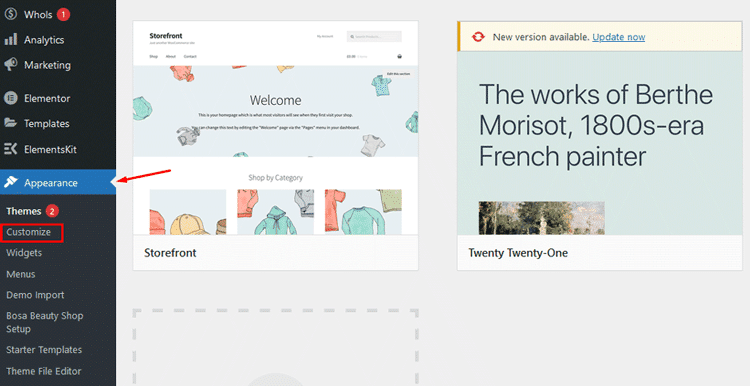
Step inside the WordPress Customizer and get a live preview of your website, plus various tabs for modifying nearly every element of it.
Then, click on the Site Identity choice. The Site Identity section allows you to customize the WordPress Site Title and Tagline. All you have to do is alter what appears in the corresponding field – it’s that easy! 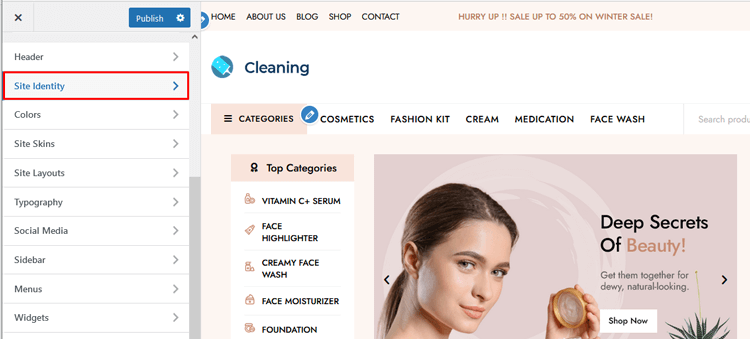
If your site theme shows the website title (and it hasn’t been replaced with a logo), you can instantly witness the transformation in the live preview.
To keep the changes applied, click on ‘Publish‘.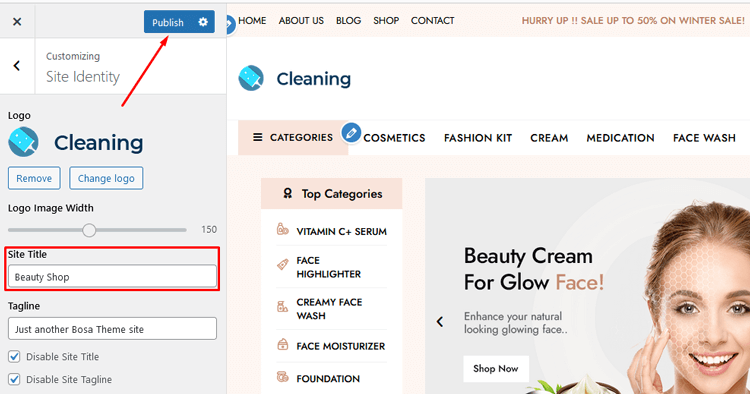
To remove the WordPress site title or customize the header, delete the text. You can do this by clearing all text in the Site Title field.
If placing your logo doesn’t work, ensure the ‘Site Title’ field is blank. This step is essential for more complex header modifications.
Change WordPress Site Title From the WordPress General Settings
Changing the site title in WordPress settings affects both the frontend and the admin dashboard areas. To change the site title on WordPress dashboard requires no coding knowledge. The General Settings page in the WordPress dashboard also gives you the option to change or erase your site titles.
To get to Site Title and Tagline settings, navigate over to Settings → General.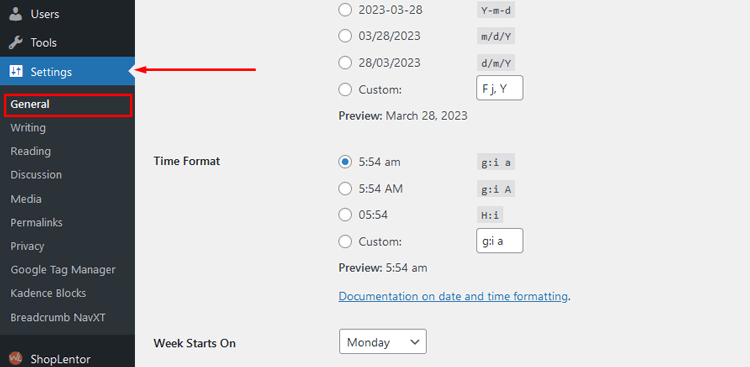
Then, you can easily customize the content in the Site Title field or remove it entirely if that’s your preference.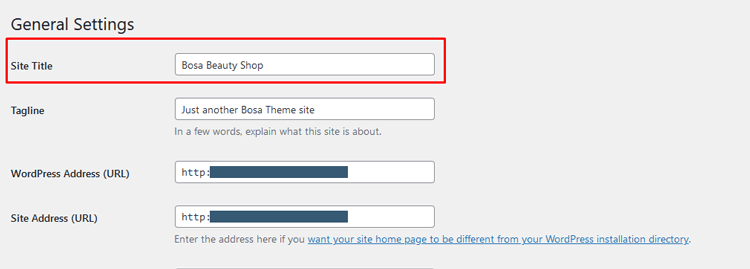
Don’t forget to scroll down and hit the “Save Changes” button! 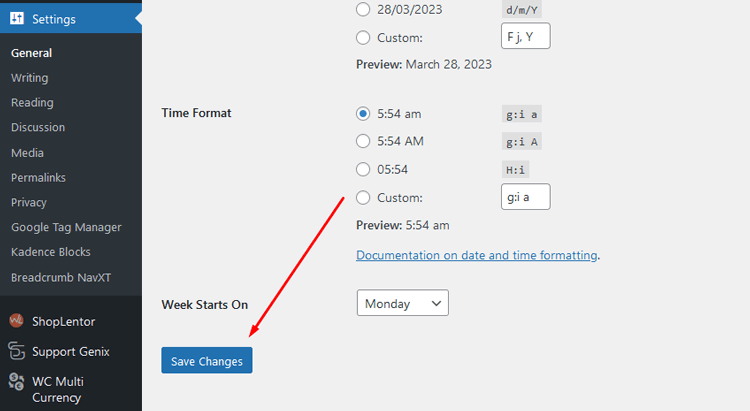
You can immediately observe the new site title on your website’s frontend header, but you may also notice it in WordPress’ backend dashboard. This is a great way to make sure that all of your changes have been made correctly.
Common Issues When Changing Your WordPress Site Title
When modifying your site title in WordPress, you might encounter a few obstacles along the way. Here are some common problems and their quick solutions to help you troubleshoot effectively:
- Title Not Updating Everywhere: Changes may not appear due to browser or plugin caching. Clear your browser cache and purge any caching plugins to see immediate updates.
- Search Engines Still Showing Old Title: Search engines take time to recognize site title changes. Submit your sitemap to Google Search Console and request a re-crawl to speed up the process.
- Theme Override Problems: Some custom themes might ignore WordPress title settings. Check your theme documentation or contact the developer if your title changes aren’t appearing.
Frequently Asked Questions
How do I change the site title in WordPress?
The easiest way to change your site title on WordPress is by heading over to the Settings → General section and customizing your site title field or even removing it if that’s what you prefer. Don’t forget to hit “Save Changes” at the bottom of the page for all the changes to take effect!
What does changing my site title do?
Changing your site title affects how your website appears in search results. It also impacts how your site is shared on social media. A catchy and descriptive title attracts more visitors to your website. Ensure that your title is both engaging and informative to stand out.
Is there a limit to how long my site title can be?
For the best results, keep your site title to 60 characters or less. This way, it won’t get cut off in search engine results and will be more inviting for potential visitors.
Can I change the site title more than once?
Yes! You can change your site title as many times as you like, just make sure you save the settings after you update the title.
Is there a way to change the site title without editing any code?
Yes! You can change your site title in WordPress manually. No coding is necessary!

Final Words
The ability to change site title in WordPress is a great way to make sure your website gets noticed.
With a few simple steps, you can have an impressive, visually appealing title that will help people find your content and bring more viewers to your page.
The process of changing the WordPress site title takes only a few minutes to complete.
Changing your site title means customizing a very important feature on your website. You can give your website a better edge by updating the title right away.
Try any of our simple methods to change the WordPress site title easily. We hope these steps helped you learn how to change site title in WordPress.