How to Get Facebook Pixel Tracking Code: Step-by-Step Guide

Are you looking for a way to get your Facebook Pixel tracking code? Worry no more! In this step-by-step guide, we will be discussing how to get Facebook Pixel Tracking Code quickly and easily.
According to BuiltWith, over 6.4 million live websites currently use Facebook Pixel, highlighting its widespread adoption for conversion tracking and advertising.
Knowing how to get your Facebook Pixel tracking code is essential for effective marketing. Let’s dive into everything you need to know about Facebook Pixel implementation and optimization!
Key Takeaways
- Understand the Purpose of Facebook Pixel
- Discover how the Facebook Pixel helps measure ad effectiveness and ROI.
- Learn how to use behavior-based data to retarget users and personalize your campaigns.
- Explore how to reach new users similar to your best customers using Pixel-generated insights.
- Follow simple steps to access, copy, and install your tracking code.
- Learn the benefits of optimizing with Real-Time Data.
What is the Purpose of a Facebook Pixel Tracking Code
The world of online advertising is constantly evolving, and Facebook has become one of the biggest players in the game.
Facebook Ads are a potent tool for businesses of all sizes. They allow companies to reach highly targeted audiences and drive conversions effectively.
However, to maximize the effectiveness of your Facebook Ads, you need to add a Facebook Pixel Tracking Code to your website.
This Facebook pixel code allows you to track the actions users take on your site after clicking through a Facebook Ad.
With this information, you can optimize your Facebook ads and improve your ROI.
The purpose of a Facebook Pixel tracking code is to collect data and track user interactions and behaviors on your website.
By embedding the tracking code in your website’s header, you enable Facebook to gather information about how users engage with your site after clicking on your Facebook ads.
The Facebook Pixel tracking code serves multiple purposes:
Conversion Tracking
The tracking code allows you to measure the effectiveness of your Facebook ads campaigns by Facebook conversion tracking.
It can track specific actions taken by users, such as making a purchase, submitting a form, or signing up for a newsletter.
This data helps you understand the ROI of your Facebook ads and optimize your campaigns accordingly.
According to Facebook Business research, advertisers who properly implemented conversion tracking saw an average 30% improvement in return on ad spend
Audience Building
With the tracking code, you can create custom audiences based on user interactions on your website.
It enables you to retarget people who have visited your site, viewed specific pages, or performed certain actions.
Custom audiences can be used to deliver personalized ads and increase the likelihood of conversions.
Optimization and Insights
The collected data from the Facebook pixel code provides insights into user behavior and preferences.
It helps you understand which ads and campaigns are driving the most engagement, conversions, and revenue.
This information allows you to refine your targeting, messaging, and overall ad strategy to maximize results.
Lookalike Audience Creation
By analyzing the data collected from the tracking code, Facebook can create lookalike audiences.
Lookalike audiences consist of people who share similar characteristics and behaviors to your existing audience.
This targeting method helps you expand your reach to new potential customers who are likely to be interested in your products or services.
Overall, the Facebook Pixel tracking code plays a crucial role in optimizing and enhancing your Facebook advertising efforts.
It empowers you to measure, target, and refine your campaigns based on real-time data, resulting in more effective and efficient marketing strategies.
🚀 Supercharge Your Facebook Advertising with Pixelavo!
Unlock the full potential of your Facebook ads. Boost conversions, increase ROI, and reach new heights with Pixelavo’s powerful features.
How to Get Facebook Pixel Tracking Code
This powerful tool can help you with Facebook conversion tracking, optimize your Facebook ads, and even retarget people who have shown an interest in your products or services.
But how to get Facebook Pixel tracking code?
Luckily, obtaining a Facebook Pixel Tracking Code is simple – it can be created through your Facebook Ads Manager account with just a few clicks.
To get your Facebook Pixel tracking code, follow these steps:
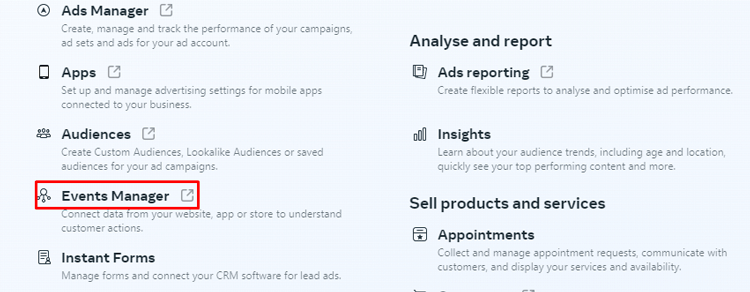
Go to your Meta Business Suite account. Then click on “All tools”
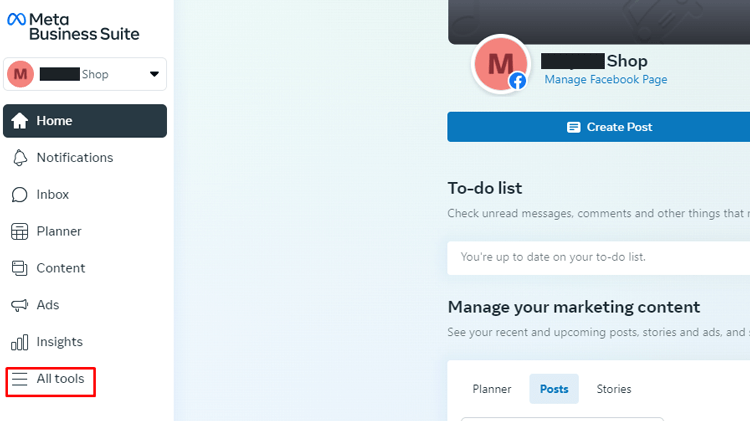
From the List of All tools, you will find “Event Manager”. Then Click on “Events Manager”
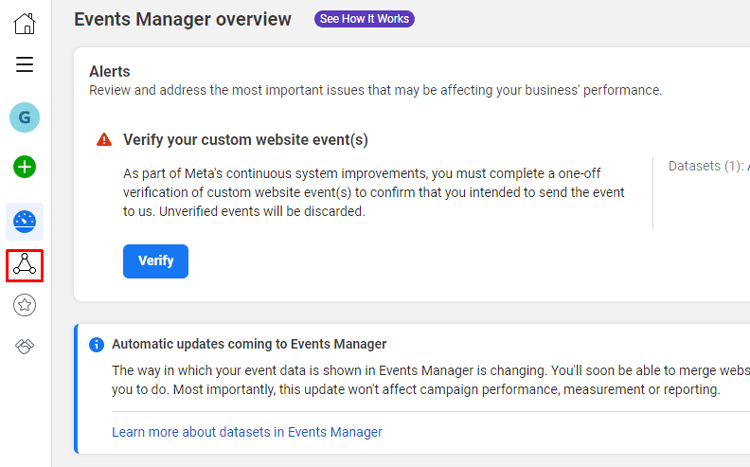
After that, Click on Data sources
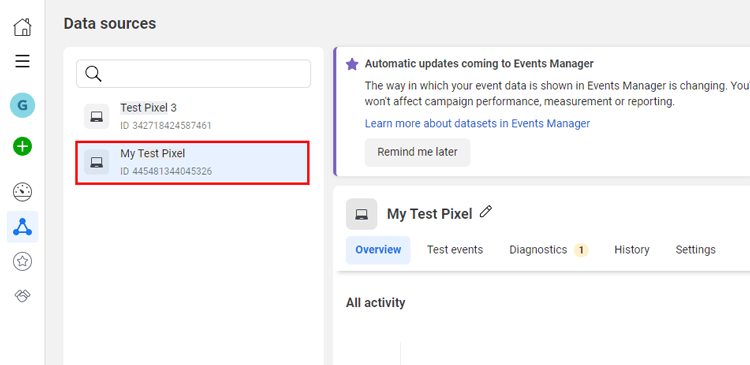
You will see a list of Pixels associated with your account. Find the Pixel for which you want to retrieve the tracking code. Click on the name or ID of your existing Pixel to view its details.
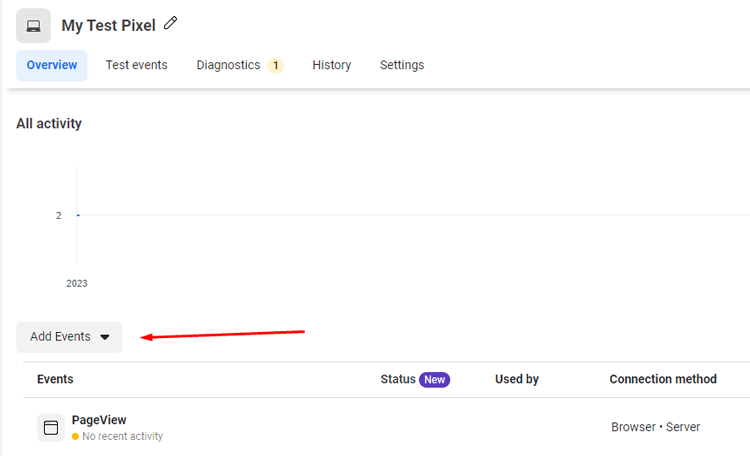
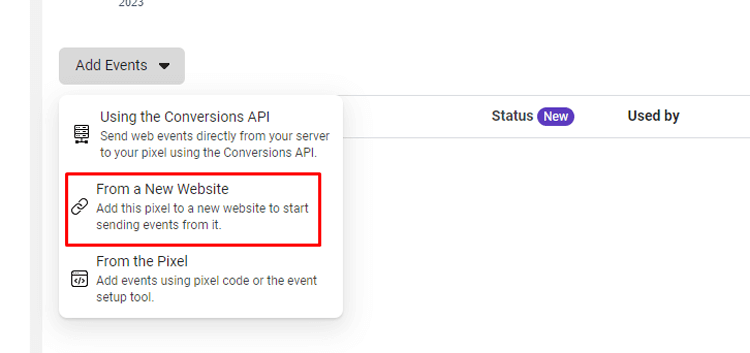
On the Pixel Overview page, you’ll find a tab called “Add Event.” Click on that
After that, Click on “From a new Website”,
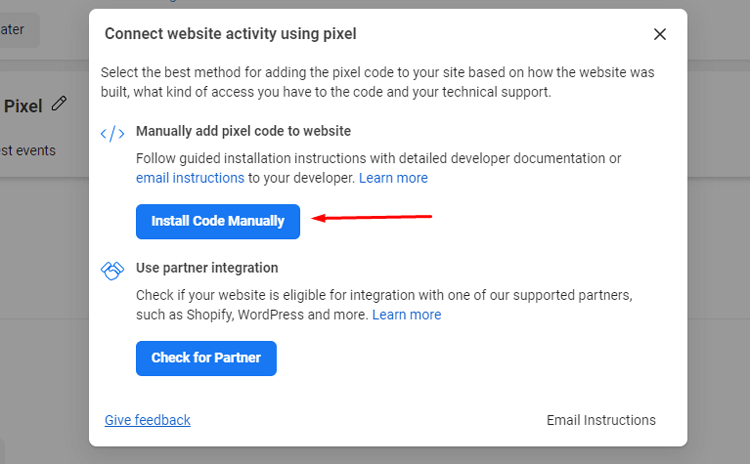
Click on “Install Code Manually”. You will get the Tracking code.
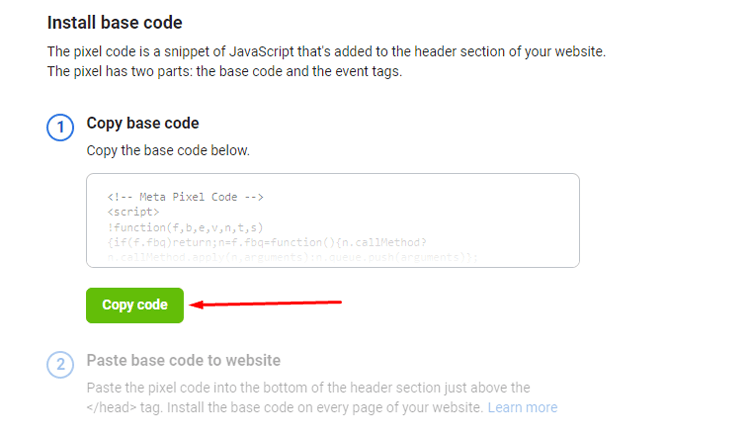
Click on “Copy Code” to Copy the entire tracking code snippet.
Recommended Blog for you:
👉 The 6 Best Facebook Pixel Plugins for WordPress
👉 How to Get an Instagram Access Token in a Few Steps
👉 How to Create Drop Down Menu in Your WordPress Site: A Complete Guideline
👉 How to Install SSL Certificate on WordPress: Keep Your WordPress Site Secure
Benefits of Using a Facebook Pixel Tracking Code
We have seen the many benefits of using the Facebook Pixel tracking code. Here are the key benefits of using the Facebook Pixel tracking code:
- Track Campaign Performance: Monitor how well your Facebook ad campaigns are performing.
- Retarget Potential Customers: Show ads to users who have previously visited your website.
- Build Custom Audiences: Create highly targeted audiences based on website behavior.
- Gain Deeper Insights: Understand who is visiting your site, how long they stay, and which content they engage with.
- Detailed Conversion Metrics: Access more comprehensive conversion tracking compared to most alternatives.
- Enable Facebook Conversion Tracking: Unlock powerful tools to track actions users take after clicking your ads.
- Improve Website Performance Measurement: Analyze user behavior to enhance site and ad performance.
- Boost Retargeting Efficiency: Re-engage users with personalized ads based on their previous interactions.
- Create Highly Effective Campaigns: Leverage audience insights to run better-targeted and more successful ads.
- Find Your Pixel Code Easily: Go to Events Manager in Meta Business Suite to locate and set up your Pixel code.
- Maximize Ad Performance: Use Pixel data to optimize targeting, bidding, and overall ad effectiveness.
- Make Data-Driven Decisions: Rely on accurate data to get better ROI from every advertising dollar.
Frequently Asked Questions
Q1: What is the Facebook Pixel code?
The Facebook Pixel tracking code is a piece of JavaScript code provided by Facebook that needs to be added to your website’s header section. It allows Facebook to track and collect data on user interactions and behavior on your website.
Q2: Where do I add the Facebook Pixel tracking code to my website?
The Facebook Pixel tracking code should be added to the header section of your website. This can be done by accessing your website’s theme files or using a plugin like Pixelavo that allows you to insert code snippets.
Q3: Can I add a Facebook Pixel tracking code to my WordPress website?
Yes, you can add a Facebook Pixel tracking code to your WordPress website. One common method is to use a dedicated Facebook Pixel plugin like Pixelavo, which simplifies the process by providing a user-friendly interface to add Facebook tracking code.
Q4: What can the Facebook Pixel track on my website?
The Facebook Pixel can track various events on your website, such as page views, purchases, add-to-cart actions, form submissions, and more. It provides valuable insights into user behavior and allows you to optimize your Facebook advertising campaigns based on this data.
Q5: Why is it essential to have the Facebook Pixel tracking code on my website?
The Facebook Pixel tracking code on your website is crucial for effective advertising. It enables you to measure the success of your campaigns. You can track conversions and build custom audiences for targeting. You can also run retargeting ads to reach people who have interacted with your website.
Final Thoughts
Adding the Facebook Pixel tracking code is one of the smartest ways to boost your ad performance.
With proper Facebook Pixel implementation, you gain powerful data for better targeting, retargeting, and ad optimization.
Understanding how to get the Facebook Pixel tracking code can be challenging.
But, it gives you access to powerful metrics that reveal exactly how users interact with your site after clicking your ads.
Now is the perfect time to start using this tool. Your competitors are likely already using Facebook Pixel tracking.
Every moment you wait, you miss out on data-driven insights that could drive sales and ROI.
So, take action today. Implement the Facebook Pixel code on your website and unlock smarter targeting, better ad spend, and more revenue for your business.