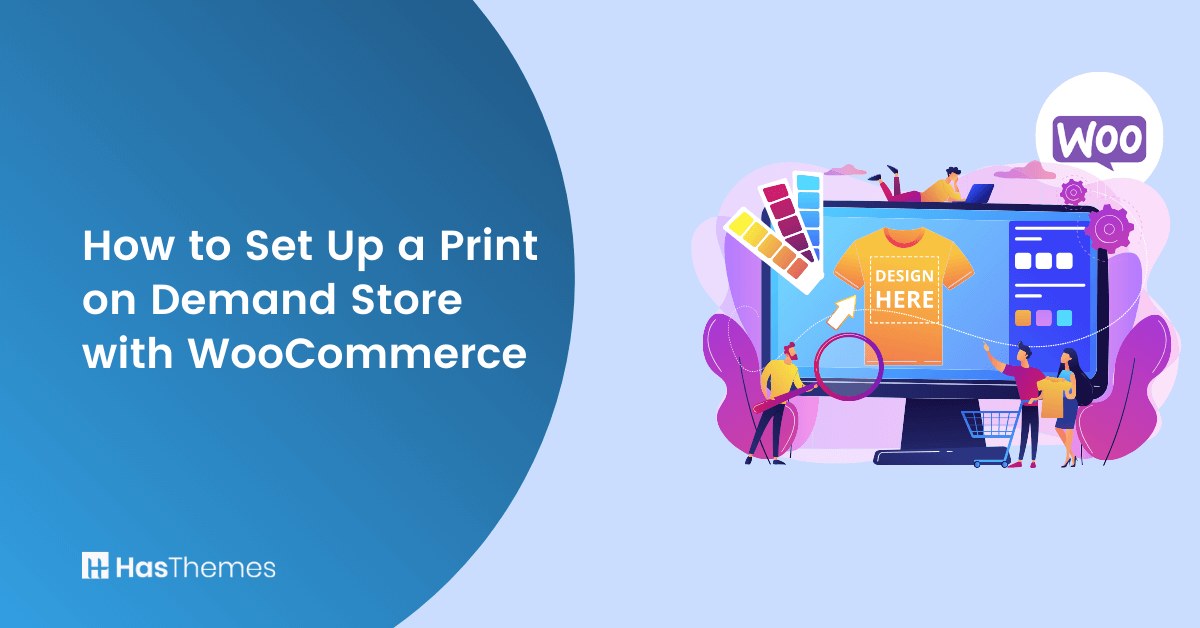
How to Set Up a Print on Demand Store with WooCommerce

There are some amazing opportunities in the world of eCommerce. The market is quickly growing. People are increasingly buying things online. They create demand for diversified products through the digital realm.
Global e-commerce sales are projected to reach $7.4 trillion in 2025. This accounts for nearly 24% of all retail worldwide. Mobile commerce alone is expected to surge to $2.51 trillion. That’s a 21% increase over 2024.
There’s never been a better time to launch an online store. The Print-on-Demand (POD) model is your low-risk ticket. You can enter this booming market easily. Imagine running a t-shirt business or selling custom products. You can test creative designs without inventory costs or manufacturing hassle.
In this article, we will discuss WooCommerce pod setup. You can create your own POD store with WordPress. We’ll use WooCommerce for this process. But first, let us explain what Print on Demand is. We’ll also tell you why it’s perfect for you!
Key Takeaways:
- Learn how to set up a WooCommerce pod store step-by-step. Integration requires a print-on-demand WordPress plugin.
- Understand the benefits of print on demand WooCommerce integration.
- Discover the best WordPress print on demand plugin options.
- Explore how the WooCommerce legacy rest api enables smooth product syncing. It connects your store with pod WooCommerce providers.
- Find out how to customize your store. Use WooCommerce print shop plugin options. Create unique customer experiences.
- Gain marketing insights to grow your WordPress on demand store effectively.
Print on Demand: Explained
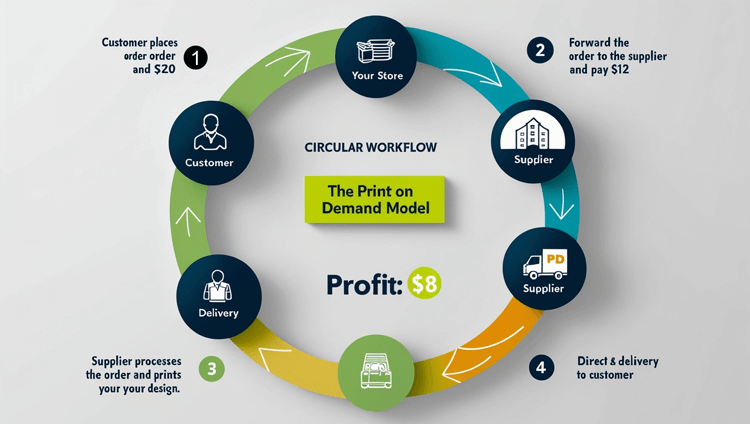
The Print on Demand (POD) WordPress business model allows budding entrepreneurs to sell custom goods online. You need minimal investments. How does it work? Items are only produced when customers make purchases in your store.
So, for example, if you’re wondering how to make money on Etsy, you can connect a good POD provider. is one excellent option. Connect it to your store and sell goods with unique designs. When customers place orders for particular items, Printify will:
- Print your designs on their white-label products and
- Ship them straight to your customer’s doorstep.
All of this happens at a small fee. You can include this fee in your price. Then pocket the rest of the profits. This enables you to provide a broad range of customized goods. You can sell t-shirts, hoodies, mugs, and more. You also eliminate the need for:
- Investing time and money in managing an inventory,
- Bothering about shipping, or
- Investing in in-house manufacturing tools.
For businesses needing advanced backend systems, the WooCommerce legacy rest api allows custom automation. It handles order and inventory management. Similarly, a web-to-print WooCommerce setup provides a seamless bridge. It connects customer design input with automated fulfillment.
If you’re seeking extra technical help, on-demand wordpress website support ensures smooth integration. It handles updates and troubleshooting too. Beyond WooCommerce, many entrepreneurs experiment with BigCommerce print-on-demand to diversify their reach.
The POD model is powerful when combined with WooCommerce print-on-demand integration. Smart integrations let you focus on design and marketing. Technology takes care of fulfillment.
Pick Your Provider
Do you understand what print-on-demand is? Now, if you want success with your POD store, it’s important to select a reliable provider. Choose one that provides:
- Top-notch quality,
- Quick manufacturing and shipping,
- Wide range of product catalogs,
- Great options to customize products,
- 24*7 support for technical needs,
- And easy integration with your store.
Printify’s catalog has over 800 white-label products of the highest quality. You can easily customize them with your designs. Use their mock-up generator for this. They even provide all the support you may need.
With Printify as your partner, clients receive items within 10 days. They get them after placing their orders. It can easily integrate with WooCommerce. This allows you to turn any website into a top-notch online store.
Create WooCommerce Store
For building an online store using the WordPress CMS, WooCommerce is perfect. It’s a free, open-source print-on-demand plugin. It makes managing the store a breeze by:
- Setting product displays,
- Processing orders,
- And supporting numerous payment methods.
Here’s a step-by-step guide on how you can set up your WooCommerce store:
Step 1: Install WordPress on your web server and Log in.
Step 2: Go to the Admin section on the left sidebar and locate the Plugins option.
Step 3: Click on “Add New” and search for “WooCommerce.” Then, install it. Then click on Activate.
Step 4: Once installed, the Setup Wizard will open up.
Step 5: Provide details about your store. Add contact details as asked.
Step 6: Choose the initial theme and layout. Follow the platform suggestions.
Your website will have a default theme applied automatically. You may modify the store’s aesthetics to suit your needs. Some familiarity with coding languages helps. The “Personalize my store” section of Setup Wizard makes uploading logos simple.
You can also customize your homepage design. Write an announcement for your store. This announcement displays directly on your web-based store. It grabs customer attention effectively.
However, if you don’t have coding skills, you can still add special features easily. These features enhance the user experience (UX) of your store. You need minimal effort for this. You may experiment with WooCommerce’s available plugins. Customize your store functionality with them. That brings us to our next section. We’ll discuss how plugins expand store performance.
Know Your Plugins
WordPress offers many advantages. Plugin availability for additional functionality is one key benefit. Hundreds of plugins are available. They enhance your business by extending WooCommerce functionality. Use plugins for:
- Manage multichannel orders,
- Product marketing,
- Checkout optimization,
- Support various payment methods, etc.
If you want to enhance your experience in setting up your WooCommerce store, Shoplentor is one such plugin that surely stands out. ShopLentor for WooCommerce is a popular WooCommerce Elementor Addons with more than a million downloads. More than 100,000 stores currently use it to enhance the capabilities of WooCommerce.
ShopLentor has useful tools. They make designing beautiful layouts simple. Create layouts for all your WooCommerce pages. Boost your store’s performance and functionality. It allows attractive storefront setup in just some clicks.
Some of ShopLentor’s great features help maximize your WooCommerce store:
- Integrate a streamlined, step-by-step, Shopify style checkout.
- Add custom fields for specific information on the checkout page.
- Make more money by upselling with the order bump feature.
- Make customers feel special with the feature to pre-order or back-order products in your store.
Shoplentor could be a great plugin for Print-on-Demand store owners. You want to boost customer experience. Provide more functionality with less maintenance. It comes with a wide variety of pre-made page layouts. It has 34 useful modules that you can choose from.
Additionally, it works well with the widely used Elementor page builder. It offers 105+ Elementor widgets. It also works with up-and-coming Gutenberg editor. Get 82+ Gutenberg blocks. These help speed up personalizing your WooCommerce shop.
Connect Your Store with Print-on-Demand Platform
You’ve created your store and picked your plugins. Now it’s time to connect your POD provider. To integrate your POD platform with WooCommerce, enable the legacy REST API. Find it in WooCommerce advanced settings on your website’s admin panel.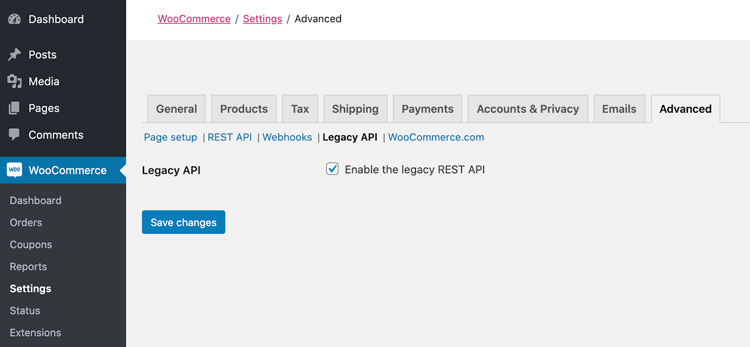
Then, change the permalink settings in the common settings. Select any option apart from plain.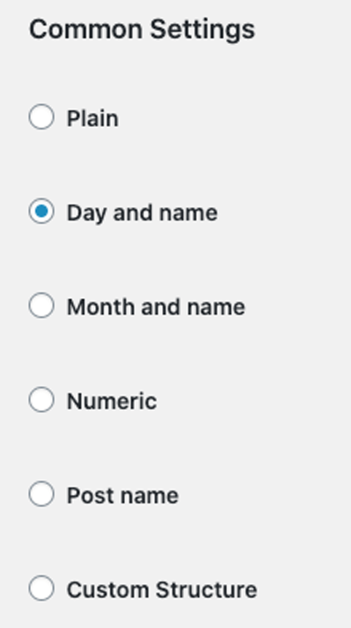
If you’ve chosen Printify as your print-on-demand WordPress provider, you’ll enjoy seamless integration. Install the Printify WordPress Plugin for WooCommerce plugin. It will update all your products, prices, and shipping rates automatically.
After taking the above steps, click Connect in Manage my store settings. Find this on your Printify page and add WooCommerce. Then add your unique WordPress URL. You’re done!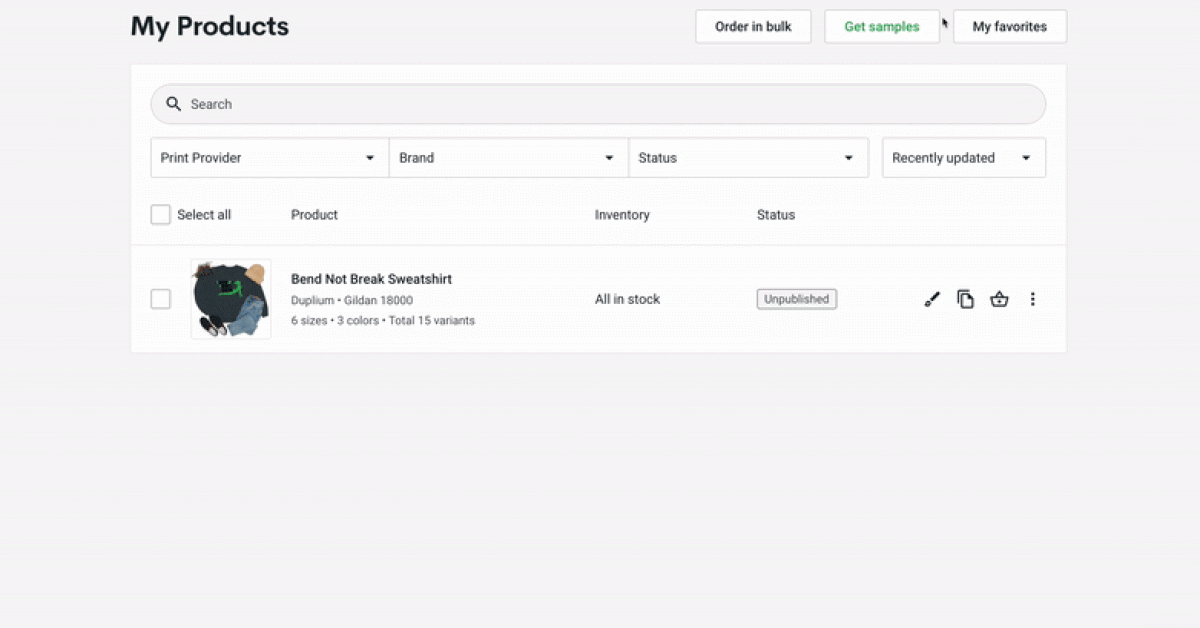
Create Your Own Products
Your provider and store are connected. The obvious next step is creating your products. Put them on display! Several ways exist to create unique designs for your products.
- You can make them on your own, using tools like:
- Canva
- Photoshop
- Illustrator
- You can hire designers using freelance platforms like:
- Behance
- Upwork
- Fiverr
- Dribble, etc.
- You can use stock images provided by websites like:
- Shutterstock
- Pixabay
- iStock
You may utilize the 3-D mockup generator with Printify. Add your designs to your products easily. It has easy-to-use text and image editor. Great Shutterstock integration too. Preview it to see how it’ll look in real life. Do this before making it available on your WooCommerce shop.
Manage Your Products and Store
It’s essential to actively monitor and optimize your items. Do this after publishing them to your WooCommerce shop. To maintain relevance and appeal to consumers, you should:
- Update product descriptions and titles with SEO in mind,
- Use attractive images from different angles,
- Set clear store policies for returns and exchanges,
- Clarify the shipping policies on your website,
- Update prices and provide discounts on a regular basis,
- Keep a check on the quality of products all the time.
The ShopLentor print on demand plugin wordpress can be great. It provides smooth and aesthetically attractive shopping experiences. You can give customers social proof of your store. Add recent sales notifications on the website. Customers know how many people made purchases at given times.
Additionally, it can also up your marketing game by customizing emails for your brand and automating them for a strong email marketing game. This brings us to the last point of our article.
Don’t Forget Advertising
Using basic digital advertising methods can help your business take off. Early days advertising helps you:
- Reach more audience
- Get more leads and traffic
- Boost your brand awareness
There are five different kinds of ads you can use for your store. These are:
- Pay-per-click ads with Google that let you bid for a keyword and show up on top of other results.
- Retargeted ads that target people who’ve visited your store without buying anything.
Using paid ads as a part of a marketing strategy can be very helpful in driving traffic and boosting revenue. With strong SEO practices, content marketing, and social media presence, advertising can help build a huge customer base for your products.
Frequently Asked Questions
What is the best way to start a print-on-demand WordPress store?
The best way is to use WooCommerce POD with a reliable print-on-demand WordPress plugin, such as Printify. This allows seamless WooCommerce print-on-demand integration. It helps you launch your store quickly without upfront costs.
Which is the best print-on-demand plugin for WooCommerce?
Popular choices include the Printify wordpress plugin, BigCommerce print on demand, and WooCommerce print shop plugin options. Printify is highly recommended for easy WooCommerce print-on-demand integration. It offers a wide product catalog.
Can I connect Printify with WooCommerce directly?
Yes, you can connect Printify with WooCommerce using the official Printify wordpress plugin. Once integrated, it automatically syncs products, prices, and shipping details. This happens through the WooCommerce legacy rest api.
Do I need coding skills to run a wordpress print-on-demand store?
No, you don’t! A print-on-demand plugin wordpress setup is simple. Tools like WooCommerce web-to-print or on-demand WordPress website support make managing your shop easy. No coding needed.
What kind of products can I sell with WooCommerce Pod?
With WooCommerce print on demand and POD WooCommerce, you can sell a wide range of products. Include t-shirts, mugs, hoodies, posters, tote bags, and more. Providers like Printify offer over 800 customizable products.
How long does shipping take with woocommerce print on demand integration?
Shipping depends on your POD provider. With Printify wordpress plugin, most orders are produced and shipped within 7-10 days. This ensures smooth wordpress on demand customer experience.
Conclusion
Using WooCommerce to launch a print-on-demand wordpress business is simple and inexpensive. It’s an effective method to enter the eCommerce world. Make use of ShopLentor’s extensive toolset. Develop a storefront that is uniquely yours.
Your shop will have great potential in the online retail industry. Partner with the right print-on-demand wordpress provider. Employ effective marketing strategies.
Make use of print-on-demand WooCommerce integration options. Commercialize your unique and creative ideas.
Use this guide and set up your WooCommerce pod store today!