Why Your WooCommerce Subscription Payments Fail: Identify the Cause Before Applying the Fix

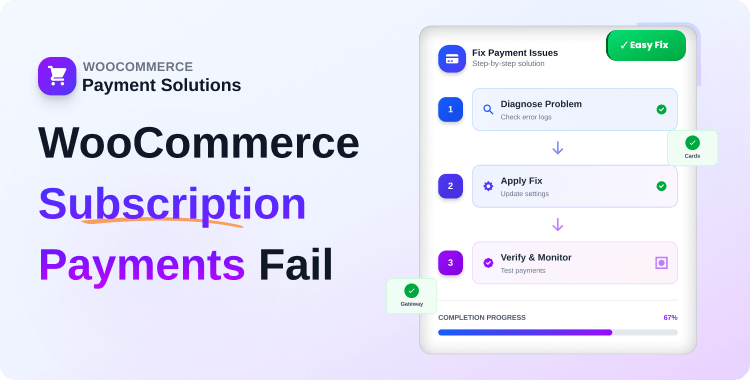
Quick Answer: Wondering why WooCommerce subscription payments fail?
They usually fail for 6 main reasons: expired cards (30–40%), insufficient
funds (26–30%), gateway misconfiguration, webhook failures, Action Scheduler
errors, and 3D Secure issues. The fix depends entirely on which type you’re
dealing with: a declined card needs retry logic and dunning emails, while a
broken webhook needs a configuration check. This guide helps you diagnose
which failure type you have.
Imagine checking your WooCommerce dashboard to discover thousands in recurring revenue silently disappearing. This is the reality when WooCommerce subscription payments fail, customers who wanted to stay are being forced out by technical barriers.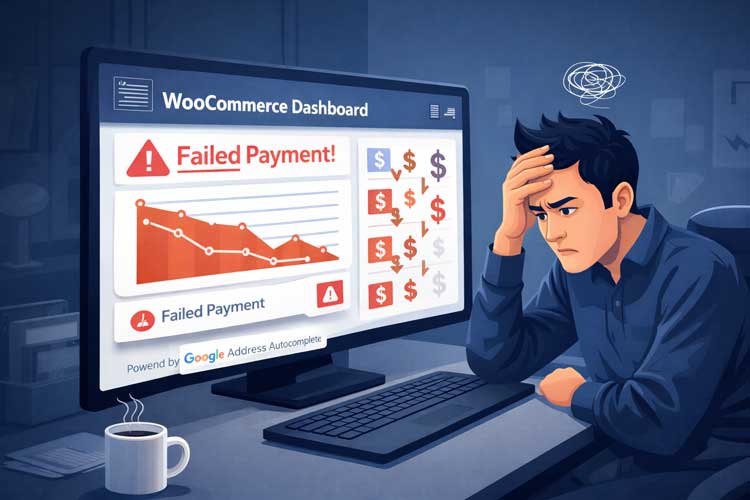
Payment failures are expected to cost subscription businesses $129 billion in lost revenue in 2025. The alarming reality: 50% of all subscription churn occurs due to failed card payments, and 80% of these failures are unrelated to customer action.
When WooCommerce subscription payments fail during renewal cycles, it’s not just a one-time lost transaction. These are recurring revenue opportunities disappearing silently.
Unlike voluntary cancellations, failed renewals are recoverable revenue. The difference between a business that recovers lost payments and one that doesn’t is often $10,000-$50,000 monthly in retained recurring revenue.
This guide identifies exactly why WooCommerce subscription payments fail and helps you diagnose which failure type you’re dealing with because the fix for a declined card is completely different from a broken webhook, and applying the wrong fix wastes hours. Once you know your failure type, you’ll know exactly which guide to follow next.
Key Takeaways
- Payment failures account for 50% of subscription churn, yet 80% are preventable with the right strategy
- 7.9% of transactions fail on the first attempt, costing subscription businesses $129 billion annually
- Expired cards and insufficient funds comprise 56-66% of all failures
- Smart retry strategies recover 45-70% of failed payments, directly boosting retained revenue
- – Each failure type has a different fix, diagnosing the cause correctly is the first step to recovery
Understanding WooCommerce Subscription Payment Fail
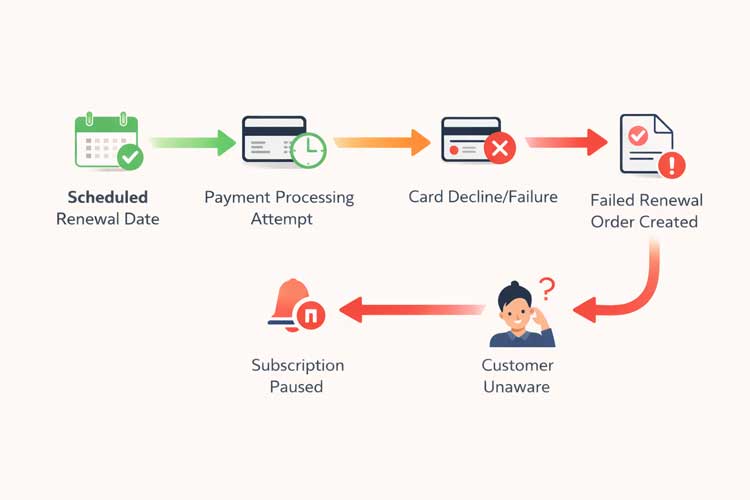
Subscription failures differ fundamentally from checkout failures. When a renewal is scheduled, WooCommerce automatically attempts payment through your configured gateway using the stored payment method. If this fails due to an expired card, a fraud flag, or a gateway error, the system creates a failed renewal order and pauses the subscription.
Two Types of WooCommerce Subscription Failure
Before troubleshooting, identify which category your failure falls into:Failure Type Sign What Happened Guide to Follow Payment-level failure Renewal order was created, status = Failed/Pending WooCommerce tried to charge but bank/gateway declined WooCommerce Subscription Renewal Failed Fix → Technical failure Renewal order was never created Cron, webhook, Action Scheduler, or token issue Complete Troubleshooting Checklist →
How to check: Go to WooCommerce → Orders. If a failed renewal order exists for the subscription date → payment-level failure. If no order exists → technical failure.
The Six Critical Causes of WooCommerce Subscription Payment Failures
1. Expired or Reissued Payment Cards
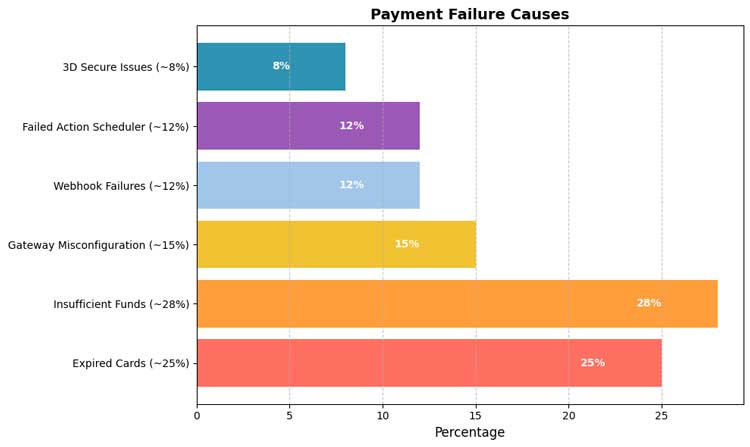
The most common failure cause is when WooCommerce subscription payments fail. Visa cards average 21 months before expiration; MasterCard averages 14 months. Loyal, long-term subscribers often forget to update their information when receiving replacement cards.
How to identify it: Check the decline code in your gateway dashboard, look for “expired_card” or “card_expired.”
Fix guide: → WooCommerce Subscription Renewal Failed Fix
2. Insufficient Funds and Bank Declines
26-30% of subscription payment failures stem from insufficient funds. This is the second most common reason WooCommerce subscription payments fail.
Banks may also decline transactions due to:
- Fraud detection flagging recurring charges
- Spending limit thresholds are being exceeded
- Unusual geographic activity
How to identify it: Decline code shows “insufficient_funds” or “do_not_honor.” This is a soft decline — recoverable with smart retry timing.
Fix guide: → WooCommerce Subscription Dunning Guide
3. Payment Gateway Misconfiguration
One of the most dangerous causes of WooCommerce subscription payments fail errors is merchant-side configuration mistakes:
- Using test API keys in live environments
- Expired or revoked credentials
- Disabled webhooks
- Incorrect sandbox/live mode settings
These errors often affect all customers simultaneously, yet store owners may not immediately realize WooCommerce subscription payments fail for this reason.
Diagnostic check: Go to WooCommerce → Status → System Status and verify your payment gateway shows active, live-mode credentials.
Fix guide: → Complete WooCommerce Subscription Troubleshooting Checklist
4. Webhook Failures
Subscription gateways rely on webhooks to confirm payment success. If webhooks are disabled or misconfigured, payment confirmations never reach your store—the customer is charged, but your WooCommerce database shows the payment as failed.
Fix: Log into your payment gateway dashboard, navigate to Webhooks/API Credentials, and confirm recent webhook delivery logs show HTTP 200 status codes.
Fix guide: → Complete WooCommerce Subscription Troubleshooting Checklist
5. Failed Action Scheduler Tasks
WooCommerce uses Action Scheduler for background subscription renewal tasks. If scheduled actions fail—due to server constraints or resource limits—renewals never trigger.
Diagnosis: Go to WooCommerce → Status → Scheduled Actions. Look for subscription actions with “Failed” status. A large backlog indicates a performance issue.
Fix guide: → Complete WooCommerce Subscription Troubleshooting Checklist
6. 3D Secure Authentication Issues
Modern payment regulations (PSD2, SCA) mandate additional customer verification for recurring transactions. If your subscription workflow doesn’t properly handle 3D Secure, payments decline silently.
Solution: Ensure your payment gateway handles 3D Secure authentication for recurring charges before processing.
Fix guide: → Complete WooCommerce Subscription Troubleshooting Checklist
Recommended Blogs for you:
👉 Your payment was declined and you want to recover the subscription → WooCommerce Subscription Renewal Failed Fix →
👉 The renewal order wasn’t created at all → Complete Troubleshooting Checklist →
👉 You want to build a fully automated dunning system → WooCommerce Subscription Dunning Guide →
What to Do After You’ve Identified the Failure Type
Now that you know which of the 6 failure causes applies to your store, here is where to go next:
If the failure is a payment decline (card expired, insufficient funds, soft decline)
The renewal order was created, but payment was rejected. You need automated retry logic, dunning emails, and a self-service payment portal.
→ Step-by-step fix: WooCommerce Subscription Renewal Failed Fix
If the failure is technical (gateway misconfiguration, webhook, Action Scheduler, 3D Secure)
The renewal never ran, or a configuration issue is affecting all customers. You need to verify API keys, webhooks, and scheduled actions.
→ Step-by-step fix: Complete WooCommerce Subscription Troubleshooting Checklist
If you want to build a fully automated recovery system
Once the immediate issue is fixed, set up proactive pre-dunning, smart retry scheduling, and multi-email sequences that recover payments automatically.
→ Full strategy guide: WooCommerce Subscription Dunning: Recover Revenue Automatically
Advanced Strategies: Minimize Future Payment Failures
Optimize Retry Timing by Failure Type
| Failure Type | First Retry | Follow-up |
| Insufficient Funds | 3-5 days | 7-10 days |
| Fraud/Decline | 1-2 days | 3-5 days |
| Expired Card | After notification | N/A |
| Gateway Error | 2-4 hours | 24-48 hours |
Segment Customers by Payment Risk
High-risk indicators:
- Subscription duration > 18 months (card expiration likely)
- Historical payment failures
- International customers (higher decline rates)
Apply targeted recovery strategies: additional verification, alternative payment methods, or enhanced communication.
Meet Recurio: Purpose-Built for Payment Reliability
Once you’ve identified your failure type, the next challenge is setting up a system that prevents and recovers failures automatically — without manual intervention every billing cycle.
Recurio is a WooCommerce subscription plugin built specifically for this.
Smart Retry Logic
Recurio supports configurable 2–5 retry attempts with custom intervals that match your customers’ payment patterns. Unlike WooCommerce Subscriptions’ basic defaults, Recurio lets you set different retry timing based on failure type — for example, retrying insufficient funds failures 3–5 days later (near payday) instead of the next day.
Recovery rate comparison:
- Basic/no retry logic: 18–30% of failed payments recovered
- Recurio optimized retries: 45–70% of failed payments recovered
Real-Time Analytics Dashboard
Recurio’s analytics dashboard shows exactly where in the payment lifecycle failures are occurring — by gateway, product, and customer segment. This is directly useful for diagnosis: if failures spike on one gateway but not another, or for international customers only, the dashboard surfaces it immediately.
Key metrics visible:
- Payment failure rates by gateway and product
- Subscription health metrics (churn rate, renewal success rate)
- Churn prediction — identifies at-risk subscribers before they fail
For the complete Recurio feature breakdown including dunning email sequences, customer self-service portal, and plan comparison: 👉 WooCommerce Subscription Renewal Failed Fix →
Frequently Asked Questions
Q: What’s the first step if I discover failed subscription payments?
In order:
1. Verify payment gateway configuration (API keys are live, not test)
2. Check webhook status (most commonly overlooked reason WooCommerce subscription payments fail)
3. Review failed orders for error messages
4. Contact affected customers requesting payment method updates
5. Manually process renewals for customers who’ve updated cards
How much revenue am I losing when WooCommerce subscription payments fail?
Calculate: (Active subscriptions × Monthly value) × 9% average failure rate
Example: 500 subscriptions × $20 × 9% = $900 monthly at risk. However, true cost is higher—each churned customer represents 12-month lost lifetime value.
How do I know if my WooCommerce subscription failure is a payment issue or a technical issue?
Go to WooCommerce → Orders and filter by the subscription’s renewal date. If a failed order exists for that date, it is a payment-level failure — WooCommerce attempted the charge but the bank or gateway declined it. Use the WooCommerce Subscription Renewal Failed Fix guide.
How do I prevent WooCommerce subscription payments from failing for international customers
This is a complex issue because some countries have legitimate higher fraud rates, while others face overly aggressive fraud detection. Strategies include:
1. Offer alternative payment methods (ACH, bank transfers, local methods).
2. Use 3D Secure selectively (only for flagged high-risk transactions)
3. Allow 5-7 retry attempts before suspension
Communicate 48 hours before renewal
4. Use multi-gateway routing to attempt alternate processors
What is the most common reason WooCommerce subscription payments fail?
Expired or replaced credit cards account for 30–40% of all subscription payment failures, followed by insufficient funds (26–30%). Together these two causes make up over half of all WooCommerce subscription payment failures — and both are recoverable with smart retry logic and dunning emails, not configuration fixes.
Conclusion
WooCommerce subscription payment failures are not a single problem with a single fix. The right solution depends entirely on the failure type, a declined card and a broken webhook require completely different responses.
Start with diagnosis:
- Check if a renewal order was created — this single step tells you whether you have a payment failure or a technical failure.
- Identify the failure cause — use the 6 causes above to narrow down the root issue.
- Follow the right guide:
- Payment declined → Renewal Failed Fix →
- Technical issue → Troubleshooting Checklist →
- Full automation → Dunning Guide →
Customers recovered from involuntary churn this month generate 12+ months of additional revenue. Invest in understanding the cause first, then apply the right fix.