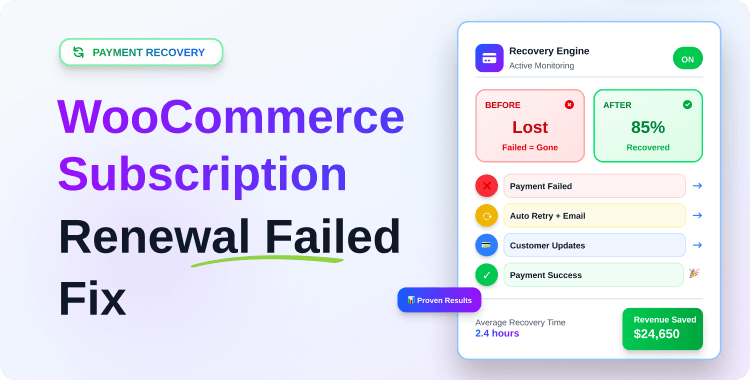
WooCommerce Subscription Renewal Failed Fix: How to Automatically Recover Payments

Quick Answer: If your WooCommerce subscription renewal has failed, the fastest fix is to enable automated payment retries (3–5 attempts over 7–14 days), set up dunning email sequences, and give customers a one-click self-service portal to update their payment method. Together, these three steps recover 55–70% of failed payments automatically — without manual intervention.
Every month, a percentage of your “loyal” subscribers are lost not because they chose to cancel, but because their renewal payment quietly failed, and nothing intelligent happened after that.
Industry reports show that payment failures and involuntary churn can account for up to 40% of lost subscribers and large annual revenue leakage.
In B2C subscription ecommerce, failed payment rates of 12–25% are common in some verticals, and advanced recovery setups have pushed recovery rates as high as 68–80%.
If you’re seeing “WooCommerce subscription renewal failed” in your orders, this isn’t just a technical annoyance it’s a recurring revenue leak that compounds every billing cycle.
This article explains what that error really means, why renewals fail, how much you’re likely losing, and a step‑by‑step WooCommerce subscription renewal failed fix using automated retries, dunning emails, self‑service payment updates, and a dedicated plugin like Recurio.
Table of Contents
Key Takeaways
- Why WooCommerce subscription renewals fail silently
- How failed payments directly increase churn
- Fastest way to fix failed renewals automatically
- How payment recovery reduces churn by 30–40%
- Tools that work, not manual workarounds
- How this fix differs from technical troubleshooting (cron/webhook issues)
What Does “WooCommerce Subscription Renewal Failed” Mean?
When you see a “WooCommerce subscription renewal failed” status, it means WooCommerce attempted to charge the customer for a scheduled renewal, but the payment gateway did not complete the transaction. The renewal order is usually created, but the order stays in pending payment or fails, and the subscription is put on hold or left active without revenue, depending on your configuration.
Common real‑world scenarios include:
- The customer’s card expired or was replaced.
- The bank declined the charge for insufficient funds or suspicion of fraud.
- The payment token is missing or invalid, so the gateway can’t charge automatically.
- The renewal or retry never ran because scheduled actions or cron jobs failed.
Store owners often don’t notice immediately because failed renewals get buried in order lists, email alerts are misconfigured, or the dashboard doesn’t highlight unpaid but active subscriptions. That’s how you end up with “active” subscribers who haven’t actually paid for months.
💡 Important: This guide covers payment-level failures where WooCommerce attempted
the renewal but the bank or gateway declined it.If your renewal orders are not being created at all (cron broken, webhook errors,
payment token missing), that is a technical infrastructure problem.👉 For technical issues, see: WooCommerce Subscription Troubleshooting.
Why WooCommerce Subscription Renewals Fail (Root Causes)
Expired or Replaced Credit Cards
Cards expire, get replaced after loss, or are reissued when banks change BIN ranges. If the customer never updates their payment method, the renewal will almost always fail with “card expired” or similar decline codes. Subscription businesses see a high volume of these “involuntary churn” events as cards naturally cycle.
Insufficient Funds
For low‑ticket B2C subscriptions, especially, it’s common for customers’ accounts to briefly dip below the renewal amount. Gateways respond with insufficient funds or similar soft declines, which are actually recoverable if you retry at smarter intervals (e.g., next payday).
Bank or Gateway Soft Declines
Not every decline is permanent. You’ll see soft declines like “do not honor,” “temporary issue,” “processing error,” or 3D Secure not completed that could succeed if retried later or with updated authentication. Without a structured retry system, these become permanent churn.
Poor Retry Logic
Out of the box, WooCommerce Subscriptions has a basic retry system, but many stores run with defaults or no retries at all. A handful of evenly spaced retries (e.g., 12–72 hours apart) without regard for customer pay cycles or segmented behavior often leaves money on the table.
Industry benchmarks show optimized retry strategies can recover 45–70% of initially failed payments, while basic or no retries recover far less. How you structure those retries and what email to send at each stage is the core of a dunning strategy.
For a complete breakdown of retry timing by failure type, see: WooCommerce Subscription Dunning Guide →
No Customer Notification
If a payment fails and your customer gets no clear email, they often don’t know anything went wrong. Maybe they changed cards, or their bank blocked the charge, but they won’t fix it if you don’t tell them promptly and clearly with a direct “update payment” link.
Lack of Dunning Automation
“Dunning” is the process of communicating with customers after failed payments to recover the revenue. Without automated dunning—emails, reminders, retries—most stores end up with either:
- Manual chasing via support (doesn’t scale), or
- Silent cancellations, where subscriptions are just turned off.
Dunning is a complete system of its own — combining retry logic, email sequences, and customer self-service.
This guide covers the practical fix steps. For a deep dive into building a full dunning strategy, read: WooCommerce Subscription Dunning: Recover Revenue from Failed Payments →
The Real Cost of Failed Renewals (Lost Revenue & Churn)
Failed renewals aren’t just one‑off losses; they compound across your subscriber base. Research shows involuntary churn from failed payments can easily represent 20–40% of total churn.
Revenue Leakage Explained
Every failed renewal that you don’t recover is:
- Lost current month revenue.
- Lost future months of recurring revenue if the subscriber churns completely.
- Lower LTV (lifetime value) and MRR (monthly recurring revenue) over time.
Simple Example Calculation
Imagine:
- 1,000 active subscribers.
- Average subscription: $30/month.
- 8% of renewals fail each month due to payment issues (80 subscribers).
If you recover only 20% of those failures, you permanently lose revenue from 64 subscribers:
- Immediate monthly loss: 64 × $30 = $1,920/month.
- If the average subscriber would have stayed another 6 months, that’s $11,520 in quiet, preventable revenue loss from just one month’s cohort.
Now imagine this happening every month. It’s obvious why solving WooCommerce subscription renewal failed scenarios with automation is one of the highest‑ROI projects you can tackle.
Revenue Recovery Potential at a Glance
| Store Size | Monthly Subscribers | Failure Rate | Lost/Month (No Recovery) | Recovered (70% fix) |
|---|---|---|---|---|
| Small | 200 | 8% | $480 | $336 saved |
| Medium | 1,000 | 10% | $3,000 | $2,100 saved |
| Large | 5,000 | 12% | $18,000 | $12,600 saved |
Assumes $30/month average subscription value
WooCommerce Subscription Renewal Failed Fix (Step-by-Step)
This is the core WooCommerce subscription renewal failed fix section. The goal: replace one‑off firefighting with an automated recovery system.
1. Implement Automated Retry Logic
If you use WooCommerce Subscriptions, enable and configure the built‑in Failed Payment Retry System. It can automatically:
- Queue a retry after a failure (e.g., 12, 24, 48, 72 hours later).
- Keep the renewal order in pending payment while retries run.
- Keep the subscription on hold instead of canceling it immediately.
A more advanced solution like Recurio gives you intelligent retry logic with:
- Configurable 2–5 retry attempts.
- Custom intervals (e.g., 1, 3, 5, 7 days) that match your audience’s pay cycles.
- Recovery analytics so you can see which retries work best.
👉 Retry timing strategy by failure type (insufficient funds, expired card, 3D Secure) — WooCommerce Subscription Dunning Guide
2. Use Smart Dunning Emails
Retries without communication feel like “ghost charges.” Every failed renewal should trigger clear, timely emails that:
- Explain the failure in simple terms (card expired, insufficient funds, etc.).
- Provide a one-click link to update the payment method.
- Set expectations about retries and potential service interruption.
Core WooCommerce emails cover some of this, but they’re often generic. A plugin like Recurio adds:
- Automated payment failure notifications.
- Recovery email sequences that nudge customers before and after retries.
- Up to 7 advanced email campaigns in Pro aimed at increasing LTV and reducing churn.
Recommended Post-Failure Email Sequence
| “We couldn’t process your payment — here’s what to do.” | When to Send | Subject Line (Example) | Goal |
|---|---|---|---|
| Email 1 | Immediately after failure | “We couldn’t process your payment — here’s what to do” | Inform + prompt action |
| Email 2 | 3 days after failure (before retry 2) | “We’re trying again on [DATE] — update your card now” | Reduce friction before retry |
| Email 3 | After retry 2 fails | “Your subscription is at risk — 1 step to fix it” | Urgency |
| Email 4 | Day 14 (final notice) | “Last chance: your subscription will cancel on [DATE]” | Final recovery attempt |
3. Offer a Customer Self‑Update Payment Portal
If fixing a failed renewal requires opening a ticket, you’ll lose many customers. The fix needs to be self‑service.
Make sure customers can:
- Log into My Account.
- See their active subscriptions clearly.
- Click “Update payment method” or similar.
- Save a new card, which will be used on the next retry or renewal.
Recurio includes a full customer portal integrated into WooCommerce My Account, where subscribers can update payment methods, see billing history, and manage their subscriptions without contacting support.
Self-service portal must-haves for failed renewal recovery:
- One-click “Update payment method” button visible on My Account
- Shows which subscription failed and why (in plain language)
- Allows saving a new card immediately
- Shows the next retry date so the customer knows when to act
- Accessible on mobile without zoom or scroll issues
4. Configure Grace Periods vs. Instant Cancellation
Instantly cancelling a subscription after the first failed renewal is almost always too aggressive. Instead:
- Put the subscription on hold after failure.
- Allow a grace period during which retries and dunning emails run.
- Only cancel if all retries fail and the customer doesn’t update their card.
With Recurio, you can:
- Keep access active or limited during the recovery window.
- Use analytics to decide optimal grace periods and retry windows based on your actual recovery rates.
Grace Period Configuration: What to Set
| Subscription Value | Recommended Grace Period | Retry Attempts | Cancel After |
|---|---|---|---|
| Low-ticket (< $15/mo) | 7–10 days | 2–3 attempts | Day 10 |
| Mid-ticket ($15–$50/mo) | 14 days | 3–4 attempts | Day 14 |
| High-ticket (> $50/mo) | 21–28 days | 4–5 attempts | Day 28 |
5. Use a Dedicated Subscription Plugin (e.g. Recurio)
You can patch together pieces with default tools, but a dedicated subscription plugin brings everything into a single system.
A tool like Recurio provides:
Recurio’s comprehensive solution includes:
- Automated billing and payment retries with configurable 2–5 attempts and custom intervals (e.g., 1, 3, 5, 7 days) that match your customers’ pay cycles and maximize recovery chances.
- Intelligent dunning management with multiple recovery emails automatically triggered at each failed payment stage, with customizable messaging and timing to encourage customers to update payment methods.
- Customer self-service portal integrated into My Account, where customers can instantly update expired cards, see billing history, manage their subscriptions, and fix issues without contacting support, dramatically reducing support burden.
- Real-time analytics dashboard showing failed renewals, payment recovery rates, churn metrics, MRR trends, and revenue impact at a glance, so you can optimize your recovery strategy based on actual data.
- 8 automated email notifications (plus 7 advanced campaigns in Pro) for renewals, failures, successful recoveries, status changes, and dunning sequences that keep customers informed and motivated to fix their payment issues.
Why Recurio stands out for the WooCommerce subscription renewal failed fix:
Without automation (default WooCommerce): Failed renewal → Order marked failed → Subscription on-hold → Manual customer outreach (if any) → Hope they notice → Silent churn
With Recurio automation:
Failed renewal → Automatic retry in 3 days → Email 1: “Payment failed, here’s why” → Automatic retry in 5 days → Email 2: “We’re trying again, update your card” → If recovered: Confirmation email → If all retries fail: Final dunning email → Analytics show exactly how many recovered and how much revenue was saved
Instead of manually chasing failures, you set up your rules once and let the system handle the bulk of WooCommerce subscription renewal failed fixes in the background. The difference is thousands of dollars per month in recovered revenue
Deep-dive guides related to this fix:
👉 Understand why your specific failure type is happening: Why Your WooCommerce Subscription Payments Are Failing →
👉 Build a complete dunning strategy with email sequences: WooCommerce Subscription Dunning Guide →
👉 Fix technical issues (cron, webhook, token problems): Complete Troubleshooting Checklist →
How Automated Payment Recovery Reduces Subscription Churn
When you set up a solid recovery system, two things happen: fewer customers churn, and the ones you recover often stay for many more billing cycles.
Pre‑Dunning vs. Post‑Failure Recovery
- Pre‑dunning: Remind customers before renewal if their card is about to expire or if you detect potential issues (e.g., upcoming trial end, billing changes).
- Post‑failure dunning: After a failed attempt, your retry + email sequence does the heavy lifting.
Combining both can significantly lower involuntary churn:
- Benchmarks show optimized retry and dunning flows recover 45–70% of failed payments.
- Some case studies report up to 40% overall churn reduction after implementing better payment recovery flows.
Why Automation Beats Manual Chasing
Manual handling of failed renewals is:
- Slow – often delayed until someone checks reports.
- Inconsistent – depends on who’s working and how busy they are.
- Error‑prone – customers get missed, and follow‑ups are forgotten.
Automation ensures:
- Every failure gets a retry schedule.
- Every affected customer gets emails with clear actions.
- You have metrics to measure what’s working and where to improve.
Plugins like Recurio make this accessible to WooCommerce store owners without building a custom billing system from scratch.
What Good Recovery Looks Like in Numbers
After implementing automated retry + dunning emails + self-service portal together:Metric Before Automation After Automation Failed payment recovery rate 15–20% (manual) 55–70% (automated) Avg. time to recovery 7–14 days 2–5 days Support tickets per 100 failures 35–50 tickets 8–12 tickets Involuntary churn rate 4–6%/month 1.5–2.5%/month Annual revenue saved (1,000 subs @ $30) ~$720 ~$2,520–$3,600
Common Mistakes Store Owners Make
Relying on Default WooCommerce Behavior
Out‑of‑the‑box WooCommerce + gateway may only attempt a single charge and mark the renewal as failed, with no structured retries or dunning. Assuming “WooCommerce will take care of it” is the fastest way to accumulate invisible churn.
Not Notifying Customers Properly
If your failed payment emails are disabled, misconfigured, or land in spam, customers won’t know they need to take action. They think everything is fine until access disappears, and many never come back.
Canceling Subscriptions Too Early
Cancelling as soon as a renewal fails turns a temporary billing issue into permanent churn. You should instead:
- Put the subscription on hold.
- Run retries and dunning.
- Only cancel as a last step after clear communication.
No Visibility into Failed Renewals
If you don’t have a dashboard showing:
- How many renewals failed?
- How many were recovered?
- How much revenue was saved?
..you’re essentially guessing. Recurio’s analytics dashboard shows real‑time metrics on failed payments, recovery, churn, and MRR, so you can treat WooCommerce subscription renewal failure as a measurable process, not a mystery.
Confusing Payment Failures with Technical Renewal Errors
Store owners often spend hours debugging WP-Cron or webhooks when the real problem is simply a declined card or vice versa. Before applying any fix, confirm whether:
- The renewal order was created (if yes → payment-level failure, use THIS guide)
- The renewal order was never created (if yes → technical failure, use the Troubleshooting Checklist)
👉 Technical issues: Complete WooCommerce Subscription Troubleshooting Checklist →
ShopLentor- WooCommerce Builder for Elementor & Gutenberg
A versatile page builder to build modern and excellent online stores with more than 100k+ Active Installations.
Frequently Asked Questions
Why does WooCommerce subscription renewal fail?
WooCommerce subscription renewals usually fail because of expired or replaced cards, insufficient funds, gateway declines, missing payment tokens, or cron and scheduled action issues that prevent the renewal payment from being processed correctly.
How do I fix failed subscription payments in WooCommerce?
First, check the renewal order notes for gateway error messages, then verify payment gateway configuration, tokens, and webhooks. Next, enable automatic retries and use a plugin like Recurio to automate dunning emails and let customers update payment details easily.
Can WooCommerce retry failed payments automatically?
Yes, WooCommerce Subscriptions has a built‑in failed payment retry system that can automatically reattempt charges over several days. You can enhance this with plugins that add smarter retry timing, better email notifications, and recovery analytics for failed renewals.
What plugin helps recover failed subscription payments?
Recurio is a WooCommerce subscription plugin that supports automated billing, smart retry logic, dunning emails, and a customer portal, making it easier to recover failed subscription payments and track recovery performance from a single analytics dashboard.
How much revenue can payment recovery save?
Studies show involuntary churn from failed payments can represent 20–40% of total churn, and optimized retry plus dunning flows often recover 45–70% of those failed payments, significantly reducing churn and increasing lifetime value for subscription businesses.
Is it worth investing in automated failed renewal recovery?
Yes, because even a small reduction in failed renewals compounds across your subscriber base. Recovering just a fraction of failed payments each month can translate into thousands in saved MRR and far higher customer lifetime value over the long term.
What is the difference between a failed renewal and a renewal that never ran?
A failed renewal means WooCommerce successfully created the renewal order and attempted payment, but the bank or gateway declined the charge. A renewal that “never ran” means the order was never even created, usually due to broken WP-Cron, failed Action Scheduler jobs, or missing payment tokens. The fix for each is completely different. Use this guide for failed payments; for renewals that never run, see the Complete Troubleshooting Checklist →
How long should I wait before cancelling a subscription with a failed renewal?
Never cancel immediately after the first failure. Best practice is a 14–28 day grace period, depending on subscription value, with 3–5 automated retry attempts and at least 3 dunning emails giving the customer a clear path to update their payment method. Only cancel after all retries fail, and the customer hasn’t responded to final notification emails. For grace period setup and full dunning workflow, see: WooCommerce Subscription Dunning Guide →
Conclusion
A “WooCommerce subscription renewal failed” message is more than a technical error—it’s a warning that you’re silently losing recurring revenue and customers who never intended to churn.
The fix isn’t to manually chase each failure; it’s to build an automated recovery system with smart retries, dunning emails, self‑service payment updates, and sensible grace periods.
The five steps in this guide, automated retries, smart dunning emails, self-service payment portals, sensible grace periods, and a dedicated plugin work together as a system. Apply them in order, starting with what’s missing from your current setup.
If you are still diagnosing why payments fail in the first place,
start here: 👉 Why Your WooCommerce Subscription Payments Are Failing →
Once you understand the failure pattern, build your full dunning workflow: 👉 WooCommerce Subscription Dunning: Recover Revenue Automatically →
And if renewals are not running at all — not a payment issue but a technical one: 👉 Complete WooCommerce Subscription Troubleshooting Checklist →
This approach quietly protects your monthly recurring revenue and stabilizes cash flow every month.