
6 Affordable WordPress Form Builder Plugins in 2026

Quick answer: HT Contact Form offers the broadest fully free feature set but lacks native payments. Forminator is strongest for free payments, quizzes and polls. Bit Form offers a low-cost upgrade path and lifetime plans, while Fluent Forms suits growing businesses that need a wider automation ecosystem. Contact Form 7 and Ninja Forms are better for narrower, modular needs.
WordPress has hundreds of form builder plugins in the directory. Most of them claim to be affordable. But very few of them actually are.
In most cases, it is seen that you install a plugin that seemed free, and then, while setting up, you find out that for conditional logic and file upload, you need separate add-ons. To connect your form with your other workflows, like CRM and an email marketing tool, you’ll need a premium plan.
A free form builder may be sufficient for a simple contact form. Costs increase when you need payments, conditional logic, CRM integrations, automation, or multi-step workflows. The most affordable option is therefore the plugin that includes your required features at the lowest sustainable total cost.
I’ve tested some popular options to find WordPress form builder plugins that are affordable and offer real value. And this list is based on this research. So this list will contain form builder plugins that are not only affordable but rich in features. Also, offers a free version that’s genuinely useful and doesn’t force expensive upgrades for everyday features.
Before discussing the plugins, let’s understand what affordable plugins actually mean.
Table of Contents
What Makes a Form Plugin Actually Affordable?
By typing “affordable form builders”, users are not just searching for a plugin with a low price tag.
Because a free plugin can become expensive if you need to purchase multiple add-ons for features that your website requires. On the other hand, a standard-priced plugin may offer better value and features in the core package.
This category of users mainly looks for plugins that would cost a decent amount and provide everything that is needed for the basic to advanced workflow of their business. No hidden costs for any extra feature.
A good, affordable form builder should give you the features you actually need without forcing you into unnecessary costs. For most website owners, the total value depends on pricing, included features, ease of use, and future scalability.
Free Features vs Paid Features
Many WordPress form builders are freemium. The free version usually covers basic needs such as contact forms, simple fields, and email notifications. This works well for personal websites, blogs, and small businesses that only need basic lead collection.
However, websites often need more advanced options like conditional logic, payment collection, CRM integrations, file uploads, analytics, and automation as they grow and those are commonly included in premium plans or paid extensions.
Before choosing a plugin, check whether the features you need are available in the free version or require an upgrade.
The Cost of Add-ons
Some form builders appear affordable at first because the core plugin is free or has a low starting price. The total cost can increase when you add extra functionality.
For example, a website may need:
- Payment gateways for orders or registrations
- Email marketing integrations
- Advanced conditional forms
- Multi-step forms
- Spam protection tools
- Custom reports
If each feature requires a separate add-on, the final cost can become higher than a plugin that includes these options in one package.
Included Features Matter More Than Starting Price
A form builder that includes more useful features in its standard plans can reduce the need for additional purchases. So don’t just blindly go for the cheapest option. Look at the feature list first.
This matters especially for small businesses and agencies that create different types of forms, including lead forms, surveys, registration forms, calculators, and application forms.
Ease of Use Saves Time
By talking about affordable form plugins, we’re not necessarily emphasizing the feature list; you also need to consider the ease of use. Time spent creating and managing forms also defines the overall value of a plugin.
In that case, drag-and-drop form builders are mostly appreciated by users as they are super easy to use. A beginner-friendly interface can reduce development time and make it easier to update forms later.
This is especially important for website owners who manage their own WordPress sites. A simple builder with ready-to-use fields, templates, and visual editing can be more valuable than a cheaper tool that requires technical work.
Consider Your Website’s Future Needs
An affordable form builder should support your current requirements while leaving room for growth.
A simple contact form plugin may be enough for a personal blog. But a growing business may eventually need advanced forms like lead qualification forms, quote calculators, etc.
Choosing a plugin that can handle future needs helps avoid switching tools later.
When comparing affordable WordPress form builder plugins, along with price tag, look for a balance of useful features, flexible plans, ease of use, and the ability to support your website as it grows.
Quick Comparison Table
| Plugin/Feature | HT Contact Form | Bit Form | Contact Form 7 | Forminator Forms | Fluent Forms | Ninja Forms |
| Free Plan | ✅ | ✅ | ✅ | ✅ | ✅ | ✅ |
| Starting Price | Free | Free, $25/year, 1 site | Free, but requires paid add-ons for advanced features. | $36/year via WPMU DEV membership | $55/year, 1 site | $59.40/year, with 16 add-ons |
| Drag-and-drop builder | ✅ | ✅ | ❌ | ✅ | ✅ | ✅ |
| Conditional logic | ✅ | ✅ | ✅ via paid add-ons | ✅ | ✅ | ✅ via paid add-ons |
| Multi-step form | ✅ | ✅ | ❌ | ✅ | ✅ | ✅ |
| Payment fields | ❌ | ✅ | ✅ via paid add-ons | ✅ | ✅ | ✅ via paid add-ons |
| Integrations | 21+ | 50+ and 150+ via Bit Integrations (Free) | Limited native integrations and Addon-dependent | 60+ | 10+, and addons | Addon dependent |
| Custom Styling | ✅ | ✅ | ❌ | ✅ | ✅ | ✅ via paid add-ons |
| Spam Protection | ✅ | ✅ | ✅ limited | ✅ | ✅ | ✅ |
6 Affordable WordPress Form Builder Plugins Compared in 2026
HT Contact Form

HT Contact Form, from HT Plugins, is a free drag-and-drop form builder with a React-based admin interface. It’s designed for building contact, lead-generation, survey, and application forms without code, and it works with both an Elementor widget and a Gutenberg block.
Its main selling point is that it’s fully free. You don’t have to pay for any features. The plugin offers 38+ field types, including file upload, signature, repeater, chained select, and NPS, conditional logic, save-and-resume, and spam protection via honeypot, reCAPTCHA v2/v3, and more. Submissions are stored in your dashboard, where you can search, filter, and export entries as CSV, Excel, ODS, or JSON.
It also supports integrations with 21+ platforms at no cost, including email marketing tools, CRMs, productivity tools, and Zapier or webhooks for everything else.
Key Features
- Drag-and-drop builder with a React-based admin and instant preview
- 38+ field types (file upload, signature, repeater, chained select, rating, NPS, and more)
- Conditional logic to show or hide fields
- Save & Resume for longer forms
- Entry management with search, filter, and export (CSV, Excel, ODS, JSON)
- 21+ built-in integrations (Mailchimp, HubSpot, Zoho, Notion, Trello, Zapier, webhooks, and more)
- Spam protection (honeypot, reCAPTCHA v2/v3, hCaptcha, GDPR consent)
- Elementor widget and Gutenberg block
Best For: Users who want a free form builder to create different types of forms, especially those already working in Elementor or Gutenberg who want integrations without add-on fees.
Pricing: Completely free, with all fields and integrations included.
Honest Limitation: HT Contact Form currently does not include native payment collection. Although it now offers 29+ templates, its template library and ecosystem are still smaller than some longer-established competitors.
Bit Form

Bit Form is a drag-and-drop form builder that allows you to create anything, starting from simple forms to very complex forms like calculator forms, multi-step forms, conditional logic forms, and more, at a very affordable price.
The visual builder is beginner-friendly, and it comes with 30+ pre-built templates so you don’t have to start from scratch. Also, you can customize forms with 50+ form field types and match them to your branding using the built-in style editor. Moreover, Bit Form integrates with multiple payment gateways so you can collect payments easily.
Bit Form’s free version is generous. You get unlimited forms, submissions, 38+ form fields, conditional logic, and more. For many small sites, that covers everyday form needs without an upgrade. And on upgrading, you get access to more exciting features like payment integrations, PDF generation, email OTP verification, and more.
Key Features
- Drag-and-drop builder with live preview
- Unlimited form submissions and 50+ field types
- 30+ ready-made templates
- Advanced features such as conditional logic, Conversational form mode, tracking Form abandonment, email otp verifications, spam protection, and more.
- Supports top payment gateways (Stripe, PayPal, Mollie, Razorpay)
- Built-in style editor for designing forms
- 50+ native integrations (free), 150+ total via Bit Integrations
Best For: Small businesses and non-techies who want an easy form builder, but at the same time need advanced features at an affordable price. Developers and agencies who want a lifetime deal that covers client sites without annual renewal pressure.
Pricing: Offers a free version, and the paid tier starts at $25/year for 1 site.
Honest Limitation: Bit Form’s template library is comparatively narrow. For advanced features like payment integrations, form abandonment, and email otp you’ll need the paid version.
Contact Form 7
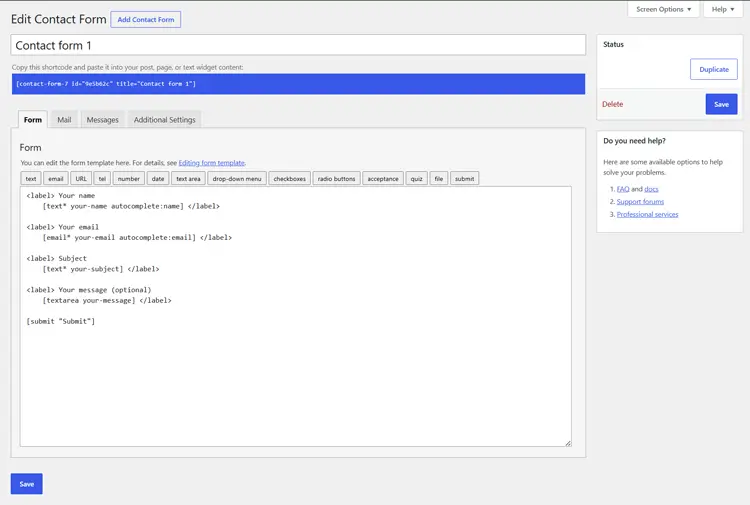
Contact Form 7 is one of the oldest WordPress form builder plugins, with over 10 million active installations. Its USP is that it is free. However, it doesn’t come with a visual builder. It asks users to write form tags (shortcode-like syntax) to define form structure.
For developers and WordPress-savvy users, that flexibility is powerful. For someone who doesn’t have any technical expertise, writing HTML might feel overwhelming.
Moreover, Contact Form 7’s core fields are sufficient for traditional contact and inquiry forms, but advanced workflows such as visual conditional forms, payments, calculations, and multi-step experiences usually require extensions. It also provides spam protection with reCAPTCHA v2/v3, Cloudflare Turnstile, and Akismet spam filtering.
Although Contact Form 7 is free, to store form submissions, accept payments, add conditional logic, or connect to your email marketing platform, you’ll need a CF7 add-on.
Key Features
- Form creation via HTML tags
- Basic field support, including text, email, URL, phone, file, date, checkbox, radio, select, etc.
- Ajax-powered submission, no page reload
- reCAPTCHA v2/v3 and Cloudflare Turnstile support
- Akismet spam filtering
- SMTP-compatible email handling
- Extensible plugin with multiple add-ons.
Best For: Developers and technically comfortable users who want a zero-cost contact form with full markup control. Sites where the requirement is genuinely just name, email, and message, nothing more.
Pricing: Contact Form 7 is free. Advanced functionality generally requires third-party add-ons, which may be free or paid depending on the feature and provider.
Honest Limitation: The tag-based editor has a learning curve compared to modern drag-and-drop builders. Submissions don’t save to your dashboard without Flamingo. Conditional logic, payments, multi-step forms, and most integrations require third-party add-ons.
Forminator Forms
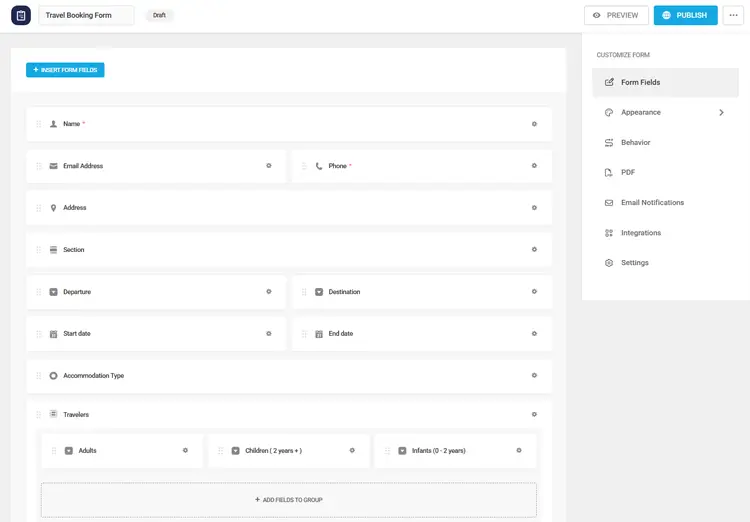
Forminator Forms is another freemium plugin. It is famous for its diversity, which allows you to create polls, quizzes, and payment forms beyond regular contact forms. It has over 20+ ready-made templates and includes Stripe and PayPal integrations.
For sites that need payments, polls, quizzes, and contact forms all in one plugin without paying extra, Forminator is the perfect plugin tool for it.
Unlike most plugins that sell Pro as a standalone upgrade, Forminator Pro is only available through a WPMU DEV membership. That membership starts at $36/year for a single site and includes their full suite of tools, security, performance, SEO, and more.
The good news: for most sites, the free version is enough. You get payment gateway integrations, conditional logic, file uploads, Google Sheets connection, Mailchimp integration, and calculation fields, all in the free version.
Key Features
- Drag-and-drop builder
- Accept payments through Stripe and PayPal
- Polls with real-time results displayed in pie charts
- Built-in spam protection with reCAPTCHA, hCaptcha, or Turnstile.
- Create Interactive quizzes and polls with real-time results
- Integrations with Mailchimp, Google Sheets, ActiveCampaign, Zapier, and others
- PDF generation through the Forminator Pro add-on.
Best For: It is suitable for sites that need to create quizzes and polls regularly. Small businesses that accept payments only through Stripe or PayPal. Agencies already on a WPMU DEV membership who get Forminator Pro as part of the package.
Pricing: Offers a free version, and the Pro plan starts at $36/year, for 1 site.
Honest Limitation: Forminator natively integrates with two payment processors—Stripe and PayPal. Stripe may expose additional payment methods, but businesses that require several separate gateway integrations may find other builders more flexible. The Pro pricing model is membership-based, not a standalone purchase. Also, Forminator Forms do not offer lifetime deals.
Fluent Forms
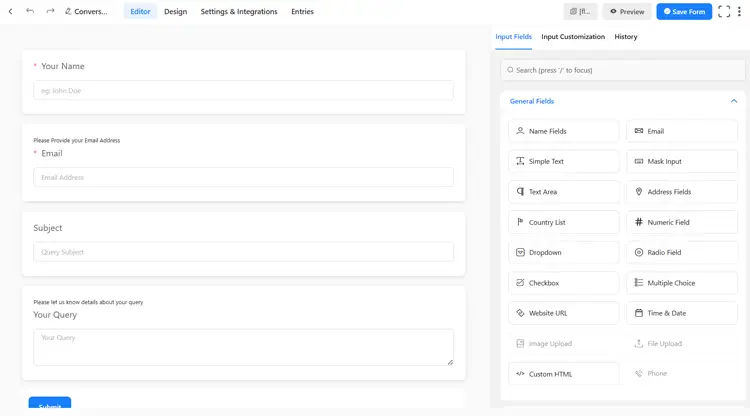
Fluent Forms is another form plugin that is fast and user-friendly. Its interface is modern and mobile-friendly, which is quite a help for WordPress beginners. Also, it offers conversational forms (interactive Q&A style), similar to Bit Form.
It is known for its generous free plan, which includes 30+ input fields, conditional logic, conversational forms, scheduling, spam protection, multi-column layouts, and multiple integrations. You can run a functioning lead capture form or contact form setup without paying anything.
For advanced workflows, you might need the premium version, which adds: multi-step forms, PDF generation, electronic signature, partial entries (form abandonment), save-and-resume, 60+ integrations, advanced styling, and more.
Key Features
- Drag-and-drop form builder with 60+ field types
- Smart conditional logic, conversational (one-question-at-a-time) forms, multi-step forms.
- Spam protection (reCAPTCHA, hCaptcha, Turnstile) built in
- Built-in analytics dashboard and visual reports
- Integration with 7+ payment gateways
- Quizzes and surveys with scoring
- 100+ templates and 60+ third party integrations
Best For: Users who want a fast, feature-rich builder. Fluent Forms excels in speed and has many built-in features (like reports and conversions) that normally require paid add-ons in other plugins. Its clean UI makes form creation easy for beginners and pros alike.
Pricing: Official Fluent Forms pricing page currently lists the paid single-site plan at $55/year promotional pricing, with a regular price of $79, and advertises 65+ input fields and 60+ integrations across the product’s paid feature set.
Honest Limitation: Fluent Forms is a powerful option because of its integrations and workflow features. But beginners looking for a simple form builder may find its advanced settings a little overwhelming. Also, some advanced features require the Pro version, and advanced automation features may require additional Fluent ecosystem tools.
Ninja Forms
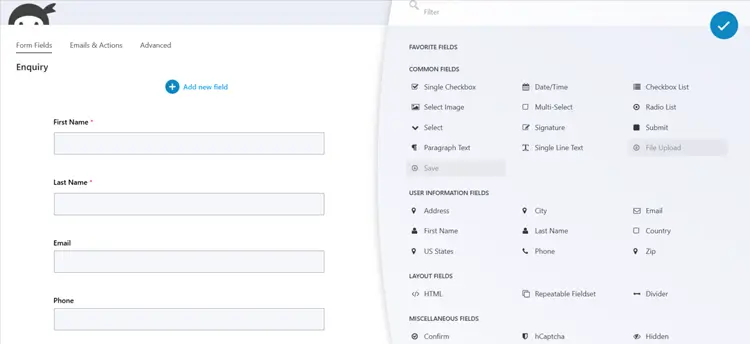
Ninja Forms takes a different approach from every other plugin on this list. It launched the “pay only for what you need” model back when every other plugin was selling expensive bundles.
It is a freemium plugin that focuses on a flexible, modular approach. Its core plugin is free (with no time limit) and contains all the basics: a drag-and-drop form builder, 28+ field types, unlimited forms/submissions, spam protection, and email notifications. For a basic contact form, the free version is genuinely enough. Ninja Forms is also developer-friendly, with well-documented hooks and filters for custom integrations and extensions.
Instead of one plan that includes everything, it sells different features as individual add-ons. For example, conditional logic, file uploads, Stripe payments, and CRM integrations- each one is a separate purchase, priced between $29 and $129 per year.
Key Features
- Clean and modern drag-and-drop builder
- Unlimited forms and submissions
- Email notifications and confirmation messages
- Multi-page form support
- Responsive layout
- 40+ premium add-ons (conditional logic, file uploads, Stripe, PayPal, HubSpot, Zapier, Salesforce, and more)
- Huge library of pre-built templates
Best For: Developers who want a flexible, developer-friendly plugin and have narrow, specific premium needs. Sites that only need the free core for a basic contact form and are aiming to scale up later via paid features. Users who are certain they need only one or two add-ons and the per-add-on pricing genuinely works out cheaper than a full plan.
Pricing:
- Core: free
- Plus: $59.40 first year, normally $99/year
- Pro: $119.40 first year, normally $199/year
- Elite: $299.40 first year, normally $499/year
Honest Limitation: Conditional logic, a feature that Bit Form and Fluent Forms both include free, is locked behind the Plus bundle in Ninja Forms. By the time you combine two or three add-ons, the total often exceeds what a competing all-inclusive plan would cost. The pricing model starts affordable and gets expensive fast.
How to Choose the Right WordPress Form Builder for Your Website
Answer these questions first to select the right form builder for your business:
Do you know how to write code? If yes, try Contact Form 7 first. And if you’re not a technical person, then try the other 5 plugins mentioned in this listicle.
Do you want something truly beginner-friendly with drag-and-drop? Try HT Contact Form, Bit Form, or Fluent Forms first. They all offer a drag-and-drop interface. Try their free versions and see which interface feels most natural to you.
Do you need payments, quizzes, or polls at zero cost? Forminator’s free tier is the strongest in this category. Nothing else gives you Stripe, PayPal, polls, and conditional logic all for free.
Do you want everything free with no upgrade path? HT Contact Form includes all the fields and integrations for free, though it doesn’t handle payments or templates.
Are you looking for lifetime deals and want the best value across free and paid tiers? You can consider Bit Form. It comes with a beautiful drag-and-drop builder, 50+ field types, a suite of built-in templates, an advanced style editor, a generous free version, and lifetime pricing. There is another plugin, Fluent Forms. Try both free versions and see which builder feels more natural to you.
Do you accept payment in your forms? → Yes, then you’ll like: Bit Form, Forminator, or Fluent Forms. All of them include integration with multiple payment methods that are used worldwide.
How many features do you actually need for your first form? → For basic name, email, and message, CF7 is a fine choice. However, if you want multi-step, conditional logic, file uploads, payments, store submissions, and spam protection without add-ons, try: HT Contact Form, Bit Form, Forminator, or Fluent Forms.
If your needs are narrow and specific, Ninja Forms’ add-on model can work in your favor. But do the math first. If you need more than one or two premium features, an all-inclusive plan from Bit Form will almost certainly cost less.
Red Flags to Avoid When Choosing a Form Plugin
Don’t pick a form plugin based on the feature list alone. Here’s what actually matters for affordability:
1. Hidden add-on costs. Check what the free version actually includes. If conditional logic is a $49 add-on, and that’s ok with your budget, you can go for it.
2. Annual renewal prices that increase. Some plugins offer 50% off the first year, then double the price. So be aware of this.
3. Site license restrictions. If you run multiple WordPress sites, single-site pricing multiplies fast. Compare annual costs across 3 sites before deciding.
4. Bundled add-ons you don’t need. Ninja Forms bundles popular add-ons at a discount, but you still pay for features you won’t use.
Frequently Asked Questions
Are these plugins really free?
Yes. Contact Form 7, Forminator, HT Contact Form, and Ninja Forms all offer completely free core plugins. Fluent Forms and Bit Form also have free versions with many features. You only pay if you want advanced add-ons or support.
Which plugin is best for multi-step or quiz forms?
For multi-step forms, Bit Form and Fluent Forms both support multi-step layouts. For quizzes and polls, Forminator and Fluent Forms include specialized quiz blocks built in. Ninja Forms can do these too, but you may need to add specific modules.
Do these plugins include payment forms?
Yes, Bit Form, Forminator Forms, and Fluent Forms support multiple payment systems built in. While Ninja Forms supports payments via add-ons and HT Contact Form doesn’t offer any.
Which is the fastest form plugin?
There is no universally fastest form plugin for every site. Test the final form page with your chosen fields and integrations using PageSpeed Insights or another performance tool.
Does Contact Form 7 save form submissions?
Not by default. You need to install the Flamingo plugin (also free, made by the same developer) to store submissions in your WordPress dashboard.
Which WordPress form builder is best for small businesses on a tight budget?
It depends on what you need. If you want everything free with no upgrade path, HT Contact Form will be the best option. If you want a free tier plus room to grow into payments and advanced workflows, Bit Form, Fluent Forms, and Forminator all have affordable paid versions. The best fit is the one whose features match your must-haves and your budget.
Final Thoughts
All five plugins above strike a balance between functionality and cost.
If you want a visual builder that covers contact forms, lead generation, and multi-step workflows in one free package, Bit Form, Fluent Forms, and HT Contact Form are all worth trying.
For built-in quizzes, polls, and payments at no cost, Forminator is a strong choice. And if your needs are narrow and you’d rather pay only for specific features, Ninja Forms’ add-on model is what you need.
What I’m trying to say is that the five plugins in this list don’t all solve that problem the same way. And the selection depends on your needs.
Don’t overspend on form building for a WordPress site; start with the free version of whichever one fits your use case. Later upgrade only when you actually need to, not because the plugin made you feel like you had to.