
The Best Google Analytics Plugins for WordPress: Analyze Your Website Traffic Like a Pro

As a WordPress site owner, understanding your audience is crucial. Studies show that 65% of businesses improve conversions through analytics tracking.
Integrating the right Google Analytics WordPress plugin can transform your website. It provides actionable insights into visitor behavior and traffic sources. You’ll understand engagement patterns better.
However, many Google Analytics plugins are available for WordPress. Choosing the right one for your needs can be challenging.
In this article, we’ll provide a comprehensive guide. We’ll explore the best Google Analytics plugins for WordPress. We’ll help you make an informed decision. We’ll explore the key features of each plugin. We’ll cover their pricing models and customization options.
By the end of this article, you’ll understand better. You’ll know how to select the best Google Analytics plugin. This will help you optimize your website effectively. You’ll be able to drive more traffic to your site.
Quick Answer: Best Google Analytics Plugins for WordPress
If you want reliable GA4 tracking without touching code, the best Google Analytics Plugins for WordPress are HT Easy GA4, MonsterInsights, ExactMetrics, Site Kit by Google, Analytify, GAinWP‑style dashboard plugins, and WP Statistics. These tools simplify GA4 setup, keep tracking accurate, and show clear reports inside your WordPress dashboard so you can focus on growing traffic and conversions instead of wrestling with tags.
Top picks at a glance:
- HT Easy GA4 – Best overall for most WordPress sites (editor’s choice).
- MonsterInsights – Deep reports and marketing‑focused insights.
- ExactMetrics – Simple GA4 and ecommerce tracking.
- Site Kit by Google – Official integration with several Google tools.
- Analytify – Clean, beginner‑friendly dashboards.
- WP Statistics – Privacy‑friendly local analytics with GA options.
- Key Takeaways
- What is Google Analytics 4 for WordPress
- Why You Need a WordPress Analytics Plugin
- Best Google Analytics Plugins for WordPress on Our List
- HT Easy GA4 (Google Analytics 4)
- Site Kit by Google
- Analytify
- Goal Tracker – Custom Event Tracking for GA4
- MonsterInsights
- Analytics Cat
- WP Statistics
- Frequently Asked Questions
- Final Words
What is Google Analytics 4 for WordPress
Google Analytics 4 replaced Universal Analytics in July 2023. This change affects all WordPress site owners. GA4 offers better cross-platform tracking capabilities. It provides enhanced privacy features too.
Key differences for WordPress users include:
- Event-based tracking instead of session-based
- Better integration with Google Ads
- Enhanced ecommerce tracking features
- Improved machine learning insights
Make sure your chosen plugin supports GA4. Some older plugins only work with Universal Analytics.
Why You Need a WordPress Analytics Plugin
Understanding your website traffic is crucial for growth. Did you know that over 90% of websites rely on data-driven decisions to improve performance?
Google Analytics 4 (GA4) is now the default analytics version, and Universal Analytics properties no longer process new data, so you need a GA4‑compatible solution to understand how people use your site. While you can add the GA4 tag manually, a plugin makes setup easier, reduces tracking mistakes, and gives you readable reports inside your dashboard instead of forcing you to learn the complex GA4 interface.
For most site owners, using a dedicated plugin is the fastest way to see which pages perform best, where visitors come from, and what actions they take on your site. When your analytics data is accurate and easy to understand, it becomes much simpler to improve content, optimize SEO, and make better business decisions based on real numbers.
What to Look for in a Google Analytics Plugin
Before choosing any plugin, check these key factors:
- GA4 support and future‑proofing: Make sure the plugin supports GA4 measurement IDs and recommended events and is actively maintained.
- Ease of setup: Look for one‑click connection, Google account login, or a setup wizard rather than copying and pasting code.
- WordPress dashboard reports: Good plugins show traffic, top pages, devices, and referrers directly in your admin panel.
- Event and conversion tracking: Useful events include outbound clicks, file downloads, form submissions, and ecommerce purchases if you run a store.
- Performance and bloat: Lightweight plugins that load tracking efficiently are better for speed and user experience.
- Privacy and consent: Check for options to integrate with cookie consent tools or delay tracking until users agree.
- Support and documentation: Up‑to‑date docs, tutorials, and responsive support are important as GA4 evolves.
2026 Comparison of Google Analytics Plugins for WordPress
| Plugin | GA4 support (2026) | WP dashboard reports | Ecommerce support | Best for |
|---|---|---|---|---|
| HT Easy GA4 | Native GA4‑only tracking, actively updated | Clean traffic and ecommerce reports | WooCommerce events in Pro | Most WordPress users wanting simple GA4 setup |
| MonsterInsights | GA4 with dual‑tracking and addons | Detailed marketing‑focused dashboards | WooCommerce and other stores | Marketers and growing businesses |
| ExactMetrics | GA4 and enhanced ecommerce tracking | Simple analytics overview in dashboard | WooCommerce and EDD | Store owners wanting plug‑and‑play stats |
| Site Kit by Google | GA4 plus Search Console and more | Basic reports from multiple Google tools | Limited ecommerce focus | Users who want official Google integration |
| Analytify | GA4 support with flexible reports | User‑friendly summaries and campaign stats | WooCommerce addon available | Beginners and bloggers |
| WP Statistics | Local analytics with optional GA integration | On‑site analytics with privacy focus | Not a full GA4 ecommerce solution | Privacy‑conscious site owners |
Best Google Analytics Plugins for WordPress on Our List
Here’s our list of the best analytics plugins. These plugins include various features. They range from basic monitoring to advanced analysis. ECommerce tracking is also available.
HT Easy GA4 (Google Analytics 4)
HT Easy GA4 is a dedicated GA4 plugin that focuses on simple setup, accurate tracking, and clear reports inside WordPress. Instead of juggling multiple settings pages, you log in with your Google account, choose your GA4 property, and start collecting data in a few clicks.
Once connected, HT Easy GA4 shows traffic, users, sessions, devices, locations, and top pages in your admin dashboard so you can quickly understand what content performs best. It also supports events such as outbound link clicks and file downloads, giving you more insight than basic pageview tracking. The plugin is lightweight and designed to have minimal impact on site performance.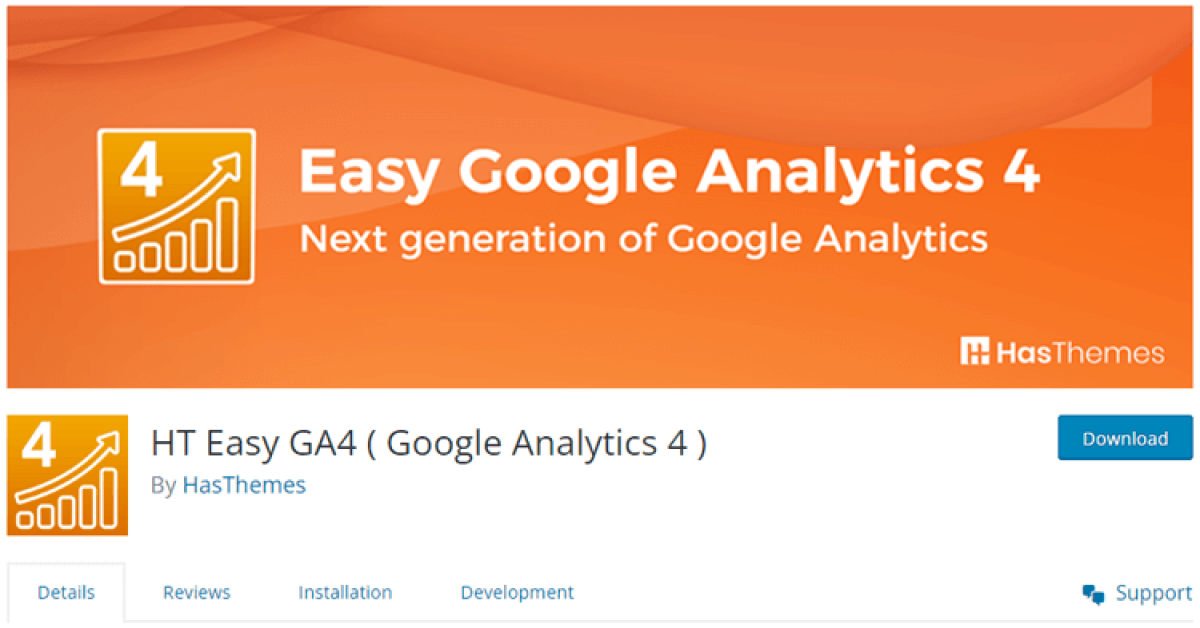
If you run a WooCommerce store, the Pro version adds enhanced ecommerce tracking, including product views, add to cart, and purchase events mapped to GA4. You can view ecommerce revenue, orders, and top‑selling products directly from your WordPress dashboard instead of switching to the full GA4 interface. Thanks to its focus on GA4 and ongoing updates, HT Easy GA4 is a strong long‑term choice among all Google Analytics Plugins for WordPress.
Highlighted Features
- Unified view between app and web
- A Plethora of Parameters
- More intelligent user privacy and tracking features
- Updated User Interface with several new reporting tools
Price:
- Free Plan: Start with Free of Cost
- Personal Plan: $59/Year
- Developer PlabL $99/Year
- Agency Plan: $199/ Year
Site Kit by Google

Site Kit by Google is the official plugin that connects WordPress to services like GA4, Search Console, AdSense, and PageSpeed Insights. It offers a straightforward setup flow where you sign in with your Google account and approve access for each service, making it easier to centralize your Google integrations.
This plugin shows combined insights in your WordPress dashboard, such as how many visitors you get from search, which queries bring traffic, and how those users behave on your site according to GA4.
Site Kit is not as ecommerce‑focused as some other options and its analytics reports are more basic, but it is a good choice if you want an official, free solution that brings multiple Google products together.
Highlighted Features:
- Direct Google Analytics 4 integration
- Search Console insights included
- PageSpeed Insights data
- AdSense earnings tracking
- Zero coding required
Price: Free
Analytify
Analytify aims to make Google Analytics data easy to understand without needing to dive into every GA4 report. The plugin provides clean dashboards in your WordPress admin area, including quick overviews and more detailed breakdowns of traffic, top pages, geographic data, and social media referrals.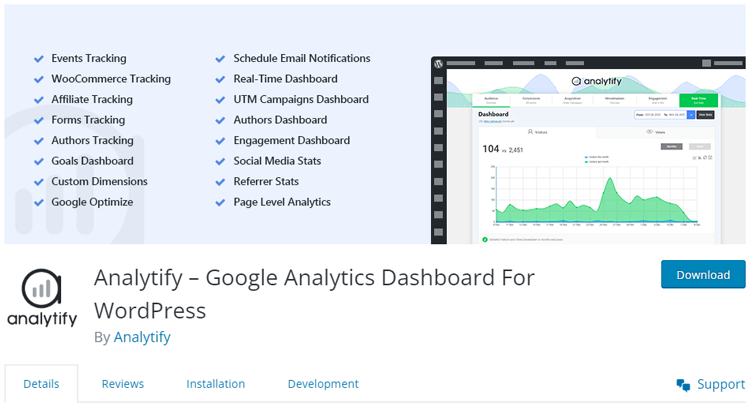
Analytify supports GA4 and offers addons for WooCommerce and other features, so you can monitor revenue and product performance alongside standard metrics. It is a solid choice for bloggers, small business owners, and agencies who want attractive, easy‑to‑read reports without overwhelming clients with the full GA4 interface.
Highlighted Features
- Automated email reports
- Real-time visitor tracking capability
- Shortcodes for data integration into custom templates
- Clear, intuitive UI
- GA4 compatibility
Pricing
- Startup: $99
- Agency: $199
- Develper: $499
HT Easy GA4
#1 📈 Google Analytics Plugin for WordPress
🚀 Supercharge your WordPress website with analytical insights. (Including WooCommerce Report)
ExactMetrics – GA4 and Ecommerce Simplified
ExactMetrics focuses on making GA4 and enhanced ecommerce tracking simple to configure. The plugin includes a setup wizard and pre‑configured events that help you track scroll depth, outbound clicks, affiliate links, and other interactions without custom code.
From your WordPress admin, ExactMetrics offers overview reports that highlight users, sessions, bounce rate, top pages, and traffic sources so you can see performance at a glance.
Its ecommerce module supports WooCommerce and Easy Digital Downloads, letting you track revenue, transactions, and product performance in GA4. ExactMetrics is well‑suited for store owners and content sites that want strong event and ecommerce tracking without spending too much time inside the GA4 interface.
Highlighted Features
- GA4 integration with setup wizard and automatic event tracking for scrolls, outbound links, and affiliate clicks.
- WordPress dashboard overview showing users, sessions, bounce rate, top pages, and traffic sources.
- Enhanced ecommerce tracking for WooCommerce and Easy Digital Downloads, including revenue and product performance.
- Custom dimensions and campaign tracking options for more detailed analysis.
- Real‑time stats widget for quickly checking current visitors and pageviews.
Price: ExactMatrix has 3 pricing plan:
- Plus: $99.50 per year for 1 site.
- Pro: $199.50 per year for up to 5 sites.
- Agency: $399.50 per year for up to 25 sites.
MonsterInsights
MonsterInsights is a popular analytics plugin that offers GA4 tracking along with options to ease the transition from older setups. The onboarding wizard connects your site to Google Analytics and configures recommended settings for you, which is helpful if you are not comfortable with code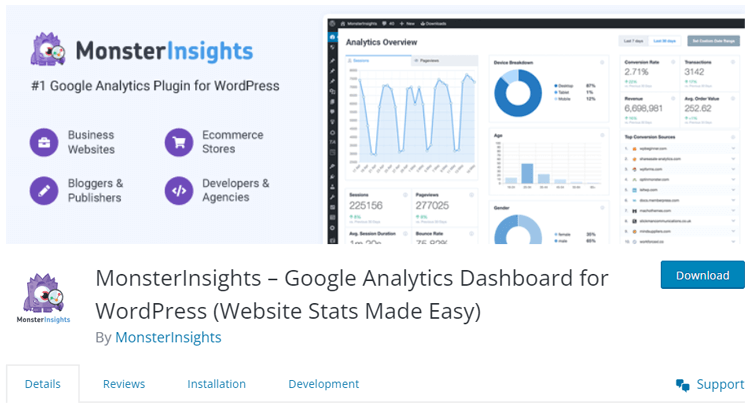
Inside your WordPress dashboard, MonsterInsights provides detailed reports on traffic, sources, top pages, devices, and engagement metrics, plus marketing‑focused views like campaign performance and conversion tracking.
With its ecommerce addon, you can track revenue, transactions, popular products, and conversion rates for WooCommerce and other store plugins. MonsterInsights is a strong fit for marketers and agencies who want in‑depth insights rather than just basic stats, though many advanced features require a paid license.
Highlighted Features
- Conversion tracking for forms,
- Improved tracking for eCommerce,
- Track affiliate links,
- Enables you to track 404 errors,
- Updated embedded tracking code,
- Monitor performance for specific pages.
Pricing
- Free Plan: Free of Cost
- Elite Bundle: $299.60/Year
- Pro: $199.60/Year
- Plus: $99.60/Year
HT Easy GA4
#1 📈 Google Analytics Plugin for WordPress
🚀 Supercharge your WordPress website with analytical insights. (Including WooCommerce Report)
WP Statistics

WP Statistics is a self‑hosted analytics plugin that tracks visitors using your own database instead of sending all data directly to third‑party servers. For some site owners, this is attractive from a privacy and compliance standpoint, especially in regions with strict data regulations.
This analytics plugin shows visits, referrers, devices, and other metrics inside your WordPress admin, giving you an overview of traffic without depending entirely on GA4. Although WP Statistics is not a full replacement for GA4’s advanced features, it can complement a GA4 setup or serve as a simpler alternative for smaller sites.
If privacy is a priority, pairing WP Statistics with one of the dedicated Google Analytics Plugins for WordPress can give you both flexibility and detailed tracking.
Highlighted Features:
- Complete privacy protection
- Real-time visitor tracking
- Detailed geographic data
- No external dependencies
- Customizable dashboard widgets
Price: Free (Premium add-ons available)
Frequently Asked Questions
Which Google Analytics plugin for WordPress is the best?
The best Google Analytics plugin for WordPress depends on your specific needs and preferences. However, popular options like HT Easy GA4, and MonsterInsights are highly recommended for their user-friendly interfaces and robust features.
Why should I use Google Analytics plugins for WordPress?
Using Google Analytics plugins for WordPress lets you get valuable insights into your website traffic, such as where your visitors are coming from, which pages are most popular, and how long they stay on your site. This information can help you optimize your website for better performance and increased engagement.
How do I install a Google Analytics plugin for WordPress?
Installing a Google Analytics plugin for WordPress is simple. First, log in to your WordPress dashboard and go to the Plugins section. Click “Add New” and Search for the plugin you want to install. Click “Install Now” and “Activate” to use the plugin.
Can I track eCommerce data with Google Analytics plugins for WordPress?
Yes, many Google Analytics WordPress plugins offer eCommerce tracking features that allow you to track sales, revenue, and other metrics related to online purchases.
How do I choose the best analytics plugin for WordPress?
Choose a WordPress analytics plugin based on features like data accuracy, ease of use, integration options, and support for your specific analytics needs and goals.
Are there any free options available for WordPress analytics plugins?
Some popular WordPress analytics plugins, such as HT Easy Google Analytics 4 provide free options. These plugins include fundamental tracking features like page views, sessions, and referral sources. For more advanced features, consider upgrading to their premium version.
Can WordPress analytics plugins provide real-time data on website traffic?
Some WordPress analytics plugins offer real-time data on website traffic, enabling users to monitor visitor activity as it happens. This provides valuable insights for immediate action and decision-making.
Final Words
The right choice depends on your goals, but for most users HT Easy GA4 is the best starting point thanks to its GA4‑only focus, simple connection, and clear dashboard reports.
If you run a content‑heavy site or need advanced marketing insights, plugins like MonsterInsights or ExactMetrics offer deeper reports and powerful event tracking.
Store owners who rely on WooCommerce should ensure their chosen plugin supports enhanced ecommerce events so they can see revenue, product performance, and funnels inside WordPress.
Finally, remember that accurate data is only useful if you actually use it: review your reports regularly, identify which pages or campaigns perform best, and use those insights to optimize content, SEO, and user experience.
With one of these Google Analytics Plugins for WordPress in place and a simple reporting routine, you will be in a strong position to make smarter decisions about your site in 2026 and beyond.