5 Best WordPress Image Zoom Plugins

WordPress plugins are awesome time-savers for webmasters, and now you can add image-zooming to your list of WordPress plugin superpowers.
Although there are many image zoom plugins available, here we will highlight the top 5 best options that can make your images stand out on the web.
These WordPress image zoom plugins 2025 landscape offers more advanced features than ever before. Modern image magnification for WordPress has evolved to include enhanced capabilities and improved performance.
Whether you need a simple solution that’s easy to install or a feature-packed option with plenty of control over design elements, you’ll find something that fits your needs in this list of 5 Best WordPress Image Zoom Plugins.
What are WordPress Image Zoom Plugins
WordPress Image Zoom Plugins are a great way to enhance the user experience for visitors viewing images on your website. They allow users to zoom in and out of an image, giving them complete control over how they view each image. With plugins like WP-Zoom, you can change the featured image size and color of your images and enable hover-over or click-through effects. Using WordPress Image Zoom Plugins also adds an element of interactivity to your website, allowing users to engage with the content more than just passively viewing it.
Benefits of WordPress Image Zoom Plugins
WordPress Image Zoom Plugins offer a great way to improve the user experience on your website or blog. These plugins allow users to get a better look at images with just the click of a button.
In addition, you can choose from various styles, such as a magnifier glass, drag and drop, or lightbox view, and change the featured image size so that it perfectly fits the aesthetics of your page.
A WordPress hover zoom feature allows visitorsallowslets visitors to examine image details by simply moving their cursor. Users can zoom in and out to get an even more detailed look at your images.
The advanced zoom image plugins even allow you to add functionality, allowing users to toggle between two images for comparison.
Product image zoom for WordPress is especially valuable for eCommerce sites selling detailed items. WordPress zoom effects can increase conversion rates.
Overall, these plugins are a handy tool for improving usability and making banner ads, product shots, and other images more eye-catching.
The 4 Best Responsive WordPress Image Zoom Plugins
HT Mega
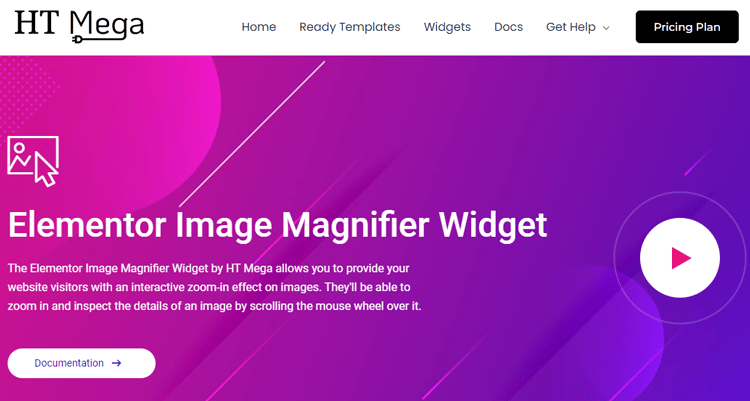
The HT Mega Elementor Image Magnifier Widget takes your user experience to a new level. With an interactive zoom-in feature, it allows website visitors explore the details of an image with ease.
This WordPress image enhancer offers seamless zoom transitions that maintain image quality
Scrolling over an image with the mouse wheel will enable them to uncover its hidden depths, image size allowing for a more engaging and dynamic browsing experience.
You can showcase product pictures or add enhanced visuals to blog posts. This widget helps make your content more engaging and visually appealing. Your audience will enjoy a better experience and get more value from their visit.
Whether you’re showcasing product pictures on your store or adding enhanced visuals to your blog posts, this widget makes it all possible so your audience can get more out of their visit.
Highlighted Features:
- 5 styles
- Clean and intuitive design
- interactive zoom-in effect
- Fast loading
Pricing: There are 3 different pricing One Year plans for HT Mega:
- Personal Plan: $49/ Yearly
- Developer Plan: $79/ Yearly
- Growth Plan: $99/ Yearly
WP Image Zoom
WP image zoom plugin is a powerful and feature-rich plugin that allows you to take advantage of the magnifying glass effect on your website’s images. Not only can you customize zoom types, apply animation easing effects, adjust fade effects, and more.
WP Image Zoom also works with WooCommerce. It offers extreme levels of control over every component within the plugin, so you can fine-tune how your images will appear to visitors.
Not only will this enhance users’ experience, but zoom image functionality could lead to higher conversion rates or improved revenue overall. This plugin perfectly shows your beautiful images and invites visitors to explore their details!
Highlighted Features:
- 4 Zooming Types
- Animation Easing Effect
- Fade Effect
- Works in Pages and Posts
Pricing:
There are 3 different pricing One Year plans for WP Image Zoom:
- Personal Plan: $78.90/ Yearly
- Developer Plan: $157.90/ Yearly
- Big Agency Plan: $249/ Yearly
YITH WooCommerce Product Gallery & Image Zoom
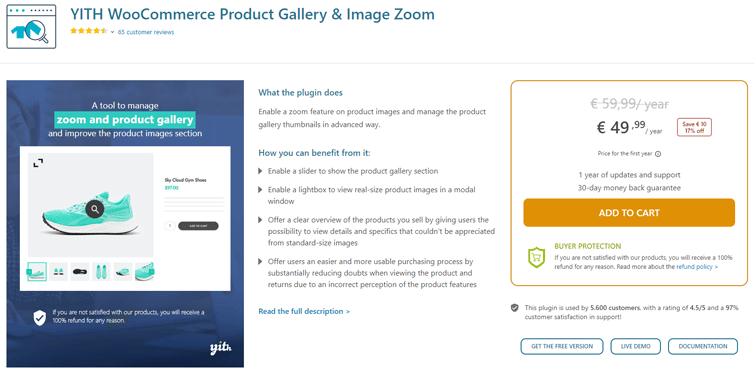
Shopping online can be a challenging experience for consumers, as their senses are limited, and they cannot touch, smell or try the product before buying.
Fortunately, the YITH WooCommerce product zoom plugin is a fantastic plugin that helps bridge this gap by providing high-quality image options for shoppers.
A WordPress zoom extension allows enabling a slider to display the product gallery section effectively
Specific settings such as being able to choose the zoom image position (inside the main image or external, in the right side), deactivate the zoom on mobile devices, set the size of the zoom window, and more give customers an accurate sense of the product they are considering buying.
Additionally, enabling a product gallery and customizing the color, size, and position of the lightbox icon allows users to explore different aspects of their desired product further.
With YITH WooCommerce Product Gallery & Image Zoom, shoppers can make more confident purchases while still getting a complete picture of what they’re buying.
Highlighted Features:
- Highlight the zoom option
- Customize size, colors, and shape
- Lightbox
- slider arrows on hover
Pricing: One Year plan for YITH WooCommerce Product Gallery & Image Zoom:
- Regular license: € 49,99/ year
WPB WooCommerce Image Zoom PRO
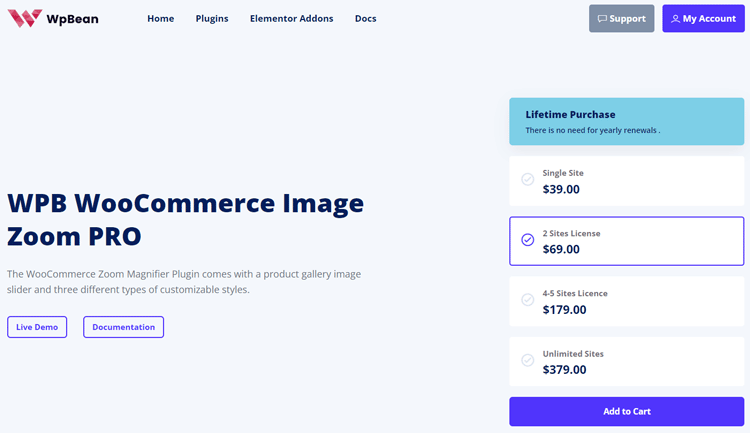
WPB WooCommerce Image Zoom PRO can give a major upgrade to your online store by allowing shoppers to get an up-close and personal look at products. With the LightBox popup image gallery, customers can zoom in on images without leaving the page, giving them a detailed display of product quality.
This is one of the best WordPress image zoom plugins to help customers see product details clearly. WooCommerce Image Zoom PRO offers advanced magnification with a gallery slider for better viewing.
The premium WooCommerce product zoom plugin has an advanced admin panel that allows you to customize the zoom levels, giving shoppers complete control over their browsing experience.
With Product Image Zoom for WooCommerce, you can provide a higher level of detail to customers, so they are entirely confident in their buying decisions and come back repeatedly, knowing they trust your store.
Highlighted Features:
- Three types of zoom
- Developer-friendly and flexible
- Lightweight.
- Simple to use
Pricing: There are 4 different pricing One Year plans0 for Product Image Zoom for WooCommerce:
- Starter Plan: $39.00
- Plus Plan : $129.00
- Agency Plan: $199.00
Frequently Asked Questions
How do I add an image magnifier in WordPress?
WordPress image zoom plugins make adding magnification simple. Install your chosen plugin from the WordPress repository or upload a premium option.
Configure settings through your dashboard, select which images to enable zoom on, and adjust magnification levels to your preference. Most plugins like HT Mega offer drag-and-drop interfaces requiring no coding knowledge.
Why do WordPress websites need image zoom functionality?
Image zoom enhances user experience by allowing visitors to examine product details closely. This feature increases customer confidence in purchasing decisions, especially for eCommerce sites.
Zoom functionality reduces product returns by setting accurate expectations and improves engagement metrics by encouraging users to interact with your content more deeply.
Which zoom plugin works best with WooCommerce?
YITH WooCommerce Product Gallery & Image Zoom and WPB WooCommerce Image Zoom PRO are specifically designed for WooCommerce integration.
These plugins add zoom functionality directly to product galleries with customizable zoom levels, lightbox options, and mobile-responsive features. Your choice depends on specific requirements like zoom window placement and styling preferences.
Can I customize the appearance of the zoom window?
Yes, most premium WordPress zoom plugins offer extensive customization options. You can adjust zoom window size, border styles, and magnification levels. Plugins like WP Image Zoom provide animation effects and fade options. Some plugins also allow you to choose between inner zoom (within the image) or external zoom windows for different visual presentations.
Do WordPress image zoom plugins slow down my website?
Quality WordPress zoom plugins are optimized for performance with minimal impact on loading times. Plugins like HT Mega and WP Image Zoom use efficient code and lazy loading techniques. For best performance, choose plugins that load resources only when needed and offer image compression options to maintain speed while delivering high-quality zoom experiences.
Final Words
Image Zoom plugins are one of a website’s most valuable tools. With a few clicks, images on a page can be enlarged, providing users with an enhanced viewing experience.
These top WordPress zoom plugins ecosystem continues evolving with new features for 2025 and beyond. The WordPress zoom plugin for eCommerce has become essential for sites focused on visual content and product sales
Thanks to responsive design, image zooms occur seamlessly despite whatever device the webpage is being viewed on. Ultimately, image zoom plugins offer website owners an intuitive way to maximize sales and keep customers coming back for more.