

How to Become a Web Developer: A Step-by-Step Guide

Quick Answer: To learn how to become a web developer, start with HTML, CSS, and JavaScript. Build responsive websites, learn Git and GitHub, and choose front-end, back-end, or full-stack work. Create three real projects, publish a portfolio, and apply for junior or freelance roles. A degree is not always required.
Web development is a skill you can learn step by step, even with no experience. The hard part is not finding tutorials. It is knowing what to learn first, what to build, and when you are ready to apply.
This guide shows you how to become a web developer with a clear roadmap. You will see the skills to master, the projects to build, a realistic timeline, and ways to find your first job. Demand is still there. The U.S. Bureau of Labor Statistics projects employment of web developers and digital designers to grow 5% from 2025 to 2035, which it describes as faster than average.
Table of Contents
What Does a Web Developer Do?
A web developer builds, tests, and maintains websites and web applications. Some focus on what visitors see. Others focus on the systems behind the screen. Most also fix bugs, improve speed, and update sites over time.
Types of Web Developers
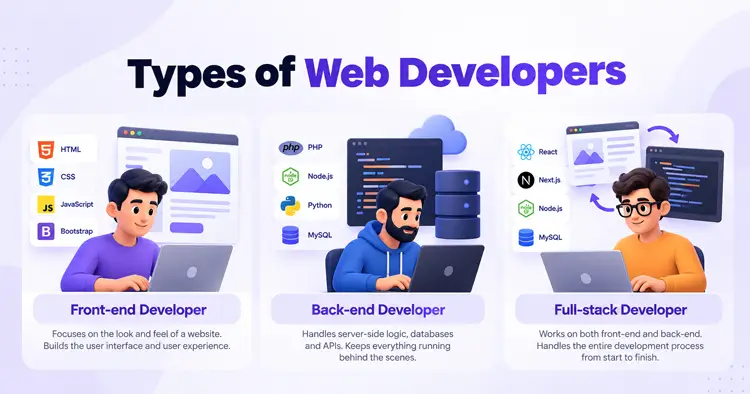
Knowing the three main paths helps you plan how to become a web developer in the right area.
Front-End Developer
A front-end developer builds the part of a website people see and use. This includes layouts, menus, forms, and animations. It is a common starting point for beginners because you see results quickly.
Back-End Developer
A back-end developer builds the logic behind a website. This includes databases, user accounts, and APIs. It suits people who enjoy problem-solving and data.
Full-Stack Developer
A full-stack developer works on both sides. They can build a feature from the screen to the database. It takes longer to learn, but it gives you more job options.
How to Become a Web Developer: Step-by-Step Roadmap
These steps show how to become a web developer in a logical order. Each one builds on the last.
Step 1: Learn How Websites Work
Start with the big picture. A browser sends a request, a server replies, and the page appears. Learn what a domain, hosting, and HTTP are. This makes every later step easier to understand.
Step 2: Master HTML and CSS
HTML creates the structure of a page. CSS controls how it looks. Learn headings, links, images, forms, Flexbox, and Grid. Rebuild simple pages you like until the code feels natural.
Step 3: Learn JavaScript Fundamentals
JavaScript makes pages interactive. Focus on variables, functions, arrays, objects, and events. Then learn how to change a page with the DOM and fetch data from an API. Do not rush into frameworks yet.
Step 4: Build Responsive, Accessible Websites
Every site you build should work on a phone and a desktop. Design for small screens first. Add alt text to images, use clear headings, and make sure people can use your site with a keyboard. These habits make you stand out.
Step 5: Learn Git, GitHub, and Browser Debugging
Set up a code editor such as Visual Studio Code. Use Git to track changes and GitHub to store your projects. Learn your browser’s developer tools to inspect elements and fix errors. Employers expect these basics from day one.
Step 6: Choose Your Specialization
Now pick a direction.
- Front-end: Learn a library such as React. TypeScript is a useful optional next step.
- Back-end: Learn a server-side language, plus databases and APIs.
- Full-stack: Learn both, one at a time.
Step 7: Build Three Real Projects
Tutorials teach syntax. Projects teach problem-solving. Build three projects of growing difficulty. The portfolio section below shows which ones to pick.
Step 8: Publish Your Portfolio
Put your best work online with live demos and clear descriptions. Simple hosting options, such as GitHub Pages, can serve static sites.
Step 9: Prepare and Apply
Practice explaining your projects out loud. Review JavaScript basics and debugging. Then start applying for junior roles, internships, and small freelance jobs.
Essential Web Developer Skills

Not every skill is needed on day one. Use this table to separate the core skills from the specialized ones.Skill Why It Matters Who Needs It HTML and CSS They build and style every web page. Everyone JavaScript It adds interactivity and runs in every browser. Everyone Git and GitHub They track changes and let you share code. Everyone Responsive design and accessibility They make sites usable on all devices and for all people. Everyone HTTP and REST APIs They show how browsers and servers exchange data. Everyone, mainly back-end Debugging and testing basics They help you find and fix errors faster. Everyone Deployment and hosting They put your work on the live web. Everyone Basic security Safe forms, passwords, and HTTPS protect users. Everyone React A JavaScript library for building user interfaces. Front-end TypeScript Adds types to JavaScript to catch errors early. Optional Node.js, PHP, Python, or Ruby Server-side languages for back-end work. Back-end SQL and MySQL They store and retrieve data. Back-end
Bootstrap is a helpful framework for fast layouts. You can study clean, responsive code in these Bootstrap 5 templates.
Which Server-Side Language Should You Learn?
PHP is a server-side language used in WordPress and many existing web applications. W3Techs reports that roughly 70% of websites with a known server-side language use PHP. That does not prove job demand. It does show that PHP skills still matter, especially for WordPress. Other good options include JavaScript with Node.js, Python, and Ruby. The best choice depends on the projects and career path you want.
Use AI Coding Assistants Carefully
AI tools can explain errors and suggest code. Use them to learn, not to skip learning. If you cannot explain a line of code, you cannot fix it when it breaks. Write the first version yourself, then ask for feedback.
Best Resources to Learn Web Development
These resources suit most beginners learning how to become a web developer. Start with free ones. Add paid ones only when you need more structure.
Free resources
- freeCodeCamp: A free curriculum with hands-on projects, from HTML to full-stack.
- MDN Web Docs: The best reference for HTML, CSS, and JavaScript.
- The Odin Project: A free, project-based path for full-stack learning.
- YouTube: Channels such as Traversy Media and The Net Ninja offer beginner-friendly tutorials.
- Official documentation: Read the docs for any framework you use.
Free and paid options
- Codecademy: Offers free basics and paid Pro plans with extra projects and career support.
- Udemy: Sells individual courses on HTML, CSS, JavaScript, React, and Node.js.
- LinkedIn Learning: A subscription platform with video courses. It was formerly known as Lynda.
Bootcamps can add structure and feedback. Costs and quality vary, so check the curriculum and graduate results before you pay.
How Long Does It Take to Become a Web Developer?
There is no fixed answer. It depends on how often you study, what you already know, and the job you want. Learning to code and being job-ready are also different things. Use this table as an illustrative plan if you study consistently.Learning Stage Illustrative Timeline HTML, CSS, and basic web concepts Months 1–2 JavaScript fundamentals Months 2–4 Git, responsive design, and first projects Months 4–5 Specialization and larger projects Months 5–8 Portfolio, interview practice, and applications Month 8 onward
Many people can build simple websites within a few months. Job readiness usually takes longer and depends on the quality of your projects. A bachelor’s degree takes about four years, but many developers learn through self-study or bootcamps.
How to Build a Web Developer Portfolio With No Experience
A portfolio is the proof that matters most when you are learning how to become a web developer with no experience. Three strong projects beat ten weak ones. Try these:
- Responsive business website (HTML, CSS, JavaScript): Build a multi-page site for a real or imaginary business. It shows layout and responsive skills.
- Interactive task manager (JavaScript, DOM, browser storage): Let users add, edit, and delete tasks. It shows you can handle data and user actions.
- Full-stack application (database, login, CRUD): Build an app where users sign up and manage their own data. It shows you can connect all the pieces.
For each project, include:
- A live demo link
- A GitHub repository with source code
- A README that explains what it does, the tools used, and how to run it
- Screenshots, including a mobile view
- A short note on a problem you solved and what you would improve
For ideas, see these web developer portfolio examples. If you want a faster start, these web development portfolio templates can serve as a base. Customize them and add your own projects.
How to Find Your First Web Developer Job
Once you know how to become a web developer, the next step is finding work. Use several channels at once. Each one gives you different chances.
- Freelance marketplaces: Sites such as Upwork and Freelancer let you build reviews with small projects. Competition is high, so start small and write a clear profile. Our guide to freelance websites compares your options.
- Job boards: Search on LinkedIn, Indeed, and Dice. Wellfound, formerly AngelList Talent, focuses on startup roles.
- Company career pages: Many companies post junior roles on their own sites. Apply directly and attach your portfolio.
- Networking: Join local meetups and online communities such as Dev.to, Reddit’s r/webdev, and Discord servers. Share your projects and ask for feedback.
- Social media: Keep your LinkedIn profile current and link your best work.
Freelancing can also grow into a business. These business ideas for web developers show where your skills can lead.
Can You Become a Web Developer Through WordPress?
Yes, but be clear about the difference. Building a site with WordPress themes and page builders is not the same as custom development. Page builders help you launch fast. They do not replace coding skills if you want to be hired as a developer.
Custom theme and plugin work needs PHP, JavaScript, HTML, CSS, WordPress hooks, and the WordPress APIs. Modern block development also uses JavaScript and React.
If this path interests you, read our guide on how to become a WordPress developer.
Common Mistakes Beginners Make
Most beginners repeat the same mistakes when learning how to become a web developer. Avoid these:
- Watching tutorials without building: Pause the video and build something yourself.
- Learning too many tools at once: Master HTML, CSS, and JavaScript before frameworks.
- Skipping the basics: Weak fundamentals make every framework harder.
- Waiting until you feel ready to apply: Start applying once you have two or three solid projects.
- Copying AI code you do not understand: You will struggle in interviews and at work.
Frequently Asked Questions
Do I need a degree to become a web developer?
No. Educational requirements vary by employer and role. Many developers are self-taught or learn through bootcamps. If you want to know how to become a web developer without a degree, focus on practical skills and a strong portfolio.
Where do I start if I want to know how to become a web developer?
Start with HTML and CSS, then move to JavaScript. These are the foundation for almost every path, including WordPress development. Add WordPress after you understand the basics.
How long does it take to become a web developer?
Most beginners can build simple sites within a few months. Becoming job-ready often takes several months to a year or more, depending on your study time and projects.
What salary can a web developer expect?
Pay varies by location, experience, specialization, and employer. The U.S. Bureau of Labor Statistics reports a median annual wage of $92,650 for web developers in May 2025. That is a U.S. figure and not an entry-level salary. Entry-level and freelance earnings may be lower and depend on your market, pricing, and client demand.
Will AI replace web developers?
No one can predict this with certainty. AI tools now help with routine code. Employers still need people who can plan, review, test, and fix real projects. Strong fundamentals remain valuable.
Are certifications worth it?
They can help show your skills, but a strong portfolio usually matters more. Choose a certification only if it fits your goal or an employer asks for it.
Is web development hard to learn?
It is challenging at first, but it gets easier with practice. Break the work into small steps and build something every week.
Conclusion
You do not need a degree or a perfect plan to start. You need a few basics and something to build.
Learn HTML, CSS, and JavaScript first. Add Git, then pick front-end, back-end, or full-stack. Build three small projects and put them online. That is how to become a web developer, one project at a time.
Your first projects will look rough. That is normal. Fix what breaks, learn from it, and ship the next one. Pick a project today and write the first line of code.