What’s Coming in WordPress 7.0? (Features and Screenshots)

WordPress 7.0 is the biggest update in years. It brings real-time collaboration (multiple users editing the same post live), new blocks (Icons, Breadcrumbs, Heading variations), a refreshed admin dashboard with smooth transitions, a WP AI Client API for plugin developers, and client-side media processing for faster uploads.
PHP 7.2 and 7.3 are dropped, and PHP 7.4 is now the minimum. The final release is April 9, 2026. Don’t upgrade your live site yet. Wait for stable, test on staging, and back up first.
TL;DR – WordPress 7.0 at a Glance:
- Multiple users can now edit posts simultaneously.
- New Icons, Breadcrumbs, and Heading blocks added.
- Admin dashboard gets a fresh new look.
- Smooth view transitions across all admin screens.
- WP AI Client API is built into the core.
- Browser now handles image resizing before upload.
- Real-time notes syncing improves team collaboration.
- PHP 7.2 and 7.3 are no longer supported.
- PHP 7.4 is now the minimum requirement.
- Final stable release scheduled for April 9, 2026.
- Never upgrade your live site during beta.
Quick Summary – WordPress 7.0 Features
WordPress 7.0 introduces real-time collaboration, a WP AI Client API, a refreshed admin dashboard, new blocks (Icons, Breadcrumbs), client-side media processing, and important developer tools.
This guide is based entirely on the official Beta 2 release notes published on WordPress.org (February 26, 2026). The final release is April 9, 2026. All features may change before then.
WordPress releases major updates two to three times per year. Each release goes through alpha, beta, and release candidate phases before reaching users as a stable version.
A beta release is pre-release software. The development team has completed the main planned features and is now focused on bug fixing and community testing. Beta 2 contains more than 70 fixes on top of Beta 1.
⚠️ Do NOT install beta software on a live website. All features in this guide come from the official WordPress.org Beta announcements and may change before the April 9, 2026 stable release.
Who should test Beta 2? Plugin authors, theme developers, and advanced users are testing staging sites. Regular site owners and bloggers should wait for the stable release.
What Is WordPress 7.0?
Official status: WordPress 7.0 is described by the WordPress.org team as a milestone release focused on collaboration, AI infrastructure, and an enhanced editing experience. It is the first major WordPress release of 2026.[WordPress.org Beta 1]
Release timeline: Beta 1 was released on February 20, 2026. Beta 2 followed on February 26, 2026, with more than 70 additional fixes. The final stable release is scheduled for April 9, 2026.[Official Release Schedule]
Who should install Beta 2: Only install Beta 2 on a staging server or local test environment. WordPress.org provides three testing options: the WordPress Beta Tester plugin, direct ZIP download, and WordPress Playground (browser-based, no installation needed).[Beta Tester Plugin]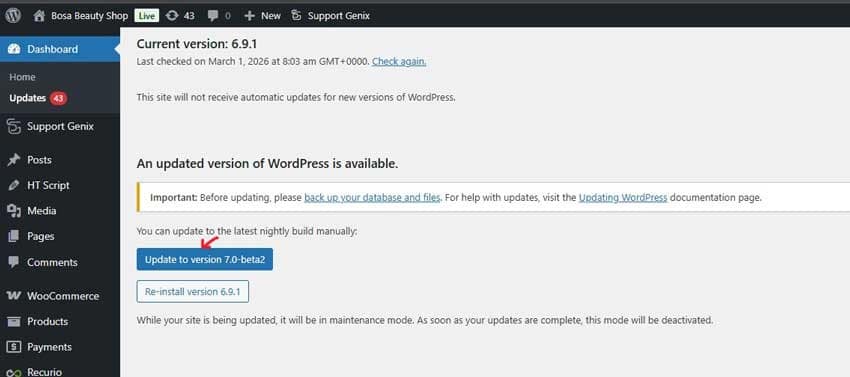
Why test beta? Testing helps the WordPress community catch bugs before launch. If you find an issue, you can report it to the Alpha/Beta support forums or WordPress Trac.[Help Test WP 7.0]
Safety reminder from WordPress.org: Never install, run, or test beta versions on production or mission-critical websites.
WordPress 7.0 Beta Updates (Quick Update)
The WordPress 7.0 beta cycle mainly focuses on polishing features and hardening security. Recent betas don’t add big new tools but refine what’s already shipped.
WordPress 7.0 Beta 3
- Large batch of editor and core bug fixes to improve stability.
- Further refines collaboration, visual revisions, and the refreshed wp‑admin experience.
- Improves the AI Connectors experience to better handle different AI providers.
WordPress 7.0 Beta 4
- Released alongside WordPress 6.9.3 to share the latest security patches.
- Pulls in the same security fixes previously delivered in WordPress 6.9.2.
- Adds extra editor and core fixes to remove smaller UI and behavior issues.
WordPress 7.0 Beta 5
- Final planned beta before the release candidate phase begins.
- Includes another round of stability and performance fixes across the editor and core.
- Adds a Command Palette shortcut in the admin bar for faster navigation.
What are the Major WordPress 7.0 Features? (Beta 2)
Every feature below is verified from the official Beta 1 and Beta 2 announcements on WordPress.org. Click any [Source] link to verify on the official site.
Block Editor Improvements
Always-iframed Post Editor: The post editor now runs inside an iframe when all blocks use Block API version 3, including for classic themes. This prevents your theme’s styles from affecting the editing interface, making the editor view more closely match the frontend.
According to WordPress.org Beta 1,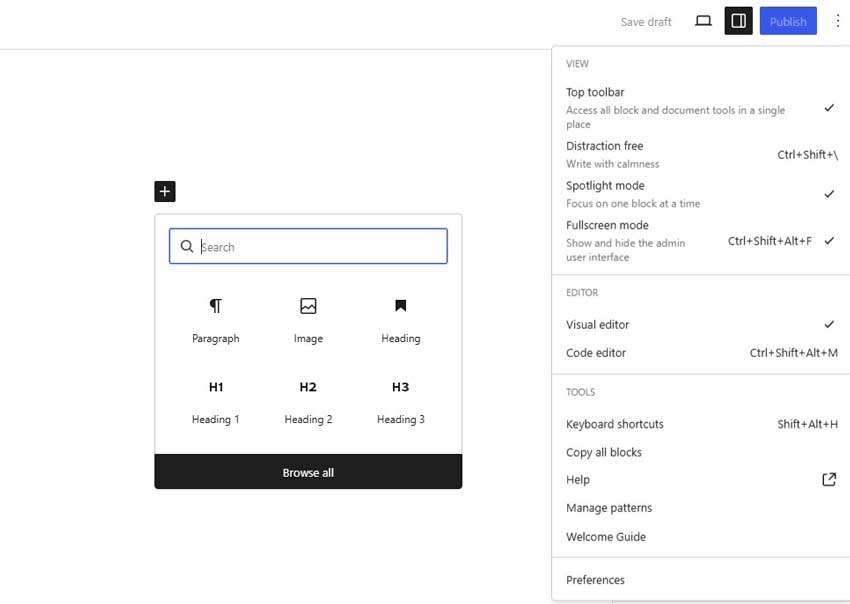
- Spotlight Mode: A new Spotlight mode helps you isolate and focus on content inside patterns and notes, while the rest of the editor fades into the background.
- Isolated Editor Mode: A new Isolated Editor mode lets you edit synced patterns, template parts, and navigation menus in a focused environment without distractions.
- New Blocks: WordPress 7.0 adds an Icons block and a Breadcrumbs block. The Breadcrumbs block supports archives, 404 pages, search result pages, and paginated content. Heading block levels are also now available as block variations.
- Block Design Tools: New tools include text line indent support, text column support, aspect ratios for wide and full images, dimension presets, width and height controls. The Gallery block gains lightbox support. The Cover block now supports video embeds as section backgrounds. The Grid block is now responsive-enabled.
- Viewport-based Block Visibility: Blocks can now be shown or hidden based on screen size, supporting responsive design directly from the editor without writing CSS.
- Font Library for All Themes: The Font Library screen for managing installed fonts is now enabled for all themes — not just block themes.
Real-Time Collaboration and Editing Enhancements
- Real-Time Co-editing: Multiple users can now edit the same post or page simultaneously. The system includes a new HTTP polling sync provider by default, with support for plugins or hosts to add WebSocket connections for faster real-time syncing.
- Stabilized Notes: WordPress 7.0 adds real-time syncing for inline notes, a keyboard shortcut for creating new notes, and stability improvements for the Notes feature introduced in WordPress 6.9.
- Visual Revision Comparisons: The editor now supports visual side-by-side comparison of revision versions, making it easier for teams to review drafts and approve changes.
- From WordPress.org: Real-time collaboration is opt-in during the beta period to allow broader feedback. It will not be active by default until the feature is ready for stable release.
Performance Improvements
- Client-Side Media Processing: WordPress 7.0 introduces client-side media handling, where the browser handles tasks like image resizing and compression before uploading to the server. This reduces server load and speeds up media uploads.
- Gutenberg 22.6 Enforced: Gutenberg 22.6, released February 25, 2026, will be included and enforced in the final WordPress 7.0. This affects block behavior, editor interactions, and performance characteristics.
Performance gains matter for SEO. Google uses Core Web Vitals, including page loading speed and interaction latency, as ranking signals. Faster media uploads and a more responsive editor benefit both visitors and search engine performance.
Recommended Blogs for You:
👉 9 Best WordPress Hosting for High Traffic Sites (100K+ Monthly Visitors)
👉 How to Install WordPress Using XAMPP: A Step-by-Step Guide
👉 What are Plugins in WordPress- The Ultimate Guide to WordPress Plugins
👉 How to Install Google Analytics on WordPress: A Step-By-Step Guide
Admin Dashboard Updates
Refreshed Default Style: WordPress 7.0 gives wp-admin a fresh default color scheme and a cleaner, more modern dashboard appearance while keeping the interface familiar to existing users.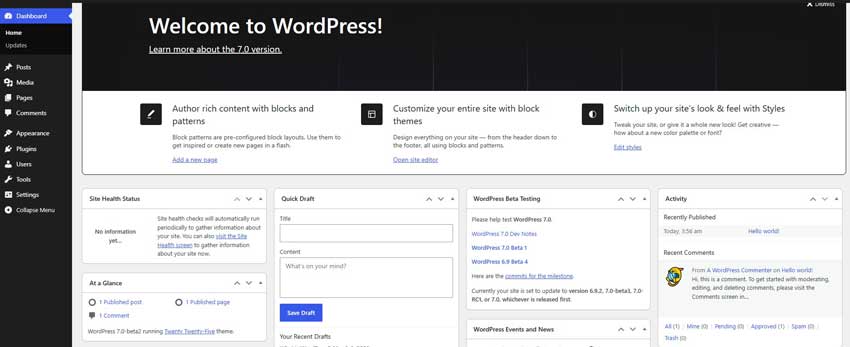
View Transitions: Cross-document view transitions create smooth visual movement from screen to screen as you navigate the admin area, replacing abrupt page loads with seamless transitions.
New Connectors UI Dashboard (Beta 2 addition): Introduced in Beta 2, a new Connectors page is accessible under Settings > Connectors. This central panel lets site owners manage all external AI service connections in one place — adding, deleting, and updating connections. Developers can extend it via a new connections-wp-admin-init hook and route-based architecture.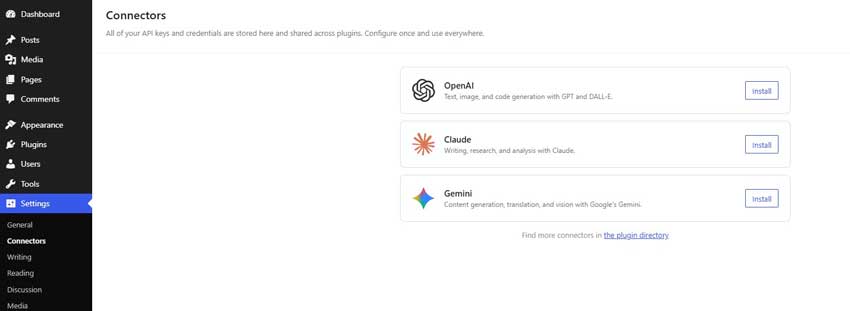
Developer-Focused Changes
- PHP Minimum Version: WordPress 7.0 officially drops support for PHP 7.2 and PHP 7.3. The new minimum supported version is PHP 7.4. PHP 8.2 or 8.3 is recommended for best performance and security. [WordPress VIP]
- WP AI Client API: A new provider-agnostic AI API built into WordPress core gives plugins and themes a standardized way to communicate with external AI models. No AI provider is bundled with WordPress, and no AI calls are made by default.
- PHP-Only Block Registration: Developers can now register blocks and auto-generate inspector controls entirely in PHP, without needing JavaScript. Blocks registered this way work with the Block API automatically.
- Client Side Abilities API: A new client-side registry for WordPress capabilities that allows plugins to register and run abilities in the browser, enabling richer and more consistent editorial workflows.
- Block Bindings Updates: Pattern overrides in Block Bindings now expand to custom dynamic blocks, giving block developers more flexibility when building reusable components.
- Iframed Editor Enforcement: Block authors must upgrade to Block API version 3 for compatibility with the always-iframed editor. The Make WordPress Core blog has published migration details.
How WordPress 7.0 Impacts Website Owners?
- For bloggers and content creators: Spotlight mode, viewport-based visibility, Gallery lightbox, Cover block video backgrounds, Font Library for all themes, and improved pattern editing tools directly improve the content creation experience.
- Plugin compatibility: Plugins that interact with the block editor, admin screens, or media uploading may need updates. Before upgrading, check plugin pages on WordPress.org and plugin developer blogs for 7.0-compatible releases.
- Theme compatibility: The always-iframed editor change is the key issue for theme authors. Classic themes whose blocks still use older Block API versions should upgrade to Block API version 3. Test on staging before going live.
- PHP version check (critical): This is the most important pre-upgrade action. WordPress 7.0 no longer supports PHP 7.2 or 7.3. Log in to your hosting control panel, verify your PHP version, and ask your host to upgrade to at least PHP 7.4 before updating WordPress. [WordPress VIP]
- Test before updating: Set up a staging copy of your live site, apply the 7.0 update there first, and test all key areas – pages, forms, checkout, custom code- before pushing to production.
Should You Upgrade to WordPress 7.0 Immediately?
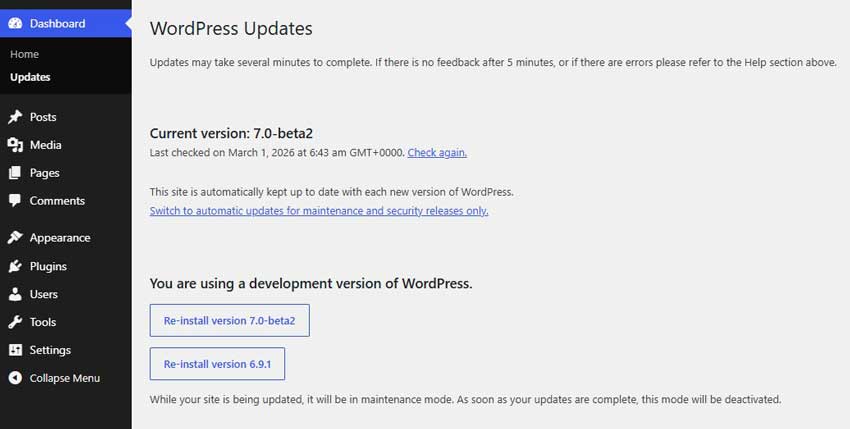
- Wait for the stable release: WordPress 7.0 is currently in Beta 2. The official stable version is scheduled for April 9, 2026. Do not upgrade live websites until the stable release is publicly available.
- Allow a settling period: After any major release, the community quickly identifies critical bugs. Waiting one to two weeks after the stable launch lets the team ship a quick patch if needed.
- Test on staging: Use a staging environment to test your full site, theme, plugins, forms, checkout, and custom code – before applying the upgrade to your live site.
- Create a full backup: Always back up your database and all site files before any major update. A current backup is your only reliable recovery option if something goes wrong.
- Check plugin updates: After the stable release launches, visit your Plugins screen to install any compatibility updates from developers before running the upgrade on your live site.
WordPress 7.0 vs Previous Version — Quick Comparison
Sources: WordPress.org Beta 1 |WordPress.org Beta 2 (February 2026)Feature WordPress 6.x WordPress 7.0 (Beta 2) Block Editor Single-user editing Real-time multi-user collaboration, iframed for all themes Collaboration Not available natively Live co-editing, HTTP polling sync, offline support Performance Standard media upload Client-side media processing (browser handles resize) Admin UI Classic design & color Refreshed color scheme, smooth view transitions AI Support None in core WP AI Client API (provider-agnostic, no bundled AI) New Blocks None added Icons block, Breadcrumbs block, Heading block variations PHP Minimum PHP 7.2+ PHP 7.4 minimum (8.2+ recommended) Dev Tools Standard Block API PHP-only block registration, Client Side Abilities API
Frequently Asked Questions
Q: Is WordPress 7.0 stable?
A: No. As of March 2026, WordPress 7.0 is in Beta 2. The final stable release is scheduled for April 9, 2026. Do not install beta versions on live production websites.
Q: What is new in WordPress 7.0?
A: Key new features include real-time co-editing, a WP AI Client API, a refreshed admin dashboard, smooth view transitions, new blocks (Icons, Breadcrumbs, Heading variations), client-side media processing, PHP-only block registration, and the new Settings > Connectors dashboard added in Beta 2. All sourced from wordpress.org.
Q: Should I install WordPress 7.0 Beta 2?
A: Only if you are a plugin or theme developer testing compatibility on a staging site. For quick testing, use WordPress Playground — no installation needed. Never install beta software on a live website.
Q: Will WordPress 7.0 break my plugins?
A: Plugins that modify the block editor, admin screens, media handling, or the Posts/Pages list may need updates. Check plugin pages on WordPress.org after the stable release and always test on staging first.
Q: How do I test WordPress beta safely?
A: Use the WordPress Beta Tester plugin on a staging site, download the beta ZIP from wordpress.org, or use WordPress Playground in your browser. All three options are listed in the official Beta 2 announcement on wordpress.org.
Conclusion
WordPress 7.0 is a milestone release. The introduction of real-time collaboration, a standardized AI API, block editor improvements, an updated admin interface, and new developer tools marks one of the most significant updates in recent WordPress history.
For bloggers and content teams, Spotlight mode, viewport block visibility, new blocks, and better pattern tools make everyday work faster. For developers, PHP-only block registration and the Client Side Abilities API open up more flexible, modern ways to build on WordPress.
The safe approach: wait for the April 9, 2026, stable release, verify your PHP version is 7.4 or higher, test everything on staging, and check plugin compatibility before upgrading your live site.
WordPress 7.0 is worth the upgrade — done safely and methodically.
Disclaimer: This article is based on pre-release Beta 2 software published by WordPress.org. Features are subject to change before the final April 9, 2026 stable release. Always verify the latest information at wordpress.org/news.