How to Set up Back Order in WooCommerce: The Ultimate Guide

Do you want to keep selling even when a product is out of stock? When your best-selling products go out of stock, you have two choices: lose potential customers or allow backorders in WooCommerce to keep sales flowing. Setting up WooCommerce backorders is a smart way to let customers order items that will be restocked soon.
WooCommerce backorders are a game-changing feature that lets customers purchase “available on backorder” items. This ensures you never miss a sale due to temporary stock shortages. This is a great strategy for keeping potential customers and generating interest in products as well.
We’ll show you how to set up WooCommerce back order in the simplest, non-coding way possible. This will help your online store stand out from other online retailers and boost sales by giving customers peace of mind when they place an order with you!
Key Takeaways
- Learn what a backorder is in WooCommerce.
- Follow step-by-step instructions to allow backorders in WooCommerce using a plugin.
- Implement effective WooCommerce backorder notification systems to keep customers informed.
- Understand when to put in backorder products.
- Discover proven strategies for managing WooCommerce products on backorder.
What is a Back-order?
Backorder occurs when there are not enough products in stock to meet all of your client’s orders. You cannot fulfill these immediately, but you will be able to continue fulfilling them at a later date once the desired product becomes available again!
When a company has backorders, it means that some inventory items are not available. However, store owners can still sell these products and make more sales for the business.
Letting customers order items on hold instead of saying “no” helps keep them happy. It also increases total revenue because you can keep selling even if the stock is low right now.
Things to Consider Before Setting up Back Order In WooCommerce
Before setting up back order in WooCommerce store, there are a few things you need to take into consideration. The first is whether or not your suppliers can keep up with the demand.
If you’re selling products that are highly popular and are constantly running out of stock, it might be worth considering setting up backorders.
However, if your suppliers can’t keep up with the demand, then you might want to rethink this strategy. Understanding the meaning of “allow backorders” is crucial for inventory planning.
When you allow backorders in WooCommerce, you’re essentially promising future delivery to customers who are willing to wait. Another thing to consider is the impact backorders will have on your customer satisfaction.
If you’re constantly running out of stock and having to backorder products, your customers might start to get frustrated. This is something you’ll need to weigh up before making a decision.
Setting up Back order in WooCommerce Using a Plugin
Sometimes it’s difficult to find the time or money necessary for setting up backorders. When you need to add WooCommerce back orders, using plugins is really helpful. They can automate the process.
You could create custom-made ones for specific tasks. For example, setting the limit for the backorder products with plugins. The plugin Back Order in WooCommerce helps with this.
Adding WooCommerce back orders to your site can be done in several ways. What’s important is finding the right plugin for you. The best WooCommerce backorder plugin should seamlessly integrate with your existing store setup.
Many store owners wonder whether to use backorder or back order terminology. Most quality plugins handle both variations automatically.
Here we are using a special WooCommerce page builder plugin named “WooLentor“. WooLentor is one of the most popular WooCommerce backorder plugins. It is easy to set up and use, even for beginners.
You can have it up and running in minutes, and you don’t need any coding experience or technical knowledge. It provides a number of features and benefits that make it an ideal solution for adding back order in WooCommerce.
Different Settings of the Back-Order Module of WooLentor
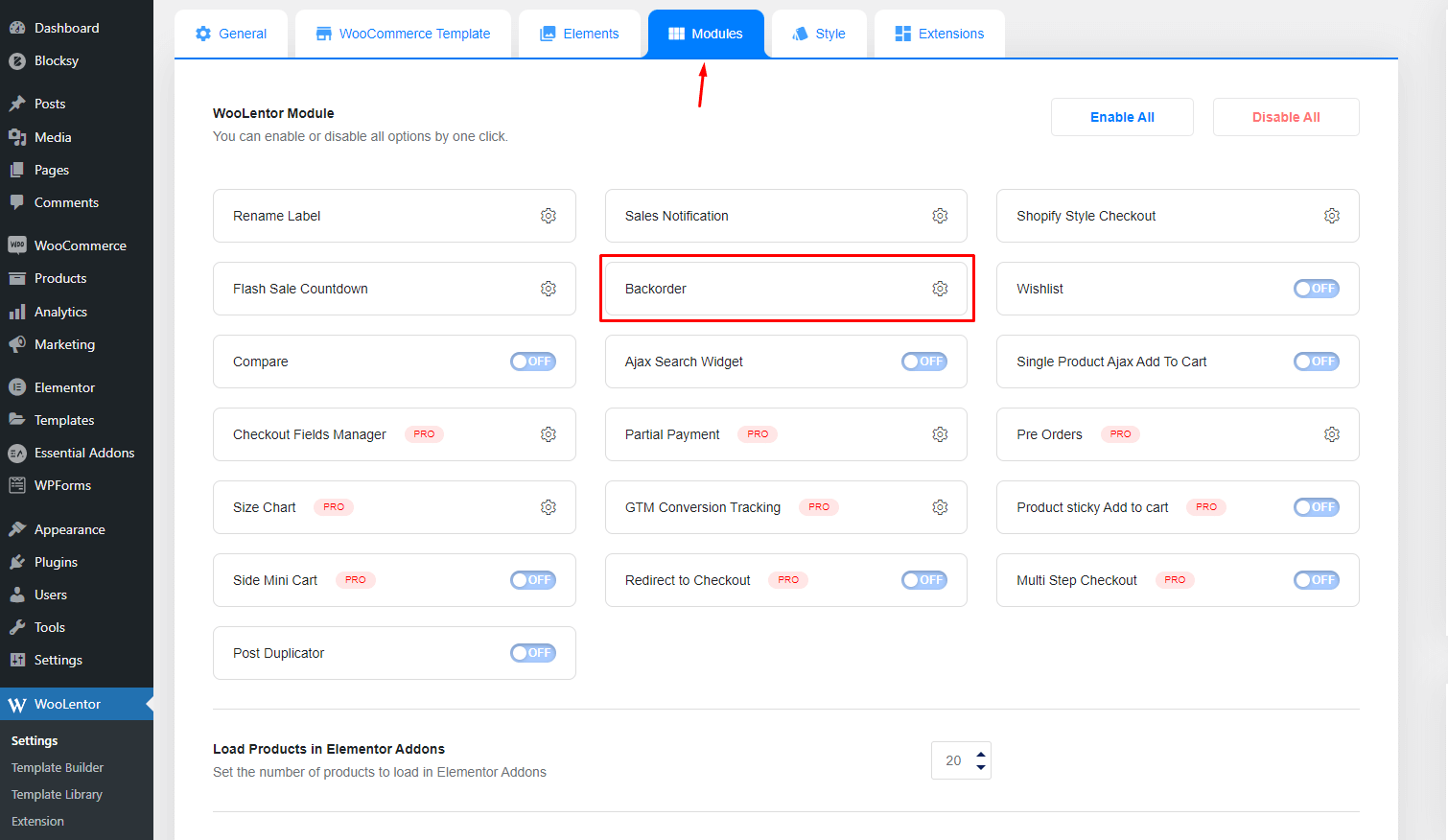
Backorder Limit
To prevent items from being purchased multiple times, set a Back Order limit. This applies to all “Backorder” goods on the entire website. You may also restrict each product individually by going to the “Inventory” page. If the number of backorders reaches a certain limit, a message will appear.
Availability Date
The availability date is a great way to manage inventory. It shows customers WooCommerce backorder notifications when their items will be available. You can set this as far back in the future or right now. This depends on your needs.
Availability Message
This option allows you to choose how you want your availability message to appear.
Step By Step: Procedure on How to Set Up Back Order in WooCommerce
Ready to put in backorder functionality on your WooCommerce store? This detailed section will show you exactly how to enable WooCommerce backorders. We’ll use ShopLentor’s intuitive interface.
Step-1: Enable the Back Order Module from the WooLentor Settings Panel
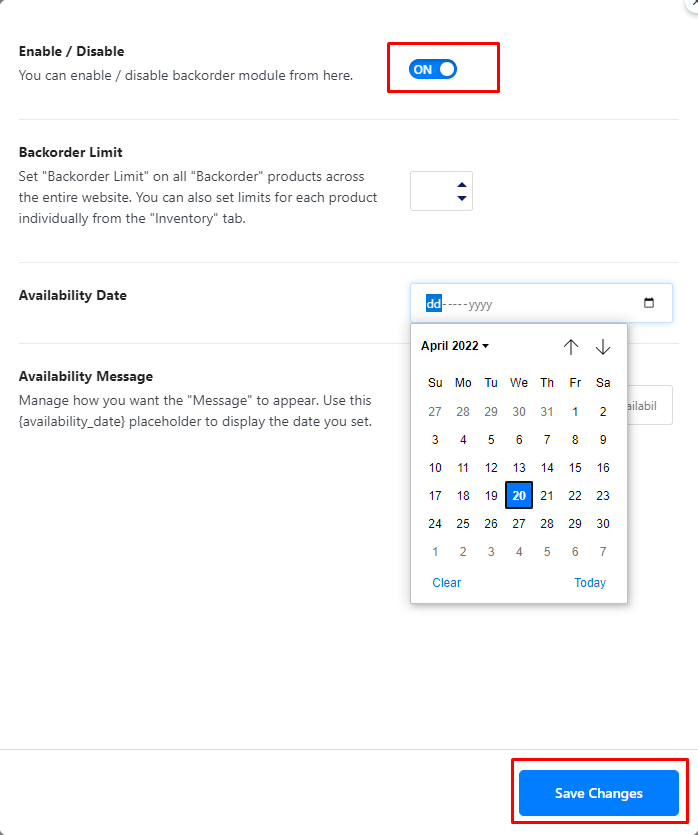
The Back Order Module will be activated once you enable it. You do this from the ShopLentor Settings Panel.
Step-2: Go to the Product Screen and Select the Specific Product for Backorder
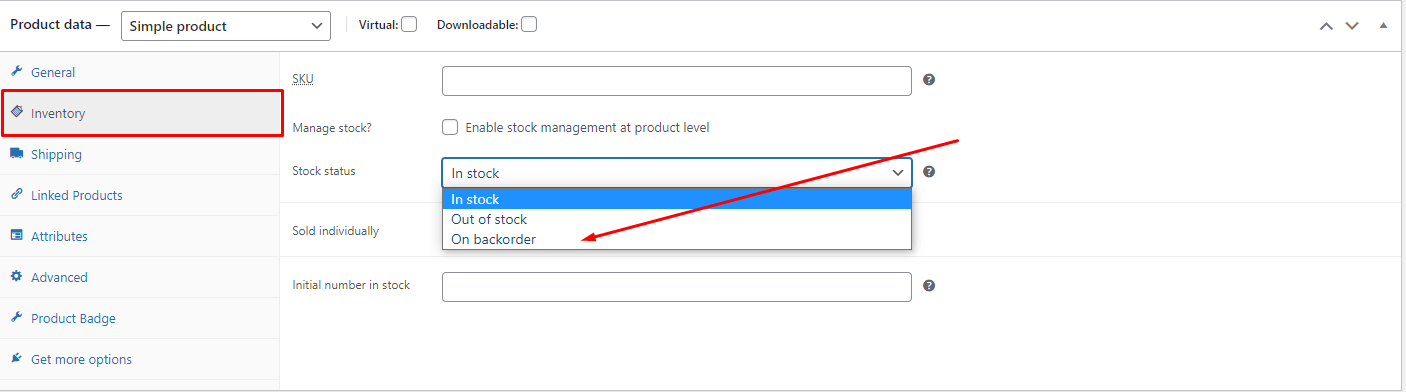
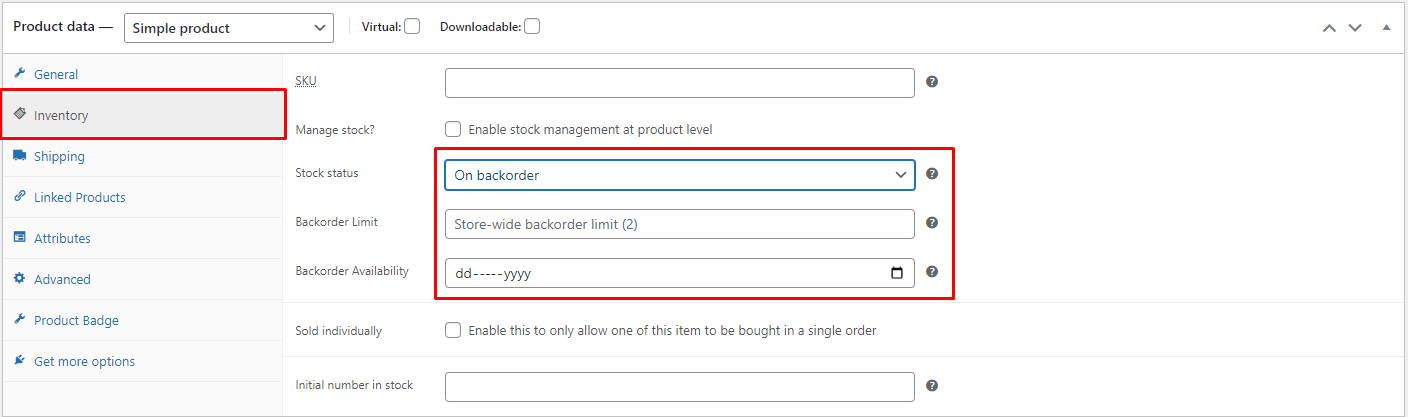
From the product panel, select the specific product. Then go to the inventory option and change the stock status to “on backorder,” and set the backorder limit and backorder availability time.
Click the Update button from the Publish section to save your work.
Step-3: Test the Backorder Product
It’s now time for you to see how your products look when added directly to the website. To do this, simply go to the product page of the particular product where you have just set the backorder! Your Back order in WooCommerce listed item will display its availability date as well as quantity limits or pricing information right on the screen so that it can be readily seen by all customers who visit their site.
Advantages of Back Order in WooCommerce
Let’s explore how WooCommerce backorders feature can become your competitive advantage. It can boost your store’s performance even during inventory challenges.
Create a tremendous demand
The strategy of creating massive demand by back-ordering is used to increase value. It also increases popularity in the eyes of customers. People will want them so badly they’ll wait until they become available again. It provides brands with another opportunity to generate additional revenue. This works for those who were already interested beforehand with this marketing plan.
Allows Modification
Backordering is simple to handle when compared with standard ordering. This is because it involves passing the order on to your supplier. This can be a great way to accommodate your clients. It works when they want extra customization options. It’s helpful if you’re looking for more variety in the product itself.
For example, if you’re offering products with different colors and styles, this works well. Customers can choose before their purchase, then this is straightforward. This will allow you to provide more options. This makes you more attractive to your customers.
Cost-cutting
The cost of transporting items is an important consideration for warehouses. Back order in WooCommerce eliminates the need to overstock. It also eliminates the associated expenses of keeping it in your warehouse.
Inventory is a form of capital. Therefore, having too much of it means investing money unnecessarily. This money could be spent on other things. For example, many high-end car companies choose to keep less inventory on hand. They order more as needed in order to minimize the money spent on stock.
Eliminating waste
Backordering is a great way to reduce extra inventory. It helps businesses that sell products like electronics or clothing months in advance. This way, they can avoid the risk of having unsold stock. When an item has been back-ordered, they can still meet demand with less stuff around. This saves money and space.
Improving brand image
Backorder campaigns are a great way to create brand awareness. They also improve the value of products. New products are released every year. This technique is used by businesses to appeal to customers’ interest and desire. They want to purchase what they want before it becomes out of stock.
Frequently Asked Questions
What is WooCommerce Backorder?
Back Order in WooCommerce is created when an item is not in stock. However, it is still being sold in your store. When an item is ordered and there are no items left in stock, the order will be placed on backorder. WooCommerce backorder allows consumers to reserve goods that aren’t currently available. These goods will become available soon.
What should I do to get started with back Orders?
Creating a Back Order in WooCommerce allows customers to place purchases on hold. This is for future delivery. You’ll need a plugin that provides this backorder feature.
For instance, the ShopLentor backorder module enables you to create a Back Order product. This allows consumers to reserve items that aren’t presently available. They will be restocked soon.
How do I fulfill a backorder?
Backorders can be fulfilled in several ways. The most common way is to place the order on hold. Then ship the products as soon as they become available. Alternatively, you can choose to cancel the back order and refund the customer.
What are the shipping options for backorders?
The shipping options for backorders will depend on the shipping settings. These are the settings that you have chosen for your store.
What is the difference between a backorder and a pre-order?
A backorder is created when there isn’t enough stock available. You cannot fulfill the demand for a product. Even though the product may not be available in the inventory now, it could be in production. It might be on its way from your supplier. It could still be being produced.
On the other hand, a pre-order is created when an item is not in stock now. It will not be available until the product release date.
What happens when a customer places an order for a product that’s out of stock?
When a customer places an order for a product that’s out of stock, their order will be placed on hold. This continues until the product becomes available again. Once the product is back in stock, the WooCommerce Backorder system will automatically fulfill the order. It will send the customer an email notification.
Can I set a maximum quantity for backorders?
Yes, you can set a maximum quantity for backorder in WooCommerce. To do this, go to the Settings page and select the Products tab. Then, scroll down to the Inventory section. Enter a number in the “Maximum quantity” field. This will ensure that customers can only place an order up to the specified maximum quantity.
Does WooCommerce allow backorders on all products?
Yes, WooCommerce allows backorders on all products in your WooCommerce store.
Conclusion
Adding back orders in WooCommerce is a great way to increase your sales. They help customers feel confident in their purchase, and they allow you time to restock if necessary, which can be especially helpful during peak seasons like summer or winter when demand may exceed supply by as much as 10 times.
If you want to avoid the hassle and cost of setting up a WooCommerce backorder system, use a plugin instead. A simple plugin can handle everything for you with less work and expense.
The ShopLentor plugin is an easy-to-use plugin that handles everything for setting a backorder. You’ll have no worries about coding either, as it’s all done for you by these plugins, which also save you money.
ShopLentor plugin provides a comprehensive back-order solution that allows you to manage back orders effectively and easily.
Ready to make backorders easy? Get ShopLentor today and keep your customers happy while boosting your sales!