How to Get an Instagram Access Token in a Few Steps

Want to connect your Instagram content to your website or app, but unsure how to get an Instagram access token? You’re not alone!
Over 200 million businesses use Instagram monthly, and integrating your feed can significantly boost engagement and brand visibility.
In this blog post, we will walk you through the steps of how to generate an Instagram access token. This is a crucial step for Instagram feed integration and should not be skipped.
Once you generate an access token, you can start displaying your Instagram posts on your website, analyze engagement data, and automate your social media workflow. Let’s get started.
- Key Takeaways
- What is an Instagram Access Token, And Why Do You Need One?
- Prerequisites: What You Need Before Getting Started
- How to Generate Your Instagram Access Token
- What to Do With Your Instagram Access Token Once You Have It
- Tips for Using Your Instagram Access Token
- Common Issues and How to Fix Them
- Frequently Asked Questions
Key Takeaways
- Understand what an Instagram access token is and why it’s essential for secure data access.
- Learn how to get an Instagram access token using the official Meta for Developers platform.
- Follow the Instagram token generation steps clearly explained for beginners and non-developers.
- Discover the difference between Instagram Basic Display API and Graph API.
- Understand token expiration and how to refresh your Instagram API credentials.
- Discover how to create Instagram access tokens to integrate your feed with apps, websites, and third-party tools.
What is an Instagram Access Token, And Why Do You Need One?
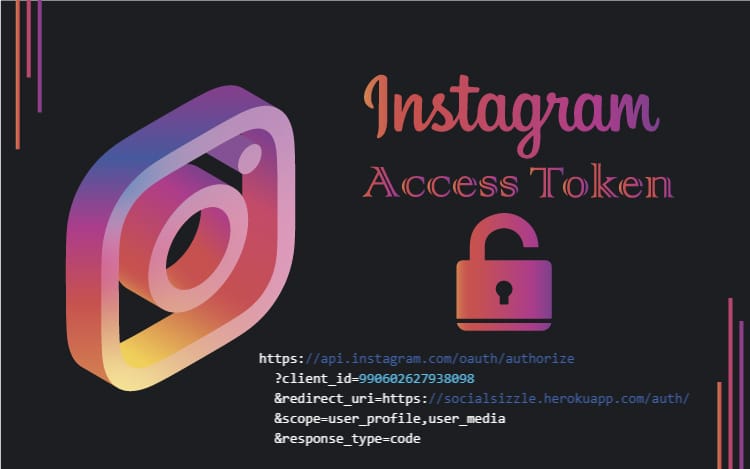
An Instagram access token is an OAuth 2.0 authorization code that allows an individual or business to connect with an application to access the Instagram Basic Display API securely.
Without an access token, developers cannot use the Instagram API’s full range of features. This includes retrieving user media, accessing profile information, posting content, and getting insights into user interaction with posts.
Access tokens provide users with the necessary security measures to make sure that protected data cannot be accessed without express consent from the user themselves.
Think of it as a digital key that grants your website or application permission to access specific Instagram data on your behalf. As such, businesses need to have one if they plan to use Instagram feed as part of their marketing strategy.
There are two main types of Instagram tokens:
- Short-lived tokens: Valid for 1 hour
- Long-lived tokens: Valid for 60 days (can be refreshed)
Prerequisites: What You Need Before Getting Started
Before you can generate an Instagram access token, ensure you have the following:
1. Automate posting (requires additional permissions)
An Instagram Business or Creator Account
- Personal accounts won’t work with the API
- Convert your account in Instagram Settings > Account > Switch to Professional Account
2. A Meta (Facebook) Developer Account
- Visit developers.facebook.com
- Log in with your Facebook account
- Accept the developer terms
3. A Website or Application
- You’ll need a valid URL for configuration
- Local development URLs (localhost) are acceptable for testing
4. Basic Understanding of Your Use Case
- Display Instagram feed on website
- Analyze engagement metrics
How to Generate Your Instagram Access Token
Generating an Instagram access token for your business or brand is easier than you might think. We’ll break this into four main phases for clarity.
Step 1: Setting Up Meta for Developers
2. Create a New App
- Click on “Create App”
- Choose “Consumer” or “None” as the app type (not “Business”)
- Fill out the basic app details:
- App name (e.g., “My Instagram Integration”)
- Contact email
- App purpose (select “Yourself or your own business”)
Step 2: Creating and Configuring Your App
3. Add Your Platform
- Scroll down and click “Add Platform”
- Select your platform (e.g., Website)
- Enter your site URL including https:// to link it
4. Set Up Instagram Basic Display
- Find “Instagram Basic Display” (not Instagram Graph API)
- Click “Set Up” to enable Instagram access for your app
- Configure the following OAuth Redirect URIs:
- For production:
https://yourdomain.com/auth/ - For testing:
https://localhost:3000/auth/
- For production:
Step 3: Testing and Authorization
5. Configure Instagram Testers
- Under Instagram Basic Display > Roles
- Click “Add Instagram Testers”
- Enter the Instagram username of the account you want to connect
- The user will receive an invitation that must be accepted
6. Accept the Tester Invitation
- Log in to your Instagram account
- Go to Settings > Apps and Websites > Tester Invites
- Accept the pending invitation from your app
Step 4: Token Generation and Storage
7. Generate Your Access Token
- Return to developers.facebook.com
- Select your app and go to Instagram Basic Display > User Token Generator
- Click “Generate Token” for your test user
8. Authorize Your Account
- Review the requested permissions
- Your short-lived access token will be displayed
Important: This token expires in 1 hour!
9. Exchange for a Long-Lived Token
- Copy your short-lived token immediately
- Use the following API endpoint to exchange it:
https://graph.instagram.com/access_token?grant_type=ig_exchange_token&client_secret={app-secret}&access_token={short-lived-token}This returns a long-lived token valid for 60 days.
What to Do With Your Instagram Access Token Once You Have It
Having access to an Instagram access token opens the door to an exciting world of possibilities. With it, you can have full control over the accounts and data associated with it.
Then, it’s important to understand how to use this token safely and responsibly once you get it. You should consider creating backups as soon as possible – you never know when an account might be compromised or otherwise become inaccessible. 
You should also think about using the access token for analytics purposes. By tracking engagement levels and audience demographics, you can optimize your Instagram presence more effectively.
With careful management, your Instagram access token can become a valuable asset in growing your brand’s visibility through the platform.
Tips for Using Your Instagram Access Token
When managing your Instagram access token, there are several tips to keep in mind.
- Use Environment Variables: Store tokens in .env files and add them to .gitignore
- Monitor Expiration: Set calendar reminders 45 days after generation to refresh tokens
- Check Rate Limits: Instagram API has 200 requests per hour for most endpoints
- Regular Audits: Review which apps have access monthly through Instagram Settings
- Secure Transmission: Only send tokens over HTTPS connections
- Principle of Least Privilege: Request only the permissions you actually need

Doing so will provide a layer of security, preventing any misuse of information or unauthorized access. Taking all of these steps will help give you peace of mind that your Instagram access token is being managed safely and securely.
Common Issues and How to Fix Them
1. “Invalid OAuth 2.0 Access Token” Error
Solution: Your token has likely expired. Generate a new one and ensure you’re using the long-lived token.
2. “Permission Denied” When Accessing Media
Solution: Check that your app has the required permissions. You may need to re-authorize with the correct scopes.
3. Token Expires Too Quickly
Solution: You’re using a short-lived token. Exchange it for a long-lived token immediately after generation.
4. Can’t Find Instagram Basic Display in Products
Solution: Ensure you created a Consumer app, not a Business app. Business apps use Graph API instead.
5. Tester Invitation Not Appearing
Solution: The Instagram account must be public during the testing phase. Switch to public temporarily.
6. API Returns Empty Data
Solution: Check if the Instagram account has posted content. Private accounts may also cause this issue.
Frequently Asked Questions
How can I get an Instagram token if I’m managing multiple client accounts?
You’ll need to generate a separate Instagram access token for each client using their account credentials and app permissions. Consider using a token management system to organize multiple tokens securely.
What should I do if my Instagram API token stops working?
If your token expires or breaks, revisit the Meta for Developers platform to regenerate your Instagram access token and reauthorize your app. Check the error message first – it might just need refreshing rather than full regeneration.
Can I use the same access token for both my app and website integration?
Yes, as long as the Instagram business account token has the required permissions, you can use it across platforms. However, for security, consider generating separate tokens for different environments.
Are there risks if I don’t store my Instagram developer token securely?
Yes, leaking your developer token may lead to unauthorized data access or API misuse, which can violate Instagram’s terms of service. This could result in your app being banned and potential data breaches.
What’s the difference between Instagram Basic Display API and Graph API?
Basic Display API is for accessing basic profile info and media from any Instagram account. Graph API is for Instagram Business and Creator accounts only, offering advanced features like insights and content publishing.
Can I automate the token refresh process?
Yes! Use the refresh endpoint before your token expires. Implement a cron job or scheduled task to refresh tokens automatically every 45 days.
Final Thoughts
Instagram access tokens are a great way to keep track of your Instagram usage and protect yourself from unauthorized access. They allow you to have control over what data and content is being shared, giving you full visibility into your activity on the app.
An Instagram user access token can be thought of as a key to your account, so it’s important to safeguard it to keep your information secure.
For those who take their Instagram presence seriously, an access token is essential. It helps manage the experience more efficiently and effectively by allowing users to track all partnerships, posts, and engagement with followers in real-time.
Now that you’ve learned how to get an Instagram access token, you’re ready to integrate your feed wherever you need it. Whether you’re building a portfolio website, an eCommerce platform, or a social media dashboard, the possibilities are endless.
Ready to unlock your Instagram integration? Follow the steps and get started today! Need help? Drop a comment below and we’ll guide you through the process.