How to Use AI to Write Better Product Descriptions for WooCommerce (Without Losing Your Brand Voice)

Quick Answer: You can use AI to write better product descriptions in WooCommerce by feeding it structured product data, writing clear prompts, and then editing the output for accuracy, SEO, and brand voice before publishing. Start with a detailed product brief, generate a first draft, then refine the bullets, tone, and keywords to create unique, conversion-focused product copy that helps shoppers and ranks in search.
If you manage a WooCommerce store, you already know how hard it is to write unique, compelling product descriptions at scale. Copying manufacturer text or publishing unedited AI output might save time today, but both hurt rankings and conversions over the long term.
AI can genuinely speed up how you write ecommerce product descriptions as long as you treat it as a drafting assistant, not a shortcut. In this guide, you’ll learn a practical workflow for using AI in WooCommerce: how to prepare product data, write better prompts, edit AI copy for SEO and conversions, and keep descriptions unique across your entire catalog.
What Are AI Product Descriptions for WooCommerce?
AI product descriptions for WooCommerce are product texts generated by an AI model such as OpenAI, Claude, or Google Gemini from prompts and product data you supply, then manually reviewed and edited before being published on your product pages.
These descriptions can include:
- Short and long product summaries
- Feature and benefit bullet lists
- SEO meta descriptions and title tags
- Product FAQs and supporting copy sections
WooCommerce store owners use AI writing tools because they speed up content creation, especially for large catalogs. The result, however, is only as good as the editing and fact-checking that follow; AI-generated text requires human review before it goes live.
Why Use AI for WooCommerce Product Descriptions?
Time and Scale
Writing hundreds of unique product descriptions by hand is difficult and expensive. AI tools can turn structured product data into first drafts in seconds, making it realistic to give every product a complete description, a bullet list, and filled meta fields.
Consistency and SEO
AI writing tools can help you:
- Apply a consistent tone and structure across similar products
- Include relevant terms in WooCommerce product copy, product page SEO, and eCommerce product descriptions without forcing keywords
- Draft matching meta descriptions and image alt text that align with on-page copy
Structured, Scannable Copy
Shoppers scan before they read. AI can help you produce structured descriptions with headers, bullets, and spec tables faster than writing from scratch — formats that both shoppers and search engines find easier to read and index.
If you want to control how those descriptions display visually on your product pages, exploring WooCommerce Elementor widgets can help you build better-looking product layouts without custom code.
Where AI Helps and Where It Can Go Wrong
Strengths of AI Writing
AI is strong at:
- Turning bullet-point specs into natural language descriptions
- Brainstorming benefit-focused copy based on features and use cases
- Producing multiple copy angles quickly for testing
Limitations and Risks
AI can go wrong when:
- It invents specs, materials, or compatibility claims that don’t exist in your product data
- It repeats generic phrases (“high-quality,” “innovative,” “best on the market”) without substance
- It produces near-identical descriptions across similar products, which can be treated as thin or duplicate content
- There is no human review and fact-checking before publishing
According to Google’s official guidance, using AI or automation to generate content primarily to manipulate search rankings violates its spam policies.
However, AI-assisted content that is original, helpful, and demonstrates E-E-A-T (Experience, Expertise, Authoritativeness, Trustworthiness) can rank well — the quality of the content matters, not the tool used to create it.
As Google’s Search Central documentation puts it: “Appropriate use of AI or automation is not against our guidelines.”
The practical takeaway: thin, copy-pasted AI descriptions carry real SEO risk. Edited, fact-checked, and brand-aligned AI-assisted copy does not.
How to Write Better WooCommerce Product Descriptions with AI
Step 1: Prepare Your Product Information Before Prompting AI
AI performs best when you provide structured, specific inputs — not vague instructions like “Write a great product description.”
Before you open any AI tool, gather:
- Product type and use case (e.g., “Stainless steel water bottle for gym and travel”)
- Key differentiators (capacity, unique features, materials, certifications)
- Exact specs (dimensions, weight, materials, compatibility, care instructions)
- Target audience (who uses this and in what context)
- Brand voice notes (formal vs. casual, playful vs. serious)
You can store this information in WooCommerce product fields, custom attributes, or a spreadsheet that you use as input for AI-integrated tools.
Step 2: How to Write Better AI Prompts for Product Descriptions
A Simple Prompt Framework
Use this structure to get more useful product copy from AI:
textYou are a copywriter for a WooCommerce store. Write a [short/long] product description
for a [product type] that matches a [brand voice: playful/modern/minimal] tone.

Here are the product details:
- Audience: [who it's for]
- Key features: [bulleted list]
- Specs: [size, materials, weight, compatibility]
- Unique benefits: [why it's better than alternatives]

Write:
1. A 1–2 sentence overview naming the product and its most important attributes.
2. A short paragraph explaining how it helps the customer.
3. 5–8 bullet points covering specs, materials, dimensions, compatibility, and care instructions.
4. A meta description under 160 characters that includes the product name and one key benefit.
Do not invent features, materials, or compatibility claims that are not listed above.
This structure gives AI enough context to produce useful copy and reduces the chance of vague or invented claims.
Prompt Tips for Better Results
- Mention “WooCommerce product page” so the AI uses suitable ecommerce language
- Ask for bullets, headings, and meta descriptions explicitly — AI won’t add them by default
- Always include the constraint: “Do not invent features or materials that are not listed above”
- Specify tone clearly; without guidance, most AI models default to generic marketing language
Reusable WooCommerce AI Prompt Templates
Copy, fill in the brackets, and use these directly with any AI writing tool.
Template 1 — Simple Physical Product
textYou are writing for a WooCommerce product page.

Product: [Product name]
Type: [e.g., kitchen tool, clothing item, fitness gear]
Audience: [e.g., home cooks, gym-goers, remote workers]
Brand voice: [e.g., friendly and practical / clean and minimal / bold and energetic]

Key features:
- [Feature 1]
- [Feature 2]
- [Feature 3]

Specs:
- Material: [material]
- Dimensions: [size/weight]
- Compatibility: [if applicable]
- Care: [washing/storage instructions]

Write:
1. A 2-sentence product overview (include the product name and top benefit).
2. A 3-sentence paragraph describing who it's for and how it helps them.
3. 5–7 spec bullets (material, dimensions, compatibility, care).
4. A meta description under 160 characters.

Do not invent features. Only use the information above.
Template 2 — Product Variant (e.g., different size or color)
textYou are writing a WooCommerce variant description. The base product is [base product name].
This specific variant is: [variant name — e.g., "1L version in Midnight Blue"].

What's different about this variant:
- [e.g., larger capacity makes it better for full-day hydration]
- [e.g., color suits professional and outdoor use equally]

Shared specs still apply:
- Material: [material]
- Key feature: [e.g., leak-proof lid, BPA-free]

Write:
1. A 2-sentence description that starts with the variant detail — not the base product.
2. 3–4 bullets specific to this variant's use case or audience.
3. A meta description under 160 characters that mentions the variant.

Do not repeat the same sentences used in the base product description.
Template 3 — Digital Product or Plugin/Theme
textYou are writing for a WooCommerce digital product page.

Product: [Plugin/theme/digital asset name]
Type: [e.g., WordPress plugin, Elementor template kit, printable planner]
Audience: [e.g., WooCommerce store owners, freelancers, small business owners]
Brand voice: [e.g., clear and professional / conversational and helpful]

What it does: [1–2 sentences]
Top 3 use cases:
- [Use case 1]
- [Use case 2]
- [Use case 3]

Key features:
- [Feature 1]
- [Feature 2]
- [Feature 3]

Compatibility: [e.g., WordPress 6.x, WooCommerce 8.x, Elementor 3.x]

Write:
1. A 2-sentence overview of what the product does and who it's for.
2. A short paragraph describing the main problem it solves.
3. 5–6 feature bullets (action-oriented: "Works with...", "Includes...", "Compatible with...").
4. A meta description under 160 characters.

Avoid marketing superlatives. Be specific and factual.
Step 3: Editing AI-Generated Product Copy for Clarity, SEO, and Conversion
AI output is a starting point — not a finished draft.
Focus your edits on three areas:
1. Accuracy First
- Check every spec, dimension, and compatibility claim against your actual product data before publishing
- Remove generic claims like “best quality” unless supported by verifiable evidence (reviews, ratings, certifications)
- Add real numbers wherever possible “holds 750 ml” is stronger than “large capacity”
2. SEO and Search Intent
- Make sure the first sentence clearly names the product and its key attributes; this helps search engines and AI answer systems understand the page at a glance
- Include relevant terms: ecommerce product descriptions, product page SEO, conversion copy, only where they fit naturally
- Write a unique meta description per product: “what it is + key attribute + one trust or logistics signal (rating, shipping, availability)”
3. Brand Voice and Conversion
- Replace generic phrases with specific benefits tied to your audience’s real use cases
- Adjust tone to match your store: more playful, more premium, or more direct depending on your brand
- Add micro-copy like “Perfect for…”, “Ideal when…”, or “Built for…” to make descriptions feel grounded and specific
Step 4: Keeping Descriptions Unique Across Similar WooCommerce Products
Large WooCommerce stores often sell many variants of similar products. Without care, AI will generate near-identical copy across them.
To keep descriptions unique:
- Supply variant-specific details in each prompt (size, color, use case differences)
- Ask AI to focus on a distinct scenario for each version (e.g., “compact travel version vs. large desk version”)
- Avoid reusing identical template sentences — vary the opening line at minimum
- Add a variant-specific FAQ that answers real questions about that exact mode.
Elementor Workflow: Using HT Mega AI Writer for Product Content
If you build product pages or supporting content in Elementor, HT Mega AI Writer lets you generate and refine copy directly inside your page builder. It supports OpenAI, Claude, and Google AI (Gemini), and is 100% free to use with your own API key — no extra subscription required.
HT Mega is one of the most feature-rich Elementor addons for WooCommerce available for WordPress, combining content widgets, product layouts, and AI writing in a single plugin.
Setting Up HT Mega AI Writer
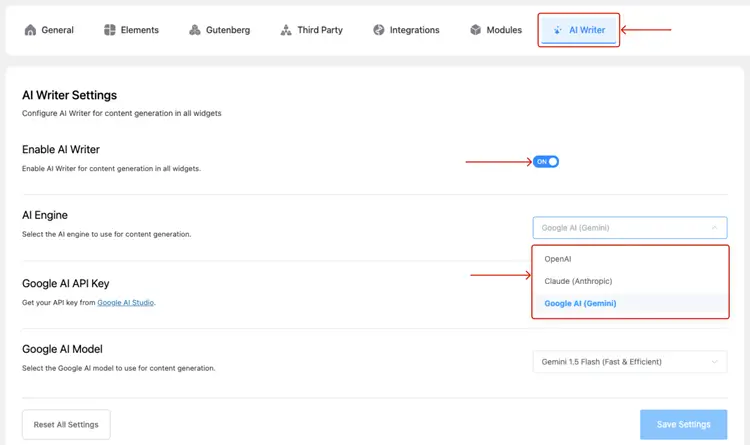
- From your WordPress dashboard, go to HT Mega → Add-ons → AI Writer.
- Make sure the Enable AI Writer switch is turned ON.
- Select your preferred AI Engine — OpenAI, Claude, or Google AI (Gemini).
- Paste your API Key from the respective platform.
Tip: Google AI (Gemini) offers a free API key via Google AI Studio, making it possible to use AI Writer at no cost.
- Choose your AI Model (e.g., Gemini 1.5 Flash for Google AI).
- Click Save Settings.
Generating Content in Elementor
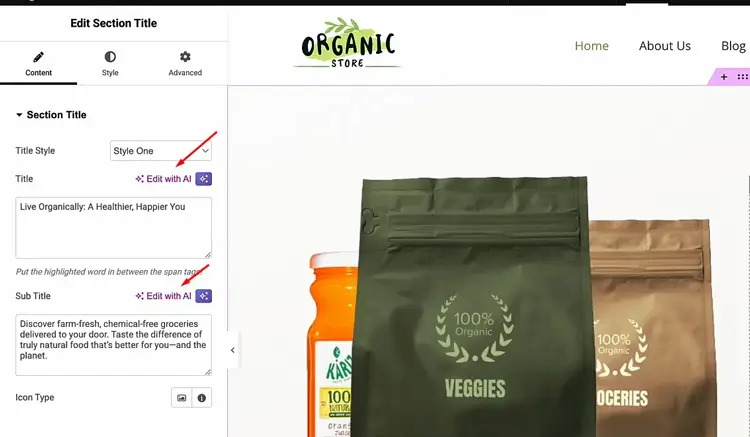
- Open any page in Elementor and edit a widget — Heading, Text Editor, or Info Box.
- Look for the “✨ Edit with AI” icon next to the content fields (Title, Description, etc.).
- Click the icon to open the AI Writer modal.
- Enter your prompt using the product templates above.
- Click Generate to see the AI-produced result.
- Click Use This Content to apply it directly to the widget field.
Note: If the AI icon doesn’t appear, confirm that AI Writer is enabled and that your API key is saved correctly in the settings. HT Mega does not store or charge for AI usage — all requests go directly through your API key.
This workflow fits well when you’re writing feature highlight sections that sit above the standard WooCommerce description, building comparison or FAQ pages that support product categories, or drafting different copy angles to test on product landing pages.
If you want to go further and fully customise your WooCommerce product page layout in Elementor, the ShopLentor WooCommerce page builder is a dedicated solution worth exploring alongside HT Mega.
For a full setup walkthrough, see the official documentation: Generate Elementor Content with HT Mega AI Writer.
Video Presentation
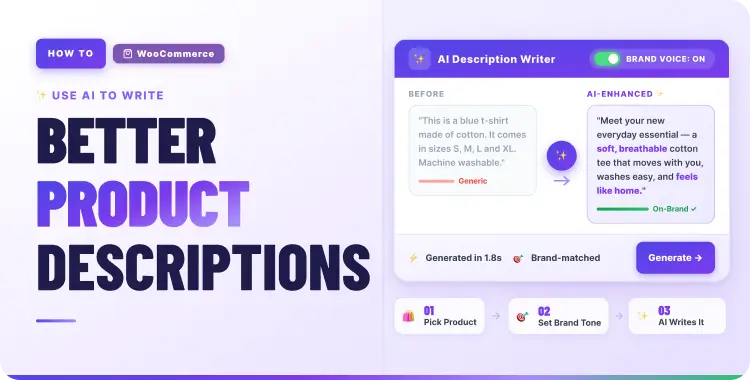
Before-and-After Example: AI-Assisted WooCommerce Product Description
Product context:
- Product: 750 ml insulated stainless steel water bottle
- Audience: Fitness enthusiasts and commuters
- Key features: Double-wall insulation, keeps drinks cold for 24 hours, leak-proof lid, BPA-free materials
❌ Before — Typical Weak Description
“This is a high-quality stainless steel water bottle. It is perfect for any occasion and keeps your drink at the right temperature. You will love using it at the gym or outdoors.”
Problems:
- Vague and unverifiable (“high-quality,” “perfect for any occasion”)
- No concrete specs — no capacity, no insulation duration, no materials
- Nothing for search or AI systems to extract as a factual answer
✅ After — AI-Assisted and Human-Edited
Stay hydrated all day with our 750 ml insulated stainless steel water bottle, designed for workouts, commutes, and weekend adventures. Double-wall insulation keeps drinks cold for up to 24 hours, while the leak-proof, BPA-free lid prevents spills in your bag or backpack.
- Capacity: 750 ml — ideal for gym sessions and full-day use
- Materials: Food-grade stainless steel with BPA-free plastic lid
- Insulation: Double-wall construction keeps drinks cold for 24 hours
- Design: Slim profile fits most car cup holders and bike bottle cages
- Care: Hand wash recommended; do not use in the dishwasher or microwave
Meta description: “Insulated 750 ml stainless steel water bottle — keeps drinks cold for 24 hours with a leak-proof, BPA-free lid. Perfect for gym and commute.”
The “after” version took an AI draft and added real specs, removed vague language, and structured the copy so both shoppers and search systems can parse the key facts at a glance.
WooCommerce Product Description Checklist
Use this before publishing any AI-assisted product description:
- First sentence clearly names the product type and key attributes
- All specs are specific and verified against actual product data
- Benefits are tied to real use cases for your target audience
- No invented features or false claims
- This product has a unique description — variants use different scenarios or specs
- Meta description is under 160 characters: “what it is + attribute + trust signal”
- Bullets cover specs, materials, dimensions, compatibility, and care instructions
- Image alt text is factual and descriptive (no keyword stuffing)
- Optional: FAQ block answers 5–10 real customer questions about this product
- Human review completed; accuracy confirmed before publishing
Common Mistakes to Avoid
- Publishing without review: AI output should never go live without a human accuracy check
- Generic language at scale: “High-quality,” “innovative,” and “best-in-class” add no value — replace with verifiable specifics
- Near-duplicate variant descriptions: Each variant needs product-specific inputs, not the same prompt recycled
- Ignoring brand voice: AI defaults to neutral tone — align every description to how your store actually sounds
- Skipping meta descriptions and alt text: Both matter for product page SEO and search visibility
- Treating AI as a product expert: AI doesn’t know your product — you do. Always supply the details
Schema Markup Recommendations
Adding structured data to your WooCommerce product pages and blog posts helps search engines understand your content and can improve how your pages appear in search results.
For WooCommerce Product Pages
Add Product schema to each product page so search engines can display price, availability, and ratings in results:
json{
  "@context": "https://schema.org",
  "@type": "Product",
  "name": "Your Product Name",
  "description": "Your product description here.",
  "sku": "YOUR-SKU",
  "brand": {
    "@type": "Brand",
    "name": "Your Brand Name"
  },
  "offers": {
    "@type": "Offer",
    "price": "29.99",
    "priceCurrency": "USD",
    "availability": "https://schema.org/InStock"
  }
}
For Product Pages with Reviews
If your WooCommerce products have customer reviews, add AggregateRating to surface star ratings in search results:
json{
  "@context": "https://schema.org",
  "@type": "Product",
  "name": "Your Product Name",
  "aggregateRating": {
    "@type": "AggregateRating",
    "ratingValue": "4.7",
    "reviewCount": "84"
  }
}
For Product FAQ Sections
If you add an FAQ block to your product pages (answering questions like “Does this fit X?” or “What’s the return policy?”), mark it up with FAQPage schema:
json{
  "@context": "https://schema.org",
  "@type": "FAQPage",
  "mainEntity": [
    {
      "@type": "Question",
      "name": "Does the 750 ml bottle fit in standard car cup holders?",
      "acceptedAnswer": {
        "@type": "Answer",
        "text": "Yes, the slim profile fits most standard car cup holders and bike bottle cages."
      }
    }
  ]
}
Implementation note: On WordPress and WooCommerce, the easiest way to add schema is with a plugin like Rank Math or Schema Pro. Both support Product, FAQPage, and Article schema without requiring manual JSON-LD editing.
Frequently Asked Questions
Can AI-generated product descriptions rank in Google Search?
Yes. According to Google’s official guidance, “appropriate use of AI or automation is not against our guidelines.” AI-generated content that is helpful, accurate, and demonstrates E-E-A-T can rank well. Content that is thin, generic, or produced primarily to game rankings is what Google’s systems penalize, not AI use itself.
Do I need to disclose AI usage on product pages?
Google’s guidance states that AI disclosures are useful “for content where someone might think ‘How was this created?'” For product descriptions, where shoppers expect factual information, a clear internal review process matters most. A sitewide AI content policy or footer note is a reasonable approach if AI is heavily involved in your content workflow.
How do I prevent AI from inventing product features?
Provide complete, specific specs in your prompt and include an explicit constraint: “Do not invent features, materials, or compatibility claims that are not listed above.” Always review AI output against your actual product data before publishing — this step cannot be skipped.
Can I use AI to generate meta descriptions and alt text for WooCommerce?
Yes. Include them explicitly in your prompt. Keep meta descriptions under 160 characters following the “what it is + key attribute + trust signal” pattern, and write alt text as factual, descriptive phrases that describe the image — not keyword lists.
How does Elementor fit into a WooCommerce AI content workflow?
Elementor is commonly used to build product landing pages, category feature sections, and supporting guides that funnel traffic to WooCommerce products. Tools like HT Mega AI Writer let you generate and edit AI copy inside Elementor widget fields, keeping your drafting workflow inside your page builder.
Is HT Mega AI Writer free to use?
HT Mega AI Writer is part of the HT Mega plugin and is 100% free to use with your own API key – no extra subscription is required. Google AI (Gemini) offers a free API key through Google AI Studio, so you can start using it at no cost. OpenAI and Claude require paid API access.
What’s the best AI model to use with HT Mega AI Writer?
HT Mega supports OpenAI, Claude (Anthropic), and Google AI (Gemini). For WooCommerce store owners who want to start for free, Google AI (Gemini 1.5 Flash) is a practical starting point. For more advanced writing tasks, OpenAI’s GPT-4o or Claude Sonnet offer stronger output quality at a usage cost.
Conclusion
AI can meaningfully speed up WooCommerce product copywriting — especially when you pair structured prompts with a consistent editing workflow. The real quality comes from combining AI drafts with your product knowledge, customer understanding, and brand voice.
Use the prompt templates and checklist in this guide as a repeatable system. Start with one product category, refine your prompts based on what the output gets right or wrong, and build from there. If you work inside Elementor, the HT Mega AI Writer module is worth exploring as part of your content workflow — it keeps AI drafting inside the tools you already use, at no additional cost.