Complete World Cup 2026 WooCommerce Store Readiness Checklist (50-Point Guide)

The FIFA World Cup 2026 is already underway – 48 teams, 16 host cities across the USA, Canada, and Mexico, and a tournament that runs from June 11 to July 19, 2026 – 40 days of non-stop football fever that will send billions of fans online to shop, browse, and buy.
This WooCommerce Store Readiness Checklist is built for store owners who want to prepare for that surge before it hurts speed, conversions, and customer experience. For WooCommerce businesses, this is one of the biggest commercial windows of the decade.
Global ecommerce revenue is projected to reach $6.88 trillion in 2026, with major sporting events driving measurable traffic spikes across verticals. But here’s the problem: most online stores are not ready. Slow pages, poor mobile UX, no analytics tracking, no customer support system, and no bulk pricing for wholesale buyers quietly reduce revenue during the highest-traffic weeks of the year.
If you have been searching for a practical WooCommerce Store Readiness Checklist for the World Cup season, this guide is designed to be that step-by-step resource. This 50-point WooCommerce World Cup readiness checklist covers everything your store needs before the next kickoff.
Work through it section by section, check off each item, and you’ll be ready to handle the traffic, convert more fans into buyers, and support them when they need help, all the way to the July 19 Final.
Quick Answer: This 50-point World Cup 2026 WooCommerce Store Readiness Checklist shows you exactly how to prepare your store for match-day traffic spikes. You’ll learn how to fix speed issues, improve product pages, run visible promotions, track results in GA4, handle support tickets, and optionally add wholesale pricing for fan clubs and bulk buyers.
Table of Contents
Before You Start – How to Use This Checklist
Who This Checklist Is For
This guide is designed for:
- WooCommerce store owners selling football merchandise, fan gear, apparel, accessories, or digital products related to sports
- Marketers and agencies managing World Cup promotional campaigns for online stores
- Developers and Elementor designers setting up or upgrading WooCommerce stores for seasonal traffic
- Any ecommerce store that expects higher traffic due to football fans, watch parties, and World Cup buzz
⚽ Fifa World Cup 2026 Limited Time Offer
Get Your WooCommerce Store Match-Ready with ShopLentor Pro — Starting at $29
Build better product, cart, and checkout pages for World Cup traffic spikes. Launch high-converting shopping experiences without coding.
Note: Pricing plan can be change. visit ShopLentor official pricing page..
How to Use This World Cup 2026 WooCommerce Store Readiness Checklist
The checklist is split into 6 sections. Each section targets a specific area of your store. Work through them in order performance first, then UX, then promotions, then analytics, then support, then wholesale. If you only have time for a few, start with Section 1 (Performance) and Section 3 (Promotions) — these have the highest direct impact on revenue during a live tournament.
Each section includes a 🔧 optional plugin suggestion for that category. These tools can help you implement the checklist items faster, especially if you don’t want to write custom code or hire a developer. You do not need every plugin mentioned here, pick only what fits your current gaps.
Section 1 — Store Performance & Technical (10 Checks)
Why Performance Is Your #1 Priority
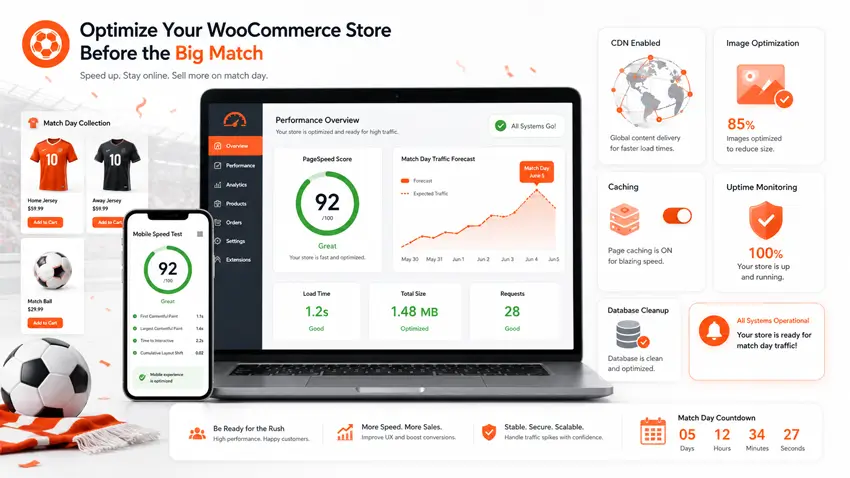
During a World Cup match, fans are on their phones. They search for products at halftime, share links in WhatsApp groups, and buy impulsively in the 15 minutes before kickoff. If your store takes more than 3 seconds to load on mobile, most of them will leave before seeing a single product.
A Google PageSpeed score of 90+ is considered fast — anything below 50 needs immediate attention before peak traffic arrives. Every second of delay in page load time can reduce conversions by up to 7%.
Here are your 10 performance checks before the next match:
✅ Check 1: Run a PageSpeed Insights Test
Visit Google PageSpeed Insights and test both your homepage and your top product category page. Aim for 90+ on mobile. Note the top 3 recommendations — fix those first.
✅ Check 2: Enable Server-Side Caching
Caching stores a static version of your pages so they load faster for every visitor. You can enable this through:
- Server-level caching (ask your hosting provider — most managed WooCommerce hosts like WP Engine, Kinsta, or SiteGround offer this)
- Plugin-based caching — WP Rocket, W3 Total Cache, or WP Super Cache (free)
Make sure your cart and checkout pages are excluded from caching (WooCommerce requires dynamic content on these pages).
✅ Check 3: Compress and Optimize All Product Images
Images are the #1 cause of slow WooCommerce pages. Before the World Cup traffic spike:
- Convert product photos to WebP format (30-50% smaller than JPEG/PNG)
- Run all images through a compression tool — Smush (free) or ShortPixel (free tier available)
- Enable lazy loading so images below the fold only load when a user scrolls to them
✅ Check 4: Enable a CDN (Content Delivery Network)
A CDN serves your static files (images, CSS, JS) from servers closest to your visitors’ locations. This is critical during the World Cup when fans from 200+ countries may visit your store. Free options: Cloudflare (free plan is excellent for most stores), or use Jetpack’s CDN module.
✅ Check 5: Minify CSS and JavaScript Files
Minification reduces file sizes by removing unnecessary spaces and code. Use a plugin like Autoptimize (free) to:
- Minify CSS, JS, and HTML
- Defer non-critical JavaScript
- Combine CSS files to reduce HTTP requests
✅ Check 6: Update PHP to Version 8.2 or Higher
PHP 8.2+ is significantly faster than older versions. Check your current PHP version in WordPress Dashboard → Tools → Site Health. If you’re on PHP 7.x or older, contact your hosting provider to upgrade. WooCommerce recommends a minimum of PHP 8.0.
✅ Check 7: Clean Up Your WordPress Database
A bloated database slows down every page on your site. Use WP-Optimize (free) to:
- Remove spam comments, post revisions, and expired transients
- Optimize database tables
- Schedule automatic weekly cleanups before the tournament
✅ Check 8: Increase PHP Memory Limit to at Least 256MB
WooCommerce recommends a minimum of 128MB, but during high-traffic periods, 256MB is safer. You can set this in your wp-config.php file:
phpdefine( 'WP_MEMORY_LIMIT', '256M' );Or ask your hosting provider to increase it from their control panel.
✅ Check 9: Test on Real Mobile Devices (iPhone and Android)
Use Google’s Mobile-Friendly Test and manually browse your store on both iOS and Android. Check:
- Are buttons large enough to tap?
- Does the product gallery load without horizontal scrolling?
- Is the checkout form easy to fill out on a mobile keyboard?
✅ Check 10: Set Up Uptime Monitoring
You need to know the moment your store goes down, not find out hours later. Set up free uptime monitoring with UptimeRobot (free) – it pings your site every 5 minutes and sends an SMS/email alert if it goes offline. Essential for match-day traffic spikes.
Section 2 – Product Pages & Store UX (10 Checks)
Why Product Page UX Wins World Cup Sales
World Cup fans are emotional buyers. They want to act fast, feel confident, and check out without friction. The average global cart abandonment rate is 70.22% — meaning 7 out of 10 people who add a product to their cart never complete the purchase. Better product pages and smoother UX is your biggest lever to close that gap.
During World Cup season, your product pages also need to communicate urgency (limited time offers, match-day deals), relevance (jersey sizes, team colors, product variations), and trust (fast shipping, easy returns, secure payment), all at a glance.
✅ Check 11: Custom Product Page Layout for Your Key Products
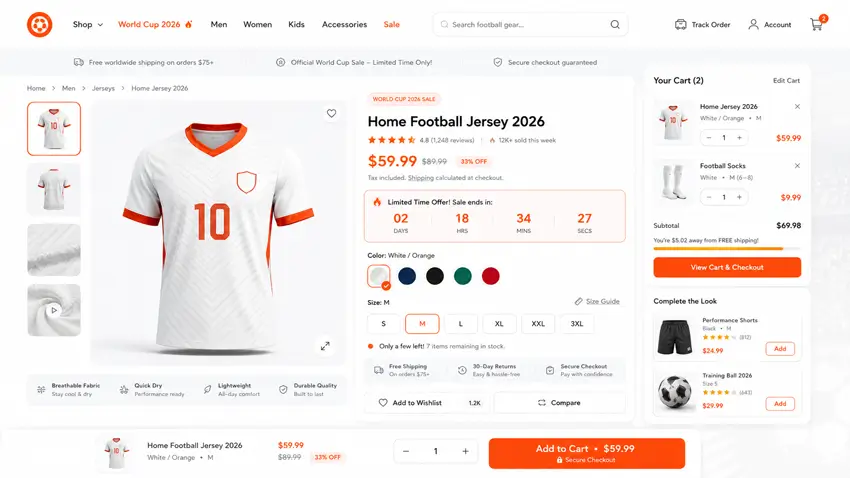
The default WooCommerce product page is generic and conversion-unfriendly. For your top-selling World Cup products (jerseys, fan gear, accessories), create a custom product page layout that includes:
- A large, high-quality product gallery
- Team color variation selector (color swatches instead of dropdowns)
- Size guide embedded as a tab
- Stock urgency indicator (“Only 8 left!”)
- Sticky add-to-cart button on mobile
✅ Check 12: Add a Flash Sale Countdown Timer to Product Pages
During World Cup, urgency sells. A visible countdown timer on a product page, “Offer ends at Full Time: 00:47:23”, triggers FOMO and accelerates buying decisions. This needs to be embedded directly on the product page, not as a site-wide popup.
✅ Check 13: Add a Sticky Add-to-Cart Bar
When a fan scrolls down your product page reading descriptions and reviews, the add-to-cart button disappears above the fold. A sticky add-to-cart bar follows them as they scroll, keeping the purchase action always visible. This single UX change can increase add-to-cart rates by 10–15%.
✅ Check 14: Enable Product Comparison for Football Merchandise
Fans comparing jerseys across multiple teams need a quick way to see differences side by side. A product comparison feature — directly accessible from the product listing or product page — reduces back-and-forth browsing and speeds up decisions.
✅ Check 15: Add a Wishlist Button to Product Pages
Not every fan is ready to buy today. Some are browsing during the group stage and planning to buy before the knockouts. A wishlist button lets them save products and return later — keeping them in your store’s ecosystem instead of going to a competitor.
✅ Check 16: Optimize Your WooCommerce Cart Page
Your cart page should:
- Show product thumbnails (not just text)
- Allow quantity changes without page reload (AJAX)
- Display shipping estimate
- Show a progress bar for free shipping threshold (“Add $12 more for free shipping!”)
- Include cross-sell recommendations
✅ Check 17: Redesign Your Checkout Page for Fewer Friction Points
The ideal WooCommerce checkout has no more than 7 fields — yet most default setups have 12+. Fix this before World Cup traffic peaks:
- Remove the “Company Name” field (unless B2B)
- Combine first and last name where possible
- Enable Guest Checkout as the most prominent option
- Add trust badges near the payment button (SSL, secure payment logos)
- Show estimated delivery date (not a vague “2–5 business days”)
✅ Check 18: Add a Side Mini-Cart for Impulse Upsells
Replace the traditional full-page cart redirect with a sliding mini-cart panel that opens when a user clicks “Add to Cart.” This keeps fans on the product page (so they can add more items) while giving them a fast path to checkout. Mini-carts with product recommendations inside can increase average order value by 15–20%.
✅ Check 19: Enable AJAX Add-to-Cart on Shop/Category Pages
Fans browsing your shop page should be able to add products without a page reload. Enable AJAX add-to-cart so clicking the button updates the cart in the background — creating a seamless, app-like browsing experience that matches fans’ expectations from mobile apps.
✅ Check 20: Test All Product Pages on Mobile — Portrait and Landscape
Before every match day, do a quick manual check of your top 5 product pages on mobile:
- Do images load quickly?
- Is the add-to-cart button thumb-reachable?
- Does the size/color variation selector work without zooming?
- Does the checkout form auto-fill correctly on iOS Safari and Chrome Android?
ShopLentor- WooCommerce Builder for Elementor & Gutenberg
A versatile page builder to build modern and excellent online stores with more than 100k+ Active Installations.
🔧 Plugin to simplify this step: ShopLentor
ShopLentor is a complete WooCommerce page builder for Elementor and Gutenberg that lets you build custom product pages, cart pages, and checkout pages with drag-and-drop — no developer or custom code needed. It includes built-in widgets for flash sale countdowns, sticky add-to-cart bars, product comparison, wishlists, side mini-cart, and AJAX cart functionality.
Most of the UX improvements in this section can be implemented with ShopLentor’s free and pro widgets, without writing custom code. If you want to redesign your product, cart, and checkout pages for World Cup traffic without hiring a developer, ShopLentor is a practical option to consider.
→ View ShopLentor on WordPress.org | See all features at woolentor.com
Read More: How to Customize WooCommerce Checkout Page Using ShopLentor.
Section 3 — Promotions & Campaign Visibility (10 Checks)
Why Visibility Is Half the Battle
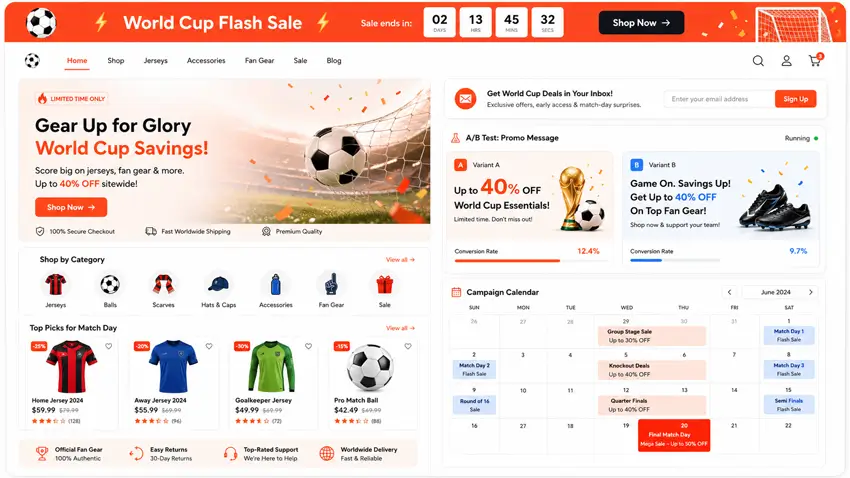
Running a World Cup promotion that no one sees is the most common mistake store owners make. You set up a flash sale, but fans land on your homepage and never notice. The offer is buried in a sidebar widget or exists only in your email newsletter. During a high-emotion, fast-moving event like the World Cup, your promotions need to be visible, immediate, and impossible to miss.
Announcement bars, countdown timers, and top-of-page notifications are among the highest-converting tools available for WooCommerce stores during time-sensitive events. Clickable notification bars with a direct CTA get 2–3x higher engagement than static promotional text embedded in page content.
✅ Check 21: Create a Site-Wide Announcement Bar for Active Promotions
Every page of your store — homepage, product pages, blog posts, checkout — should display a top or bottom announcement bar during active World Cup promotions. This bar should include:
- The offer (e.g., “⚽ World Cup Flash Sale — 20% off all jerseys”)
- A CTA button (“Shop Now”)
- A countdown timer when applicable
✅ Check 22: Schedule Bars by Match Date and Kickoff Time
Don’t manually turn your promotions on and off. Set up scheduled bars that:
- Activate automatically 2 hours before kickoff
- Deactivate automatically after the final whistle
- Run on specific dates matching the World Cup match schedule
This automation ensures your promotions are live exactly when fans are most engaged — even during late-night matches.
✅ Check 23: Add a Countdown Timer to Your Highest-Priority Offer
A countdown timer creates visual urgency that text alone cannot replicate. Use it for:
- Matchday flash sales (e.g., “Sale ends at full time”)
- Limited-stock offers (e.g., “Last 5 jerseys — offer expires in 1:23:45”)
- Tournament-round promotions (e.g., “Quarter Final Deal — 48 hours only”)
✅ Check 24: Set Up an Email Signup Bar to Capture World Cup Fan Leads
The World Cup gives you a one-time opportunity to grow your email list with highly engaged football fans. Add an email subscription bar to your site (separate from your regular signup forms) with a World Cup-specific incentive:
- “Get exclusive World Cup offers — subscribe free.”
- “Join 10,000 football fans for match-day deals.”
These subscribers become long-term customers even after the tournament ends.
✅ Check 25: Create a Dedicated World Cup Landing/Category Page
All your football merchandise should live under one URL — /world-cup-2026/ or /football-fan-gear/ — that you can link to from ads, social media, and notification bars. This page should:
- Be indexed and SEO-optimized before the tournament starts
- Feature your best-selling World Cup products
- Include your active promotions prominently
✅ Check 26: Create Tournament-Round Specific Promotions
Structure your campaign calendar around the World Cup schedule:Round Dates Promotion Idea Group Stage June 11–27 “Group Stage Starter Sale — 15% off” Round of 32 June 28–July 3 “Last 32 Deal — Free shipping this week” Round of 16 July 4–7 “Sweet 16 Sale — 20% off jerseys” Quarterfinals July 9–11 “Quarter Final Flash Sale — 48 hours” Semifinals July 14–15 “Final Four Offer — Buy 2, Get 1 Free” Final Week July 17–19 “Final Countdown — Biggest sale of the tournament”
⚽ Fifa World Cup 2026 Limited Time Offer
Get Your WooCommerce Store Match-Ready with ShopLentor Pro — Starting at $29
Build better product, cart, and checkout pages for World Cup traffic spikes. Launch high-converting shopping experiences without coding.
✅ Check 27: Add a Promo Banner to Your Product Category Pages
Your shop page and category pages are high-traffic entry points. Add a prominent promotional banner at the top of these pages for World Cup offers — not just on the homepage.
✅ Check 28: A/B Test Your Announcement Bar Messages
Don’t assume your first message is the best one. Set up two versions of your bar message and track which gets more clicks:
- Version A: “⚽ 20% off all World Cup jerseys — Today Only”
- Version B: “🔥 World Cup Flash Sale — Ends at Full Time! Shop Now”
Use the winning message for all future matchday campaigns.
✅ Check 29: Set Up Abandoned Cart Notifications
During World Cup match nights, fans get distracted. They add a jersey to their cart, their team scores, and they forget to check out. Abandoned cart emails — sent 1 hour after cart abandonment — recover an average of 5–10% of lost sales. Set these up in WooCommerce before the tournament begins.
✅ Check 30: Pre-Schedule All Campaigns for the Full Tournament Calendar
Using the tournament schedule as your guide, pre-schedule your announcement bars and promotional emails for the entire tournament in advance. This is the most time-saving and high-ROI action you can take before the World Cup — your campaigns run automatically while you watch the matches.
🔧 Plugin to help with this step: HashBar
HashBar is a powerful WordPress notification bar and announcement bar plugin that lets you create unlimited bars with countdown timers, email signup forms, CTA buttons, and promotional banners. It supports scheduled display by date/time, page-level targeting, and A/B testing — making it the perfect tool for automating all 10 campaign visibility checks in this section.
Every World Cup promotion you create can be scheduled, styled, and targeted using HashBar’s free version — with no coding or developer help required.
→ View HashBar on WordPress.org | See all features at wphashbar.com
Read More: HashBar Plugin is Now Compatible with WPML Multilingual Plugin
Section 4 – Analytics & Tracking (5 Checks)
Why Tracking Is Non-Negotiable During World Cup
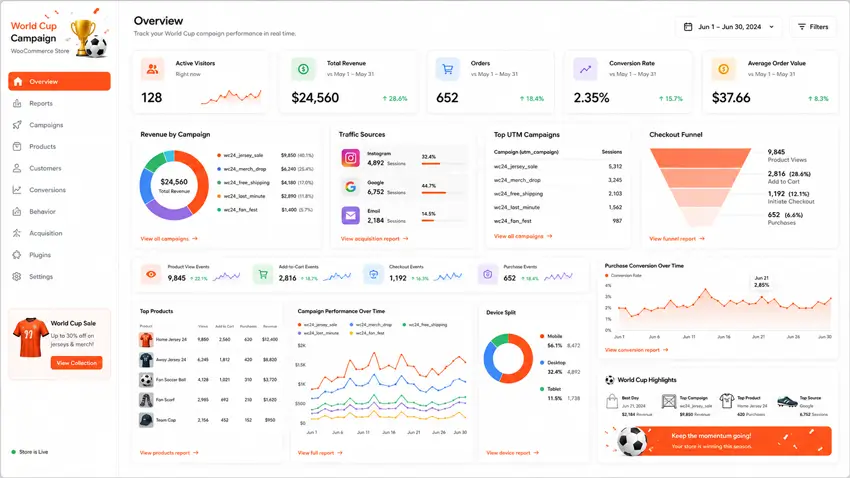
If you run World Cup promotions without proper analytics, you have no idea what’s working. Which match-day campaign drove the most revenue? Which product page has the highest drop-off rate? Which traffic source — Instagram, Google, or email — brings buyers who actually convert?
Without GA4 properly configured, these questions stay unanswered. You’d be spending money and effort on campaigns you can’t measure, improve, or scale.
World Cup 2026 is also a once-in-four-years opportunity to collect data about your highest-value audience — football fans. The behavioral data you capture during the tournament will inform your marketing for years.
✅ Check 31: Connect Your WordPress Site to Google Analytics 4
If you haven’t migrated from Universal Analytics (UA) to GA4, do it now. GA4 is the current standard, and Universal Analytics has been sunset. You need a GA4 property connected to your WordPress site to track any World Cup traffic.
To set this up:
- Go to analytics.google.com and create a GA4 property
- Copy your Measurement ID (format: G-XXXXXXXXXX)
- Add it to your WordPress site — ideally using a plugin (no manual code editing needed)
✅ Check 32: Enable WooCommerce Enhanced Ecommerce Tracking
Standard GA4 tracks pageviews. Enhanced Ecommerce tracking gives you the full purchase funnel:
- Product views (how many fans looked at each jersey)
- Add to cart events (which products get added most)
- Checkout initiation (how many start the checkout process)
- Purchase completions (actual revenue by product)
- Funnel drop-offs (where fans abandon — product page, cart, or checkout)
This data is essential for identifying and fixing your biggest conversion bottlenecks during the tournament.
✅ Check 33: Set Up UTM Parameters for All World Cup Campaigns
Every external link you share for World Cup promotions — in emails, social media posts, ads, and WhatsApp groups — should include UTM parameters so GA4 knows which campaign sent which visitor.
Use Google’s Campaign URL Builder to create tagged links. A basic structure looks like this:
text https://yourstore.com/world-cup-2026/?utm_source=instagram&utm_medium=social&utm_campaign=group-stage-saleKey parameters to always include:
utm_source— where the traffic comes from (e.g.,instagram,newsletter,google)utm_medium— the channel type (e.g.,social,email,cpc)utm_campaign— your campaign name (e.g.,world-cup-quarterfinal-sale)
✅ Check 34: Create a World Cup Traffic Dashboard in GA4
Build a custom GA4 dashboard (or use GA4’s “Explorations” feature) that shows you, at a glance:
- Real-time active users during match hours
- Top landing pages for World Cup traffic
- Revenue by campaign (using UTM data)
- Conversion rate by device (mobile vs. desktop)
- Geographic breakdown of visitors (which countries are your football fans from?)
Check this dashboard every matchday to catch performance issues and winning patterns early.
✅ Check 35: Filter Out Internal Traffic from Your Analytics
If you and your team are browsing your own store during testing, this pollutes your data. In GA4:
- Go to Admin → Data Streams → Configure Tag Settings
- Add an Internal Traffic rule for your office/home IP address
- Apply a filter in your reports to exclude internal traffic
Clean data during the World Cup is critical for making good decisions fast.
🔧 Recommended Tool for Section 4: HT Easy GA4
HT Easy GA4 is the simplest way to connect your WordPress site to Google Analytics 4 without touching any code. It connects directly to your GA4 account from the WordPress dashboard, enables enhanced WooCommerce ecommerce event tracking automatically, and displays your key GA4 reports — including real-time data and ecommerce performance — inside your WordPress admin panel.
All 5 tracking checks in this section are solved or supported by HT Easy GA4 — from initial connection to WooCommerce event tracking to in-dashboard reporting.
→ View HT Easy GA4 on WordPress.org | Full plugin details at hasthemes.com
Read More: How to Track Website Traffic with Google Analytics 4 – Easy, Step‑by‑Step Guide
Section 5 – Customer Support Setup (10 Checks)
Why World Cup Creates a Customer Support Crisis
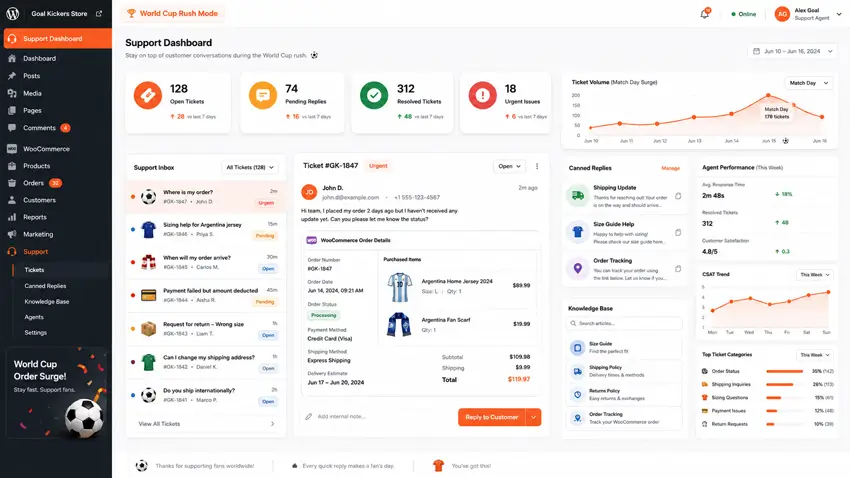
World Cup season brings your biggest-ever order volume and your biggest-ever customer support volume. Research on major sporting events shows that support ticket volumes surge dramatically during tournament windows, with some sectors seeing +300% in live chat volume and +400% in payment-related tickets during match windows.
Most small WooCommerce stores manage support through their email inbox. This completely fails during a tournament because:
- Multiple customers ask the same questions (shipping, sizing, stock) — and you answer each one manually
- Inquiries pile up while you sleep (international fans are in different time zones)
- There’s no way to track which queries are open, answered, or escalated
- Customer frustration grows, leading to refund requests and negative reviews
A proper ticket-based support system solves all of this, and you can set it up in under an hour before the next matchday.
✅ Check 36: Install a Ticket-Based Support System
Move away from email inbox management. A support ticket system:
- Assigns each inquiry a unique ticket number (traceable)
- Shows which tickets are open, in progress, or resolved
- Allows multiple agents to handle tickets simultaneously
- Prevents duplicate replies to the same customer
✅ Check 37: Create Ticket Categories for Common World Cup Queries
Set up pre-defined ticket categories so every incoming inquiry is sorted automatically:
- Order Status & Tracking — “Where is my order?”
- Sizing & Product Queries — “What size jersey should I order?”
- Shipping & Delivery — “When will it arrive before the Final?”
- Returns & Refunds — “I ordered the wrong team’s jersey.”
- Payment Issues — “My payment failed.”
✅ Check 38: Write Canned Replies for Your Top 5 Support Questions
The most powerful time-saving feature of a support system is canned replies — pre-written responses to common questions that agents can send with one click. For World Cup season, write canned replies for:
- “Your order has been dispatched — here is your tracking number: [link].”
- “Your size guide is available here: [link to size chart].”
- “Our estimated delivery time for your region is 3–5 business days.”
- “To request a return or exchange, please use this form: [link].”
- “Your payment issue has been noted — our team will resolve it within 24 hours.”
✅ Check 39: Assign Support Agents for Match-Day Windows
For each major match window (peak periods around Group Stage and Knockout rounds), assign a dedicated support agent to monitor and respond to tickets in real time. Even during a 3-hour match window, having one person on live ticket duty prevents backlogs from forming.
✅ Check 40: Create a Self-Service FAQ Page for World Cup Orders
Proactively answer the most common questions so fans never need to submit a ticket. Create a dedicated FAQ page — /world-cup-2026-faq/ — covering:
- Shipping timelines for your key markets
- Size guide and jersey fitting advice
- Return/exchange policy for match merchandise
- Payment methods accepted
- How to track an order
Link to this FAQ page from your product pages, checkout confirmation email, and announcement bars. Every ticket you prevent saves time and improves the customer experience.
✅ Check 41: Enable Email Piping for Support Tickets
Email piping allows customers to reply to support emails and have their replies automatically attached to the original ticket — no need to log into a portal. This is critical for customers who prefer email communication, especially older fans who aren’t comfortable with online portals.
✅ Check 42: Set Up Agent Performance Reporting
During a high-volume tournament period, you need to know:
- Average first response time per agent
- Number of tickets resolved per day
- Tickets still open after 24 hours (escalation candidates)
This data helps you adjust staffing and response workflows mid-tournament.
✅ Check 43: Add a Knowledge Base for Self-Service Support
Beyond a basic FAQ, a searchable knowledge base allows fans to find detailed answers to complex questions without contacting support. Articles like “How to Choose the Right Jersey Size” or “Our International Shipping Policy” reduce inbound ticket volume by 30–40%.
✅ Check 44: Integrate Support Tickets with WooCommerce Orders
The most powerful feature of a WooCommerce-integrated support system is the ability for agents to see a customer’s order details inside the support ticket — without switching tabs or systems. This eliminates the back-and-forth of “Please provide your order number” and speeds up every resolution.
✅ Check 45: Set Up Post-Resolution Customer Satisfaction Surveys
After closing a support ticket, automatically send a 1-question satisfaction survey: “How would you rate your support experience? ⭐⭐⭐⭐⭐”
During World Cup season, this data:
- Identifies which agents or query types have poor resolution quality
- Gives you positive feedback you can feature in marketing (“Our fans love us!”)
- Builds long-term customer relationships beyond the tournament

🔧 Recommended Tool for Section 5: SupportGenix
SupportGenix is an AI-powered WordPress helpdesk and support ticket plugin designed for WooCommerce stores. It includes unlimited tickets, unlimited agents, email piping, canned replies, ticket categories, WooCommerce order integration, agent performance reporting, and a knowledge base — all available from your WordPress dashboard.
If you prefer to keep your helpdesk inside WordPress instead of using an external SaaS tool, SupportGenix gives you a structured way to handle World Cup support requests. It doesn’t replace the need for good processes or staffing, but it makes it much easier to track, organize, and respond to tickets as volumes spike during the tournament.
→ View SupportGenix on WordPress.org | Full plugin details at supportgenix.com
Read More: SupportGenix Review: The Best WordPress Support Ticket Plugin
Section 6 – Wholesale & Bulk Orders (5 Checks)
The Wholesale Opportunity Most Stores Miss
Here’s a revenue channel most WooCommerce football merchandise stores completely ignore: bulk orders from fan clubs, corporate clients, schools, and event organizers.
Think about the buyers that World Cup creates:
- Local fan clubs are ordering 50 matching jerseys for their watch party
- Companies are buying branded football merchandise as employee gifts during the tournament
- Event organizers are sourcing fan gear for World Cup viewing events at bars and restaurants
- Schools and universities ordering team colors for student World Cup celebrations
These buyers don’t want to pay retail prices, and they don’t want to place 50 individual orders. They want a wholesale portal — a way to register as a bulk buyer, see trade pricing, and place a single large order.
Adding wholesale functionality to your existing WooCommerce store doesn’t require a second website or a complex setup. It requires one plugin.
✅ Check 46: Create a Wholesale Registration Page
Add a dedicated registration page to your store — /wholesale-register/ — where fan clubs, event organizers, and bulk buyers can apply for a wholesale account. The form should collect:
- Business/club name
- Contact details
- Expected monthly order volume
- What they plan to order (jersey types, quantities)
You review applications and approve or reject with one click.
✅ Check 47: Set Up Tier-Based Wholesale Pricing
Create quantity-based pricing tiers for your key football merchandise:Quantity Discount 1–9 units Standard retail price 10–24 units 10% wholesale discount 25–49 units 15% wholesale discount 50–99 units 20% wholesale discount 100+ units 25% wholesale discount + free shipping
These tiers incentivize larger orders and reward your best bulk buyers.
✅ Check 48: Assign Wholesale User Roles with Different Access Levels
Not all wholesale buyers are the same. You might have:
- Fan Club Wholesale — 10% discount, minimum order 10 units
- Event Organizer Wholesale — 20% discount, minimum order 50 units
- Distributor/Retailer — 25% discount, access to B2B catalog
Create separate user roles for each tier so pricing is applied automatically when they log in.
✅ Check 49: Set Minimum Order Quantities for Wholesale
Wholesale pricing should only apply when a meaningful bulk order is placed. Set minimum order quantities (MOQ) at the product level or globally:
- Jerseys: Minimum 10 units
- Accessories (scarves, hats): Minimum 20 units
- Full fan gear bundles: Minimum 5 sets
This protects your retail pricing from being undercut by customers claiming they’re buying wholesale.
✅ Check 50: Add a “Bulk Orders” Announcement Bar During Tournament Weeks
Your wholesale program is invisible unless you promote it. During the group stage and knockout rounds, add an announcement bar specifically targeted at bulk buyers:
“⚽ Fan club or event organizer? Get 20% off bulk jersey orders — Register for wholesale pricing →“
Link this bar to your wholesale registration page. You’ll be surprised how many unregistered bulk buyers are already browsing your store.
🔧 Recommended Tool for Section 6: Whols
There are several wholesale plugins available for WooCommerce. If you want to run retail and wholesale from the same store, without building a separate B2B site, Whols is one option that makes it easy to add wholesale registration, role-based B2B pricing, minimum order quantities, and tiered discounts on top of your existing catalog.
Retail customers continue to see normal prices, while approved wholesale buyers see their negotiated pricing automatically when they log in. This lets you serve fan clubs and corporate clients during World Cup without complicating the shopping experience for regular fans.
→ View Whols on WordPress.org | Full plugin details at hasthemes.com
Read More: A Comprehensive Review of Whols – WooCommerce Wholesale Prices Plugin
Your World Cup 2026 Action Plan
You now have a complete 50-point checklist. Here’s how to prioritize if the next match is in 48 hours:
🚨 Do Today (Match-Day Critical)
- Check 1 (PageSpeed test) — know your current score
- Check 21–23 (Announcement bar + countdown) — promotions must be visible
- Check 36 (Install support ticket system) — can’t manage surge via inbox
📅 Do This Week (Tournament Impact)
- Checks 2–10 (Performance) — speed improvements
- Checks 11–20 (Product page UX) — install ShopLentor, redesign key pages
- Checks 31–35 (Analytics) — install HT Easy GA4, enable ecommerce tracking
🗓️ Do Before Knockout Rounds (Scale Your Revenue)
- Checks 37–45 (Full support system) — canned replies, FAQ, agent assignment
- Checks 46–50 (Wholesale setup) — fan club and event organizer bulk buyers
📋 Plugin Summary
| Section | Plugin | Free Download |
|---|---|---|
| 🛒 Product Pages & UX | ShopLentor | ShopLentor |
| 📣 Promotions & Bars | HashBar | Hasbar |
| 📊 Analytics & Tracking | HT Easy GA4 | HT Easy GA4 |
| 🎧 Customer Support | SupportGenix | Support Genix |
| 🏭 Wholesale & Bulk Orders | Whols | Whols |
Frequently Asked Questions
Do I need every plugin in this checklist?
No. Use only the tools that match your store’s current gaps, such as UX, promotions, analytics, support, or wholesale.
How early should I prepare my WooCommerce store for World Cup traffic?
Ideally 2–4 weeks before your busiest match window, so you have time to test speed, promotions, checkout, and tracking.
Can I use this checklist without hiring a developer?
Yes. Most items can be handled with standard WooCommerce settings, lightweight plugins, and a few no-code tools.
Which section should I prioritize first?
Start with performance, product page UX, and promotions. These usually have the fastest impact on traffic retention and conversions.
Is the wholesale section relevant for every store?
No. It matters most for stores targeting fan clubs, event organizers, corporate buyers, or other bulk-order customers.
Final Note: The Tournament Won’t Wait
The FIFA World Cup 2026 Final is on July 19 at MetLife Stadium in New York. That gives you roughly 5 weeks from the tournament start to capture the biggest football-driven ecommerce spike of this decade.
Every check on this list is something you can action today. Most take under an hour to implement. The plugins recommended are free to install and proven to work on WooCommerce stores of all sizes.
Don’t wait until the quarterfinals to start optimizing. The store that wins the World Cup season is the one that is prepared before kickoff.