Top 10 WooCommerce Subscription Mistakes That Quietly Kill Your MRR (And How to Fix Them)

Subscription revenue is supposed to be predictable, but in WooCommerce, small configuration errors can snowball into major churn and cash-flow problems.
Many stores assume that once a customer subscribes, renewals will “just work,” yet recurring payments face much higher decline rates than one-off orders.
Industry data shows that subscription businesses typically see 3–5% monthly churn, while many ecommerce brands lose 60–80% of customers annually when they don’t optimize retention.
On top of that, recurring and card-on-file payments can see 15–30% decline rates, meaning a large share of your WooCommerce recurring payments will silently fail without proper dunning.
The real problem? The result is avoidable refunds, failed subscription renewals, and involuntary churn that eats into your MRR long before you notice it in your reports.
For a store doing $100,000 in annual subscription revenue, payment failures alone could cost you $15,000 per year and that’s before counting the customers who never return after a single failed transaction.
Why WooCommerce Subscriptions Fail More Than Expected
WooCommerce subscriptions often fail not because the model is bad, but because store owners underestimate how complex recurring billing actually is.
They install a subscription plugin, add a plan, and assume the work is done, without planning for lifecycle events like card expiry, plan changes, or failed charges.
In reality, recurring billing combines technical, financial, and customer-experience risks: higher decline rates, more edge cases, and more touchpoints to manage.
The gap between “plugin installed” and “subscription engine that retains customers reliably” is where most WooCommerce subscription problems appear.
Common underlying causes of subscription failure:
- Technical issues: Action Scheduler or WP-Cron failures are preventing renewal orders from being created
- Payment gateway misconfigurations: Missing webhooks, incorrect API keys, or improper tokenization setup
- Operational gaps: No monitoring, no retry logic, no communication strategy
- Strategic mistakes: Overcomplicated pricing, poor onboarding, and a lack of customer self-service
Closing that gap requires better tools, clear processes, and a mindset that treats subscriptions as a living system rather than a one-time setup task.
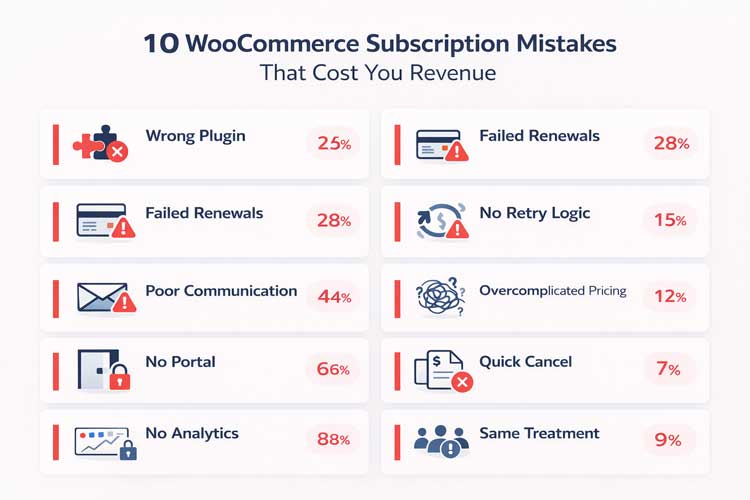
Top 10 WooCommerce Subscription Mistakes
1. Choosing the Wrong Subscription Plugin
Many stores start with the first subscription plugin they find—often the cheapest or the one bundled in a theme, without mapping it to their business model and growth plans. This leads to limitations around billing frequencies, payment gateways, analytics, dunning, and customer portals that only become obvious once you scale.
Why owners make this mistake:
- They assume all subscription plugins do the same thing.
- They optimize for upfront cost instead of long-term revenue recovery and automation.
- They don’t evaluate how the plugin handles edge cases like plan switches, early renewals, or partial refunds.
Real impact:
- Inability to add common billing options (e.g., quarterly or custom intervals) forces awkward pricing workarounds that confuse customers.
- Limited dunning and retry logic means you lose revenue every time a card fails.
- Weak analytics make it hard to see churn by cohort, product, or segment, so you keep guessing instead of optimizing.
How to avoid or fix it:
- Define your subscription model first: billing periods, trials, upgrades/downgrades, installment plans, and discounts.
- Evaluate plugins for: automated retries (2–5 configurable attempts), flexible billing cycles, self-service customer portal, analytics (MRR, churn, LTV), and strong WooCommerce integration.
- If you’re already living on a limited tool, plan a migration to a more complete subscription management system that offers flexible billing cycles, intelligent retry logic, a customer portal, and advanced analytics built for WooCommerce.
Comparison: Key Features to EvaluateFeature Basic Plugins Advanced Solutions Billing Periods Monthly, yearly only Daily, weekly, monthly, quarterly, custom Retry Logic 0–1 attempt 2–5 configurable with timing Customer Portal Limited or missing Full self-service (pause, cancel, update card) Analytics Basic revenue only Cohorts, churn, LTV, revenue forecasting Dunning Workflows None Multi-email, AI-powered recovery API & Integrations Limited Full REST API, webhooks, Zapier/Make
2. Ignoring Failed Renewal Handling
Many store owners assume that if a renewal fails once, the customer will fix it or pay manually—but subscription and recurring payments are among the most failure-prone transactions in ecommerce. Industry benchmarks indicate that recurring payment declines can reach 15–30%, and 62% of customers never return after a single failed transaction.
Why owners make this mistake:
- They rely on default gateway behavior and don’t configure separate KPIs for recurring payments.
- They don’t realize that most declines are “soft” and recoverable with retries and better messaging.
- They lack clear ownership: no one on the team is explicitly responsible for monitoring renewal failures.
Real impact:
- Involuntary churn rises because subscriptions are cancelled or left in “on-hold” limbo after a single failure.
- Cash flow becomes unpredictable, making inventory and marketing planning harder.
- Support gets swamped with “why did my subscription stop?” tickets, hurting customer experience.
Hard numbers on failed payment recovery:
- First retry: 40% success rate
- Second retry: 33% success rate
- Third retry: 25% success rate
- Automated recovery vs. manual: 50–70% success (automated) vs. 20–30% (manual)
For a store with $100k annual subscription revenue and a 14% payment failure rate, proper recovery could rescue $7,140 in revenue that would otherwise be lost.
How to avoid or fix it:
- Set up dedicated reports or dashboards that show failed subscription renewals, recovery rate, and time-to-resolution.
- Use a subscription platform with built-in failed payment workflows, so you can define rules for when to retry, when to email, and when to mark a subscription as cancelled.
- Make someone explicitly accountable for monitoring renewal failure trends weekly and improving them.
3. No Smart Retry Logic for Failed Payments
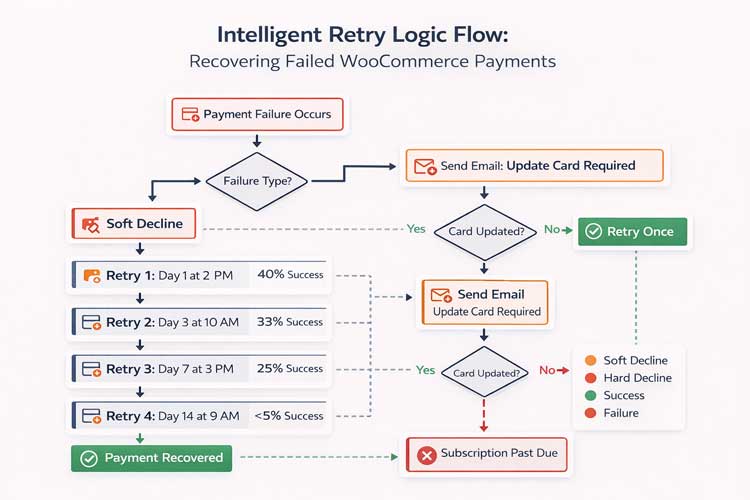
Some stores have no retry logic at all; others use a fixed “try again tomorrow” approach that ignores how banks and issuers behave. This is one of the most common WooCommerce subscription mistakes because it stays invisible in the admin panel unless you track recovery metrics.
Why owners make this mistake:
- They assume the payment gateway’s default is good enough.
- They don’t differentiate between soft and hard declines.
- They don’t realize that structured retries can recover 20–40% of failed payments.
Real impact:
- Unnecessary cancellations, even when customers would have gladly continued paying.
- Lost MRR from “good” customers whose cards failed for temporary reasons (insufficient funds, network issues).
- Higher support burden as customers re-enter card details manually or contact support to reactivate subscriptions.
Smart retry strategy by failure type:Failure Type Cause Best Retry Timing Success Rate Insufficient Funds Payday hasn’t arrived 3–7–14 days later 50–70% Credit Limit Exceeded Billing cycle reset needed 30 days later 30–50% Technical Timeout Gateway/network issue Immediately, then 1 hour 60–80% 3D Secure Fail Auth incomplete Email customer (don’t auto-retry) 40–60% AVS/CVV Mismatch Address/code incorrect Prompt for correction 70–90%
How to avoid or fix it:
- Implement a dunning strategy with 2–5 retries spread over 7–14 days, at different times and days.
- Use tools that differentiate between soft and hard declines and stop retrying when the card is clearly invalid.
- Use a plugin like Recurio Pro, which includes intelligent retry logic and multi-email recovery campaigns designed specifically for WooCommerce recurring payments.
4. Poor Customer Communication During Renewals
Many WooCommerce stores send either no renewal emails or generic, confusing messages that customers ignore. This is especially risky for annual and higher-priced subscriptions where customers feel blindsided by charges.
Why owners make this mistake:
- They treat subscriptions like repeat orders, not long-term relationships.
- They rely only on payment gateway emails, which are technical and often land in spam.
- They worry that “reminding customers” will increase cancellations, so they say as little as possible.
Real impact:
- Surprise charges lead to disputes, chargebacks, and refund requests.
- Customers who might have downgraded instead cancel entirely because they don’t trust the brand.
- Low engagement with renewal reminders means customers don’t update cards until after a failure, adding friction.
How to avoid or fix it:
- Set up a multi-touch email flow: pre-renewal reminder (14 days), renewal confirmation (transaction date), and follow-up for failed payments with clear calls to action.
- Use simple language and highlight what renews, when, for how much, and how to manage or cancel the subscription.
- Use a subscription system that provides 8+ event-based email templates out of the box (sign-up, upcoming renewal, failed payment, cancellation, etc.) to keep customers informed.
Recommended email sequence:
- 14 days before renewal: “Your subscription renews on [DATE] for $[AMOUNT]. Here’s what you’ll get…”
- Renewal day: “Your subscription has been renewed! Here’s your invoice.”
- If payment fails: “We had trouble charging your card. Update it here [LINK] or contact us.”
- 2–3 days after failure: “Second attempt: We’re retrying your payment. No action needed, but you can update your card here.”
5. Overcomplicated Pricing and Plan Structures
Trying to cover every scenario with a separate plan is a classic WooCommerce subscription problem. Customers face confusing options, complex billing intervals, and unclear value differences, which kills conversions and increases churn.
Why owners make this mistake:
- They copy SaaS pricing pages with many tiers without matching their own product reality.
- They add edge-case plans for a handful of customers instead of using add-ons or usage-based logic.
- They fail to test how real shoppers navigate the plans on mobile.
Real impact:
- Decision paralysis reduces new subscription sign-ups.
- Customers end up on the “wrong” plan and churn early because it doesn’t match their usage.
- Support gets constant “which plan is right for me?” and “can you switch my plan?” tickets.
How to avoid or fix it:
- Start with 2–3 clear plans with distinct value steps (e.g., Essentials, Growth, Pro) instead of a dozen tiny variations.
- Use flexible billing features (monthly/yearly, custom intervals, trials, signup fees) rather than adding completely separate products for each scenario.
- Use tools that support plan switching with automatic proration so you can keep a lean plan structure while giving customers flexibility.
Example: Simple Plan StructurePlan Best For Price Billing Essentials Solo creators, startups $9/month Monthly or annual Growth Growing teams $29/month Monthly or annual (+20% savings) Pro Agencies, larger teams $79/month Monthly or annual (+25% savings)
Recommended Blogs for You:
👉 8 Top WooCommerce Subscription Plugins
👉 Subscription Analytics for WooCommerce: How to Boost Recurring Revenue (Real Examples)
👉 Odoo vs SAP: Manufacturing Feature Comparison & Cost Analysis
👉 Complete WooCommerce Subscription Troubleshooting Checklist (Payment, Renewals & Emails)
6. No Self-Service Customer Portal
If customers must email support to cancel, change plans, or update card details, your subscription model will not scale. A missing or weak customer portal is one of the most overlooked subscription management mistakes in WooCommerce.
Why owners make this mistake:
- They underestimate how often subscribers want to change something about their plan.
- They fear that a visible cancel button will increase churn, so they hide controls.
- They rely solely on the default WooCommerce “My Account” page without extending it for subscriptions.
Real impact:
- Friction drives angry cancellations and public complaints because customers feel trapped.
- Support time explodes with simple “can you pause my subscription?” requests.
- Customers don’t update payment methods proactively, causing more failed renewals.
How to avoid or fix it:
- Provide a clean self-service portal where customers can pause, resume, cancel, update cards, change plans, and switch billing frequency.
- Integrate the portal directly into WooCommerce “My Account” so the experience feels native on desktop and mobile.
- Use a tool that offers a responsive customer portal that plugs into WooCommerce accounts or a standalone page and is designed for subscription management at scale.
Self-service portal features checklist:
- View upcoming renewal date and amount
- Update payment method in one click
- Pause subscription (with optional resume date)
- Change billing frequency (monthly to yearly, etc.)
- Switch to a different plan (with proration)
- Download invoices and receipts
- Cancel with optional feedback form
7. Cancelling Subscriptions Too Quickly
Many stores treat any failed payment or churn-risk behavior as a reason to cancel immediately. This ignores the fact that a sizable share of failed transactions can be recovered with retries and targeted messaging.
Why owners make this mistake:
- They want a “clean” subscription list and fear keeping invalid subscriptions active.
- Their plugin doesn’t support nuanced states like “past due” or “retrying,” only “active” vs. “cancelled.”
- They don’t segment between voluntary churn (customer intentionally cancels) and involuntary churn (payment failures).
Real impact:
- Lost MRR from customers who would have stayed if given a chance to update details or get a short grace period.
- Poor customer experience when subscriptions stop without clear communication, even if the issue was temporary.
- More work to reactivate customers manually instead of saving them automatically.
How to avoid or fix it:
- Use clear lifecycle states: active, trialing, past due, dunning, cancelled, and track how many move through each stage.
- Apply grace periods and smart dunning sequences before cancelling for failed payments.
- Only mark a subscription as fully cancelled after multiple recovery attempts and clear customer notifications.
8. No Analytics or Churn Tracking
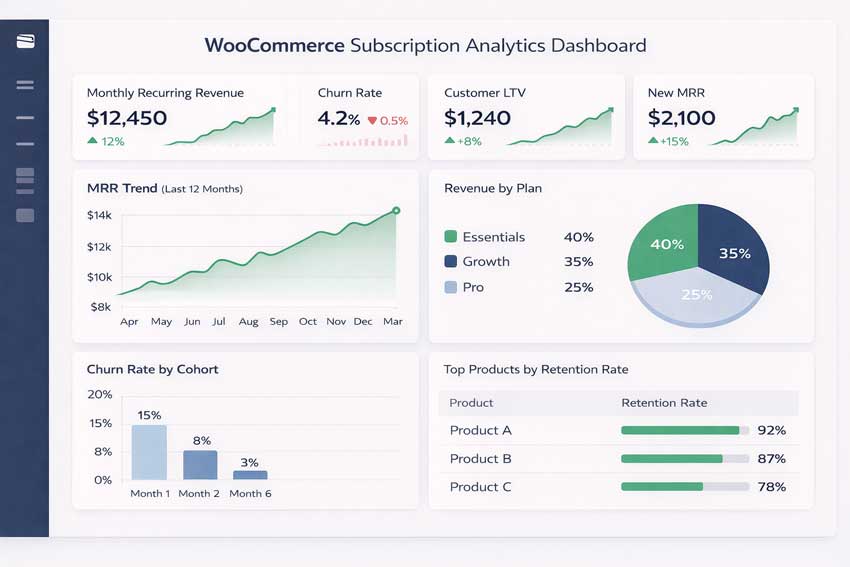
Many WooCommerce subscription sites only look at total revenue and order count instead of subscription-specific metrics. Without a view of MRR, churn, retention, and cohorts, it’s impossible to understand whether your subscription engine is healthy.
Why owners make this mistake:
- WooCommerce core reports aren’t built for subscriptions.
- They assume “more orders this month” means subscriptions are working.
- They find it hard to calculate churn and retention manually.
Real impact:
- You don’t notice churn trending up until cash flow drops.
- You can’t identify which products or customer segments have the best retention.
- Optimization becomes guesswork instead of data-driven experimentation.
Essential subscription KPIs to track:Metric Formula Benchmark Why It Matters MRR (Monthly Recurring Revenue) Total predictable monthly revenue Growing 5–10% month-over-month Shows overall business health New MRR Revenue from new subscriptions this month Target: 15–20% of total MRR Growth indicator Churn MRR Revenue lost from cancellations/failures Target: <5% of total MRR Retention problem indicator Net MRR Growth New MRR minus Churn MRR Target: >10% True business momentum Churn Rate (Cancelled subscriptions / start of month) × 100 Target: <5% monthly Health check Cohort Retention % of customers from month X still active in month X+6 Target: >60% Customer quality
How to avoid or fix it:
- Track subscription-specific KPIs: MRR, new MRR, churned MRR, net MRR growth, average revenue per user, and churn rate over time.
- Use tools with built-in subscription analytics, including cohort analysis and segmentation by plan, country, and acquisition source.
- Make analytics a weekly ritual: review dashboards, spot anomalies, and create action items for retention improvements.
9. Treating All Subscribers the Same
Sending identical emails, offers, and experiences to every subscriber ignores how different their behaviors and value really are. High-value long-term customers, discount-driven buyers, and trial users should not receive the same treatment.
Why owners make this mistake:
- They lack built-in segmentation data like lifetime revenue, churn risk scores, and subscription history.
- They run generic campaigns (“10% off for everyone”) instead of targeted retention programs.
- Their subscription plugin doesn’t expose customer-level analytics.
Real impact:
- High-value subscribers feel under-appreciated and are more likely to churn when a competitor shows them more tailored offers.
- Discount-sensitive segments get over-discounted, hurting margins without improving retention.
- You miss opportunities to upsell engaged customers to higher-value plans.
How to avoid or fix it:
- Segment customers by tenure, plan type, churn risk, and lifetime value.
- Use platforms that automatically calculate churn probability and segment classification so you can trigger different retention flows for each group.
- Create specific campaigns: loyalty perks for long-term subscribers, win-back flows for at-risk segments, and targeted upsells for engaged customers.
Example segmentation strategy:Segment Characteristics Churn Risk Retention Strategy VIP (12+ months) High lifetime value, consistent renewal Low Loyalty program, exclusive access, concierge support At-Risk Churn probability >70%, declining engagement High Discount offer, check-in email, pause option Trial First month subscribers Very high Onboarding emails, success tips, and upgrade incentives Discount Seekers Acquired via promotion, low margin Medium Loyalty rewards (non-discount), feature upgrades
10. Forgetting Post-Signup Onboarding
Many WooCommerce stores think “job done” once the checkout is complete, especially for physical subscriptions. But onboarding is critical to helping customers reach first value quickly, which directly reduces early subscription churn.
Why owners make this mistake:
- They focus all effort on acquisition and treat onboarding as an afterthought.
- They underestimate how confused new subscribers can be about billing, shipping, or access.
- Their subscription stack doesn’t provide onboarding-friendly triggers and messaging.
Real impact:
- Higher early churn when customers don’t understand how to get value from the subscription.
- More support tickets for “how do I use this?” or “when will I be billed/shipped?
- Lower referral and review rates because the first-time experience is fragmented.
How to avoid or fix it:
- Build a short onboarding sequence: welcome email, how-to guide, clear billing/renewal timeline, and tips for getting the most from the subscription.
- Use subscription events (new signup, first renewal, plan change) to trigger contextual onboarding content.
- Highlight the customer portal early so subscribers know how to manage their subscription without contacting support.
Onboarding email sequence (Days 0–14):
- Day 0 (Signup): “Welcome! Your order is confirmed. Here’s what happens next…”
- Day 1: “5 tips to get the most from your subscription”
- Day 3: “Your first shipment/access details + tracking link”.
- Day 7: “Here’s how to pause, cancel, or change your subscription”.
- Day 14: “Enjoying your subscription? Here’s what’s coming next month.”
Common Patterns Behind These Mistakes
Across hundreds of WooCommerce subscription sites, the same patterns repeat: owners underestimate subscription complexity, over-rely on default settings, and lack clear ownership of retention.
Many issues are technical (gateway configuration, cron jobs, plugin conflicts), others are strategic (pricing, positioning), and many are operational (no monitoring, weak support workflows).
Without automation, every edge case failed payment, plan change, and early renewal requires manual intervention, which doesn’t scale and leads to errors.
Stores that treat subscriptions like a “set and forget” feature see higher churn and more revenue leakage than those that treat them as a core product with dedicated processes.
How to Prevent WooCommerce Subscription Mistakes Long-Term
Preventing these WooCommerce subscription mistakes over the long term requires a systematic approach rather than one-off fixes. Think in terms of a checklist, automation principles, and proactive retention practices backed by the right tooling.
Best Practices Checklist
- Choose a subscription platform that supports flexible billing, retries, analytics, and customer portals from day one.
- Configure dunning flows with smart retry logic and clear emails for failed subscription renewals.
- Provide transparent renewal communication, including upcoming renewal reminders and easy management links.
- Track subscription churn, WooCommerce metrics (MRR, churn, cohorts), and review them regularly.
- Offer simple plans with clear value steps and easy plan switching with proration.
- Monitor Action Scheduler and WP-Cron to ensure renewal orders are generated on time.
- Test payment flows monthly on multiple devices and gateways.
- Segment customers and run targeted retention campaigns instead of blanket offers.
Automation Principles
- Automate routine lifecycle events: billing, retries, emails for sign-ups, renewals, expiries, and failed payments.
- Use webhooks and integrations to sync subscription events into CRMs, help desks, and marketing tools instead of duplicating data manually.
- Use machine-learning-driven features where available (e.g., revenue predictions, churn risk scoring) to prioritize retention actions.
Importance of Proactive Retention
- Monitor cohorts to see where churn spikes (e.g., month 1 vs month 6) and fix upstream causes like poor onboarding or mis-aligned pricing.
- Use targeted retention campaigns for high-risk segments instead of blanket discounts.
- Invest in the right WooCommerce subscription management solution that centralizes subscription settings, automates billing and retries, exposes detailed analytics, and gives customers a robust self-service portal—all critical for reducing churn and protecting recurring revenue.
Recurio: The Solution for WooCommerce Subscription Success
If you’re struggling with any of the 10 mistakes above, Recurio offers an integrated solution that addresses all of them. Built from the ground up for WooCommerce subscription businesses, Recurio combines powerful automation, advanced analytics, and a beautiful customer experience—all designed to reduce churn, recover failed payments, and grow your recurring revenue.
Why Store Owners Choose Recurio
- Eliminates Technical Headaches: Recurio handles all the subscription complexity that causes Mistake #1-#3 (plugin choice, failed renewals, retry logic). No more wrestling with limited plugins or manual payment recovery.
- Turns Data Into Revenue: With Recurio’s advanced analytics dashboard, you finally see the metrics that matter (Mistake #8 solved)—MRR, churn by cohort, customer lifetime value, and churn risk scores. No more guessing.
- Empowers Customer Self-Service: Recurio’s responsive customer portal lets subscribers manage their subscriptions (pause, resume, cancel, update cards) without contacting support, cutting support costs while improving retention (Mistake #6 solved).
- Automates Your Entire Workflow: 8+ automated email templates for every subscription event, intelligent dunning with 2-5 configurable retries, and split payment support all work without you lifting a finger (Mistake #4 & #5 solved).
- Supports Growth from Day One: Whether you’re starting with simple monthly plans or managing complex tiered subscriptions with variable products, Recurio scales with your business. Support for daily, weekly, monthly, quarterly, and custom billing intervals (no more Mistake #5 “overcomplicated pricing”).
Recurio’s Key Features
| Feature | Benefit | Solves Mistake # |
| Advanced Analytics | Real-time MRR, churn, LTV, cohort analysis | #8 |
| Smart Dunning | Recover 50-70% of failed payments with intelligent retries | #2, #3 |
| Customer Portal | Self-service management (pause, cancel, switch plans) | #6 |
| 8+ Email Templates | Automated renewal, failure, and lifecycle notifications | #4 |
| Flexible Billing | Daily, weekly, monthly, quarterly, custom intervals | #5 |
| Variable Products | Unique settings per variation for tiered plans | #5 |
| Plan Switching | Automatic proration for mid-cycle upgrades/downgrades | #5, #7 |
| Customer Segmentation | Automatic churn risk scoring and LTV tracking | #9 |
| Webhook Integrations | Connect to Zapier, Make, CRMs, and custom apps | Enables automation |
| REST API | Developer-friendly integration with external systems | Enables automation |
Free vs. Pro: What’s Right for You
Recurio FREE (17 powerful features at no cost):
- Unlimited subscriptions and customers
- Flexible billing (monthly, yearly, custom)
- Customer portal (pause, resume, cancel)
- Basic analytics dashboard
- 8 automated emails
- Stripe, PayPal, and gateway support
Recurio PRO (Advanced features to scale faster):
- Intelligent retry logic (2-5 attempts) with 50-70% recovery rate
- Advanced email campaigns (7 additional templates)
- Churn prediction (82% accuracy)
- Revenue forecasting (85% accuracy)
- Daily, weekly, quarterly billing
- One-time + Subscribe & Save options
- Plan switching with automatic proration
- Customer segmentation & targeting
- Webhooks and API access
Frequently Asked Questions
What are the most common WooCommerce subscription mistakes?
The most common WooCommerce subscription mistakes include choosing a limited plugin, ignoring failed renewal handling, skipping retry logic, offering overcomplicated pricing, and not providing a self-service customer portal. Many stores also fail to track subscription churn, send weak renewal communication, and neglect post-signup onboarding, all of which hurt retention.
Why do WooCommerce subscriptions fail?
WooCommerce subscriptions typically fail because recurring payments are more fragile than one-off orders and require specialized configuration, monitoring, and dunning flows.
Configuration errors, plugin conflicts, poor gateway setup, and a lack of automation around failed payments and renewals all contribute to unexpected subscription failures.
Additionally, issues with Action Scheduler, WP-Cron, webhook delivery, or missing payment tokens can prevent renewals from being created or processed on time.
How can I reduce churn in WooCommerce subscriptions?
To reduce churn, you need better onboarding, clear renewal communication, smart retry logic for failed subscription renewals, and strong self-service tools for customers.
Combine this with subscription analytics (MRR, cohorts, churn rate) and segmentation so you can identify at-risk customers early and run targeted retention campaigns rather than reactive discounts.
Track metrics weekly, segment customers by lifetime value and tenure, and invest in proactive retention strategies like loyalty programs for VIPs and win-back campaigns for declining segments.
What should I avoid when starting subscriptions in WooCommerce?
Avoid launching subscriptions in WooCommerce without a dedicated management plugin, clear pricing strategy, or a plan for handling failed payments and customer communication.
Don’t rely only on default WooCommerce reports, don’t hide cancellation options, and don’t overload customers with too many similar plans or confusing billing rules. Also, avoid single payment gateways (always have a backup), poor checkout UX (mobile matters), and skipping onboarding or communication.
How do I fix WooCommerce subscription renewal failures?
To fix renewal failures, start by checking WooCommerce > Status > Scheduled Actions for pending or failed renewal actions. Verify that Action Scheduler isn’t stuck and that WP-Cron is running. Check payment gateway logs for tokenization errors or declines.
Ask customers to re-add their payment method if tokens are invalid. For payment failures, configure automatic retry logic with multi-email recovery campaigns. For technical issues (cron failures), contact your host to verify WP-Cron is enabled or set up a real server cron job.
If renewals aren’t being created, ensure your plugin supports the Action Scheduler system (WooCommerce Subscriptions v3.0+).
Conclusion
Most WooCommerce subscription failures are not caused by bad products, they stem from preventable configuration issues, weak processes, and missing automation.
By addressing the ten WooCommerce subscription mistakes outlined here, you can significantly reduce involuntary churn, recover more failed subscription renewals, and create a smoother experience that grows MRR over time.
Now is the time to audit your current setup: review your plugin capabilities, dunning flows, renewal communication, analytics, and customer portal experience.
As you uncover gaps, invest in better tools and processes to turn your WooCommerce recurring payments into a reliable, scalable revenue engine instead of a source of silent revenue loss.