How to License WordPress Plugins and Themes: A Step-by-Step Guide

Are you looking to purchase a WordPress plugin or theme but not sure how to go about it? Licensing WordPress plugins and themes can be confusing at first, but this step-by-step guide will help you navigate the process with ease.
WordPress powers over 43% of all websites globally, making it the most widely used CMS.
As a result, understanding WordPress plugin licensing has become essential for developers and website owners alike.
With thousands of premium and free plugins available, ensuring GPL compliance for WordPress developers is more important than ever.
In this blog post, we’ll discuss the different steps involved in how to license WordPress plugins and themes.
Follow along as we dive into the options available to make licensing your desired plugin or theme a breeze.
- Key Takeaways:
- Overview of Licensing WordPress Plugins and Themes
- How to License WordPress Plugins and Themes: Easy Steps
- Step 1: Install and Activate Elite Licenser Plugin
- Step-2: How to Add Product for Licensing
- Step-3: Adding License Types
- Benefits of Licensing WordPress Plugins and Themes
- Frequently Asked Questions
- Wrapping Up
Key Takeaways:
- Learn how the WordPress license impacts your rights as a developer and how to remain compliant.
- Get a step-by-step approach to licensing WordPress plugins effectively and securely.
- Discover WordPress plugin licensing best practices to protect your WordPress plugin with license management tools.
- Find out the correct way to license WordPress themes while staying within the bounds of the open-source framework.
- Discover how to sell licensed WordPress plugins and stay compliant with copyright standards.
Overview of Licensing WordPress Plugins and Themes
If you’re thinking about distributing your WordPress product, licensing is an essential aspect to consider.
Licensing WordPress plugins and themes involves setting up a software licensing system that requires users to activate their license key. This process is done to ensure that your product is being used in compliance with your terms and conditions.
It’s essential to protect your intellectual property rights and earn a fair return on your investment in creating your plugin or theme.
Moreover, license activation helps you offer support and updates to your users efficiently. It allows tracking of license usage and provides unique license keys to individual users.
Understanding how to license your WordPress product can help you generate revenue and protect your intellectual property.
With the right licensing system in place, you can focus more on developing high-quality products. These products will meet your users’ needs while maintaining control over how they are used.
How to License WordPress Plugins and Themes: Easy Steps
In this tutorial, we will show you how to license WordPress plugins and themes using a special WordPress license manager plugin named Elite Licenser.
The Elite Licenser plugin is an easy-to-use license management system designed specifically for WordPress. It allows you to quickly and easily add and manage licenses on your WordPress website.
With the Elite Licenser, you can add licenses to individual plugins or themes, as well as bundles of plugins and themes. This makes it easy to manage multiple products on a single website.
🔐 Manage Your Software License with Elite Licenser!
Ultimate license manager for digital products. Effortlessly oversee licenses for WordPress Themes, Plugins, Joomla, and various CMS, plus PHP, .NET, Java, and Android applications
Step 1: Install and Activate Elite Licenser Plugin
Installing and activating the Elite Licenser on your WordPress website is a simple process. Follow these steps:
Purchase the plugin from the download page and download the file.
In your WordPress Dashboard, navigate to “Plugins” and click “Add New.”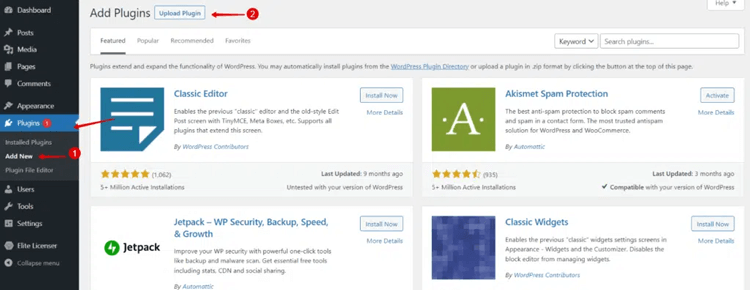
Choose the option to “Upload Plugin” and select the downloaded file.
Click on “Install Now” to install the plugin.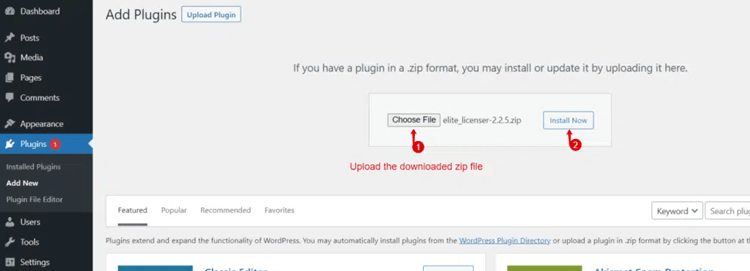
Once the installation is complete, activate the plugin. To proceed, please obtain the license key from the license page and input it.
To activate the Elite Licenser plugin, you can directly paste the zip file into your wp-content. > Plugins folder.
Then, extract the .zip file and go to your WordPress dashboard > plugin > Elite Licenser.
Finally, click “Active plugin“.
You need to use the license key to access Elite Licenser, that you received when you purchased it. Simply enter the key into the license box and activate the plugin. Once activated, you will be able to view the admin panel.
The plugin is designed for WordPress and should be easy to set up on your system, similar to other plugins.
Step-2: How to Add Product for Licensing
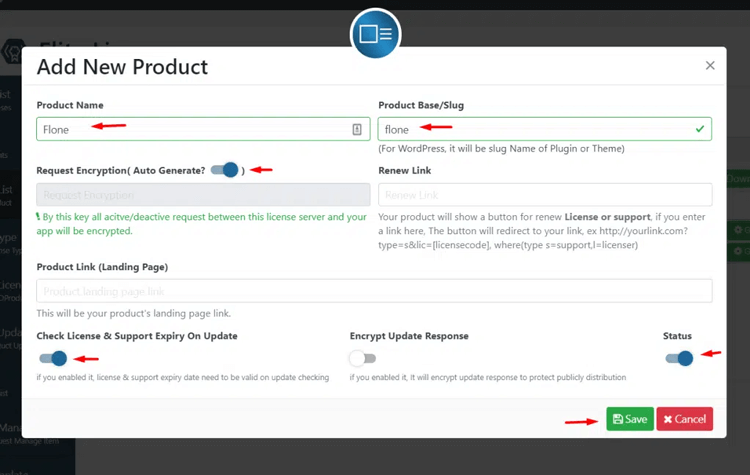
Access the product list option to add, edit or delete products. Click the “Add New” button to open a popup window where you can provide your product information to add a new product. Fill in all fields carefully, including
- The product name,
- Slug name (example: test-application),
- Request encryption,
- Renew link,
- Product link,
- Check license and support expiry on update,
- Encrypt update response and
- Status.
What is Request Encryption?
Request Encryption is a security feature in the licensing system for your product. Once your product is released, you may want to modify or update the Request Encryption.
To do so, you’ll need to implement a new base license class. This is because all requests made by your product to the licensing system are encrypted using the current Request Encryption settings.
However, it’s essential to be cautious when changing the Request Encryption because doing so will render all older versions of your products (such as apps, plugins, themes, etc.) invalid.
To ensure continued validity, you must update all previous versions of the product with the new encryption settings.
This ensures that the licensing system can properly handle the encryption changes. It also maintains the security and authenticity of the licensing process for both old and new versions of your product.
What is Renew Link Option?
The “Renew Link” option allows you to specify a link where users can renew their product’s license or support. When you enter a link in this field, a renewal button will be displayed to customers.
When they click on this button, they will be redirected to the provided link. This link typically includes parameters like the license code and the type of renewal (support or license) to process the renewal effectively.
For example: http://yourlink.com?type=s&lic=[licensecode], where ‘type=s’ represents support renewal, and ‘type=l’ represents license renewal.
What is ‘Generate License Script’?
“Generate License Script” is a feature in Elite Licenser that enables you to obtain the licensed raw code for your product. When you click on the “Generate License Script” button, the system will generate a script file tailored to your product’s platform.
For instance, if your product is a WordPress plugin or theme, you would select the “WordPress” option before clicking the “Next” button to initiate the download process.
The generated script file will contain the necessary code to handle licensing functionality for your product.
🔐 Manage Your Software License with Elite Licenser!
Ultimate license manager for digital products. Effortlessly oversee licenses for WordPress Themes, Plugins, Joomla, and various CMS, plus PHP, .NET, Java, and Android applications
Generate License Code
The “Generate License Code” feature allows you to create license codes for your product. These license codes are essential for validating and activating licenses for users who purchase your product.
When you use the “Generate License Code” feature, the system will create unique license codes that can be assigned to individual users upon their purchase. Each license code serves as a key to unlock the full functionality of your product, and it is typically tied to a specific domain or user account.
By generating license codes, you can effectively control access to your product and ensure that only authorized users can use it. This helps protect your intellectual property and maintain the security and integrity of your product’s licensing system.
Step-3: Adding License Types
You can find all license types available here, and this specific license key is valid for all products. Within the add/edit panel, simply click on the “Add New” button to create a new license type. Provide the name for your new license type, and set the number of expiry days. 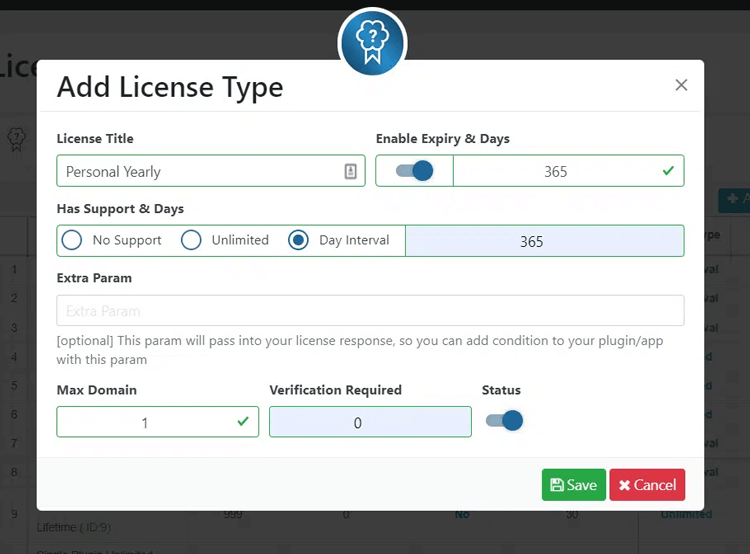
Activate Expiry & Days:
To set the number of days for the license activation, click on the switch button to enable the field. Enter the desired number of days in the input box. For instance, if you enter 30, the license will be activated for 30 days and will expire after that.
Has Support & Days:
The “Has Support & Days” feature has three modes:
- “No Support” means your license type doesn’t include support.
- “Unlimited” includes support with no time limit.
- “Day Interval” lets you specify the number of days of support your license type includes.
Extra Param:
You can use this parameter in your license response to set a specific condition in your plugin or app.
Max Domain:
maximum value allowed for the domain will be displayed here, if you enter the number 23, the license key will only allow for a maximum of 23 domains.
Verification Required:
Setting a Max Domain value of 50 allows usage on up to 50 domains without verification. However, entering 5 domains in the Verification Required field restricts automatic usage to only 5 domains.
Any usage beyond these 5 domains requires manual verification by the author. Additionally, forum sharing becomes automatically blocked when exceeding the verification limit.
Benefits of Licensing WordPress Plugins and Themes
Licensing WordPress plugins and themes offers several benefits for both developers and users within the WordPress ecosystem.
These benefits contribute to a healthy and vibrant community of developers and users. They promote innovation, collaboration, and adherence to open-source principles.
Here are some of the key benefits of licensing WordPress plugins and themes:
Legal Compliance:
Licensing ensures that developers and users are operating within the legal boundaries of open-source software. Choosing appropriate licenses allows developers to grant users the right to use, modify, and distribute their code. Users, in turn, can have confidence that they are using the software legally.
Encourages Open Source Development:
Licensing under open-source licenses, such as the GPL, encourages a culture of sharing and collaboration. Developers can learn from each other’s code, build upon existing solutions, and contribute back to the community. This fosters a rich ecosystem of plugins and themes that benefit everyone.
Community Building:
Licensing helps build a strong and active community of developers and users. A shared understanding of licensing enables developers to contribute to each other’s projects. It encourages collaboration on improvements and collectively enhances the WordPress experience.
User Trust and Reliability:
When a plugin or theme is licensed under recognized open-source licenses, users can trust that the code has been vetted and adheres to certain standards. This can increase user confidence in installing and using the software, knowing that it is part of a larger open-source ecosystem.
Security and Reliability:
Open-source software is often scrutinized by a large number of developers, which can lead to quicker identification and resolution of security vulnerabilities and bugs. Licensing encourages code review and contributions from the community, making the software more robust and reliable.
Flexibility for Users:
Licensing allows users to modify the code to suit their specific needs. They can customize themes to match their brand, add new features to plugins, or fix issues that might be affecting their website. This level of customization is especially beneficial for businesses and developers seeking tailored solutions.
Long-Term Viability:
Open-source licensing helps ensure the long-term viability of WordPress plugins and themes. If a developer discontinues their work, the code can still be maintained by others in the community. This allows the code to be improved, preventing abandoned plugins from becoming obsolete.
Supports Innovation:
Licensing fosters an environment that encourages innovation. Developers can build upon existing solutions, experiment with new ideas, and push the boundaries of what’s possible within the WordPress ecosystem.
Accessibility and Affordability:
Open-source licensing democratizes access to software. Users with limited budgets can access high-quality plugins and themes. This promotes inclusivity and accessibility in the WordPress community without significant costs.
HT Easy GA4
#1 📈 Google Analytics Plugin for WordPress
🚀 Supercharge your WordPress website with analytical insights. (Including WooCommerce Report)
Frequently Asked Questions
Q: What is the difference between a license for WordPress plugins and a license for WordPress themes?
A: The main difference lies in their intended use and functionality. A WordPress plugin is an add-on software component that extends the features and capabilities of a WordPress website. On the other hand, a WordPress theme is a collection of files that control the design and appearance of a WordPress website.
Q: What are the common types of licenses for WordPress plugins and themes?
A: The most common types of licenses for WordPress plugins and themes are:
GPL (General Public License): This is the most popular license for WordPress items. It grants users the freedom to use, modify, and distribute the software as long as any derivative works are also licensed under the GPL.
Commercial License: Some premium plugins and themes come with a commercial license. This means users need to purchase the item to use it on their website, and the usage rights are usually restricted to a single domain or a limited number of domains.
Freemium License: This is a combination of free and premium features. The base plugin or theme is available for free with limited functionality, and users can purchase a premium version to unlock additional features and support.
Q: Are there any restrictions on the number of websites I can use a commercial WordPress plugin or theme on?
A: Yes, there are often restrictions on the number of websites you can use a commercial WordPress plugin or theme on, as specified in the license terms. Some licenses may allow usage on a single domain, while others may permit usage on multiple domains within a limited range.
Q: Can I transfer a license for a WordPress plugin or theme to another person or entity?
A: It depends on the license terms provided by the developer. Some licenses allow license transfers, while others do not. Be sure to check the specific license agreement for the item you wish to transfer.
Q: What is Elite Licenser, and how does it work with WordPress plugins and themes?
A: Elite Licenser is a licensing plugin for WordPress that helps developers protect and manage their premium plugins and themes. It enables developers to implement license key verification, control updates, manage support, and restrict usage to authorized users.
The plugin works seamlessly with WordPress plugins and themes. It allows developers to offer their products through a licensing system and provide ongoing support and updates to their customers.
Q: Is Elite Licenser compatible with all WordPress plugins and themes?
A: Elite Licenser is designed to work with most WordPress plugins and themes. However, compatibility may vary depending on the structure and coding practices of individual products. Developers should thoroughly test their plugins and themes with Elite Licenser to ensure seamless integration.
Q: What license does Elite Licenser use for its distribution?
A: The license used for distributing Elite Licenser itself depends on the licensing policy set by its developers. It could be GPL (General Public License) or a commercial license. Users should review the license terms provided by the developers before using the plugin.
Wrapping Up
This comprehensive guide on how to license WordPress plugins and themes can help you navigate the process confidently and avoid common pitfalls.
In conclusion, licensing your WordPress theme is an important step to protecting your content and making sure others credit you for your hard work.
It also grants legitimate permission over usage rights, allowing for a higher level of control and security over any content created.
Most importantly, if you plan to monetize your WordPress theme in any way, it’s absolutely necessary to license the product correctly.
This comprehensive guide on how to license WordPress plugins and themes can help you navigate the process confidently and avoid common pitfalls.
Remember that picking the right license isn’t just a formality; it is the key to maintaining full security of everything related to your theme or plugin.
Make sure all proper information is provided through your chosen software and platforms. This ensures your interests remain protected and separate from any potential legal infringements.
Ready to take control of your product’s future? Start licensing your WordPress plugins and themes the right way today! You now have all the basics needed to secure your digital products for future development.