WooCommerce Product Presentation Tips That Boost Modern Store Sales

Your product presentation determines whether shoppers become customers or bounce to competitors. 83% of shoppers say product images are extremely influential in purchasing decisions, yet most WooCommerce stores present products in generic, uninspiring ways that fail to convert.
The difference between stores that generate sales and those that merely display inventory comes down to effective WooCommerce product presentation.
WooCommerce product presentation combines visual design, persuasive copywriting, and technical optimization. When executed properly, an optimized product presentation strategy can increase conversion rates by 30-40%, dramatically boosting revenue without requiring more traffic.
Stores that master WooCommerce product display consistently outperform competitors by 2-3x in revenue per visitor. This guide reveals the exact tactics top-performing stores use to present products more effectively, building customer confidence and driving sales through proven WooCommerce product presentation techniques.
Key Takeaways
- High-quality images drive 83% of purchase decisions.
- Video content increases conversions by up to 86%.
- Product pages loading in 1-2 seconds convert best.
- Personalized CTAs convert 42% more visitors.
- Product recommendations increase revenue by 35%.
- Smart attribute displays improve user experience.
HT Mega Elementor Addons
The ultimate Elementor page builder addons to build stunning websites.
What Is WooCommerce Product Presentation?
WooCommerce product presentation refers to how your store showcases products across category pages, search results, and product pages. An effective product presentation strategy encompasses high-resolution images, compelling descriptions, page speed, trust signals, and conversion-optimized call-to-action buttons.
The core purpose of excellent WooCommerce product display is to eliminate doubt and friction from the buying decision. When customers land on a product page, they need to quickly understand what the product is, why they need it, and why they should buy from you. Poor ecommerce product showcase design leaves unanswered questions, causing customers to abandon and shop elsewhere. Strategic product presentation answers every question before it arises.
Consider two approaches: Store A uses a single small image, a generic description, and a basic “Add to Cart” button. Store B provides 360-degree views, multiple lifestyle images, detailed specifications, reviews, and a sticky add-to-cart button. Store B clearly wins because it removes every reason for doubt. This difference separates successful WooCommerce product presentation from mediocre attempts.
Research shows that every additional second of load time causes a 0.3% conversion drop, and pages loading in 1-2 seconds achieve 3.05%+ conversion rates. Yet many stores overlook these optimization details for aesthetic choices that actually hurt conversions.
For deeper insights into WooCommerce optimization strategies, explore WooCommerce’s official best practices guide which outlines comprehensive product page customization approaches.
WooCommerce Product Presentation Tips: The Complete Guide
Mastering WooCommerce product presentation requires attention to multiple components working together. Each element of your product page design either builds confidence or creates friction.
High-Quality Images and Visual Confidence
Images are the most influential factor in online purchase decisions. When shoppers can’t physically inspect products, they rely entirely on photography to feel confident. This makes product image optimization absolutely critical. Start with resolution: product images should be at least 1200×1200 pixels to display crisply on modern screens. Smaller images appear pixelated and unprofessional, immediately reducing confidence.
Use consistent aspect ratios across your catalog: 1:1 square, 4:5 portrait, or another ratio. Consistency signals professionalism and makes your WooCommerce product display feel curated. Lighting and composition profoundly influence perceived quality. Studio-lit photography with neutral backgrounds (white or soft gray) lets products dominate. Products should occupy 60-70% of the frame with balanced negative space.
Include multiple angles for each product. Show front, back, and sides. For clothing, include close-up detail shots of seams and fabric. For physical products, include lifestyle images showing actual use. These presentations increase conversions by 28% because they help customers envision themselves using the product.
Zoom functionality and 360-degree views transform confidence levels. When customers can inspect details or rotate products to see all sides, they feel more in control. This capability is particularly powerful for jewelry, watches, and furniture.
Advanced product image optimization techniques, including responsive image delivery and lazy loading strategies, are detailed in Elementor’s comprehensive ecommerce optimization guide, which provides data-backed recommendations for image performance and conversion impact.
Product Titles, Descriptions, and Pricing
Your product title is the first text customers read. Weak titles like “Blue Shirt” lose sales to specific titles like “Premium Cotton Oxford Dress Shirt – Navy Blue, Slim Fit”. Effective titles include product type, key attributes, and benefits. They answer: What is this? What makes it special? Why would I want it?
Product descriptions bridge features and benefits in WooCommerce product presentation. Features describe what the product is (100% organic cotton); benefits explain why customers care (you’ll stay cool all day). The best descriptions weave both together. Organization matters: describe important information first, size, material, color options. Break descriptions into short paragraphs using white space liberally.
Strategic product presentation strategy for pricing creates contrast. When customers see both regular and sale prices, they need instant clarity on savings. Use different colors and sizes to distinguish them. Specific discount percentages outperform generic messaging. “Save 25%” converts better than “SALE”. Research shows percentage-off badges convert 40% better than generic labels.
For international stores, always display currency clearly, “$99 USD”, not just “$99”. Use scarcity messaging only when genuine: “Only 3 left in stock” creates real urgency, but false urgency destroys trust immediately.
Video Content and Demonstrations
Video content increases conversions by up to 86%, making it one of the highest-impact changes to WooCommerce product presentation. Product demonstration videos showing products in action are infinitely more persuasive than static images.
A 1-2 minute video showing someone using a tool, wearing clothing, or assembling furniture builds confidence through an authentic product function demonstration.
Lifestyle videos showing products in real environments work particularly well for furniture, home décor, and fashion. A couch in a beautifully styled living room helps customers envision it in their own homes, driving purchases emotionally.
User-generated videos, unboxing, and customer reviews add powerful social proof. Seeing real people opening products and sharing honest reactions builds authenticity that no marketing video can match.
Host videos on YouTube or Vimeo rather than self-hosting to ensure fast, reliable playback across devices. This preserves your WooCommerce product display experience without slowing pages.
Trust Signals and ShopLentor Product Grid Luxury Integration
Social proof transforms skeptics into buyers. Star ratings displayed prominently on category pages and product pages demonstrate customer satisfaction. Research shows products with 50+ reviews convert 27% better than those with few reviews. Review count visibility matters as much as the rating—a 4.8-star with 342 reviews carries far more weight than 4.9 stars with 3 reviews.
User-generated content, customer photos, and videos dramatically increase trust in WooCommerce product presentation. Customers wearing or using your product provide authentic proof. This content increases conversions by 28% and is viewed as significantly more trustworthy than professional marketing content.
Trust badges for security, money-back guarantees, and payment methods should be visible near the add-to-cart button. SSL certificates, secure payment logos, and refund policies signal it’s safe to buy from you.
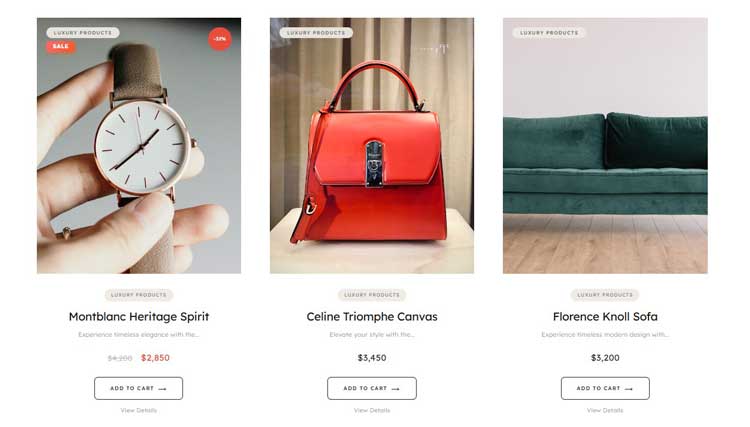
ShopLentor’s Product Grid Luxury widget exemplifies perfect WooCommerce product display optimization. This tool brings editorial-quality grids to your store with 4 aspect ratio options (1:1, 3:4, 4:5, 9:16), automatic discount badges, product subtitles, ghost-style CTAs, and custom typography.
Transform standard product presentation strategy into conversion engines without writing code. The widget’s sophisticated interactions and smart badge system naturally highlight bestsellers and create perceived brand value that standard grids cannot achieve.
Conversion-First CTA Buttons and Mobile Optimization
Your call-to-action button’s design, placement, and copy dramatically influence whether shoppers complete purchases. Buttons should be impossible to miss; use contrasting colors that stand out. Buttons should be sticky, remaining visible as customers scroll. Many stores force customers to scroll back to the top to add items, causing unnecessary friction. A sticky add-to-cart button eliminates this completely.
Button copy matters more than most realize in WooCommerce product presentation. “Add to Cart” is standard but generic. Personalized copy converts 42% better. “Buy Now,” “Get It Today,” “Secure My Order,” or product-specific copy like “Try Risk-Free” work better because they emphasize benefits or urgency. Minimum button height should be 44 pixels for comfortable mobile tapping.
Mobile shoppers represent enormous traffic, yet many stores optimize poorly. Mobile conversion rates range 1-3% while desktop reaches 3-5%. Yet this gap reflects poor optimization, not inherent mobile limitations. Properly optimized mobile experiences achieve conversion rates within 1-2% of desktop.
Buttons need a 44-pixel minimum height for comfortable tapping. Replace hover effects with tap-activated interactions. Swipe gestures work well for image galleries. Responsive image scaling prevents slow loading on mobile networks. Optimize images, minimize code, and implement lazy loading so pages load in 1-2 seconds on typical mobile connections.
Call-to-action placement differs from desktop. On mobile, customers want immediate answers. Consider placing add-to-cart buttons higher and using sticky positioning to keep them accessible.
Mistakes to Avoid in WooCommerce Product Presentation
Low-quality or inconsistent images are the most common mistake undermining WooCommerce product display. Photos taken in poor lighting and with inconsistent backgrounds convey an unprofessional impression that no other optimization can overcome. Invest in proper product photography, it’s among the highest-ROI investments you can make.
Slow-loading pages destroy conversions. Every additional second causes a 0.3% conversion drop. A page loading in 5 seconds instead of 2 loses 0.9% conversion rate, massive revenue impact. Compress images, minify code, and use content delivery networks to ensure fast loading globally.
Cluttered descriptions overwhelm readers. Use clear organization, white space, and short paragraphs. Missing trust signals like reviews, ratings, and security badges cause hesitation at the final moments. Weak or generic buttons fail to convert ready-to-buy customers. Missing product specifications force customers to contact support.
Inadequate zoom or view functionality frustrates customers wanting to inspect closely. Provide a minimum 2x zoom. For products where details matter, jewelry, textiles, and 360-degree views transform confidence levels.
ShopLentor- WooCommerce Builder for Elementor & Gutenberg
A versatile page builder to build modern and excellent online stores with more than 100k+ Active Installations.
Frequently Asked Questions
What makes an effective WooCommerce product presentation?
High-quality images, clear descriptions, fast loading, visible reviews, strong CTAs, mobile optimization, and strategic video content work together to maximize conversions.
How do product images impact conversions?
83% of shoppers say product images are extremely influential in purchasing decisions. High-quality, multi-angle photography with zoom capability significantly increases confidence and conversion rates.
Does video really boost sales?
Yes, product pages with embedded videos see up to 86% conversion increases. Videos help customers visualize products in real-world use and build emotional connections.
What’s the ideal product page load time?
Pages loading in 1-2 seconds achieve 3.05%+ conversion rates. Every additional second causes 0.3% conversion drop, so optimization is critical.
How important are product recommendations?
Highly important, stores using personalized recommendations see 4.5x higher conversions. Advanced personalization increases revenue by 35%.
Conclusion
WooCommerce product presentation is the foundation of ecommerce success. From image quality and description clarity to page speed and conversion-optimized buttons, every detail influences whether shoppers become customers.
Winning stores understand that product presentation strategy isn’t just about aesthetics; it’s about removing every barrier between interest and purchase. When you optimize images for trust, design CTAs for clarity, strategically position recommendations, and optimize experiences for mobile users, conversions follow naturally.
Start auditing your current product pages.
Do images feel professional? Do descriptions answer customer questions? Do pages load in 1-2 seconds? Are CTAs prominently placed? Are reviews and trust signals visible? Is the mobile experience optimized?
Pick one area and improve this week. Test changes and measure results. Data shows which optimizations matter most for your products and audience. Over time, incremental improvements compound into dramatically higher conversion rates.
Your products deserve a beautiful, persuasive WooCommerce product presentation. When they are, sales follow naturally.