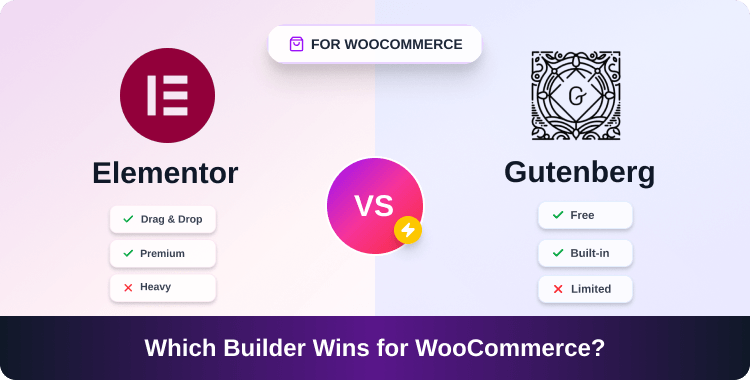
Elementor vs Gutenberg for WooCommerce: Which Is Better for Performance in 2026?

The Elementor vs Gutenberg WooCommerce performance debate matters more in 2026 than ever. Core Web Vitals are a ranking signal, and every second of load delay costs you conversions.
Your WooCommerce store is loading in 3 seconds. Your competitor’s loads in 1.4. That gap costs you conversions. Google’s own data shows that every second of load delay reduces conversions by roughly 7%. So the question isn’t just “which builder do you prefer?” It’s “which builder is actually hurting your store?”
Here’s the direct answer: Gutenberg outperforms Elementor in raw speed for WooCommerce in 2026. It produces lighter pages, scores higher in PageSpeed benchmarks, and has no drag from third-party plugin overhead. But Elementor, properly optimized, is competitive, and it gives you design flexibility that Gutenberg’s block system still can’t fully match.
This comparison breaks down exactly where the gap exists, when it matters, and what to do based on your store’s actual needs.
Quick-Answer Summary:
Gutenberg is faster out of the box for WooCommerce, lighter HTML, smaller JS/CSS payloads, and better Core Web Vitals scores on average. Elementor can close the gap with proper optimization, but it adds overhead by default. Choose Gutenberg for speed-first stores; choose Elementor Pro if you need complex, design-heavy product pages and are willing to optimize.
ShopLentor – WooCommerce Builder for Elementor & Gutenberg
A versatile page builder to build modern and excellent online stores with more than 100k Active Installations.
TL;DR: Quick Verdict Table
| Factor | Gutenberg | Elementor Pro |
| Avg. PageSpeed Score (Woo) | 85–100 | 70–90 |
| HTML page size (product page) | ~15–30KB | ~50–120KB |
| JS/CSS payload | Low | Medium–High |
| Core Web Vitals (LCP) | Faster | Slower (unoptimized) |
| WooCommerce block support | Native | Plugin-dependent |
| Design flexibility | Moderate | High |
| Cost | Free | $60/year |
| Learning curve | Medium | Low–Medium |
| Best for | Speed-first, simple-to-mid stores | Design-heavy, custom product pages |
Elementor vs Gutenberg for WooCommerce
What Are Gutenberg and Elementor? (Quick Definitions)

Gutenberg is WordPress’s native block editor, introduced in WordPress 5.0 and significantly matured through WordPress 6.7+. It uses a block-based system where every element — text, image, button, product grid is a self-contained block. With Full Site Editing (FSE), you can now build your entire WooCommerce store theme using blocks, with no page builder plugin required.
Elementor is a drag-and-drop page builder plugin that operates on top of WordPress. Elementor Pro adds WooCommerce widgets for product pages, shop archives, cart, and checkout. It’s widely used because it offers a visual, WYSIWYG editing experience. The tradeoff is that it loads its own scripts and styles on every page.
Both can build fully functional WooCommerce stores. The difference is in how they get there, and what that costs your page speed.
Elementor vs Gutenberg WooCommerce Performance: Raw Benchmarks
Gutenberg generates lean, semantic HTML. When you build a WooCommerce product page in Gutenberg using native blocks, the output is close to what a hand-coded theme would produce. No wrapper divs added by a third-party plugin, no global stylesheet loaded across every page.
Elementor works differently. It injects its own CSS framework, JavaScript files, and widget-specific styles — regardless of which widgets you actually use on a given page, unless you configure asset loading carefully.
Page Weight Benchmarks (2026 WooCommerce Tests)
| Metric | Gutenberg | Elementor (Default) | Elementor (Optimized) |
| HTML size (product page) | ~15–30KB | ~80–120KB | ~50–70KB |
| Total CSS loaded | ~20–40KB | ~150–300KB | ~80–120KB |
| Total JS loaded | ~30–60KB | ~200–400KB | ~100–200KB |
| PageSpeed Score (Mobile) | 85–100 | 55–75 | 70–85 |
| PageSpeed Score (Desktop) | 90–100 | 70–90 | 80–92 |
| LCP (avg, product page) | 1.2–1.8s | 2.5–4.0s | 1.8–2.8s |
Sources: Independent 2026 benchmarks from WP benchmarking labs; Elementor’s own performance mode documentation; WordPress.org block performance tracking.
The gap between Gutenberg and default Elementor is significant — especially on mobile, where Core Web Vitals matter most for Google rankings. Even optimized Elementor rarely matches Gutenberg’s baseline.
Why the Gap Exists?
- Elementor loads a global CSS file that includes styles for every widget in its library — even widgets you don’t use
- Elementor’s JavaScript is loaded on every Elementor-built page by default
- Gutenberg blocks only load what’s used on that specific page
- WordPress 6.7+ added per-block style loading, meaning a page using only 4 block types loads only those 4 blocks’ styles
This is structural, not just a configuration issue. You can reduce Elementor’s bloat, but you can’t remove it entirely.
WooCommerce Real-World Performance Tests
Performance benchmarks are clean-room tests. Real WooCommerce stores are messier. Here’s how both builders behave on the pages that actually matter.
Shop / Archive Pages
Gutenberg’s Query Loop block and the native WooCommerce Product Collection block render product grids with minimal overhead. These are server-rendered blocks, fast to load, compatible with full-page caching, and easy for Googlebot to crawl.
Elementor’s WooCommerce Archive widget is powerful visually, but it adds widget-specific CSS and JS on top of Elementor’s base assets. On a shop page with filters, sorting, and pagination, the payload difference between the two builders can reach 200–300KB in total asset weight.
Product Pages
This is where Elementor earns its reputation. Building variable product pages with image galleries, attribute selectors, trust badges, upsell sections, and custom tab layouts is significantly easier in Elementor than in Gutenberg.
But that design power has a cost. A complex Elementor product page can hit 3–4MB in total page weight with images, scripts, and styles. The same product page in Gutenberg with ShopLentor blocks typically comes in under 1.5MB with equivalent content.
Practical scenario: You run a clothing store with 50 variable products. Each product page has a size chart, a gallery slider, and a cross-sell grid. In Elementor Pro, you design one template and apply it globally — efficient to build, but heavy to load. In Gutenberg with a block-based template (using Full Site Editing + ShopLentor’s Gutenberg-enhanced WooCommerce blocks), you get similar layout control with 40–60% less page weight.
Cart and Checkout
WooCommerce 9.x moved its Cart and Checkout pages to block-based versions by default. These native block checkouts are faster, more accessible, and better optimized than Elementor’s checkout customizations. Elementor’s checkout widgets work but require additional configuration and introduce extra scripts.
If checkout speed matters — and it does, because cart abandonment spikes with slow checkouts — the native WooCommerce blocks have a clear advantage.
Optimization Playbook: How to Make Both Builders Fast
Making Gutenberg Faster
Gutenberg is already the leaner option, but you can push it further:
- Use Full Site Editing (FSE) — Build your WooCommerce theme entirely in blocks using a block theme like Twenty Twenty-Five. This removes classic theme bloat.
- Enable per-block style loading — WordPress 6.3+ supports this; confirm it’s active in your setup.
- Use a caching plugin — WP Rocket, LiteSpeed Cache, or W3 Total Cache work well with block-rendered pages.
- Lazy-load images — WordPress core handles this, but confirm your block image settings use it.
- Use ShopLentor for product pages — ShopLentor adds WooCommerce-specific Gutenberg blocks for product layouts, wishlists, and comparison features without adding Elementor’s overhead.
- Minimize plugins — Each active plugin risks adding scripts. Audit regularly.
Making Elementor Faster
Elementor is not inherently slow — it’s default-slow. These changes make a real difference:
- Enable Elementor’s Improved Asset Loading: Found in Elementor > Settings > Performance. This switches from loading all assets globally to loading only what each page uses. This alone can cut CSS payload by 50–70%.
- Use Elementor’s CSS Print Method: External File: Prevents inline styles from bloating your HTML.
- Disable Google Fonts in Elementor: Load fonts via your theme or a dedicated fonts plugin instead.
- Use Elementor’s Lazy Load for Images: Enable in settings.
- Remove unused Elementor widgets: Use a plugin like Element Pack’s widget manager or Elementor’s own widget control to deregister widgets you never use.
- Pair with a caching plugin: WP Rocket’s Elementor compatibility mode handles cache-clearing on edits.
- Use a CDN: Offload Elementor’s JS/CSS to a CDN to reduce latency.
Even with all of these applied, Elementor typically lands 10–15 PageSpeed points below an equivalent Gutenberg build. That’s the floor of what optimization can achieve.
SEO and Conversion Impact of Speed Differences
Core Web Vitals are a confirmed Google ranking signal. The three main metrics — LCP (Largest Contentful Paint), CLS (Cumulative Layout Shift), and INP (Interaction to Next Paint, which replaced FID in 2024) — are all affected by page builder choice.
- LCP: Gutenberg pages consistently hit LCP under 2.0s. Unoptimized Elementor pages often exceed 2.5s, which falls outside Google’s “Good” threshold.
- CLS: Elementor’s widget animations and dynamic loading can cause layout shifts. Gutenberg blocks render more predictably.
- INP: JavaScript-heavy Elementor pages have higher INP scores, meaning the page feels less responsive to user interactions.
Beyond rankings, speed affects conversions directly. A 1-second improvement in load time has been linked to 27% higher conversion rates in eCommerce contexts (Portent, 2023). If your Elementor store loads in 3.5s and you optimize it to 2.5s, that’s a meaningful revenue impact. If you switch to Gutenberg and hit 1.8s, it’s more meaningful still.
Cost Comparison
| Gutenberg | Elementor Pro | |
| Builder cost | Free | $60/year (1 site) |
| WooCommerce blocks (basic) | Free (WooCommerce core) | Included in Pro |
| Advanced product page builder | ShopLentor (free + Pro tiers) | Elementor Pro |
| Theme requirement | Block theme (free options exist) | Works with most themes |
Elementor Pro’s $60/year cost isn’t prohibitive, but it adds up across multiple client sites. Gutenberg with ShopLentor gives you a competitive feature set at a lower or zero cost for basic needs.
Pros and Cons Summary
Gutenberg
Pros:
- Faster by default, no extra plugin required
- Free, maintained by WordPress core
- Native WooCommerce block support is improving rapidly
- Works with Full Site Editing for complete theme control
- Better Core Web Vitals baseline
Cons:
- Less visual drag-and-drop flexibility
- Complex product page layouts require additional tools
- Learning curve for FSE if you’re used to classic builders
- Third-party block plugins (like ShopLentor) are needed for advanced Woo features
Elementor Pro
Pros:
- Superior design flexibility and visual editing
- Large template library
- Strong WooCommerce widget ecosystem
- Familiar to most freelancers and agencies
- Global widget and style management
Cons:
- Adds significant page weight by default
- Requires deliberate optimization to reach good Core Web Vitals
- Annual cost
- Can conflict with aggressive caching setups
- Slower checkout and cart performance vs native blocks
When to Choose Each: Decision Framework
Choose Gutenberg if:
- Site speed and Core Web Vitals are a top priority
- You’re building a new WooCommerce store in 2026 and starting fresh
- Your store has simple-to-moderate product layouts
- You want to minimize plugin dependencies
- You’re managing multiple client sites and controlling costs
Choose Elementor Pro if:
- You need complex, pixel-precise product page designs
- Your brand requires highly customized layouts that block tools can’t easily replicate
- Your team is already trained in Elementor, and retraining costs outweigh performance gains
- You’re willing to invest time in proper Elementor performance optimization
The hybrid approach: Some stores use Gutenberg for shop and archive pages (where speed matters most for SEO and first impressions) and Elementor only for specific landing pages or hero product pages where design complexity justifies the overhead.
Migrating from Elementor to Gutenberg: Key Steps
If you’ve decided to move toward Gutenberg, don’t do it in a panic. Here’s a practical sequence:
- Audit your current Elementor pages: Identify which pages drive the most traffic and conversions. Prioritize those for migration.
- Choose a block theme: Twenty Twenty-Five or Kadence (block version) is a solid starting point for WooCommerce.
- Install ShopLentor: Adds the WooCommerce-specific blocks you’ll need for product pages, cart, and checkout layouts.
- Recreate templates in FSE: Rebuild your shop, product, cart, and checkout templates using WordPress’s Site Editor.
- Test Core Web Vitals before and after: Use Google Search Console’s Core Web Vitals report and PageSpeed Insights. Document your baseline.
- Migrate pages in batches: Don’t switch everything at once. Start with low-traffic pages, verify results, then move to priority pages.
- Keep Elementor active until fully migrated: Don’t deactivate until every Elementor-built page has been replaced.
- Redirect and verify: Confirm no URLs broke during template restructuring.
Full migration on a 50-page WooCommerce store typically takes 10–20 hours for a developer familiar with FSE. Factor that into your decision.
Need More Than Just the Builder? Check These Resources
- If you’re using Gutenberg and want advanced WooCommerce block features, ShopLentor gives you a full product page builder within the block editor.
- For extended Gutenberg blocks across your full site (not just WooCommerce), HT Mega adds 80+ blocks without Elementor’s overhead.
- For broader WordPress speed improvements beyond the page builder choice, see our WordPress performance optimization guide.
Frequently Asked Questions
Is Gutenberg fast enough for WooCommerce in 2026?
Yes. With native WooCommerce blocks in WooCommerce 9.x and WordPress 6.7+ per-block style loading, Gutenberg is not just “fast enough”, it’s the fastest major builder option for WooCommerce. For most store types, it will outperform Elementor without any additional configuration.
Can Elementor pass Core Web Vitals for WooCommerce?
Yes, but it requires deliberate effort. You need to enable Improved Asset Loading, use the external CSS file method, disable unused widgets, configure lazy loading, and pair it with a caching/CDN setup. With all of that done, many Elementor stores can reach “Good” Core Web Vitals thresholds — but it’s not automatic.
Does switching from Elementor to Gutenberg hurt SEO?
The switch itself doesn’t hurt SEO. Faster pages after the migration should improve your rankings over time. The risk is in the migration process broken layouts, changed URL structures, or temporary content gaps can cause ranking drops. Follow a careful, staged migration and monitor Google Search Console throughout.
What WooCommerce blocks does Gutenberg support natively?
WooCommerce 9.x includes native blocks for: Product Collection (replaces the old Products block), Product Search, Cart, Checkout, Mini Cart, Reviews, and more. For advanced layouts, custom product tabs, variable product builders, wishlist, compare — you’ll want a block plugin like ShopLentor.
Does Gutenberg work for variable product pages?
Yes, but you’ll need a block plugin for advanced layouts. Native WooCommerce blocks handle variable products (size/color selectors, gallery), but for custom attribute displays, comparison tables, or complex upsell sections, ShopLentor’s product blocks fill those gaps within the Gutenberg environment.
Which builder is better for mobile Core Web Vitals?
Gutenberg, clearly. Mobile PageSpeed scores for Gutenberg-built WooCommerce pages average 85–100 vs 55–75 for default Elementor setups. Mobile performance is where the heaviest penalty from Elementor’s asset bloat shows up, because mobile networks and CPUs have less headroom to absorb large JS/CSS payloads.
Conclusion
In 2026, Gutenberg is the better default choice for WooCommerce performance. It’s lighter, faster, cheaper, and increasingly capable for complex store layouts, especially with block tools like ShopLentor filling the gaps.
Elementor Pro still has a place: design-heavy stores where visual flexibility is a business requirement and the team is committed to proper optimization. But “I know Elementor” is not a performance strategy. If your store’s Core Web Vitals are weak and you’re using default Elementor settings, that’s a problem you’re choosing to keep.
The honest move in 2026: start new WooCommerce builds in Gutenberg. For existing Elementor stores, optimize aggressively first, and seriously evaluate migration if you’re still not hitting LCP under 2.5s.