
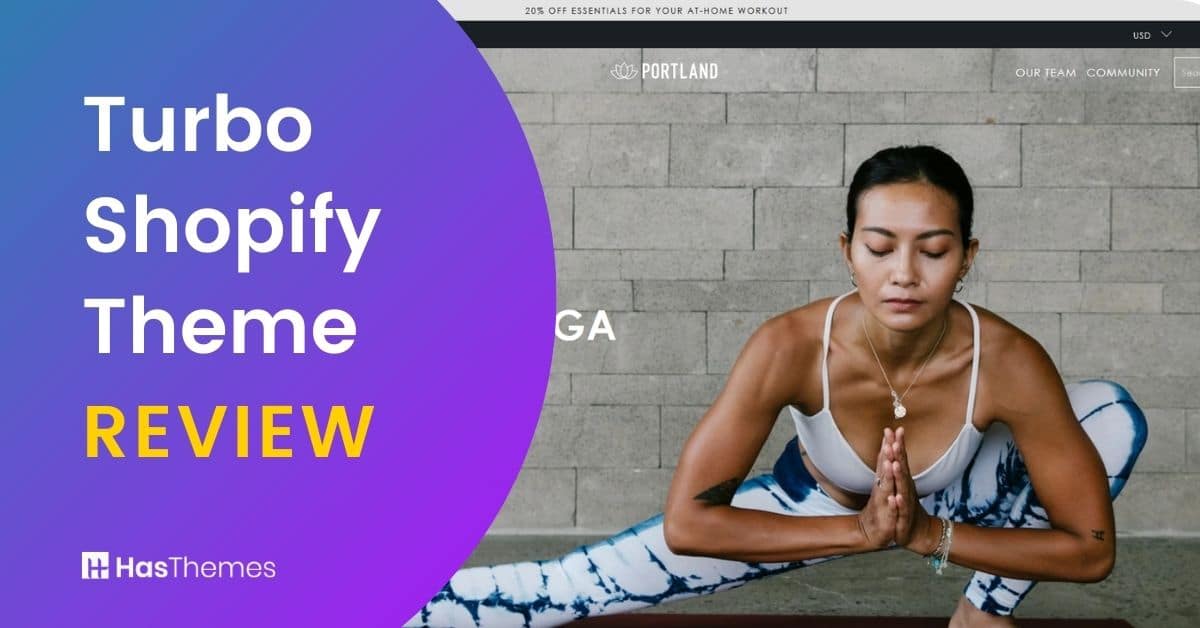
Turbo Shopify Theme: In-Depth Review

What’s the best way to make your Shopify store stand out from the competition? The answer lies in speed, style, and seamless performance, exactly what the Turbo Shopify Theme delivers.
Developed by Out of the Sandbox, Turbo is designed to help you build a high-performing online store that impresses visitors and converts them into loyal customers.
The turbo theme out of the sandbox offers exceptional build quality, reliable support, and lightning-fast loading times paired with a flexible, eye-catching design that works beautifully on any device.
What Makes Turbo Stand Out?
Turbo’s greatest strength is its ability to maximize performance while minimizing load times—a critical factor since customers expect instant access without confusion or delays. Many turbo theme performance reviews highlight its industry-leading speed and optimization capabilities, making it one of the fastest Shopify themes available.
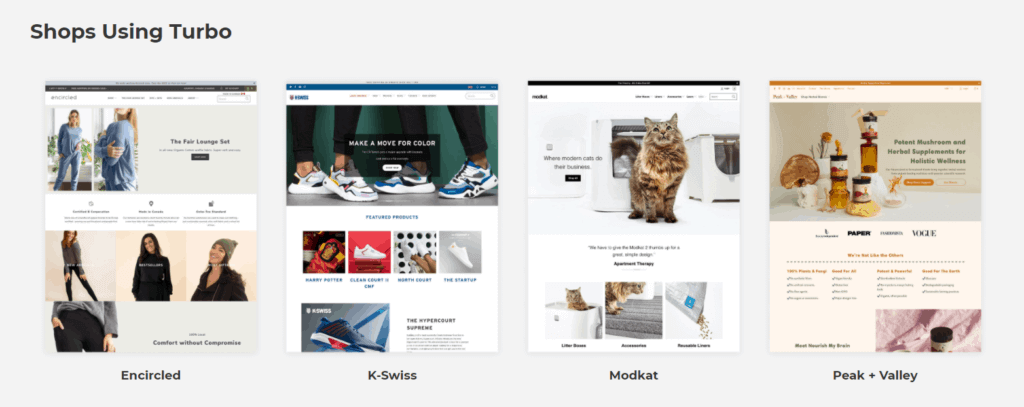
The Turbo Shopify theme is fully compatible with Shopify’s Online Store 2.0, ensuring you have access to the latest features and customization options. The theme has been continuously updated since its release, with version 7.0.0 (released September 2021) marking the transition to full OS 2.0 compatibility.
Before purchasing, you can explore the Turbo Shopify theme demo to experience its features firsthand and see how it can transform your online store.
Enhanced Customer Experience Features
Beyond speed, Turbo includes features specifically designed to improve customer satisfaction:
- Predictive search functionality that helps users find products instantly
- Quick View options that let customers preview product details without leaving collection pages
The turbo theme SEO features include optimized meta tags and structured data to help improve your search rankings. The customizable slideshow brings your product images to life with creative fade and scroll effects that engage visitors from the moment they arrive.
Key Takeaways
- Understand Turbo’s core strengths
- Learn how the Turbo theme out of the Sandbox achieves lightning-fast speeds, smooth animations, and unmatched reliability, as seen in many Turbo theme performance reviews.
- Discover how the Turbo theme SEO features help improve search visibility and user experience.
- Get hands-on insights into Turbo theme design options, page layouts, and Turbo theme product pages that you can tailor to your brand.
- Find detailed comparisons in the Turbo theme alternatives section.
- Understand how different features help increase Turbo theme conversion rates and customer satisfaction.
Turbo Shopify Theme Feature List
The Turbo Shopify Theme comes packed with advanced features designed to boost performance, speed, and user experience. It includes flexible layouts, dynamic sections, and built-in tools that help create visually appealing and high-converting online stores.
- Enhanced Customer Experience Features
- Page Transition and Speed
- Predict Search
- Advance Mega Menu
- Quick Shop
- Page Layouts
- Homepage Variations
- Unique Page Templates
- Promotional Sections and Banners
- Mini Cart
- Multi Tag Filter
- Gallery Page
- Recently Viewed Products
- Theme Updates and Management
- Turbo Shopify Theme Styles
- How Much Does Turbo Cost?
- Where to Buy Turbo Theme
- Watch the Video About the Turbo Shopify Theme
Page Transition and Speed

Turbo Shopify Theme has tons of features, but the one that sets it apart is speed. It’s designed to keep your site running as smoothly and quickly as possible with two different speed settings: Ludicrous and Sport mode. Independent turbo theme loading speed tests consistently show sub-second page load times across devices.
Turbo also includes smart page preloading technology so visitors don’t experience delays. This helps pages load more efficiently and keeps users engaged. The turbo theme mobile optimization ensures seamless shopping experiences on smartphones and tablets.
The Ludicrous mode provides the full advantage of Turbo’s performance-enhancing features, while Sport mode offers all the same techniques except page preloading. Page preloading uses advanced methods to predict the next page a user will visit and starts loading it in the background.
Predict Search
Have you experienced customers struggling to find what they’re looking for? Well, now you won’t have to worry about that. A new and powerful feature in Turbo 3 is setting the predictive search widget as a homepage post or product page option.
This innovative feature provides your customers with convenience and an improved shopping experience, saving them time when browsing products.
Advance Mega Menu
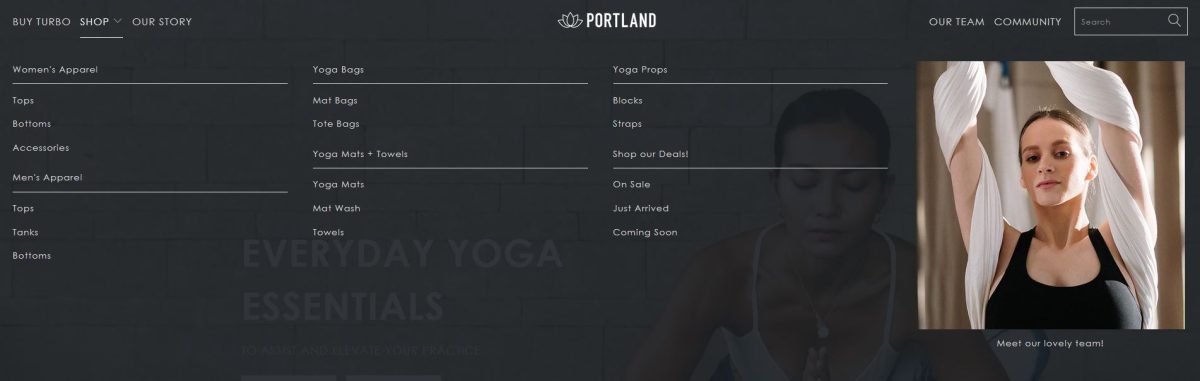
The advanced mega menu can increase the effectiveness of any online store. It’s a great option for companies with a huge inventory that want to appeal to customers without weighing them down with content.
You can create up to five advanced mega menu layouts, each with up to five columns of configurable content. This function is an excellent method to showcase all of your products and collections on a single page.
Customers seeking specific items can simply scroll through the organized list instead of having to search or browse through multiple pages! Following the turbo theme best practices helps you maximize menu navigation and user engagement.

Bring your ideas to life for $1/month
The future of business is yours to shape. Sign up for a free trial and enjoy 3 months of Shopify for $1/month on select plans.
Quick Shop
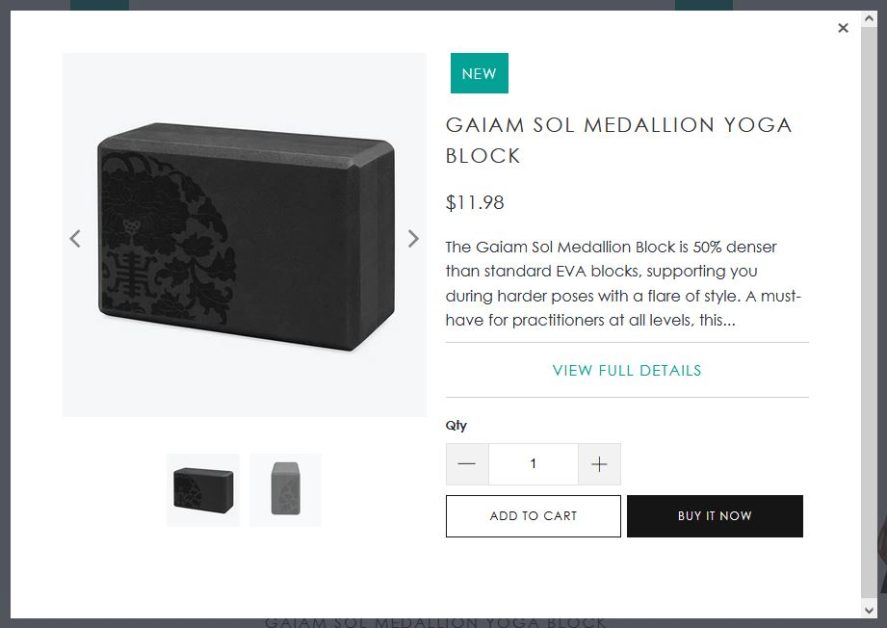
This Turbo Shopify Theme has a great feature called Quick Shop. The quick shop functionality allows users to import items into the shopping cart right away from the collection page. So, users can check the product details even though they don’t browse the product page.
This is especially beneficial for stores with large inventories or slower connection speeds. The turbo theme checkout optimization features reduce cart abandonment and increase sales.
Page Layouts
The Turbo theme provides you with an attractive and customizable layout. Extensive turbo theme design options allow merchants to create unique brand identities effortlessly. In addition, the template allows for different layouts, such as photo galleries and about pages, making the design process simpler and more efficient.
With Online Store 2.0 compatibility, you can tweak section designs directly within the Theme Editor to customize your site further. This includes the use of tabs, adding unique sections, embedding videos, and moving either part or your whole product description under the product image or below the fold.
Homepage Variations
Turbo has a ton of sections that you can use on the homepage. And one of those is for custom HTML, which will allow you to add some extra flair and creativity in how you present your content. With 22 different options available right now there’ll be no limit on what kind of style merchandising will work best for your needs.
Unique Page Templates
Turbo’s page templates are great for any business looking to stand out from the competition. The Shopify Theme Turbo provides many customizations that can be changed on your website, including contact information and communication forms. Optimized turbo theme product pages showcase items with high-quality images and detailed descriptions.
Grow Your eCommerce Business with Valuable Resources, Tools, and Lead Magnets
- Bring your ideas to life for $1/month
- One platform that lets you sell wherever your customers are—online
- Create a beautiful eCommerce website
- Start for free, then enjoy $1/month for 3 months
- Build your own website in a few steps
- Create a website in minutes easily, secure method
- Turn what you love into what you sell
- Discover the Shopify Point of Sale
- AI Based Business Name Generator
Promotional Sections and Banners

Promotion is a crucial part of running any successful business, but it’s not easy to get right. With the Turbo theme Shopify, you can customize promotional sections and banners to achieve optimum performance for your company’s needs.
With the Turbo Shopify theme, you can easily control the placement and visibility of your promotional content to maximize its impact on customers. Effective banner placement can significantly improve Turbo Theme conversion rates.
Mini Cart
The Minicart is a new sort of cart that allows you to keep your site clean and clutter-free with a single click. When visitors add things from Turbo themes eCommerce stores to their shopping carts, the shopping cart will come up automatically, eliminating the need for them to exit or browse away before checking out! This handy feature makes things easier for everyone.
🚀 Ready to skyrocket your Shopify store to success?
🚀 Unlock the secrets to success and boost your sales 📈 with ShopiBuffet’s expert services. Don’t miss out, get started now!
Multi Tag Filter
This is a unique feature that not many websites have. This multi-tag filter enables your customers to filter products by attributes like supplier, material, size or color, etc. This functionality provides your customers an advanced filtering option at gallery pages. Also, it even allows adding custom colors for color properties.
Gallery Page
A tempting product is much easier to sell when people love what they see. The Turbo theme includes a free library page with an easy-to-use drag-and-drop interface for generating stunning gallery pages and look books. This gallery page will make your products more appealing than ever!
Recently Viewed Products
If you wish to boost your sales, this feature will assist you. It allows you to recommend other products to customers by displaying them in a different location on product pages and collections. Customers will be able to discover the product they want faster, and you will see a substantial boost in sales.
Theme Updates and Management
Out of the Sandbox offers a Theme Updater & Backups app that makes maintaining your Turbo theme effortless. The app provides:
- One-click automated theme updates – Save time by automatically copying over your settings and code changes
- Free plan available – Get the latest version of Turbo at no additional cost
- Regular updates – Turbo Shopify theme is regularly updated with new features at no additional charge
This eliminates the previously cumbersome and costly process of manually transferring custom code when updating your theme.
Turbo Shopify Theme Styles
With so many incredible features to choose from, the Turbo Theme is a unique product on its own. But have you ever thought about how each merchant has different needs? The turbo theme customization capabilities enable brands to tailor every aspect to their needs.
Out of Sandbox has taken these themes and made them even better by adapting them just enough to match specific requirements. When you purchase the Turbo theme for $425, you get access to ALL six theme styles. The style you choose during purchase simply determines the default visual style when you first upload your theme.
The Six Turbo Theme Styles:
1. Turbo Theme Portland – The default preset with a minimal, clean design. Perfect for fashion, health and fitness, or beauty stores seeking a sleek and professional look.
2. Turbo Theme Seoul – A gorgeous preset with elegant lines and minimalist design aesthetic, great for one-product stores or technology companies. Notable feature: product display prominently on the homepage.
3. Turbo Theme Florence – An elegant preset perfectly fit for jewelry stores and handcrafted items. Notable feature: focus on displaying collections with warm, inviting style that captures Italian craftsmanship.
4. Turbo Theme Dubai – A classically designed preset with solid, simple colors and a fancy, sophisticated look. Notable feature: “Popular picks” section on the homepage.
5. Turbo Theme Chicago – A preset that offers a playful, bold look for your website with dramatic and powerful appearance. Notable feature: trendy design with clean mega menu, ideal for streetwear, sportswear, or businesses targeting a younger, livelier audience.
6. Turbo Theme Tennessee – Designed with a warm and inviting feel, perfect for businesses that want to create a friendly and approachable online store. This style features classic and timeless design elements providing a sense of reliability and comfort.
This Shopify theme is ideal for high-end alcohol and beverage stores, barware accessories, or luxury product businesses. The design is straightforward yet striking enough to convey luxury vibes and leave a lasting impression.
All these themes are created with great capabilities, allowing you to customize these templates in any way you can think of.
Turbo Shopify Theme Pricing and Purchase Information
How Much Does Turbo Cost?
The Turbo theme Shopify price is $425 USD as a one-time payment. This gives you:
- Access to all 6 theme styles (Portland, Seoul, Florence, Chicago, Dubai, and Tennessee)
- Lifetime access to the theme
- All future updates at no additional cost
- Comprehensive support from Out of the Sandbox
- Detailed documentation and video guides
- 14-day money-back guarantee – Full refund if you’re not satisfied
Where to Buy Turbo Theme
IMPORTANT: Turbo is NOT available in the Shopify Theme Store. You must purchase it directly from the Out of the Sandbox website at outofthesandbox.com.
Installation Process
- After purchase, you’ll receive an order confirmation email with a personalized registration link
- Register your theme by adding your email and shop domain
- You’ll receive a Registration Confirmation email with a download link
- Download the theme as a ZIP file (includes all 6 styles)
- Upload your preferred style to your Shopify admin under Online Store > Themes
Is It Worth the Price?
While $425 is more expensive than most Shopify themes, it offers premium performance, strong Turbo theme conversion rate optimization, and top-tier customer support—making it a great investment for serious store owners, especially those with:
- Large product catalogs (200+ products)
- High-volume traffic
- Shopify Plus stores
- Businesses prioritizing speed and performance
Watch the Video About the Turbo Shopify Theme
Turbo Shopify Theme Alternatives
If you’re exploring Turbo Shopify Theme alternatives, several premium Shopify themes match its speed, flexibility, and professional design. These alternatives deliver high-performance layouts, advanced customization options, and conversion-optimized features. It’s perfect for building a fast, engaging, and visually stunning online store that stands out from the competition.
Mavon Shopify Theme
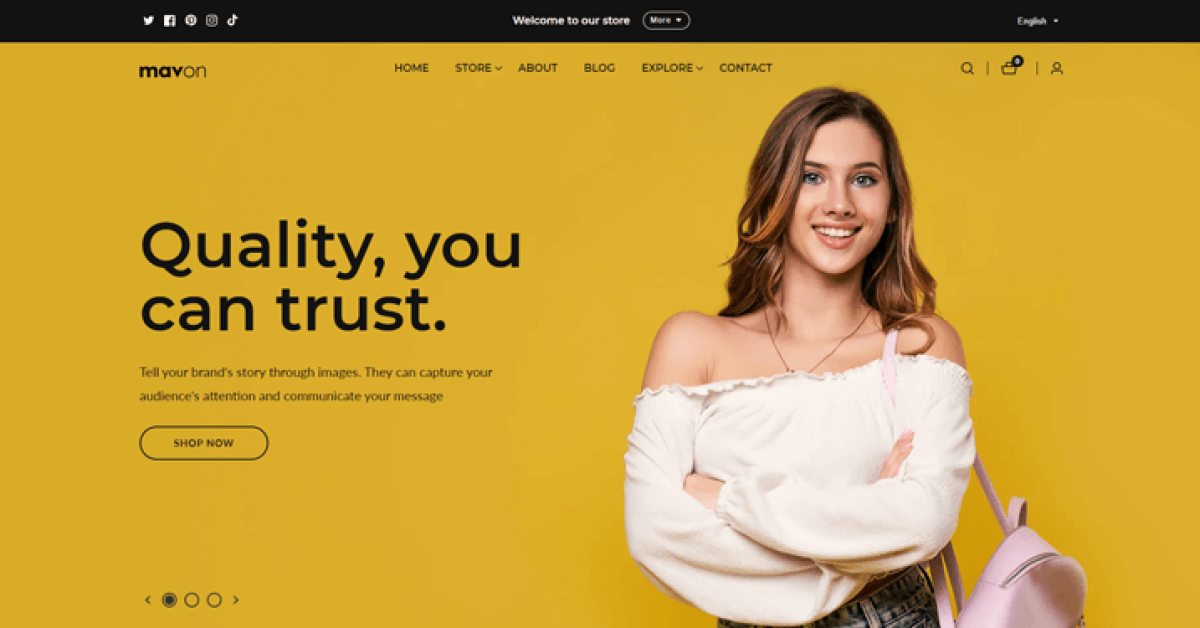
The Mavon Shopify Theme is a modern, minimalist, and high-performing theme that makes an excellent Turbo theme alternative. Designed with flexibility in mind, it features a sleek layout that enhances brand identity while ensuring smooth navigation across all devices.
Mavon includes customizable homepage sections, product pages, and collection layouts—giving you full control over your store’s appearance. Its responsive design and optimized speed ensure seamless performance for users browsing on desktop or mobile, making it a great choice for fashion and lifestyle stores.
Lezada – Multipurpose Shopify Theme

If you are looking for an alternative for Turbo Shopify theme, check out the Lezada Shopify theme that has a massive collection of 225+ homepage variations letting you create a Shopify store for any niche you want. Plus, it has tons of modern and useful features and is updated to the latest version of Shopify.
Bring your ideas to life for $1/month
The future of business is yours to shape. Sign up for a free trial and enjoy 3 months of Shopify for $1/month on select plans.
Pros and cons of Turbo Shopify Theme:
Pros of Turbo Shopify theme:
- Turbo has a predictive search (live) and Quick View option.
- Turbo comes equipped with features that improve customer satisfaction.
- Turbo’s key strength is its ability to improve performance while limiting load times.
- Positive turbo theme customer reviews consistently praise its speed and feature-rich design
- Regular updates with new features at no additional charge
- Access to all 6 theme styles with one purchase full Online Store 2.0 compatibility
- One-click theme updates via the Theme Updater app
- 14-day money-back guarantee
Cons of Turbo Shopify Theme:
- This theme can be expensive for beginner or small business owners.
- This theme offers a wide range of color options, which may make it difficult to choose the suitable one.
- Can be overwhelming to set up for those new to Shopify, though extensive tutorials and documentation are available
- Not available in the Shopify Theme Store (must purchase from the Out of the Sandbox website)
Frequently Asked Questions
How do I install the Turbo Shopify Theme?
Installing the Turbo theme is simple. You can follow the Turbo theme installation guide provided in the Turbo theme documentation by Out of the Sandbox. After purchasing from outofthesandbox.com, register your theme, download the theme ZIP file, upload it to your Shopify admin, publish it, and start customizing right away. The ZIP file includes all 6 theme styles (Portland, Seoul, Florence, Chicago, Dubai, and Tennessee).
How does the Turbo theme compare to other Shopify themes?
When comparing Turbo vs other Shopify themes, Turbo stands out for its lightning-fast load times, flexible layouts, and advanced Turbo theme SEO features. Its performance optimization makes it ideal for large stores aiming for high conversion rates and seamless user experiences. It’s also fully compatible with Online Store 2.0, ensuring access to the latest Shopify features.
Is the Turbo theme mobile-friendly?
Yes, the Turbo theme mobile optimization is one of its biggest advantages. The theme automatically adjusts layouts and images for mobile devices, ensuring smooth navigation and high readability on any screen size.
Can I customize the Turbo theme according to my brand?
Absolutely! The Turbo theme customization tools allow you to modify layouts, typography, colors, and sections easily. Whether you choose the Turbo Portland theme Shopify version or another preset, you can personalize every aspect to match your brand identity. With Online Store 2.0, you can customize directly in the Theme Editor with drag-and-drop functionality.
What kind of support is available for Turbo theme users?
Turbo theme support is handled directly by Out of the Sandbox, offering detailed documentation, FAQs, video guides, and responsive customer assistance. You can also refer to Turbo theme troubleshooting and update history for fixing common issues and ensuring your theme runs smoothly. The Theme Updater app also provides automated updates to keep your theme current.
Is Turbo compatible with Shopify 2.0?
Yes! Turbo has been fully compatible with Shopify’s Online Store 2.0 since version 7.0.0 (released September 2021). This ensures you have access to all the latest Shopify features, including enhanced customization options, improved theme editor functionality, and better performance optimization.
Watch the Video about Turbo Shopify Theme: In-Depth Review
Conclusion
Overall, the Turbo Shopify Theme is an excellent theme for your e-commerce company. With their user-friendly design, it’s simple to use and personalize; they’ve thought of everything you would need while putting up your site!
With 6 unique theme styles, Online Store 2.0 compatibility, and regular free updates, Turbo offers exceptional value for businesses of all sizes.
At $425, Turbo is a premium investment, but it includes access to all 6 styles, lifetime updates, top-tier support, and a 14-day money-back guarantee. For businesses with large catalogs, high traffic volumes, or those using Shopify Plus, Turbo’s performance optimization and conversion-focused features make it an ideal choice.
We hope this review provides you with some useful information about what it provides and how it might help your business flourish. If you’re looking for a great starting point, we highly recommend giving this one a shot!





