
Best Elementor User Register Widget

Do you want to integrate user registration forms into your WordPress site quickly and easily? The Elementor User Register Widget makes adding this important feature simple.
You can create Elementor registration forms for users to sign up and create accounts on your site quickly and effortlessly with the widget.
Additionally, the widget is fully customizable, enabling you to create website registration forms that seamlessly integrate with the appearance and feel of your site.
Creating an effective Elementor user registration form can significantly improve conversion ratesn membership sites. Many developers prefer the Elementor register form for its intuitive drag-and-drop functionality. Professional registration form Elementor solutions include anti-spam measures built right in.
Key Takeaways
- HT Mega and Move Addons offer complete registration form solutions.
- Registration widgets work with membership sites and email marketing tools.
- Advanced styling options ensure forms match your brand aesthetics.
- Registration widgets increase conversions by streamlining signup processes.
What is Elementor User Register Widget
Elementor User Register Widget is the easiest way to get people signed up for your website. This simple widget accelerates the registration process, making it simple for users to create an account. With this widget, you can speed up the registration process and keep your visitors engaged.
Why Use Elementor User Register Widget
The Elementor User Register Widget is a must-have for any WordPress site. This WordPress user registration widget is the perfect solution for keeping your signup process smooth and streamlined. With this widget, your visitors can quickly and easily register for your site.
With minimal effort, users can fill in their information and be on their way. The Elementor User Register Widget is a great way to track who’s signing up for your site and to welcome new subscribers with a first-login link.
Setting up elementor login and register functionality creates a seamless user experience. The elementor custom registration form capabilities allow for conditional fields based on user inputs.
Best Elementor User Register Widget in 2025
There are many Elementor user register widgets available. Here, we’ll discuss two popular plugins, HT Mega and MoveAddon that offer Elementor user register widget. Lets starts.
Elementor User Register Widget by HT Mega
With Elementor User Register Widget by HT Mega, you can create a stylish and easy-to-use Elementor user registration form for your website visitors for free. With five different layout options to choose from, you can create an Elementor register form that perfectly suits your site’s aesthetic.
The register form elementor functionality includes honeypot fields for enhanced security protection. HT Mega’s elementor registration form widget supports custom redirects after successful registration. 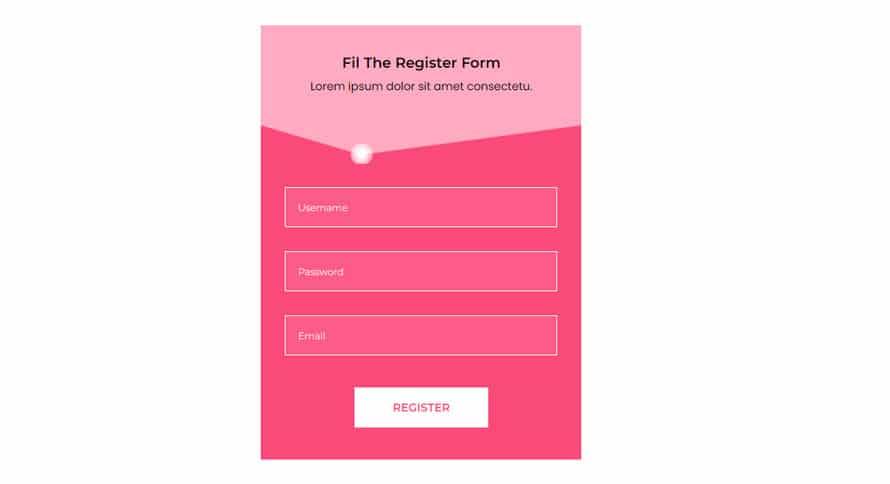
You can add sections for first name, last name, nickname, website info, and biographic info – or hide any of these sections that you don’t need. Plus, you have full control over the submit button label.
The elementor registration form adapts fluidly to different screen sizes without additional configuration. Mobile users experience a streamlined sign up form Elementor layouts optimized for touch interactions. Form fields automatically resize on smaller screens for better usability and conversion rates
The typography and color of the text area and submit button can be customized according to your preference from the style tab. From the advanced style tab, you can adjust the move hover effect, motion effect, and the position of the Elementor register form on your website.
How to Add User Login Form Widget Using HT Mega Elementor Addon
Elementor User Register Widget by Move Addons

The Elementor User Register widget by Move Addons is another perfect tool for creating an easy-to-use user registration form for your website. This widget is available in the pro version of Move Addons. 
With options for adding a first name, last name, nickname, biographic info, and more, you can create a custom registration form that meets your specific needs. You can also choose to hide any of the included sections if desired, and easily insert a login link into your form.
Additionally, with customizable loading and success messages, you can provide a seamless user experience for all your website visitors.
You can choose from a variety of colors and fonts from the style tab to create a look that’s unique to your brand. The widget also includes options for advanced customization, so you can make sure the user registration form matches your exact specifications.
Pricing Plan: HT Mega and Move Addons
Check the pricing table for Move Addons and HT Mega plugins.HT Mega Move Addons 1 Website: $49/year 1 Website: $39/year 5 Websites: $79/Year 5 Websites: $89/Year 999 (Growth Package) Websites: $99/Year Unlimited Websites: $179/Year Buy Now or Check Pricing Plan Buy Now or Check Pricing Plan
Frequently Asked Questions
Can I create custom fields in my Elementor registration form?
Yes, Elementor Pro allows adding custom fields using the Form widget. You can include fields such as phone numbers, dropdowns, and checkboxes. This helps collect specific user information and improve the registration process for a better user experience.
How can I style my Elementor registration form?
You can style your Elementor registration form using the built-in Style tab. Customize fonts, colors, spacing, and button designs to match your website’s branding. For advanced styling, use custom CSS or third-party Elementor add-ons for more design flexibility.
Do Elementor registration forms integrate with other WordPress plugins?
Yes, Elementor registration forms integrate with plugins like Mailchimp, HubSpot, WooCommerce, and MemberPress. These integrations allow automated email marketing, user management, and payment processing, enhancing your site’s functionality.
Are Elementor registration forms secure?
Yes, Elementor forms are secure, but adding reCAPTCHA, anti-spam protection, and SSL encryption improves security. Using security plugins like Wordfence and regular updates helps prevent spam and unauthorized access to user data.
What’s the difference between free and premium registration widgets?
The free version offers basic form-building features, while Elementor Pro provides advanced customization, integrations, and conditional logic. Premium widgets also support multi-step forms, custom fields, and enhanced styling for a professional registration experience.
Conclusion
The Elementor User Register Widget is designed to help you increase conversions by simplifying the registration process for your site.
You can quickly and easily construct a registration form with Elementor’s registration widget. You can include an opt-in form or ask for their name, company, job title, email address, and other information in your newsletter.
he Elementor register widget can save developers hours of custom coding time. Implementing both elementor login and register forms creates a complete authentication system. The signup form elementor designs maintain simplicity while capturing essential information.
It’s simple to set up, totally configurable, and allows you to collect all of the information you need to develop your list and boost conversion rates. So, give it a shot right now.