
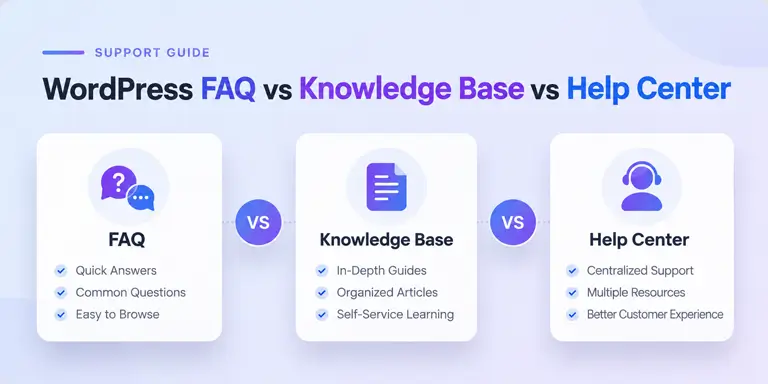
WordPress FAQ vs Knowledge Base vs Help Center: What’s the Difference?

If you run a WooCommerce store, you’ve probably searched some version of “WordPress FAQ vs knowledge base” while trying to figure out how to organize customer support. The terms get thrown around loosely, and most articles either treat them as synonyms or bury the actual difference under generic definitions.
That’s a problem, because picking the wrong format wastes time: an FAQ that’s trying to be a knowledge base becomes a wall of text nobody reads, and a knowledge base built before you actually need one just sits there unmaintained.
This guide breaks down what separates a WordPress FAQ, a knowledge base, and a help center, when each one actually earns its place on your site, and how to know when it’s time to move from one to the next. You’ll also see where a help desk and product documentation fit into the picture, since those terms get confused just as often.
Table of Contents
Quick Answer: FAQ vs Knowledge Base vs Help Center
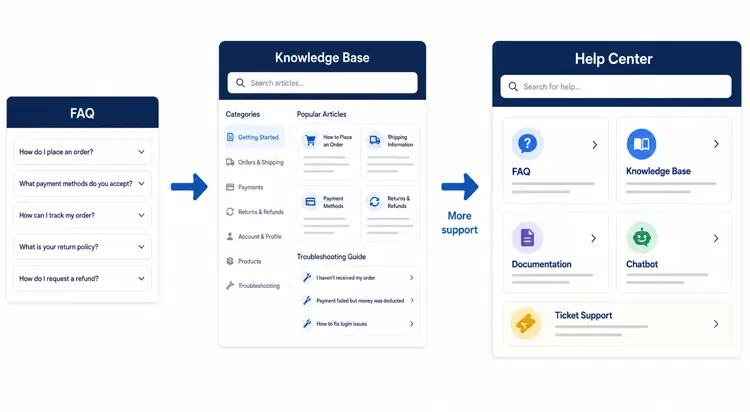
The WordPress FAQ vs knowledge base question comes down to depth and audience.
An FAQ is a short list of quick answers to mostly pre-purchase questions.
A knowledge base is a searchable library of detailed, categorized articles that helps existing customers solve problems on their own.
A help center is the broader support hub that combines both, plus a way to reach a human when self-service isn’t enough.
Most WooCommerce stores don’t need all three on day one. The right choice depends on how many repeat questions you’re getting and how complex your product actually is.
FAQ vs Knowledge Base vs Help Center at a Glance
| Dimension | FAQ | Knowledge Base | Help Center |
|---|---|---|---|
| Primary purpose | Answer quick, common questions | Provide in-depth, self-service problem-solving | Unify all support resources in one place |
| Typical content length | 1-3 sentences per answer | 300-1500+ words per article | Varies, spans multiple content types |
| Structure | Flat list | Categories, subcategories, tags | Navigation across FAQ, KB, and contact options |
| Search functionality | Rarely needed | Usually built in | Site-wide search across all support content |
| Article depth | Shallow, single-fact | Deep, step-by-step | Mixed, depending on section |
| User intent | Pre-purchase clarification | Post-purchase troubleshooting or setup | Both, plus escalation |
| Pre-purchase vs post-purchase | Mostly pre-purchase | Mostly post-purchase | Both |
| Troubleshooting fit | Poor | Strong | Strong (via knowledge base) |
| Account-specific support | Not suited | Not suited | Suited, via ticketing |
| Ticket integration | None | Sometimes linked | Usually integrated |
| Chat integration | Rare | Sometimes | Common |
| Search analytics | Rare | Usually available | Usually available |
| Maintenance effort | Low | Moderate to high | Highest |
| Scalability | Limited | Good | Best |
| Recommended for WooCommerce | Small stores, simple products | Stores with setup steps, subscriptions, or plugins | Stores managing both content and live support |
| Example question type | “Do you ship internationally?” | “How do I change my subscription payment method?” | “How can we help you today?” |
What Is a WordPress FAQ?
A WordPress FAQ is a single page, or a short section, listing common customer questions with brief, direct answers. It’s usually a flat list without categories, search, or navigation. Customers scroll and scan. Many WooCommerce stores build this with an Elementor FAQ widget for a quick accordion-style layout.
FAQs work best for pre-purchase questions: shipping costs, return policy, payment methods, or plugin compatibility. They serve visitors who haven’t bought yet and just need quick clarification before they commit.
Example FAQ entry:
Question: Do you ship internationally?
Answer: Yes. We currently ship to over 40 countries, with delivery times varying by region.
When an FAQ works well:
- You’re a new or small store with limited support volume
- Most questions are simple and don’t require multiple steps to answer
- You don’t have the resources to maintain a larger content library yet
Where an FAQ falls short:
- It can’t handle multi-step instructions well
- It has no search function, so long lists become hard to scan
- It becomes harder to scan and maintain as the number of questions grows, especially when the questions cover multiple topics
What Is a WordPress Knowledge Base?
A knowledge base is a centralized, searchable repository of detailed articles: how-to guides, troubleshooting steps, setup tutorials, and feature explanations. Unlike an FAQ, it’s organized into categories and subcategories, has its own search bar, and is usually powered by dedicated plugin or software functionality.
This is really the heart of the WordPress FAQ vs knowledge base decision. An FAQ tells a visitor a quick fact. A knowledge base teaches an existing customer how to actually do something, often across several steps.
Example knowledge-base article:
For subscriptions that support payment method changes:
- Log in to your WooCommerce account.
- Navigate to My Account → Subscriptions.
- Open the subscription you want to update.
- Select Change Payment Method, if available.
- Enter your new payment details and submit the form.
Note: This option depends on your subscription status, renewal settings, and payment gateway compatibility.
When a knowledge base works well:
- Customers repeatedly ask the same setup or troubleshooting questions
- Your product requires multiple steps to configure or use
- You want to reduce ticket volume so your team can focus on complex, account-specific issues
Where a knowledge base falls short:
- It requires ongoing maintenance and content review
- Poor organization can make articles hard to find, which creates a new support problem rather than solving one
- It doesn’t handle issues that are specific to one customer’s account or order
What Is a Help Center?
A help center is the umbrella structure that houses your FAQ, your knowledge base, and usually a way to contact support directly through live chat, a contact form, or a ticketing system. It’s your support homepage: one search bar that covers everything, with clear paths to self-service content or human help.
Example help-center layout:
How can we help?
- Search support articles
- Browse FAQs
- Browse documentation
- Contact support
- Submit a ticket
A help center is not the same as a help desk. A help center is the public-facing destination customers browse. A help desk is the internal tool your support team uses to manage and respond to tickets.
FAQ vs Knowledge Base vs Documentation vs Help Desk
These terms get used interchangeably, which causes confusion. Here’s the distinction that actually matters:
- FAQ: Quick answers to common questions, usually pre-purchase
- Knowledge base: A self-service library of detailed support articles
- Documentation: Detailed instructions for using a specific product, feature, or process, often technical and reference-style
- Help center: The customer-facing destination containing FAQs, knowledge base, and documentation, plus a path to contact support
- Help desk: A help desk is a support management system that allows agents to track, assign, and resolve customer requests. While agents typically work through an internal dashboard, customers may also interact with the system through a ticket submission form, email, or support portal.
Documentation and knowledge base often overlap in WordPress contexts. The practical difference: documentation tends to be structured like a manual organized by product or feature, while a knowledge base is structured around customer questions and problems, even if the underlying content is similar.
FAQ vs Knowledge Base for SEO: Which Is Better?
Neither format automatically ranks better than the other. Search intent matters more than the format you choose.
Detailed knowledge-base articles can naturally match specific informational searches because they answer a particular problem in depth. An FAQ is useful for concise question-answer intent, where the searcher just wants a fast yes-or-no or a short clarification.
A few practical points for a WooCommerce site:
- Internal linking between related knowledge-base articles helps both users and search engines understand your support content as a connected topic cluster.
- Unique, genuinely useful answers matter more than simply adding a large number of questions to a page.
- Structured data should accurately represent the visible content on your page. Google discontinued FAQ rich results in May 2026, so adding FAQPage markup should not be treated as a way to earn FAQ rich snippets. Focus instead on helpful, well-organized answers that satisfy users’ search intent.
- A well-organized knowledge base can attract organic search traffic from people researching a problem before they even become a customer.
Which One Should Your WooCommerce Store Use?
Use this decision structure:
1. Do customers mostly ask short, pre-sale questions?
→ Yes: Start with an FAQ
2. Do customers repeatedly need instructions or troubleshooting help?
→ Yes: Build a knowledge base
3. Do you have articles, FAQs, and a live support or ticketing channel all in place?
→ Yes: You effectively have a help center
4. Do customers need account-specific help, like order or billing issues?
→ Yes: Add a ticketing system alongside your content
Example: How an FAQ, Knowledge Base, and Help Center Work Together
Imagine a WooCommerce store selling subscription products.
A visitor asks, “Can I cancel my subscription anytime?” A short FAQ can answer that question.
After subscribing, the customer wants to change their payment method. A knowledge-base article can explain the process with screenshots and step-by-step instructions.
If their payment fails because of an account-specific issue, the customer can submit a support ticket through the help center.
In this workflow, each support resource serves a different purpose without replacing the others.
Practical Signals to Watch
These are practical heuristics, not universal industry thresholds. Use them as a starting point, then adjust based on what you actually see in your own support inbox.Signal What it means The same question keeps coming up regularly FAQ candidate, or early knowledge-base candidate The answer requires several steps Knowledge-base candidate Customers need screenshots to understand the answer Knowledge-base candidate Customers need account-specific help Ticket candidate, not content Customers need multiple support paths (chat, ticket, articles) Help-center candidate Customers search your site but don’t find answers Information architecture problem in your existing content
When Should You Upgrade From an FAQ to a Knowledge Base?
Different WooCommerce business types hit this point at different stages:
- Small apparel store: Usually stays with an FAQ covering shipping, returns, and sizing. Rarely needs a full knowledge base unless the product line becomes complex.
- WooCommerce plugin or theme store: Needs a knowledge base early, covering installation, configuration, compatibility, and troubleshooting, because setup questions are inherently multi-step.
- Subscription box store: Typically upgrades to a knowledge base once questions about billing, subscription changes, and delivery scheduling start repeating.
- Larger ecommerce business: Eventually needs a full help center combining FAQ, knowledge base, ticketing, and live chat, since support volume and product complexity both increase.
When NOT to Build a Knowledge Base Yet
A knowledge base is not automatically the next step for every store. Hold off if:
- You have very few recurring questions.
- Your products require almost no setup or explanation.
- Your support volume is extremely low.
- Your content would only cover a handful of short answers, which an FAQ handles just as well.
- Nobody on your team is responsible for keeping articles updated.
Building a knowledge base you can’t maintain often creates more confusion than having no knowledge base at all, since outdated articles erode customer trust.
How to Structure a WooCommerce Knowledge Base
Once you’ve decided you need one, organize it around customer problems, not internal product structure. A practical starting structure:
Getting Started
- Create an account
- Place an order
- Track an order
Orders
- Change an order
- Cancel an order
- Understand order status
Payments
- Payment methods accepted
- What to do about a failed payment
- How refunds are processed
Shipping
- Shipping times by region
- International shipping details
- How to track a shipment
Returns
- Return policy
- Exchange process
- Refund timeline
Start with the categories that map to your most common ticket topics, and expand from there as new patterns emerge.
How Knowledge Bases Help Reduce Support Tickets
The mechanism is straightforward: When customers find an answer through search or browsing, they don’t need to open a ticket. This shifts repetitive, low-complexity questions away from your support team and toward self-service, freeing up staff time for issues that genuinely require a human, such as account-specific problems or edge cases the content doesn’t cover.
In many WooCommerce stores, a relatively small group of recurring questions, such as order status, shipping, returns, and basic product information, tends to generate a disproportionate share of support requests. The exact proportion varies by store, product type, and season, so treat this as a general pattern rather than a fixed benchmark.
Some support plugin vendors, including several Zendesk alternatives, advertise specific ticket-reduction percentages tied to their own AI-powered knowledge base tools. Treat these figures as vendor-reported claims rather than independent, third-party research.
Actual results depend heavily on article quality, how well customers can find and understand the content, and the type of support requests a given store receives.
Common Mistakes to Avoid
- Treating your FAQ as a knowledge base substitute by stuffing dozens of detailed questions into one flat page with no categories or search
- Building a knowledge base and never reviewing search analytics to find content gaps
- Skipping a clear ticket-escalation path, since even strong self-service content won’t resolve every issue
- Ignoring mobile experience, since a large share of WooCommerce traffic comes from mobile devices and support content needs to be fast and readable on small screens
- Writing generic definitions instead of answering the specific, practical questions your actual customers ask

Can One WordPress Plugin Handle FAQ, Knowledge Base, and Tickets Together?
Once you understand which layer of support your store actually needs, the practical question becomes whether you need separate tools or one integrated system. You don’t necessarily need an all-in-one plugin; separate tools can work well too, and it’s worth comparing a few customer support apps before deciding.
The advantage of an integrated system is keeping your knowledge base, chatbot, and tickets connected instead of managing them in disconnected places.
Support Genix is a WordPress helpdesk plugin built around exactly this progression. It combines a knowledge base with unlimited articles, categories, and tags, an AI-powered chatbot feature that pulls answers directly from your knowledge base to respond instantly, and a full ticketing system for escalating issues that require human support.
The knowledge base also includes a “Write With AI” feature that can draft structured, SEO-oriented help articles in minutes, and an analytics dashboard that shows what customers search for, which articles perform best, and where content gaps exist.
This kind of setup lets repeat questions get resolved through the knowledge base and chatbot, while anything more complex gets routed to a ticket for your support team.
For a growing WooCommerce store, consolidating FAQ, knowledge base, chatbot, and ticketing into one plugin like Support Genix can simplify both the customer experience and the internal workflow, compared to running separate, disconnected tools for each layer of support.
Frequently Asked Questions
Can I have an FAQ and a knowledge base on the same WordPress site?
Yes, and it’s usually the right setup. Keep a short FAQ for quick pre-sale questions on product and pricing pages, and use the knowledge base for deeper, categorized self-service content aimed at existing customers.
Should a WooCommerce store put FAQs on product pages?
Yes, for pre-purchase questions specific to that product, such as sizing, materials, or compatibility. Save broader account, billing, and shipping questions for a general FAQ or knowledge base.
Should knowledge-base articles be indexed by Google?
Public, useful knowledge-base articles can be indexed by Google when you want them to attract search traffic. Keep account-specific, private, or sensitive support content behind appropriate access controls rather than leaving it open to search engines.
How often should a knowledge base be updated?
Review it whenever your product, pricing, or policies change, and check search analytics periodically to see which articles get read, which searches return no results, and where new articles are needed.
What should happen when customers can’t find an article in the knowledge base?
When customers can’t find an article, check whether the information is missing, poorly organized, or difficult to discover through search. Review no-result searches, article titles, and category structure. Provide a clear way to contact support when self-service doesn’t resolve the issue.
Is a help center necessary for a small WooCommerce store?
Not usually at the start. A small store with low support volume is typically well served by an FAQ alone. A full help center becomes worthwhile once you’re managing a knowledge base, FAQs, and a ticketing system together.
Conclusion
The WordPress FAQ vs knowledge base decision isn’t about picking one format and sticking with it forever. It’s usually a sequence that matches your store’s growth: start with an FAQ for quick pre-sale clarity, add a knowledge base once repeat questions and setup complexity increase, and move toward a full help center once you’re managing content and live support together. The signals in this guide, rather than a fixed rule, are the most reliable way to know when it’s time to move to the next stage.