How to Optimize Your Help Center for ChatGPT and Google AI Overviews in 2026

TL;DR: AI search systems can retrieve and use relevant information from web pages when generating answers. Clear, self-contained sections make your help content easier for both users and search systems to understand. If your knowledge base is well-organized for humans, it usually needs only small structural adjustments to become equally readable for AI.If you want to optimize your help center for ChatGPT, the goal is not to write for an algorithm but to make accurate support information easier for both customers and AI systems to find and understand.
AI systems now read it too, looking for accurate answers they can summarize or reference in ChatGPT, Google AI Overviews, and similar tools.
AI-search optimization isn’t simply about making passages easy to extract. Your help content still needs to be accurate, original, useful to customers, technically accessible, and better than generic information already available elsewhere.
Optimizing your help center for AI search means restructuring your existing support content so it’s easy for these systems to find and use, without changing what makes it useful for real customers.
Table of Contents
What Does It Mean to Optimize a Help Center for AI Search?
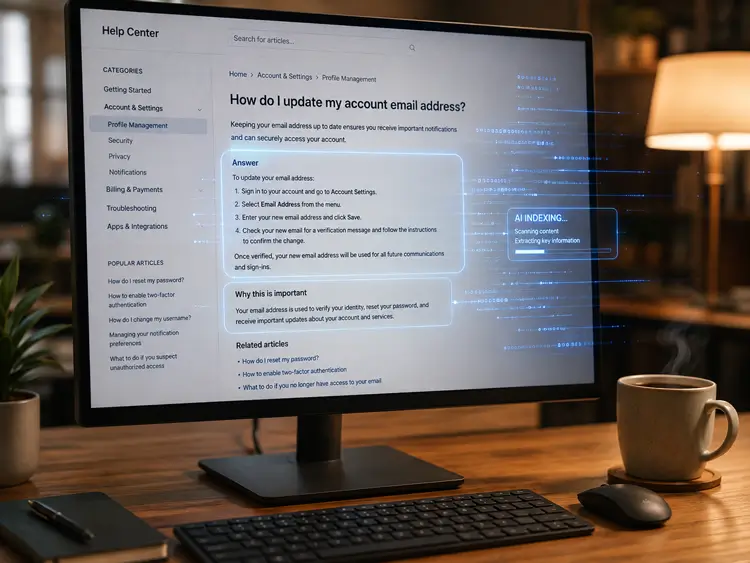
Optimizing a help center for AI search tools means writing and structuring your support content so systems like ChatGPT, Google AI Overviews, Perplexity, and Copilot can find, evaluate, and reuse it accurately.
AI search experiences may retrieve information at both page and passage level, depending on the system and query. This makes clearly structured, self-contained sections particularly useful for detailed questions.
Google itself explains that AI Overviews may use a “query fan-out” technique, running several related searches behind a single question to build a fuller answer. This is a useful conceptual model for how these systems work, though it’s not a universal rule that applies identically across every AI system.
In practical terms, optimizing for AI search means:
- Writing direct, self-contained answers instead of long narrative explanations
- Structuring headings around real customer questions
- Making each section understandable without needing the rest of the page for context
- Keeping information accurate, specific, and up to date
- Making sure the page is technically accessible to crawlers in the first place
In other words, to optimize your help center for ChatGPT, focus on making every important answer clear, contextual, current, and accessible rather than trying to manipulate how AI systems retrieve content.
Why This Matters for WooCommerce Stores and Online Businesses
Support content has quietly become one of the most valuable types of content a business owns for AI visibility, and most stores are not treating it that way.
Customers increasingly ask AI tools direct questions like “How do I track my order from [store]?” or “What’s the return policy for [product type]?” before they ever visit a website. If your help center answers these questions clearly, an AI system can retrieve and use that answer, sometimes with a link back to your site, sometimes without. Either way, being a clear, trustworthy source of information builds visibility that generic marketing content can’t easily replicate.
There’s also a competitive angle. Most WooCommerce help centers are written for internal clarity, not for extraction. They bury answers inside long paragraphs, skip clear headings, or rely on screenshots without accompanying text. A store that restructures its help content even slightly can pull ahead of competitors who haven’t touched their knowledge base structure in years.
This connects directly to broader WooCommerce SEO strategy. Support pages often target long-tail, high-intent questions that product pages never touch, questions about shipping timelines, sizing, returns, and troubleshooting. These pages tend to have less competition and higher trust once optimized, making them efficient targets for both traditional search and AI visibility.
AI shopping behavior is also changing how customers discover products in the first place, which is closely tied to how your support content performs. If you want to understand this shift in more depth, the article on ChatGPT for WooCommerce covers how AI tools are influencing purchase decisions before a customer even reaches your site.
How to Optimize Your Help Center for ChatGPT Without Hurting User Experience
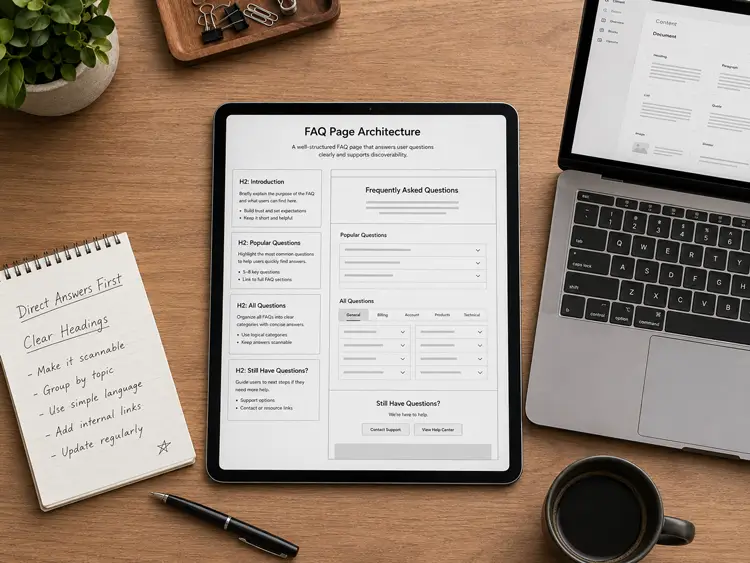
Here’s a practical framework for restructuring existing help center articles, or writing new ones, so they’re easier for AI systems to retrieve and use.
1. Answer the Question in the First Sentence
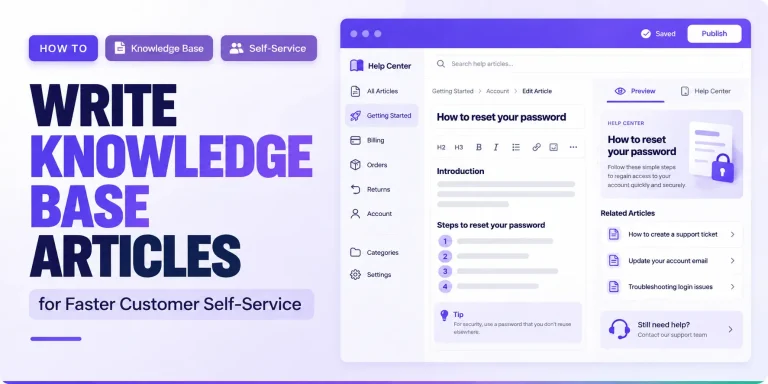
Every article or FAQ entry should state its answer immediately, not after three paragraphs of context. If someone asks “How long does shipping take?”, the first sentence should state the shipping window directly. Background information, exceptions, and edge cases can follow.
This is sometimes called the inverted pyramid or BLUF (bottom line up front) approach. Putting the direct answer early also improves usability because readers can resolve simple questions without working through unnecessary context. This is one of the simplest ways to optimize your help center for ChatGPT while also improving the experience for customers who want a quick answer.
2. Use Question-Based Headings
Write your H2 and H3 headings as actual questions customers ask, using the same words they would type. Instead of “Shipping Information,” use “How long does shipping take?” This alignment between heading and customer language helps both traditional search snippets and AI systems match your content to the right query.
3. Keep Each Section Self-Contained
This is one of the most important structural habits to build. Every answer should make sense if it were the only sentence someone read, with no reference to “as mentioned above” or “see the previous section.” A useful answer can potentially be surfaced even when it appears within a larger article, which is one reason individual sections should remain clear and understandable on their own.
A good test: copy a section into a blank document. If it still makes complete sense on its own, it passes.
4. Keep Answers Short and Specific
Aim for concise, focused answers rather than sprawling explanations. Short paragraphs of two to four sentences, specific numbers instead of vague terms, and one clear idea per section all make your content easier to read and use accurately.
For example, instead of writing “We usually ship pretty fast,” write “Orders ship within 1–3 business days, and delivery typically takes 5–7 business days within the continental US.”
5. Use Structured Data Where It Accurately Describes the Page
Structured data can help search engines understand information on a page, but you don’t need special schema markup to appear in Google AI Overviews. If you use structured data, make sure it accurately represents the visible content. FAQPage markup can still be used where appropriate, although Google now limits FAQ rich results mainly to authoritative government and health sites.
6. Organize by Customer Journey Stage
Group related questions by intent: pre-purchase questions, order and shipping questions, returns and refunds, account and troubleshooting issues. This mirrors how real customers search and helps AI systems understand the relationship between different pieces of your knowledge base.
7. Keep Content Current
Keep help content current because outdated shipping, pricing, return, or troubleshooting information can lead to incorrect answers and a poor customer experience. Reflect meaningful updates with a visible “last updated” date rather than changing the date without substantive changes.
8. Make Sure the Page Is Technically Accessible
Structure and clarity don’t matter if a page can’t be crawled or indexed in the first place. Before focusing on content formatting, confirm the basics:
- The page must be crawlable and not blocked in robots.txt
- Googlebot must not be blocked from accessing the page.
- The page should return an HTTP 200 status code.
- Important content must be indexable and exist in textual form, not locked inside images or scripts alone.
- Internal links should allow both users and crawlers to discover the page.
You cannot effectively optimize your help center for ChatGPT or other search experiences if important support information is blocked, non-indexable, or unavailable in accessible text.
9. Check Your Snippet Controls
Google has confirmed that the nosnippet and max-snippet robots meta directives now apply to AI Overviews and AI Mode, not just traditional snippets. If a page carries nosnippet, or a restrictive max-snippet value, it can be excluded from or limited within AI-generated answers, even if it ranks well. Review these settings on any help center page you want eligible for AI Search visibility.
What Content Formats Work Well for Help Centers and AI Search?
Certain content formats tend to be easier for both human readers and AI systems to parse and use. Understanding these formats helps you prioritize where to spend your editing time.Content format Why it can be useful FAQ-style Q&A Closely matches direct customer questions Numbered steps Makes processes easy to follow Comparison tables Summarizes differences clearly Self-contained paragraphs Retains meaning outside surrounding context Specific details Reduces ambiguity
Avoid unnecessary vagueness. When the correct answer depends on conditions, state those conditions explicitly instead of using an unexplained “it depends.” For example, “Return eligibility depends on whether the product has been opened and which product category it belongs to” is more useful than a false blanket statement about a universal return window.
Common Mistakes That Hurt AI Visibility
Most help centers unintentionally sabotage their own AI visibility with a handful of recurring mistakes.
- Burying the answer in long paragraphs. If a customer has to scroll through three paragraphs of context before reaching the actual answer, both humans and AI systems struggle to use it.
- Relying on screenshots without supporting text. AI systems may process visual content, but important instructions should still be available as crawlable text. Pair interface screenshots with written steps so users and search systems can understand the process even without interpreting the image.
- Vague or inconsistent policies across pages. If your shipping policy is worded differently on three different pages, AI systems may struggle to determine which version is accurate, or reference an outdated one.
- No clear heading structure. Pages without proper H2/H3 hierarchy make it harder for any system, human or AI, to understand how information is organized.
- Letting content go stale. An unchanged “last updated” date on a page with outdated shipping times or discontinued policies damages both user trust and the reliability of any answer built from it.
- Writing for internal teams, not customers. Internal jargon or product-team shorthand rarely matches how real customers phrase their questions, which reduces the chance of matching AI queries.
- Treating the help center as a dumping ground. Combining unrelated topics into one long page, rather than organizing by clear, focused questions, makes it harder for any single passage to stand out as a complete answer.
- Overlooking technical accessibility. Blocked crawlers, restrictive snippet directives, or non-indexable content can prevent even well-written pages from being eligible for AI Search visibility at all.
Good customer support best practices already address several of these issues from a service-quality angle. AI optimization builds directly on top of that same foundation.
How a Well-Structured Help Center Benefits Users and AI Systems Together
The good news is that AI optimization and good customer experience point in the same direction. A help center that’s clear, well-organized, and easy to scan is exactly what both a rushed customer and an AI system need.
Customers get faster answers because they don’t have to read through unnecessary context to find what they need. Support teams see fewer repetitive tickets because self-service content actually solves problems. AI systems get clean, well-structured content they can use and represent accurately, which improves the odds your business shows up in an AI-generated answer.
Consider a WooCommerce store that sells skincare products. A customer asks ChatGPT, “Can I return an opened skincare product?”
If that store’s help center has a specific, self-contained answer stating exactly which opened products are returnable and under what conditions, that answer becomes genuinely usable by an AI system building a response. A specific policy gives search and AI systems substantially more usable information than a generic “contact us for return questions” page.
This overlap is why help center optimization deserves the same attention as product page SEO. It’s not a separate project bolted onto your support system; it’s a natural extension of writing clear, honest, well-organized content that follows Google’s broader guidance: people-first usefulness, crawlability, original information, good page experience, and solid foundational SEO, without a separate magic layer required just for AI Search.
Support teams managing this kind of restructuring at scale often benefit from a dedicated knowledge base tool that supports clean article formatting, FAQ organization, and easy updates.
Support Genix is one option built specifically for WooCommerce stores that want to structure and manage help center content, with knowledge-base, AI writing, and chatbot functionality built for WooCommerce integration.
Frequently Asked Questions
Does Google AI Overviews use the same ranking factors as regular Google Search?
Google’s AI experiences build on the same foundational Search systems and SEO practices used across Google Search. However, AI Overviews may also use query fan-out to retrieve supporting pages across related subtopics, so appearing in an AI response isn’t simply the same as ranking in the traditional ten blue links.
Do I need FAQ schema markup for AI visibility?
FAQ schema is not required for AI visibility. Structured data can help search engines understand page content, but it must match what users can see on the page. Also, Google’s FAQ rich results are now largely limited to authoritative government and health websites.
How long should each help center answer be?
There is no fixed ideal length. Use the shortest answer that completely addresses the question, then add exceptions or supporting details where they genuinely help.
Will optimizing my help center for AI guarantee it gets cited by ChatGPT?
No tool or technique guarantees citation. AI systems select from many competing sources, and citation behavior changes over time. Clear structure, technical accessibility, and accurate, specific answers meaningfully improve your odds, but they don’t guarantee inclusion.
Should I rewrite my entire help center at once?
Not necessarily. Start with your highest-traffic or highest-intent articles, such as shipping, returns, and account issues, then expand the same structural approach across the rest of your knowledge base over time.
Final Thought
To optimize your help center for ChatGPT, focus first on clarity: answer real customer questions directly, organize information around how people search, keep policies and instructions current, and make every important page technically accessible.
Focus on answering real customer questions directly, organizing content around how people actually search, keeping information current, and making sure the page is technically accessible, and the AI optimization side takes care of itself.