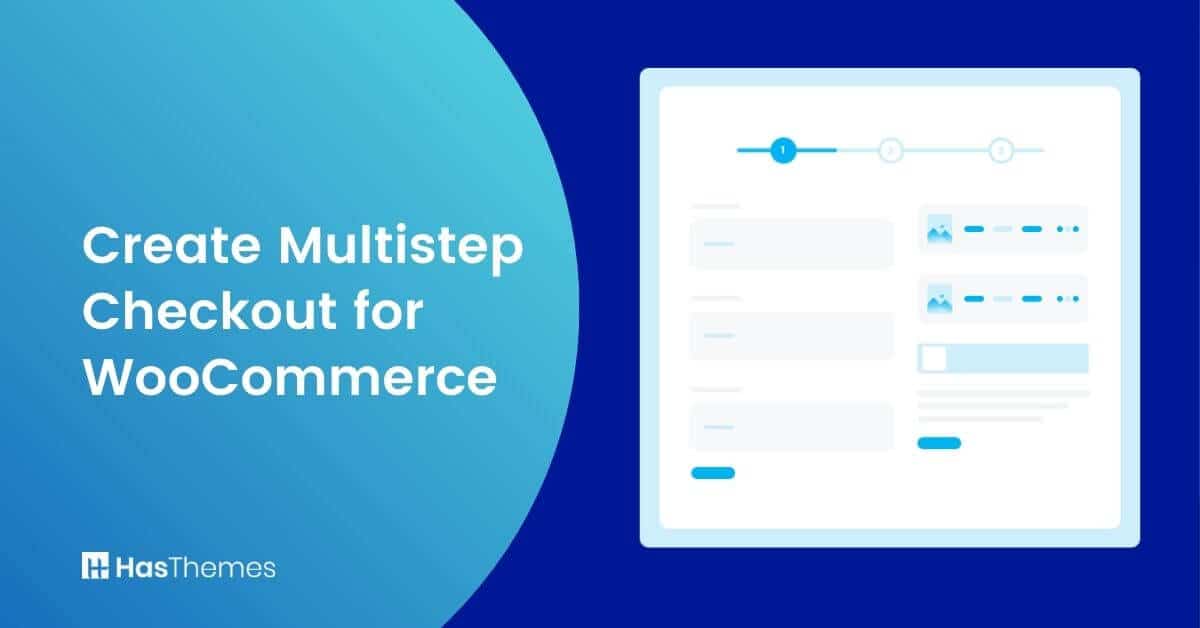
How to create Multistep Checkout for WooCommerce Store

Creating a multistep checkout for WooCommerce store improves user experience significantly. It also increases conversion rates for online businesses.
Plus, the WooCommerce multistep form is streamlined and designed carefully. This helps customers complete their purchase quickly and effortlessly.
In this article, we will show you how to create multistep checkout for WooCommerce. We will use the ShopLentor plugin for this comprehensive tutorial.
We will also discuss the benefits of using a multistep checkout. Finally, we provide tips for optimizing your checkout process. Let’s get started
Key Takeaways
- Discover how breaking down your WooCommerce checkout into multiple steps can simplify the process.
- Discover the key benefits of multistep checkout for conversion rates.
- Follow a step-by-step guide to create a multistep checkout using ShopLentor.
- Get practical tips for clear, secure, and mobile-friendly checkout experiences.
- Understand how progress bars guide customers and increase completion rates.
- Access actionable optimization ideas for higher sales and repeat purchases.
What is a Multistep checkout?
A multistep checkout is a process that allows customers to complete their purchase in several steps. This can make the checkout process more convenient and less daunting for customers.
According to Baymard Institute, 18% of shoppers abandon their carts. The reason is that checkout processes are too long or complicated. By using a WooCommerce multistep checkout, you can break down the process. This makes it easier and faster for customers to finalize orders.
Additionally, the WooCommerce multistep order form often provides an opportunity for customers to add additional items to their cart before finalizing their purchase. As a result, multistep checkouts can help to increase both conversion rates and average order values.
The multistep WooCommerce checkout process can be a great way to ensure your customers feel comfortable and have no questions about how to complete their purchases.
By breaking down the purchase into several easy steps, it is quick for everyone involved in this transaction. This will increase both sales volume and revenue because people who complete an order quickly are more likely to return more often.
Prerequisites
Before starting this tutorial, ensure you have the following:
- Active website with products already configured
- WordPress admin access with full permissions
- WooCommerce plugin installed and activated
- Basic familiarity with WordPress dashboard navigation
- Elementor plugin (free version minimum) installed
How can WooCommerce Multistep Checkout Benefit You?
By using a multistep checkout WooCommerce process, you can make the purchase of your goods more convenient for customers. Customers like using multistep checkout forms because they save them time. A WooCommerce multistep checkout plugin can dramatically improve conversion rates.
We’ll go through some advantages of using a multistep WooCommerce checkout below. The problem is that most WooCommerce multistep forms are too long. They’re also complicated, with too many form fields and insufficient guidance. Many stores implement multi-step checkout for WooCommerce to solve this problem.
We’ll go through some of the advantages of using a multistep WooCommerce checkout below. The problem is that most WooCommerce multistep forms are too long and complicated, with too many form fields and not enough guidance.
Reducing Cart Abandonment Rate
A long and complicated checkout page persuades customers to abandon their carts. To reduce the cart abandonment rate, you need to simplify the checkout process.
If customers struggle with even short form fields, they give up. There’s a high chance customers will abandon purchases online! The WooCommerce multi-step checkout approach helps reduce cart abandonment rates significantly.
Removing Distractions
Removing distractions makes customers feel more at ease during purchases. This WooCommerce two-step checkout is designed for simplicity. It’s especially user-friendly for first-time buyers.
The WooCommerce simplified multistep checkout keeps customers focused on completion. By allowing customers to visit different pages, you present essential data. A multistep checkout is crucial for increasing sales. You’ll achieve this with a streamlined checkout process.
Ensuring Mobile Friendliness
People are shopping more online now. You need to ensure your site can accommodate them properly. Mobile-friendly checkout options ensure customers have easy smartphone and tablet experiences.
The more complicated your checkout process, the worse mobile sales become. Large and easily visible buttons help mobile users. Simple layout, clear text, and fewer fields make multistep checkout mobile-friendly.
Mobile users prefer multi-step checkout over single-page forms for easier navigation. WooCommerce checkout optimization makes it easy for customers to complete transactions.
Creating Multistep Checkout with Elementor and Woolentor
There are several Elementor Addons that help create professional-looking Multistep Checkout Pages and WooLentor is one of them. Woolentor offers a multistep checkout that makes it easy for customers to complete their purchases. This checkout process includes several steps, so customers can complete their purchase in a way that is convenient for them. You may also use this plugin with this WooCommerce plugin to create a checkout page that delivers an outstanding customer experience. It will enable you to help your clients go through the checkout procedure as smoothly as possible, making it as simple and as feasible for them.
Here we will walk you through the steps of how the amazing WooLentor plugin helps you implement Multistep checkout in your WooCommerce store.
How to Create a Multistep Checkout WooCommerce Using WooLentor: Step by Step Guide
Step-1: Download and Install the WooLentor Plugin
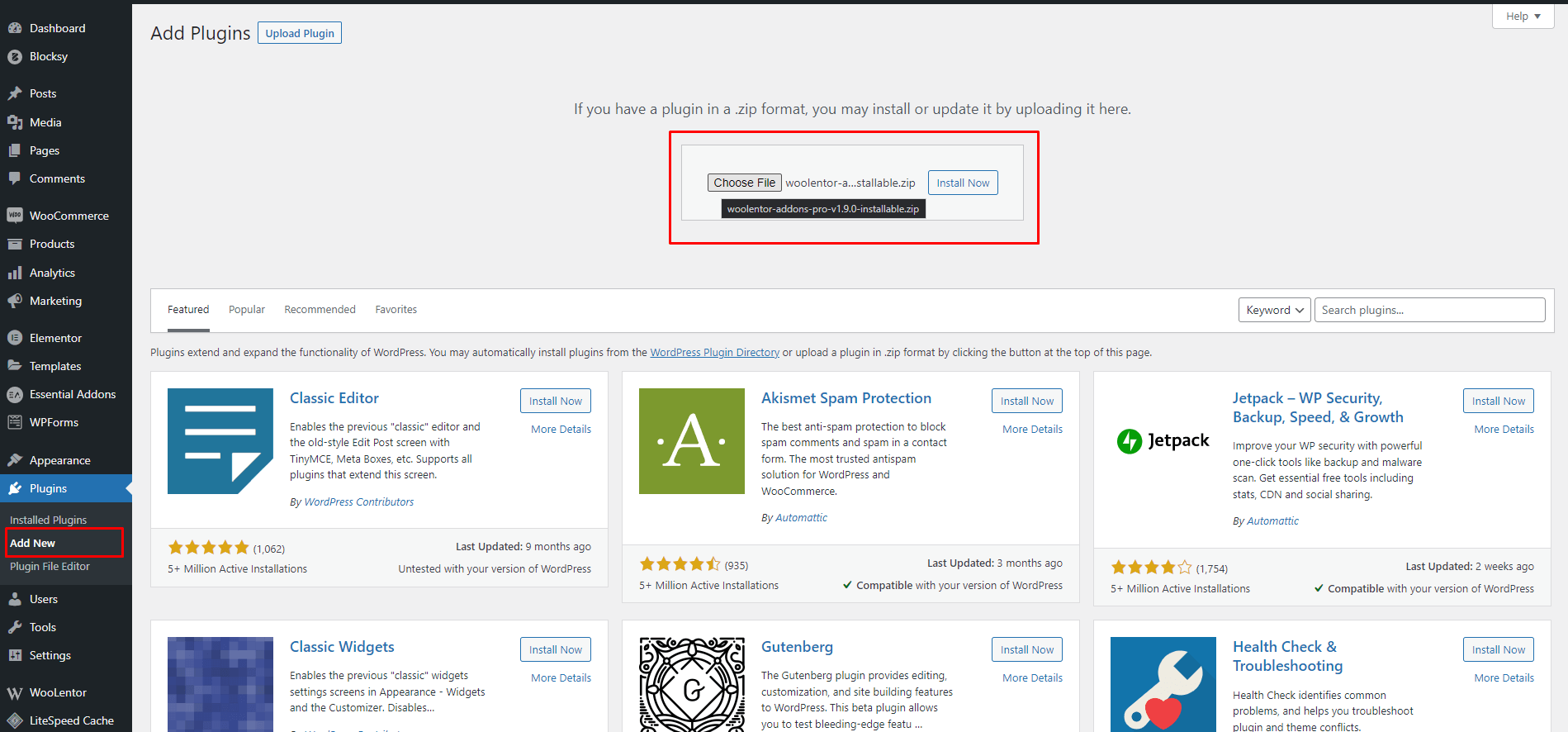
To start, you’ll need to download and install the WooLentor plugin from the WordPress Plugin Repository.
Step-2: Enable the Multi-Step Checkout Module in ShopLentor Settings Panel
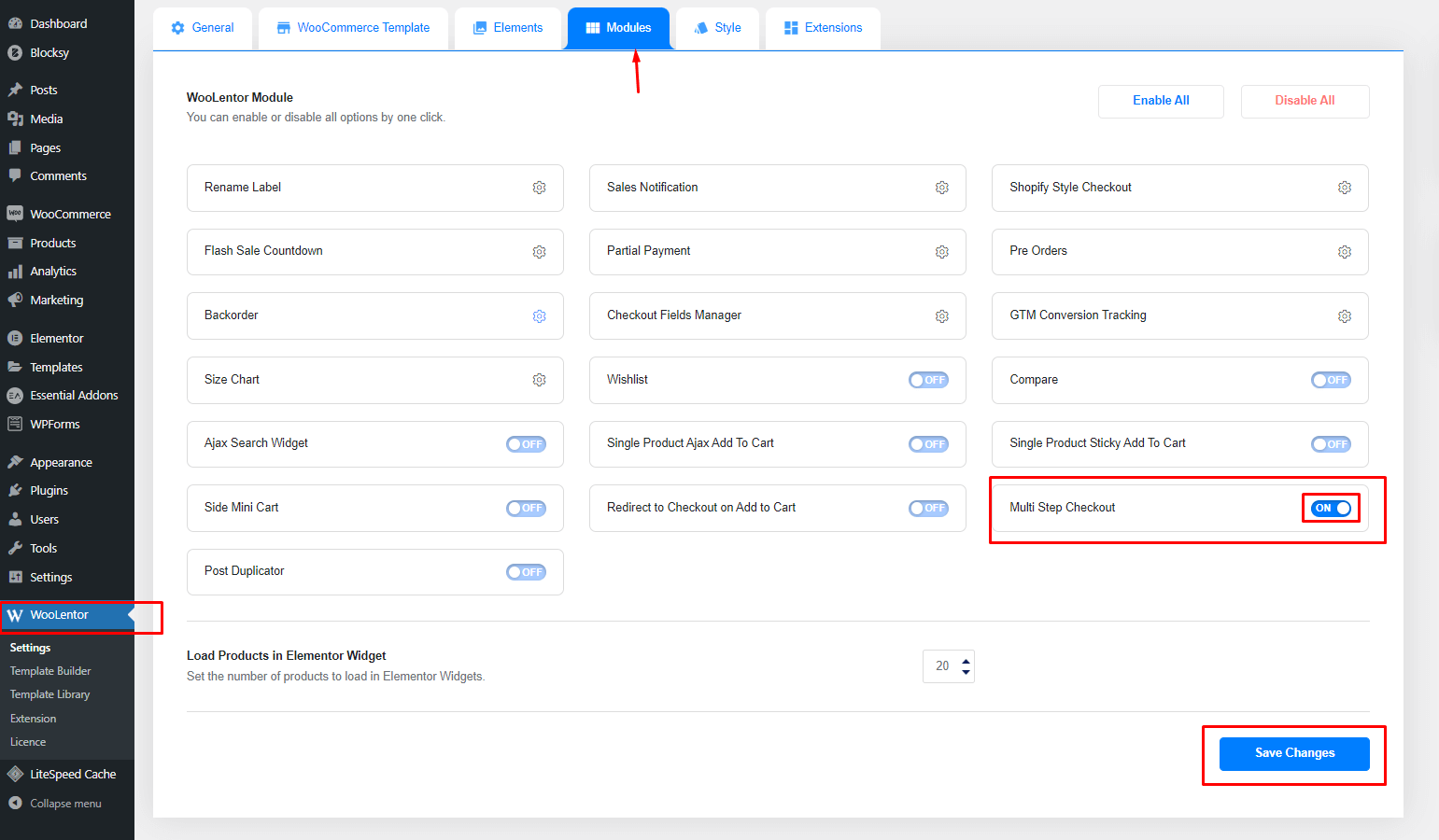
After you have installed and activated the ShopLentor plugin, navigate carefully. Go to the ShopLentor Settings Panel and enable the Multi-Step Checkout module.
To do this, first click on the “ShopLentor” tab. Find it from the left sidebar of your WordPress Dashboard. Then, click on the “Multi-Step Checkout” tab from the navigation menu.
Next, you will need to click on the “Enable” button. This enables the ShopLentor Multi-Step Checkout module.
Step-3: Add New Template from Templates Menu in Dashboard
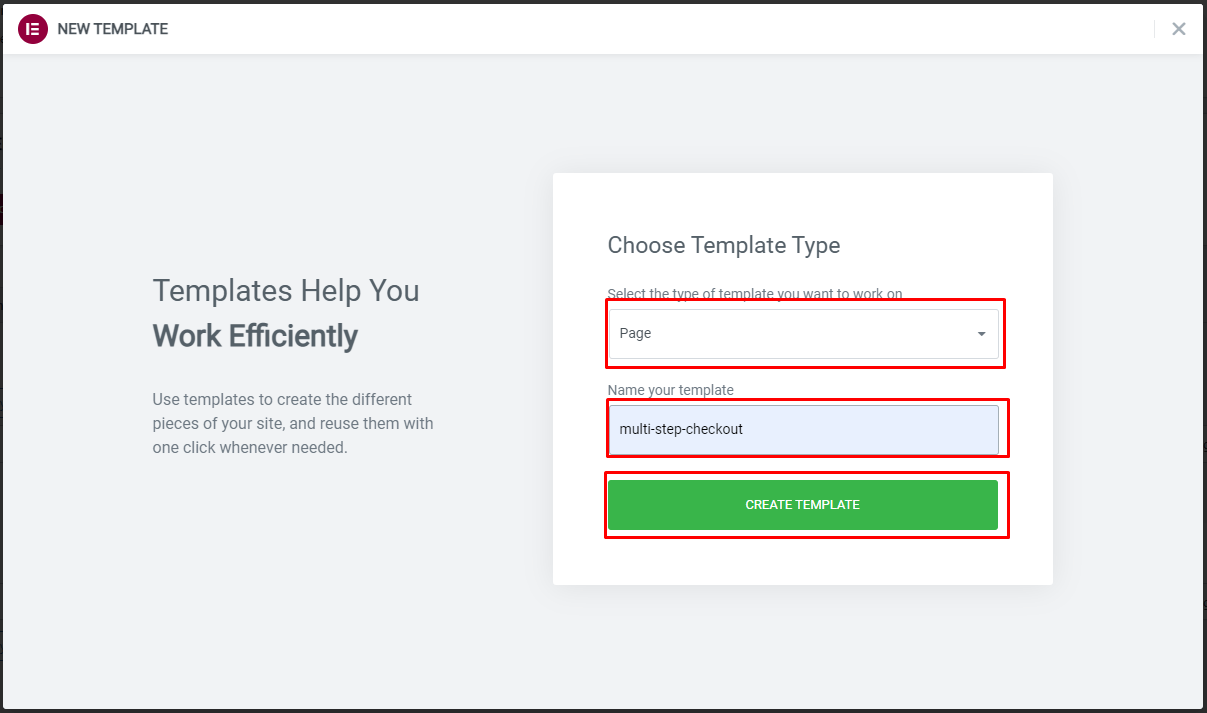
Now that you have configured the multistep checkout settings, you will need to create a new template. To do this, go to the Templates menu from the WordPress Dashboard. Select Add New from the options.
On the next screen, you will need to give your template a name. Click on the create template button. Once the template is created, you’ll be redirected to the Elementor edit screen.
When you enable the Multistep checkout module from the ShopLentor settings panel, something happens. The Multistep checkout widget becomes activated. Then, drag and drop the widget. A Multi-step form will appear on your site. Now you need to add the necessary fields for each step.
The button panel can be modified to suit your needs. You’ll have the option of including the “back to cart” button. This brings you back to the cart page. There’s also an option for editing text on buttons. You can customize both the next and previous buttons.
There is also a “Skip Login button” that saves time and effort. Your customer can be automatically taken to their preferred page. They don’t need to log in or create an account. This is thanks to the skip login button provided.
You can change the link text as well. You may modify all form settings in the forms panel. This includes billing information, delivery information, and other data.
Once you make all changes to the template according to requirements, save it. Make sure to save the template properly.
Step-4: Set Your New Template in ShopLentor Settings
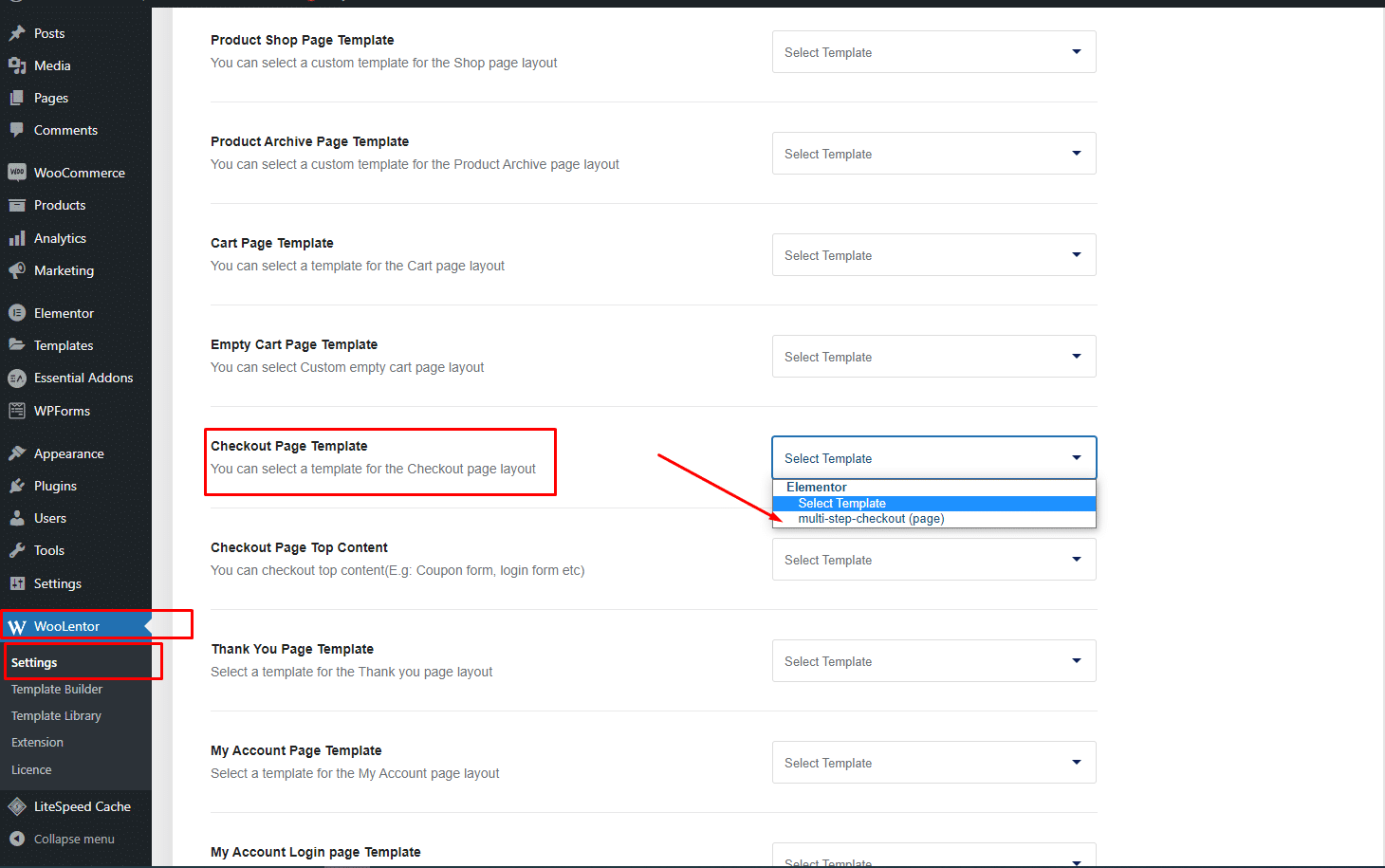
After you have configured the WooCommerce multistep checkout settings, navigate to ShopLentor Settings. Then, set the newly created template as the checkout page template.
Step-5: Test The MultiStep Checkout Page
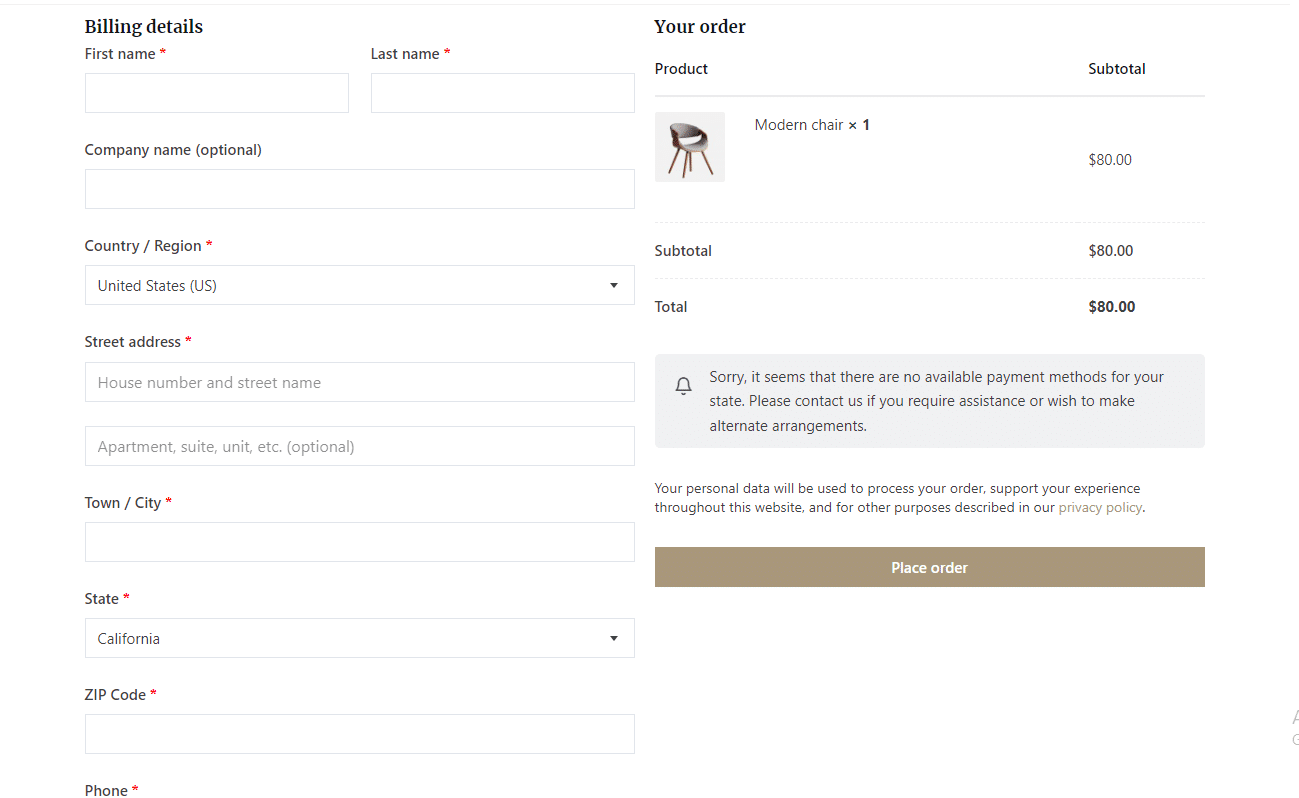
Now it’s time to test the multistep checkout page. To do this, simply add a product to your cart and navigate to the checkout page.
This is how you place an order with multi-step checkout! First, fill out the billing information. Then click next to proceed and review your order details. Finally, select a payment method and place your order. That’s it!
Watch the video about How to add WooCommerce Multistep Checkout using WooLentor [NEW]
Tips for optimizing your checkout process
The checkout process is a crucial component of every eCommerce site. A complicated checkout procedure with many phases will result in reduced sales. Shoppers will abandon their carts if the checkout procedure is difficult to navigate.
The checkout procedure on your website should include few steps. It should still guide customers through an easy and painless experience. Implementing multistep checkout can significantly improve user experience and conversions.
Here are simple techniques to make your checkout procedure faster and easier.
Minimize the Number of Steps
Try to limit the number of steps to four or five maximum. Any more than that risks customers getting frustrated and abandoning purchases.
Don’t be a time-waster. You should only ask for critical information at purchase or registration. The ideal multi-step checkout balances simplicity with comprehensive information collection.
Don’t waste your consumers’ time! Requesting excessive data will negatively influence your sales. A well-designed WooCommerce step checkout only asks for essential purchase information.
Offer a Variety of Payment Options
The more options you can provide, the better. Customers should be able to choose from credit cards, debit cards, PayPal, and other popular payment methods. If you only offer a limited number of options, you may lose out on potential sales.
Make Sure the Checkout Process is Secure
Customers should feel confident that their personal and financial information is safe. Use SSL encryption to protect sensitive data during transactions.
Make sure your privacy policy is clearly displayed and accessible. Security features are crucial for any multi-step WooCommerce checkout implementation.
Make the Checkout Process as Easy to Use as Possible
Make sure that all fields are easy to find and fill out. Ensure that buttons and links are clearly labeled and visible. If you have special requirements like zipcode or age verification, make them clear. These should be easy to find and understand.
Give Customers the Option to Save Their Progress.
If a customer needs to take a break from checkout or leaves temporarily, accommodate them. Make sure they can save their progress and pick up later. This prevents customers from starting over from scratch if something comes up.
Use a Progress Bar to Keep Customers Informed.
Conversion optimization techniques help improve your checkout process effectiveness. Test different versions of your checkout pages and measure results. You can find out what works best for your customers. Use these techniques to improve your multistep checkout conversion rate.
Offer customer support
If a customer has any questions or problems during the checkout process, they should be able to reach out to customer support for help. By offering excellent customer service, you can ensure that your customers have a positive experience and are more likely to complete their purchases.
Use conversion optimization techniques
Conversion optimization techniques can help you improve the overall effectiveness of your checkout process. By testing different versions of your checkout pages and measuring the results, you can find out what works best for your customers. Use these techniques to improve the conversion rate of your multistep checkout process.
Strip away distractions
When a customer is checking out, they should be focused on completing the transaction. If there are any distractions or unnecessary elements on the page, it can lead to confusion and frustration. Remove all unnecessary clutter from the checkout process and make sure the focus is on the task at hand.
Frequently Asked Questions
What is multistep checkout?
Multistep checkout is a type of checkout process that allows customers to complete purchases. It uses multiple steps or stages. This can help improve user experience by breaking up checkout processes. It creates smaller, more manageable steps.
Why use multistep checkout for WooCommerce?
Multi step checkout WooCommerce can help improve conversion rates. It makes the checkout process simpler and more user-friendly. It can also reduce shopping cart abandonment. This happens by making it easier for customers to complete purchases.
How does multistep checkout work?
Multi-step checkout guides customers through a series of focused stages:
1. Customer Information: Name, email, and account details.
2. Billing Address: Billing information and contact details.
3. Shipping Options: Delivery method and shipping address.
4. Payment Method: Payment details and processing
5. Order Review: Final confirmation before purchase.
Each step includes validation to catch errors early. Customers can navigate back to previous steps if needed. A progress indicator shows their position in the process.
Can I use multistep checkout with WooCommerce?
Yes, multistep checkout is available as a plugin like ShopLentor for WooCommerce. The WooCommerce multistep checkout plugin replaces your long and complicated checkout page.
Can I customize the multistep checkout process?
Yes, you can customize the multistep checkout process to suit needs. You can choose which steps to include. You can also configure each step to collect necessary information.
Conclusion
When implemented correctly, multistep checkouts can be powerful tools for increasing sales. Keep the steps few and the process clear. This ensures your checkout stays quick and effortless for customers. By utilizing up-selling and cross-selling techniques, you can encourage additional purchases. This increases your revenue significantly.
We understand the importance of convenience when it comes to checkout. Therefore, ShopLentor’s multistep checkout procedure makes it simple for clients. This checkout process includes several stages. Purchasers may complete their purchase in ways that are most convenient.
So, give multistep checkouts a try. See how they can benefit your business.