Wholesale Registration Form Best Practices for WooCommerce Stores

A Wholesale Registration Form is more than a signup page. For WooCommerce B2B stores, it is the first filter between regular visitors and qualified wholesale buyers. A good form helps you collect business details, review applications, protect wholesale pricing, and give approved customers the right account access.
The best wholesale registration forms are simple for real buyers but structured enough for store admins to make approval decisions. They ask for useful verification details, explain what happens after submission, support manual approval, and connect the buyer to the correct wholesale role or pricing group.
Quick Answer / TL;DR
A strong Wholesale Registration Form should collect only essential business details, explain approval clearly, reduce fake applications, support role-based access when needed, and protect wholesale prices from regular shoppers. Keep the form simple, verify buyers manually when necessary, and test the full journey from application to wholesale pricing access.
What Is a Wholesale Registration Form?
A Wholesale Registration Form is a dedicated application form that lets business buyers request wholesale access from your WooCommerce store.
Unlike a normal WooCommerce customer registration form, a wholesale form usually collects extra business information. This may include company name, business email, phone number, tax ID, website, reseller license, business type, or expected order volume.
The goal is not just to create an account. The goal is to help you decide whether the applicant should receive wholesale pricing, bulk order rules, role-based product access, or other B2B benefits.
For example, a retail customer may only need an email and password to buy one product. A wholesale buyer may need to prove that they represent a shop, salon, distributor, agency, reseller, or purchasing department before seeing special pricing.
Why WooCommerce Stores Need a Better Wholesale Registration Form
WooCommerce is flexible, but the default account registration flow is not built for full B2B approval. It does not automatically collect wholesale verification details, separate customer groups, or protect wholesale access by business type.
A better Wholesale Registration Form helps you solve three common B2B problems:
- Unqualified applications from people who only want discounts.
- Unclear approval workflows that create support questions.
- Pricing visibility issues where retail shoppers may see wholesale offers too early.
If you sell to both retail and wholesale buyers from the same WooCommerce store, your registration process needs to separate the two journeys. Regular customers should be able to shop normally. Wholesale buyers should apply through a more structured form and receive access only after approval.
This creates a cleaner B2B onboarding process without forcing you to run a second website.
Learn More: How to Create WooCommerce Wholesale Registration: The Ultimate Guide
Wholesale Registration Form Best Practices
The following best practices will help you design a form that is useful for buyers, easy for your team to review, and strong enough to support a professional WooCommerce wholesale workflow.
1. Ask Only for Information You Actually Need
The first rule is simple: do not turn the form into a long survey.
A Wholesale Registration Form should collect enough information to verify the buyer and assign the correct access level. It should not ask every possible question about the business unless those answers are required for approval.
For most WooCommerce wholesale stores, the essential fields are:
- contact name
- business email
- company name
- phone number
- billing or business address
- business type
- tax ID, VAT number, or reseller ID when relevant
You can add more fields if your approval process requires them, but each field should have a reason. If the answer will not help you approve, reject, segment, or contact the buyer, consider removing it.
This matters because form friction affects completion. Serious wholesale buyers may still abandon a form if it feels unnecessarily long or unclear.
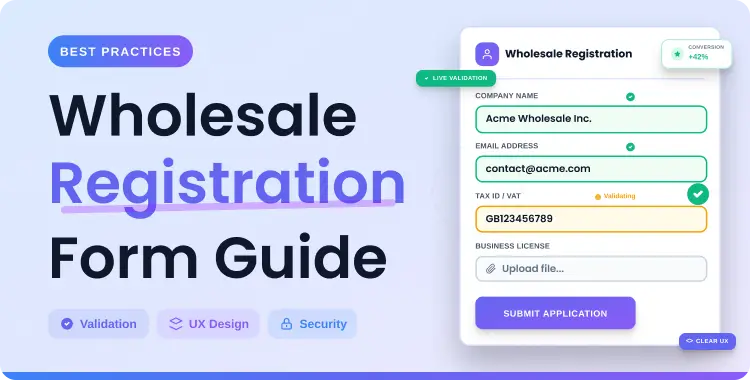
2. Collect Business Verification Details
A wholesale form should help you confirm that the applicant is a real business buyer.
Useful verification fields include:
- company name
- business email address
- phone number
- website URL
- billing address
- tax ID or VAT number
- reseller license or business document upload
- expected order volume
- type of business, such as retailer, distributor, agency, or manufacturer
Not every store needs every field. A clothing wholesaler may need a reseller certificate. A food supplier may need business location and order volume. A digital product wholesaler may only need business website, company name, and email verification.
The best approach is to collect the details that match your risk level. If you sell high-value products, restricted wholesale pricing, or region-specific products, you may need more verification. If your wholesale program is simple, keep the form lighter.
3. Explain the Approval Process Clearly
One of the easiest ways to reduce confusion is to tell applicants what happens after they submit the form.
Add a short note above or below your Wholesale Registration Form that explains:
- whether approval is manual or automatic
- what information your team reviews
- whether the applicant will receive an email after approval
- whether wholesale pricing appears only after login
- how long the review usually takes, if you have a clear internal timeline
For example:
After you submit your wholesale application, our team will review your business details. If approved, your account will receive wholesale access and you will be able to view wholesale pricing after logging in.
This type of note prevents duplicate submissions and support messages. It also sets the right expectation before the buyer applies.
4. Use Manual Approval for Wholesale Access
Manual approval is often better for WooCommerce wholesale stores because it protects your pricing and keeps your buyer list cleaner.
If every applicant is approved automatically, anyone can create an account and potentially access wholesale benefits. That may be fine for low-risk stores, but it is usually not ideal for brands that want to protect margins, verify resellers, or maintain separate B2B pricing.
Manual approval gives you time to check:
- whether the business looks legitimate
- whether the applicant fits your wholesale program
- which wholesale role they should receive
- whether they need a special pricing tier
- whether follow-up is needed before approval
Manual approval does add one extra admin step, but it gives you more control. For most B2B merchants, that control is worth it.
5. Use Role-Specific Registration When You Have Multiple Buyer Groups
Role-specific registration is useful when not all wholesale buyers should receive the same access.
For example, you may have separate roles for:
- retailers
- distributors
- agencies
- VIP wholesale buyers
- regional partners
- tax-exempt customers
- high-volume buyers
If your WooCommerce store uses different wholesale roles, a role selection field can help buyers indicate which type of account they need. Whols documentation describes a role-specific registration workflow where the Wholesaler Roles field can be enabled from the Registration & Login settings, then used during the registration process.
However, do not use role selection just because it is available. If all wholesale customers receive the same pricing and access, role selection may confuse applicants. In that case, keep the form simple and assign one wholesale role after approval.
6. Keep Wholesale Pricing Hidden Until Approval
Wholesale prices should usually stay hidden from guests and regular retail customers.
There are three reasons for this:
- Retail customers may ask for the same discounts.
- Competitors may monitor your wholesale pricing.
- Unqualified visitors may apply just to access lower prices.
A good Wholesale Registration Form should connect to a controlled access workflow. The buyer applies first. The admin reviews the application. Then the approved account receives the correct wholesale role and pricing visibility.
This is especially important if your store sells both B2C and B2B from the same product catalog.
7. Use Clear Field Labels and Helpful Instructions
Field labels should be simple and specific.
Instead of vague labels like “Details” or “Business Info,” use labels such as:
- Company Name
- Business Email
- Tax ID / VAT Number
- Reseller License
- Business Website
- Expected Monthly Order Volume
- Preferred Wholesale Role
Helpful labels reduce mistakes and make applications easier to review.
You can also add short field descriptions when needed. For example, under “Tax ID / VAT Number,” you might write: “Enter your business tax identification number if applicable.”
Do not over-explain every field. Use instructions only where they prevent confusion.
8. Keep the Form Mobile-Friendly
Some B2B buyers will complete your form from a phone, especially if they discover your store through email, social media, or a product page.
Before publishing your Wholesale Registration Form, test it on mobile. Check whether:
- fields are easy to tap
- dropdowns work properly
- required fields are clear
- file upload fields are usable
- the submit button is visible
- validation messages are easy to understand
A mobile-friendly form is not just a design issue. It affects how many qualified buyers complete the application.
9. Reduce Spam and Low-Quality Applications
Wholesale forms can attract fake submissions, discount hunters, and incomplete applications.
You can reduce low-quality submissions by:
- asking for business email instead of only personal email
- requiring company name and phone number
- adding a clear approval note
- using manual approval
- asking for website or business document when necessary
- avoiding public wholesale pricing before approval
Do not overcomplicate the form with too many barriers. The goal is to filter low-quality applications without frustrating legitimate buyers.
10. Test the Full Buyer Journey
Many store owners test only whether the form submits. That is not enough.
You should test the full journey:
- Open the registration page as a visitor.
- Submit a test wholesale application.
- Check whether the request appears in the admin area.
- Approve the request.
- Assign the correct wholesale role.
- Log in as the approved buyer.
- Confirm wholesale pricing or access rules work correctly.
- Check whether regular users still see the normal retail experience.
This final step catches problems that are easy to miss, such as incorrect role assignment, missing price rules, or unclear login behavior after approval.
Recommended Fields for a WooCommerce Wholesale Registration Form
The right fields depend on your store, products, and approval process. Use this table as a starting point.Field Required or Optional Why It Matters First name and last name Required Identifies the applicant and contact person. Business email Required Helps verify that the buyer represents a business. Company name Required Shows which business is applying for wholesale access. Phone number Recommended Gives your team a direct contact method. Business address Recommended Helps with billing, shipping, and verification. Website URL Optional Helps confirm business identity for online stores or resellers. Tax ID or VAT number Optional or required Useful for tax handling and B2B verification. Reseller license Optional or required Useful when reseller proof is required. Business type Recommended Helps segment retailers, distributors, agencies, and other buyers. Expected order volume Optional Helps you understand buyer potential and pricing needs. Requested wholesale role Optional Useful when you offer multiple wholesale levels. Message or notes Optional Lets buyers explain special requirements.
Do not make every field required. A strong Wholesale Registration Form separates essential approval fields from optional details.
Wholesale Registration Form Example for a B2B Store
Imagine you run a WooCommerce skincare store that sells to both individual shoppers and spa owners.
Retail customers can buy products normally from your public shop. But spa owners need access to wholesale bundles, lower per-unit pricing, and minimum order rules.
A practical wholesale form for this store might include:
- contact name
- business email
- spa or company name
- phone number
- business website or social profile
- business address
- tax ID or reseller certificate if required
- expected monthly order volume
- message field for special product needs
After submission, the store admin reviews the application. If the buyer looks qualified, the admin approves the account and assigns a wholesale role. The approved buyer can then log in and see wholesale pricing or eligible product rules.
This workflow keeps retail shopping simple while giving serious B2B buyers a clear path to wholesale access.
Common Mistakes to Avoid
Asking Too Many Questions
A long form can reduce applications. Start with the fields you truly need and add optional fields only when they help your review process.
Using Only the Default WooCommerce Registration Form
The default WooCommerce registration form is not designed for wholesale approval. It usually does not collect business verification details or manage wholesale roles by itself.
Showing Wholesale Prices Before Approval
If wholesale prices are visible to everyone, you lose control over who sees your B2B pricing. Keep wholesale pricing behind login and approval when your pricing strategy requires protection.
Not Explaining Approval Time
If buyers do not know what happens after submission, they may contact support or submit the form again. Add a short approval note near the form.
Not Testing Role-Based Access
If you use wholesale roles, test each role carefully. Confirm that the right buyers see the right prices, products, discounts, or restrictions.
Forcing Role Selection When It Is Not Needed
Role-specific registration is useful for multiple buyer groups. But if your store has one wholesale level, role selection may add confusion. Keep the process simple unless role choice helps the buyer.
How Whols Can Help With Wholesale Registration in WooCommerce
Managing wholesale applications manually can become difficult when you need to review buyers, assign roles, and protect wholesale pricing.
A plugin such as Whols can help you create a wholesale registration workflow inside WooCommerce. The official Whols documentation references a registration shortcode for showing the wholesaler registration form, role-specific registration through the Wholesaler Roles field, wholesaler request review and approval, and role assignment after approval.
Whols documentation also describes a Form Builder that can help customize registration fields when that feature is available in your installed version. Since plugin interfaces can change by version, always check your own Whols admin menu and official documentation before writing exact setup steps in a live tutorial.
For this article, the important point is not to add every available feature. It is to build the right registration process:
- collect useful buyer details
- review applications clearly
- assign the right wholesale role
- protect wholesale pricing
- test the buyer journey after approval
After planning your form fields and approval workflow, the next step is choosing a WooCommerce wholesale plugin that supports registration, approval, and role-based pricing in the way your store needs.
Wholesale Registration Form Checklist
Before you publish or promote your wholesale registration page, review this checklist.
- The form explains who should apply.
- The form asks only for useful approval details.
- Required fields are limited to essential information.
- Business verification fields match your store’s risk level.
- The approval process is explained clearly.
- Manual approval is enabled if you need buyer verification.
- Role selection is used only when multiple buyer groups exist.
- Wholesale pricing is hidden until approval if pricing needs protection.
- The form works on desktop and mobile.
- The submit button and validation messages are clear.
- Admins know where to review requests.
- Approved users receive the correct wholesale role.
- Wholesale pricing or access rules are tested after approval.
- Regular customers still see the normal retail experience.
Frequently Asked Questions
What should a wholesale registration form include?
A Wholesale Registration Form should include contact name, business email, company name, phone number, business address, and any verification fields your store needs, such as tax ID, VAT number, website URL, reseller license, or expected order volume.
Should wholesale approval be manual or automatic?
Manual approval is usually better for wholesale stores that need to verify buyers before showing wholesale pricing. Automatic approval may work for low-risk stores, but it gives you less control over who receives B2B access.
Can WooCommerce create wholesale registration forms by default?
WooCommerce can handle basic customer registration, but it does not provide a complete wholesale registration, approval, role assignment, and wholesale pricing workflow by default. Most stores use a wholesale or B2B plugin for this.
How do I reduce fake wholesale applications?
You can reduce fake wholesale applications by asking for business email, company name, phone number, website, tax ID or reseller proof when needed, and using manual approval before giving access to wholesale pricing.
Should I show wholesale prices before approval?
In most cases, you should not show wholesale prices before approval. Keeping wholesale pricing behind login and approval helps protect margins and prevents regular shoppers from expecting B2B discounts.
What is role-specific wholesale registration?
Role-specific wholesale registration lets applicants choose or request a wholesale role during registration. This is useful when your store has different buyer groups, such as retailers, distributors, agencies, or VIP wholesale customers.
How many fields should a wholesale registration form have?
A wholesale form should have enough fields to verify the buyer, but not so many that it discourages qualified applicants. Start with essential contact and business details, then add optional fields only when they support approval or segmentation.
Conclusion
A strong Wholesale Registration Form helps you qualify B2B buyers, protect wholesale pricing, and create a smoother onboarding process inside WooCommerce.
The best forms are not the longest forms. They are the clearest forms. Ask for the right business details, explain the approval process, use manual review when needed, assign the correct wholesale role, and test the full experience from application to pricing visibility.
Once your form strategy is clear, you can choose a WooCommerce wholesale solution that supports registration, approval, and role-based pricing for your store’s workflow.