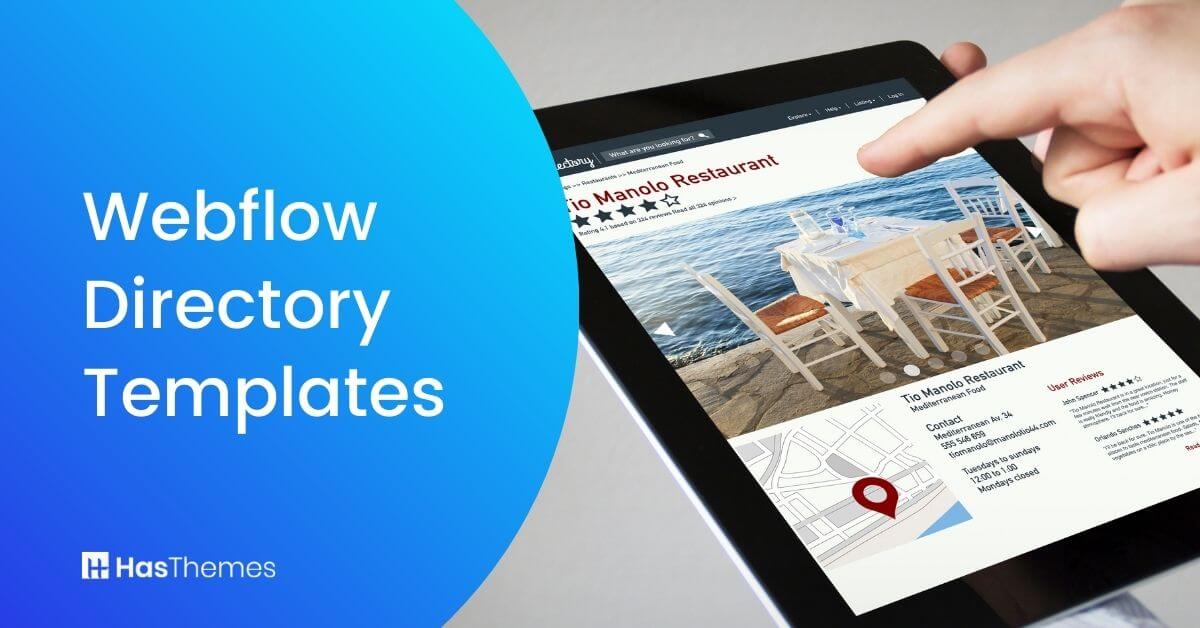
9 Webflow Directory Templates to Help You Get Started

If you want to build a directory website without starting from scratch, a Webflow directory template is one of the smartest shortcuts available right now. These templates come pre-built with listing pages, search filters, CMS support, and responsive layouts — everything you need to launch without touching a line of code.
This guide covers 9 hand-picked Webflow directory templates, what each one does well, what type of project it suits best, and how to decide which one is right for you.
Quick answer: Webflow directory templates save you weeks of design work. They come with built-in CMS, responsive layouts, and SEO-ready structure — so you can focus on content and listings instead of design.
What Is a Webflow Directory Template?
A Webflow directory template is a ready-made website design built specifically for directory-style websites — think job boards, real estate listings, business directories, help centers, or marketplace platforms. Instead of designing from scratch, you get a structured layout with all the key pages and functionality already in place.
You simply import it into Webflow, connect your CMS collections, and customize the design to match your brand. No developer required.
Why Build a Directory Site on Webflow?
Webflow now powers over 500,000 live websites globally and holds a 1.2% share of the CMS market — a figure that has doubled since 2021.
The platform hit $213 million in annual revenue in 2024, growing 66% year-over-year, a clear signal it’s only getting stronger.
And directory sites themselves carry real business value. Research shows that 71% of new customers first discover a business through a directory listing before ever visiting the brand’s website directly. Launching a Webflow directory puts you right in the middle of that discovery traffic.
The Top 9 Webflow Directory Templates
Here are nine well-built options, each suited to a different directory use case.
Funder – Agency Webflow Template
Best for: Business directories, agency sites, and company listing portals
Funder is a clean, professional Webflow template built for business directories and agency websites. It’s designed to be straightforward — easy to import, easy to customize, and fast to load. The layout is structured to give your listings room to breathe while keeping navigation intuitive for visitors.
What makes Funder stand out in the directory space is its built-in CMS Filter and CMS Sort functionality (powered by Finsweet). This means visitors can filter listings by category, price, or custom fields without any extra development work on your end. For a business directory that could grow to hundreds of entries, this feature alone saves significant setup time.
The template includes 16+ fully designed pages, all optimized for speed, and the SEO-friendly code structure means your directory pages are ready to be indexed from day one. Smooth micro-animations give it a polished feel without adding page weight.
Price: Regular License — $49
Key Features:
- 16+ fully responsive template pages
- CMS Filter and CMS Sort (Finsweet-powered)
- SEO-optimized code structure
- Webflow CMS included
- Seamless custom animations
- Fast loading speed optimization
Villar – Real Estate Webflow Template
Best for: Property listings, real estate agencies, and rental directories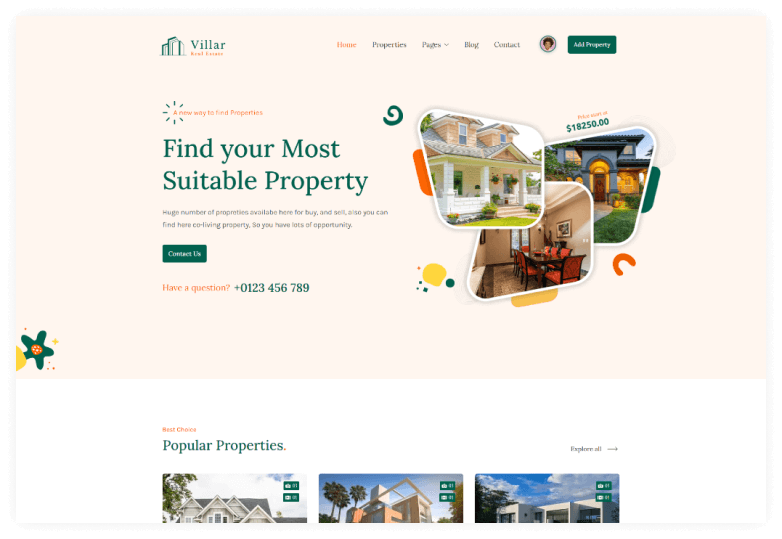
Villar is purpose-built for real estate directories. It comes packed with everything a property listing site needs — a customizable header and footer, three distinct property listing layout variations, Google Maps integration, and retina-ready graphics that make property photography look sharp on any screen.
The template covers 30+ static and CMS pages, so you get listing detail pages, search result pages, agent profile pages, and more out of the box. You won’t need to design these from scratch. The Finsweet-powered CMS Filter, CMS Load, and CMS Sort functions make it easy for visitors to filter properties by location, type, price range, or any other custom field you set up in Webflow’s CMS.
If your business involves buying, selling, or renting properties, Villar gives you a complete professional-grade starting point. For more property-focused options, browse our full list of Webflow real estate templates.
Price: Villar – Real Estate Webflow template offers one license for users:
Regular License: $49
Highlighted Features:
- Fully responsive and easy to customize
- Essential Utility Pages
- 30+ Template pages
- Optimized for fast loading speed
- Perfect Responsive for all devices
- 100% Customizable
- Webflow CMS included
- CMS Filter, CMS Load, and CMS Sort functionalities (finsweet)
Realtor X – Real Estate Webflow Template
Best for: High-end property directories, luxury real estate, and paid listing platforms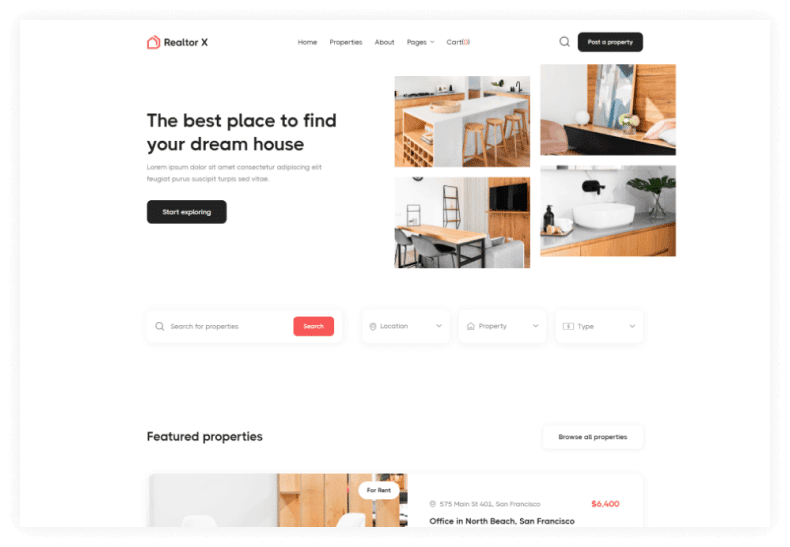
Realtor X is for when you need to go beyond a standard real estate template. It’s designed for modern companies and individual realtors who want their website to feel premium, not just functional. The visual design is richer, the animations are smoother, and the overall experience is noticeably more polished than most templates at this price point.
One major advantage over Villar and Alley is the inclusion of Webflow CMS and eCommerce together. This makes Realtor X suitable for platforms where property owners or agents pay to list their properties, or where featured listing upgrades can be purchased directly through the site.
If you’re building a monetized directory platform rather than a single-agency site, this is the template to look at.
It’s fully speed-optimized and 100% customizable, so while the base design feels premium, you’re not locked into any fixed visual style.
Price: Realtor X offers one license for users:
Regular License: $129
Highlighted Features:
- Unique & Premium Design
- Speed Optimized
- Perfect Responsive
- Seamless Animations
- 100% Customizable
- Webflow CMS & Ecommerce
Alley – Real Estate Webflow Template
Best for: Real estate directories that need standout interactions and modern animations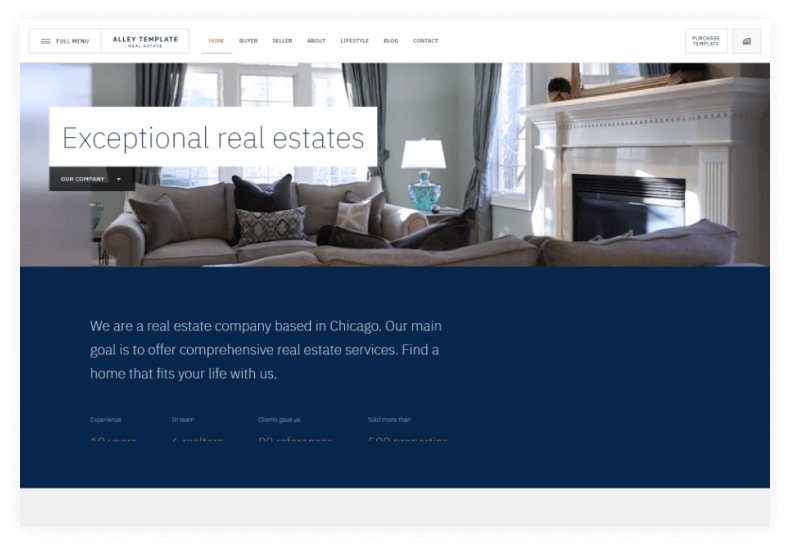
Alley takes a more design-forward approach to the real estate directory template category. While Villar focuses on page count and practical features, Alley focuses on making the user experience feel memorable. It ships with custom animations, micro-interactions, and — most distinctively — an animated fullscreen aside menu that gives it a high-end editorial feel.
This is not a basic template. It comes with 30+ static and CMS pages, multiple layout variations, and a range of interaction patterns that most template buyers would otherwise have to build manually. The design is exclusive to the Webflow marketplace, so your site won’t look like anyone else’s.
If you’re building for a client who wants something that stands out visually, or if you’re running a real estate brand that competes on presentation as much as listings, Alley is worth the modest price.
Price: Alley offers one license for users:
Regular License: $49
Highlighted Features:
- 30+ static and CMS pages
- Different layouts
- Unique design only for the Webflow marketplace
- Animated fullscreen aside menu
- Many interactions & micro animations
Engrafa – Help center Webflow Template
Best for: SaaS companies, software documentation, and knowledge base directories
Engrafa takes a different angle on the directory concept. Instead of listing businesses or properties, it organizes information — making it the right choice for SaaS companies that need a structured help center, documentation portal, or knowledge base. Think FAQs, tutorials, development docs, support guides, and platform update logs, all cleanly organized and easy to navigate.
The modular design system is Engrafa’s biggest practical advantage. Every section is built to be mixed and matched without breaking the layout, so you can build out a help center that matches your brand’s structure without getting tangled in custom code. The color palette and type system are already built in, so the design stays consistent as you expand.
It’s also SEO-optimized and fully mobile-friendly, which matters a lot for a help center; many users will arrive from a Google search on their phone looking for a quick answer.
For more SaaS-specific options, also see our Webflow SaaS templates.
Price: Engrafa offers one license for users:
Regular License: $49
Highlighted Features:
- Fonts, colors & images
- Modular design
- Mobile-friendly design
- Search engine optimization
- Built-in styles and color palettes
JobGurus – Job Portal Webflow Template
Best for: Job portals, recruitment agencies, resume markets, and freelance directories
JobGurus is the most purpose-built job board option in this list. It covers every page type a recruitment directory needs — job listing pages, employer profiles, candidate search, resume submission pages, FAQ, and contact forms. With 35+ pages included, it’s one of the most complete starting points available for anyone launching a job platform on Webflow.
It’s fully responsive and Retina-supported, so listings look sharp on every screen size and browser combination. The built-in contact forms are a small but practical detail, they save you from having to set up form integrations manually, which matters when you’re also managing CMS collections and listing categories.
If you’re building a niche job board, remote work, creative freelancers, tech hiring, or local job listings — JobGurus gives you a solid foundation that’s faster to launch than building custom.
Price: JobGurus offers one license for users:
Regular License: $79
Highlighted Features:
- Fully Responsive Design
- +35 Pages
- Retina Supported
- 100% Responsive
- FAQ Page
- Contact Forms
Also see our Webflow job board templates roundup and our broader best job board HTML templates list for more options.
Links – App Webflow Template
Best for: Personal link directories, creator portfolios, and social media link-in-bio pages
Links is a mobile-first template built around one simple, useful idea: a single page that collects all your important links in one place. Think of it as your own self-hosted version of Linktree — but fully customizable, living on your own domain, and built on Webflow’s flexible CMS.
It comes with 16 pre-made page layouts, so you’re not stuck with a single design. You can add as many links as you need, and the layout handles them cleanly without feeling cluttered. It’s retina-supported and responsive, so it looks just as good on a phone as on desktop.
For freelancers, creators, consultants, or brands that manage multiple content channels, Links is a lightweight but genuinely practical directory template. It’s also a great option for anyone who wants full control over their link hub without paying for a third-party tool monthly.
Price: Links offers one license for users:
Regular License: $49
Highlighted Features:
- Fully Responsive Design
- 16 pre-made page layouts
- Retina Supported
- 100% Responsive
- Easily customized
Market – Marketplace Webflow Template
Best for: Design asset marketplaces and digital product directories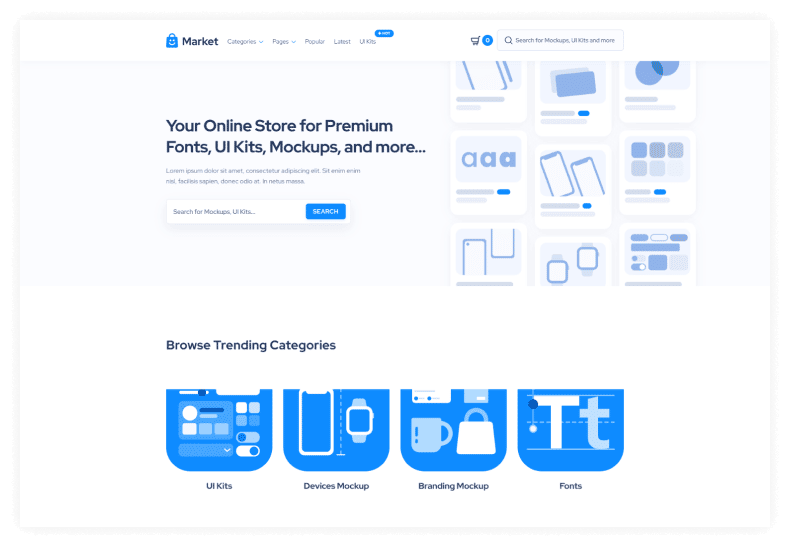
Market is designed for anyone who wants to launch a digital marketplace — fonts, design mockups, illustrations, icons, templates, or any other type of creative resource. The template includes a powerful built-in search function so buyers can find products quickly, and the checkout flow is clean and straightforward.
The design itself is premium-feeling without being over-engineered. It’s speed-optimized so large product catalogs don’t slow down the browsing experience — which is a real consideration once you have hundreds of listed items. Like all Webflow templates, it’s 100% customizable, so if your marketplace sells something other than design resources, you’re not locked into that category.
Market is the most commerce-adjacent template on this list that doesn’t require Webflow’s full eCommerce plan to feel functional. If you’re evaluating paid listing or asset marketplace platforms, also check out our premium Webflow templates collection.
Price: Market offers one license for users:
Regular License: $79
Highlighted Features:
- Unique & Premium Design
- Speed Optimized
- Perfect Responsive
- Seamless Animations
- 100% Customizable
Powerblog – News Webflow Template
Best for: News sites, content portals, editorial directories, and curated resource hubs
Powerblog rounds out this list as the best option for content-driven directories. If your “directory” is really a curated collection of articles, resources, or editorial content rather than business listings, Powerblog is the right fit. It’s CMS-powered, meaning you can publish and organize content without any technical setup — just connect your collection and start writing.
The design is clean and editorial, with a premium look that suits professional publications and niche media sites equally well. It’s perfectly responsive across all devices, so readers get a good experience whether they find your content on mobile or desktop.
Customization is straightforward even for Webflow beginners. The layout adapts well to different content categories, so whether you’re running a curated tool directory, a niche news site, or an industry resource hub, Powerblog gives you a clean, fast foundation to build on.
Price: Powerblog offers one license for users:
Regular License: $49
Highlighted Features:
- Premium Look&Feel
- Speed Optimized
- Perfectly Responsive
- CMS-powered for Projects
- 100% Customizable
For more content-focused picks, see our Webflow blog templates.
Comparison Table
| Template | Best Use Case | Price |
|---|---|---|
| Funder | Business directory / agency | $49 |
| Villar | Real estate listings | $49 |
| Realtor X | Premium property / paid listings | $129 |
| Alley | Modern real estate + animations | $49 |
| Engrafa | SaaS help center / docs | $49 |
| JobGurus | Job board / recruitment | $79 |
| Links | Link hub / personal directory | $49 |
| Market | Digital asset marketplace | $79 |
| Powerblog | News / content portal | $49 |
How to Choose the Right Webflow Directory Template
The right template depends entirely on what type of directory you’re building. Here’s a quick decision guide:
- Property or real estate listings? → Villar (budget-friendly) or Realtor X (premium + eCommerce). See all Webflow real estate templates.
- Job board or recruitment portal? → JobGurus is purpose-built. Also explore Webflow job board templates.
- Digital asset or design marketplace? → Market is the strongest fit.
- SaaS help center or documentation? → Engrafa covers this specifically. See also Webflow SaaS templates.
- Content or news directory? → Powerblog. More in our Webflow blog templates.
- Personal link hub for social media? → Links is the lightest and most targeted option.
- General business directory? → Funder is the most flexible starting point.
Still browsing? Check out the full Webflow templates collection at HasThemes for more options across every category.
What to Check Before Buying Any Webflow Template
Before you buy, run through this quick checklist:
- CMS included? — Essential for any directory with dynamic listings. All templates above include Webflow CMS.
- Filter + search functionality — Directory sites live or die by how easy it is to search. Look for Finsweet CMS Filter support.
- Page count — More pre-built pages means less custom design work on your end.
- Responsive design — All templates listed here are fully responsive, but always preview the mobile version before purchasing.
- eCommerce support — Only needed if you plan to charge for listings. Realtor X is the best option here.
- License type — All prices above refer to a single-site Regular License. Check marketplace terms before purchasing.
Watch the Video about Webflow Directory Templates
Frequently Asked Questions
What is a Webflow directory template?
A Webflow directory template is a pre-designed website layout built for directory-style platforms, such as business listings, job boards, real estate portals, or link hubs. You import it into Webflow, customize the design and CMS collections, and launch without writing custom code.
Are Webflow directory templates SEO-friendly?
Yes. All nine templates listed here are built with SEO in mind — clean code, fast loading speeds, mobile-responsive layouts, and structured heading hierarchies. Webflow itself generates clean HTML and allows full control over meta titles, descriptions, and Open Graph tags on every page.
Can I customize a Webflow directory template without coding?
Yes. Webflow’s visual editor lets you change colors, fonts, layouts, and content directly in the browser. For CMS-driven directory listings, you can manage all content through Webflow’s CMS editor without touching any code.
Which Webflow directory template is best for a real estate site?
It depends on your budget and goals. Villar is the best all-round choice at $49 — it includes 30+ pages, Google Maps, and three listing layout options. Realtor X ($129) is the better pick if you need eCommerce functionality for paid listings or a more premium design.
Do these templates work with Webflow’s free plan?
You can build and preview on Webflow’s free plan, but you’ll need a paid Webflow hosting plan to publish your site with a custom domain and to remove the Webflow.io subdomain. CMS plans are required for sites with dynamic directory listings.
Conclusion
Webflow directory templates are one of the most practical ways to launch a professional listing site quickly.
Whether you’re building a property portal, a job board, a help center, or a digital marketplace, there’s a template in this list that matches your use case, and all of them give you the CMS flexibility, responsive design, and SEO-ready structure you need to grow.
Start with the use case first, then match it to the template. Villar and JobGurus are the strongest all-round picks for their respective niches.
Realtor X is worth the premium if you need eCommerce built in. And Funder is the safest starting point if you’re building a general business directory and want room to customize freely.