Meta Pixel vs Google Analytics 4: Which Tracking Tool Actually Helps You Grow in 2026?

Most marketers are not asking “What is Meta Pixel?” or “What is GA4?”—they want to know which one will actually help them track sales and scale campaigns. If you are running Facebook or Instagram ads and trying to understand how they impact overall traffic and revenue, you have probably noticed that Meta’s conversion numbers rarely match what you see in Google Analytics 4.
Table of Contents
Key Takeaways:
- Meta Pixel optimizes Meta Ads; GA4 analyzes all traffic sources
- Both now use event-based tracking models(event tracking as their core data model)
- GA4 replaced Universal Analytics in July 2023
- Server-side tracking exists for both (CAPI and sGTM)
- Most eCommerce stores should use both tools together for full web analytics and website tracking.
Should I Use Meta Pixel, Google Analytics, or Both?
Nearly every store owner running Meta Ads asks this at some point. The short answer: they do completely different things, and you almost certainly need both.
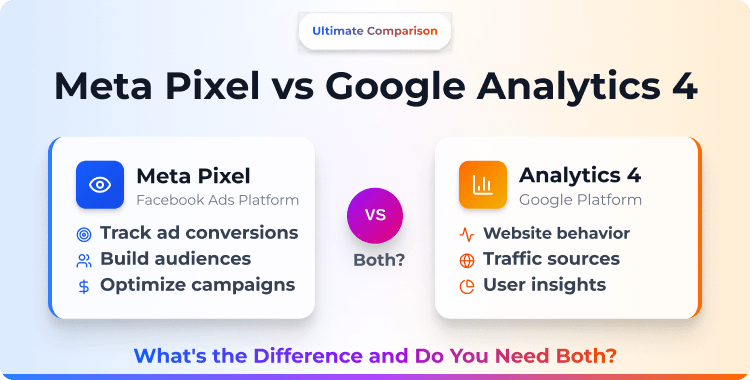
Meta Pixel feeds data to Meta’s ad algorithm. It tells Meta which visitors converted, so the algorithm can find more people like them. Google Analytics 4 gives you a bird’s-eye view of your entire website — where traffic comes from, how users behave, and which channels drive the most revenue.
One optimizes your ads. The other helps you understand your business. They don’t compete with each other, and they don’t conflict when installed together.
This Meta Pixel vs Google Analytics comparison is updated for 2026 — we’re covering GA4 (not the old Universal Analytics, which Google shut down in July 2023) versus Meta Pixel with Conversion API and server‑side tracking options.
If you’ve read older versions of this comparison, some of the facts around cookies, attribution, and data collection have changed significantly.
Meta Pixel vs GA4 at a Glance
| Dimension | Meta Pixel | Google Analytics 4 |
| Primary Purpose | Ad optimization & retargeting | Website analytics & traffic analysis |
| Who Uses the Data | Meta’s ad algorithm | You (reports & dashboards) |
| Tracks | Actions tied to Meta Ads | All traffic from all sources |
| Tracking Model | Event-based | Event-based |
| Server-Side Option | Conversion API (CAPI) | Server-side GTM (sGTM) |
| Cookie Type | First-party + third-party | First-party |
| Retargeting | ✅ Custom Audiences | ❌ Analytics only |
| Ad Optimization | ✅ Feeds Meta’s algorithm | ❌ Reporting only |
| Cross-Channel View | ❌ Meta only | ✅ All channels |
| Ecommerce Reports | Basic (Events Manager) | Detailed (funnels, cohorts, LTV) |
| Free | ✅ Yes | ✅ Yes |
What Meta Pixel Does? (And Doesn’t Do)
Meta Pixel’s pixel code tracks specific visitor actions called events on your website and sends that data to Meta in real time. When someone views a product, adds to cart, or completes a purchase, the pixel fires the corresponding event.
Meta uses this data to measure which ads drive conversions, optimize delivery toward users most likely to buy, and build audiences for retargeting and lookalikes.
With Conversion API (CAPI) running alongside the pixel, events also fire server-side — closing the tracking gaps caused by ad blockers and iOS privacy restrictions. Together, Pixel + CAPI give Meta the most complete conversion data possible.
What Meta Pixel doesn’t do:
- Can’t show you organic traffic, email traffic, or referral sources.
- Can’t analyze your full website funnel across all channels.
- Can’t provide SEO insights or content performance data.
- Can’t compare Meta’s performance against other ad platforms in one view.
Meta Pixel is purpose-built for one ecosystem. It’s excellent at that job, but it’s not a general website analytics tool. For a deeper look at why it matters, see why Meta Pixel is important for your business.
What Google Analytics 4 Does? (And Doesn’t Do)
GA4 tracks everything that happens on your website, regardless of where the visitor came from. Organic search, paid ads (Meta, Google, TikTok), email campaigns, social referrals, direct visits – GA4 captures it all as a multi‑channel analytics platform and organizes it into reports you can analyze
GA4 uses an event-based data model, which is a significant change from Universal Analytics’ session-based approach. Every interaction, page view, scroll, click, purchase — is an event. This actually makes GA4 structurally similar to Meta Pixel, though the data goes to very different places.
Key GA4 capabilities for eCommerce:
- Acquisition reports — which channels bring the most (and best) traffic
- Funnel analysis — where users drop off between landing and purchase
- Cohort analysis — how user groups behave over time
- LTV predictions — machine learning–based revenue forecasting
- BigQuery export — raw data access for custom analysis
- Server-side tracking via sGTM (server-side Google Tag Manager)
- Engagement metrics like bounce rate, session duration, and engagement rate across your entire site
GA4 is free. GA360 is the enterprise paid version with higher data limits and SLAs.
What GA4 doesn’t do:
- Can’t optimize ad delivery on any platform
- Can’t build retargeting or lookalike audiences for Meta
- Can’t feed conversion data to Meta’s algorithm
- Can’t replace Meta Pixel for Meta Ads optimization
GA4 is your analytics brain. Meta Pixel is your ad optimization engine. They answer different questions.
🚀 Supercharge Your Facebook Advertising with Pixelavo!
Unlock the full potential of your Facebook ads. Boost conversions, increase ROI, and reach new heights with Pixelavo’s powerful features.
5 Key Differences Between Meta Pixel and GA4
1. Purpose: Ad optimization vs site analytics
This is the fundamental distinction. Meta Pixel exists to make your Meta Ads perform better. Every event it tracks feeds Meta’s machine learning to find more converters and lower your cost per acquisition. Both tools handle conversion tracking, but Meta Pixel sends conversion data to Meta’s algorithm while GA4 records it for your own reports and dashboards.
GA4 exists to help you understand your website — where people come from, what they do, and where you’re losing them. One feeds an algorithm. The other feeds your decision‑making.
2. Data ownership and access
Meta Pixel data lives inside Meta’s ecosystem. You access it through Events Manager and Ads Manager, and you’re limited to the reports and breakdowns Meta provides. You can’t export raw event-level data or connect it to external analysis tools.
GA4 data is yours. You can explore it in GA4’s interface, build custom reports, and — critically — export raw data to BigQuery for SQL‑based analysis. GA4 uses data‑driven attribution by default, distributing conversion credit across multiple touchpoints instead of last‑click only.
If you ever need to build custom attribution models, merge data with your CRM, or run analyses that GA4’s UI doesn’t support, BigQuery integration makes it possible.
3. Tracking model (both event-based now)
Here’s where things have converged. Universal Analytics tracked sessions and pageviews as its primary units. GA4 switched to a fully event-based model — every interaction is an event, just like Meta Pixel.
This makes the two tools more similar architecturally than they were a few years ago. But the similarity is structural, not functional. Meta Pixel events go to Meta for ad optimization.
GA4 events go to your analytics reports. Same concept, different destinations, different purposes. From a technical perspective, both rely on event tracking, but they answer different questions in your analytics stack.
4. Server-side Tracking Options
Both platforms now offer server-side tracking to combat ad blockers and privacy restrictions:
- Meta: Conversion API (CAPI) sends events directly from your server to Meta. On WordPress and WooCommerce, plugins like Pixelavo handle this automatically. On Shopify, apps like Pixee do the same. Setup is straightforward — no server infrastructure required.
- GA4: Server-side GTM (sGTM) routes your tracking through a server container you host, typically on Google Cloud. It’s more powerful and flexible but also more complex — you’ll likely need a developer to configure it, and there’s a hosting cost (~$100+/month).
Both approaches bypass ad blockers and improve data accuracy. The difference is accessibility: CAPI via plugins is something any store owner can set up. sGTM typically requires technical resources. For a detailed CAPI walkthrough, see our Meta Conversion API guide.
5. Cookie handling (correcting common myths)
There’s a persistent misconception, including in earlier versions of this article, that “Facebook Pixel uses first-party cookies” and “Google Analytics uses third-party cookies.” Both claims are wrong in 2026.
Meta Pixel uses first-party cookies set by its JavaScript on your domain (like _fbp). It can also leverage third-party cookies from facebook.com when available, but as browsers restrict third-party cookies, this capability is diminishing. That’s precisely why Conversion API has become essential.
GA4 uses first-party cookies exclusively. The _ga and _gid cookies are set on your domain. GA4 was built for a privacy-first future — it uses machine learning and data modeling to fill gaps when cookies are unavailable, or consent isn’t granted.
Both tools must now operate within stricter GDPR and data privacy rules, which means you should implement proper consent banners before loading any tracking scripts in regions like the EU.
Bottom line: both tools primarily rely on first-party cookies now. The third-party cookie distinction that older comparisons emphasized is largely outdated.
Summary of Key Differences
| Feature | Meta Pixel | Google Analytics 4 |
|---|---|---|
| Main purpose | Optimize Facebook & Instagram ads, track paid social conversions | Measure all website and app traffic and user behavior |
| Data scope | People who see or click Meta ads, then act on your site | Visitors from every channel: SEO, email, paid search, social, referrals |
| Best at | Remarketing, lookalike audiences, conversion‑focused ad optimization | Understanding full customer journey, content performance, multi‑channel ROI |
| Attribution view | Includes view‑through conversions and Meta’s default attribution windows | Uses last‑click or data‑driven attribution across all channels |
| Setup | Pixel code, plugin, or Tag Manager plus optional Conversion API | GA4 property with tag or Tag Manager, often via WordPress plugin |
| Reporting surface | Ads Manager (campaigns, ad sets, creatives) | GA4 interface (reports, explorations, funnels, paths) |
Recommended Blog for you:
👉 How to Add a Meta Pixel to WordPress
👉 How to Get Meta Pixel Tracking Code
👉 The 6 Best Meta Pixel Plugins for WordPress
When to Use Meta Pixel vs GA4
Use Meta Pixel when:
- You run Meta Ads (Facebook or Instagram ads) — this is non-negotiable.
- You want to build retargeting audiences from website visitors.
- You want to create lookalike audiences from your buyers.
- You need Meta’s algorithm to optimize toward purchases, not just clicks.
- You want to improve ROAS (return on ad spend) by feeding Meta higher‑quality conversion data.
Use GA4 when:
- You want to understand where ALL your traffic comes from.
- You need funnel analysis to find where users drop off.
- You want to compare channel performance — is Meta, Google, email, or organic driving more revenue?
- You need cohort reports, LTV predictions, or BigQuery access for custom analysis.
- You need consistent conversion rate reporting across every marketing channel, not just Meta.
Use both when:
- You run any kind of online store — this applies to 95% of businesses
- Meta Pixel handles ad optimization; GA4 handles the bigger picture
- They run independently, don’t conflict, and don’t slow each other down
The “Meta Pixel vs Google Analytics” framing implies you need to pick one. You don’t – the real question is how you use them together as part of a complete tracking and attribution strategy.
HT Easy GA4
#1 📈 Google Analytics Plugin for WordPress
🚀 Supercharge your WordPress website with analytical insights. (Including WooCommerce Report)
How Meta Pixel and GA4 Work Together
Install both. They operate independently — there’s no interference, no duplicate tracking, and no performance conflict.
Here’s how the workflow looks in practice:
- Meta Pixel tracks conversions and sends them to Meta, where the algorithm uses that data to optimize your campaigns. You check Events Manager for event health and Ads Manager for campaign performance.
- GA4 tracks the same traffic but shows you everything else too — organic, email, referral, direct. You check GA4 to see which channels perform best overall and whether Meta is actually your highest-ROI source.
- UTM parameters bridge the two and enable cross‑platform tracking. Tag your Meta ad URLs with UTMs, and GA4 shows exactly how much revenue Meta campaigns drive compared to other channels
- Server-side tracking can run in parallel: CAPI for Meta, sGTM for GA4. No conflict.
Together, Meta Pixel and GA4 give you a full view of the customer journey — from first ad impression, through on‑site behavior, to repeat purchases and lifetime value.
In every eCommerce store we’ve audited, the ones using both tools make better decisions than those relying on just one. Meta Pixel tells you how to spend on Meta. GA4 tells you whether Meta is even your best channel.
If you haven’t set up GA4 yet, see our guide on adding Google Analytics to your WordPress website.
Recommended Blog for You:
👉 How to Install Google Analytics on WordPress
👉 5 Best WooCommerce Google Analytics Plugins
👉 The Best Google Analytics Plugins for WordPress
Video Presentation: How to Set Up Google Analytics on WordPress
Frequently Asked Questions
Q1: Can Meta Pixel replace Google Analytics?
No. Meta Pixel only tracks actions related to Meta Ads. It can’t show organic traffic, email performance, or overall site analytics. You need GA4 for the full picture.
Q2: Does Google Analytics help with Facebook Ads?
Not directly. GA4 can report on Meta traffic via UTM parameters, but it doesn’t feed data to Meta’s ad algorithm. You need Meta Pixel for ad optimization.
Q3: Do Meta Pixel and GA4 slow down my site?
Both load asynchronously and have minimal performance impact. Running them together doesn’t cause a meaningful slowdown on any modern hosting setup.
Q4: Which one is more accurate for conversions?
For Meta Ad conversions, Meta Pixel with CAPI is more accurate — it’s purpose-built for Meta attribution. For overall conversions across all channels, GA4 gives the broader, cross-channel view.
Q5: Is Universal Analytics the same as GA4?
No. Google replaced Universal Analytics with GA4 in July 2023. GA4 uses a completely different data model (event-based), a different interface, and different reporting capabilities. All UA properties stopped processing data.
Q6: Which is better – Meta Pixel or Google Analytics?
Neither is “better” in absolute terms — they solve different problems. Meta Pixel is better for ad optimization: it feeds conversion tracking data to Meta’s algorithm, so your campaigns find more buyers at a lower cost per acquisition.
Google Analytics 4 is better for web analytics: it shows all traffic sources, funnels, and user behavior across your entire site. Most eCommerce businesses should use both together instead of choosing one over the other.
Q7: Do I need both tools if I only run occasional ads?
Even with a small budget, running Meta Pixel alongside GA4 is useful because you can see which ads drive leads or sales and still track long‑term growth from organic channels. The setup cost is low compared to the clarity you gain
Conclusion
The Meta Pixel vs Google Analytics decision is not an either‑or choice — both are free, both are essential, and both solve different problems in your tracking stack.
If you run Meta Ads, you need Meta Pixel — it’s what makes your campaigns optimize properly. If you want to understand your website traffic beyond Meta, you need GA4 — it’s your cross-channel analytics layer.
Running both gives you the full picture: Meta Pixel ensures your ad spend is efficient, GA4 ensures you’re investing in the right channels overall.
For the best results in 2026, pair Meta Pixel with Conversion API to close tracking gaps from ad blockers and iOS privacy changes, and consider server‑side GTM for GA4 if you need the most robust, privacy‑aware website tracking setup.
Set up is straightforward on any platform — see our WordPress Pixel plugin guide or Shopify Pixel app guide to get started.