How to Add Accordion to a WordPress Site: Step-by-Step Guide

Do you want to add an accordion to your WordPress site? This can be a great way to add interactivity and engage visitors on your pages. It helps make your pages more interesting and encourages visitors to explore your content.
Many website owners search for ways to implement WordPress accordion features. Learning how to add an accordion in WordPress improves user experience. The WordPress accordion widget works with most themes. Finding the right WordPress accordion plugin simplifies the implementation process.
In this article, we will show you how to add accordion to a WordPress site using the Accordion plugin. We will also show you how to customize the appearance and behavior of the accordion. Let’s get started!
Key Takeaways
- WordPress accordions organize content without cluttering your website pages.
- HT Mega Plugin simplifies accordion creation without coding skills.
- Accordion widgets work responsively across all device types.
- Customizable styles enhance website appearance and visitor engagement.
- Elementor accordion settings control the default open-close display states.
What is an Accordion, and How Does It Work
An accordion is a user interface element that displays content in collapsible sections, allowing users to expand or hide information as needed. Rather than overwhelming visitors with large blocks of text, accordions help organize content in a compact and user-friendly format.
In WordPress and WooCommerce, accordions are commonly used for FAQs, product specifications, return policies, and other expandable content. They improve user experience by making pages cleaner and easier to navigate, especially on mobile devices.
Accordions typically consist of “cards” that contain text, media, or even widgets. When one section is opened, others may collapse automatically to maintain a streamlined view. This behavior helps reduce visual clutter and enables shoppers to find relevant information quickly.
Developers often implement custom accordion designs using tools like Elementor. By configuring accordions to remain closed on page load, you can improve the initial page appearance and loading speed perception.
Overall, using accordions in WooCommerce is a smart way to display layered content without sacrificing usability. Whether you’re presenting technical specs or customer Q&A, they help visitors engage with your content efficiently.
How to Add Accordion to a WordPress Site: Steps
The accordion plugin for WordPress offers numerous customization options. Using Elementor accordion “start-close” settings improves the appearance of the page load. The accordion WordPress implementation works with most page builders.
Adding an accordion widget to your WordPress site can help create a more organized and interesting experience. HT Mega Plugin provides users with a simple way to add a responsive accordion to their website in just a few steps. 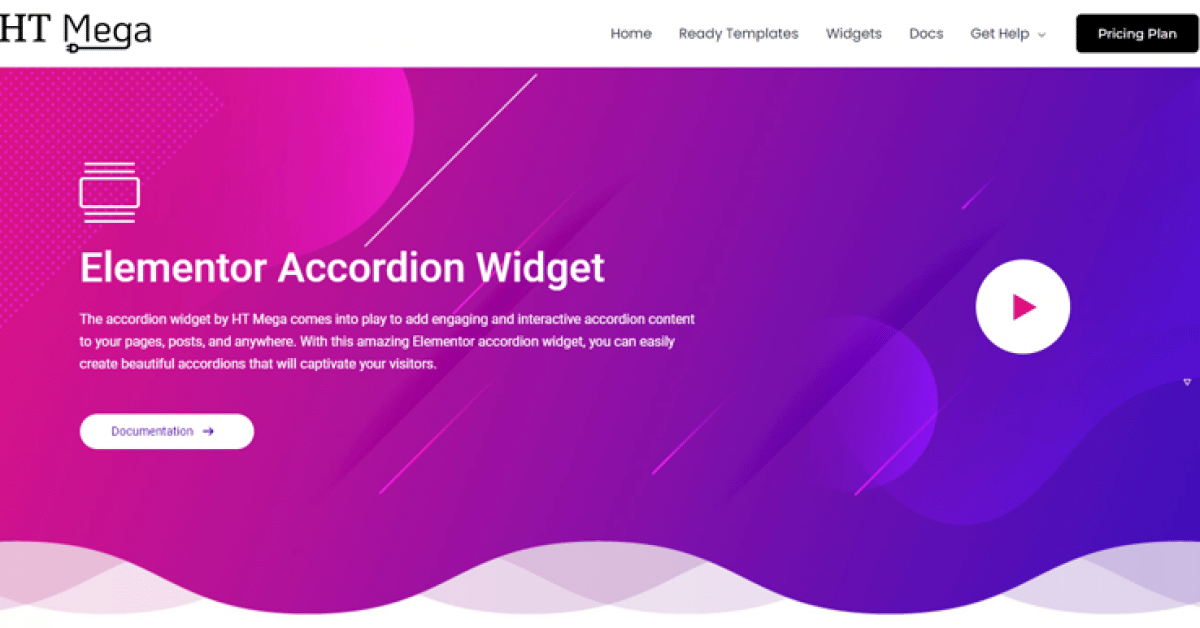
HT Mega plugin’s powerful features make it quick and easy to add interactive layers of content. It allows visitors to view the entire page at a single glance.
This plugin for Elementor also allows users to customize the style and design of the accordions. This makes the accordions look unique and engaging, offering a better experience to visitors
To get started first make sure that you have the HT Mega plugin installed in your WordPress. After that take a look at the following simple steps to easily add an accordion feature to your WordPress website.
Step 1 – Enable Accordion
Select HTMega Addons from your WordPress Dashboard, navigate to “Settings,” select the “Elements” option and enable the “Accordion” widget from the list.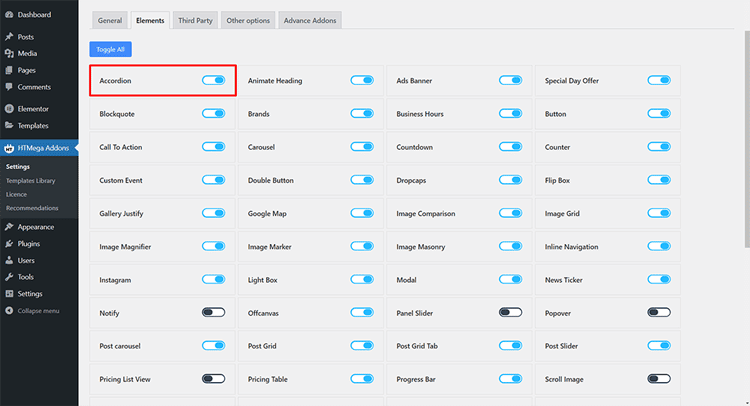
Step 2: How to Utilize the Accordion Widget
To add the Accordion widget, go to the Elementor panel while editing a particular page or post, and search “Accordion.”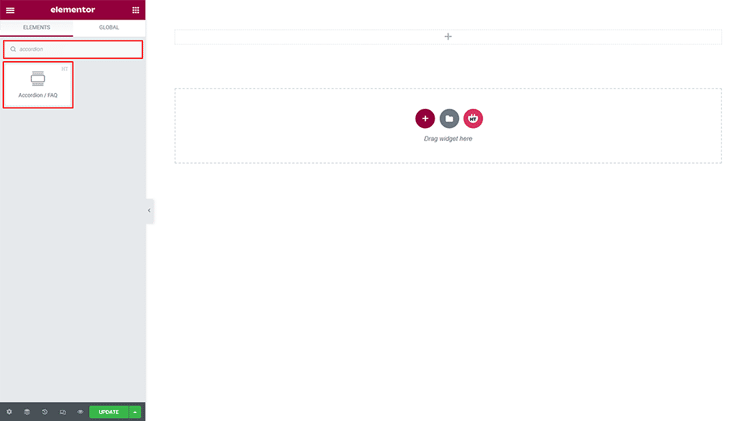
After locating the widget with an “HT badge,” simply drag it onto your page template.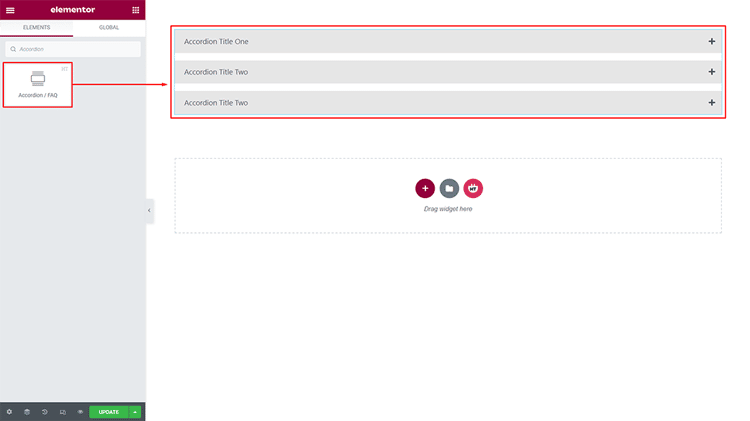
Step 3: Customizing the Accordion Widget
This extension offers a variety of accordion styles to create visually appealing designs. It allows you to craft accordions for any purpose, enhancing the look and feel.
Content :
Style: You have a range of 5 unique Accordion styles to choose from – select the one that best fits your needs!
Add items: You can easily craft a new Accordion item simply by pressing the button!
Item Icon: If you wish to customize the look of your Accordion collapse icon and open collapse icon, then you can easily do so with a few simple adjustments.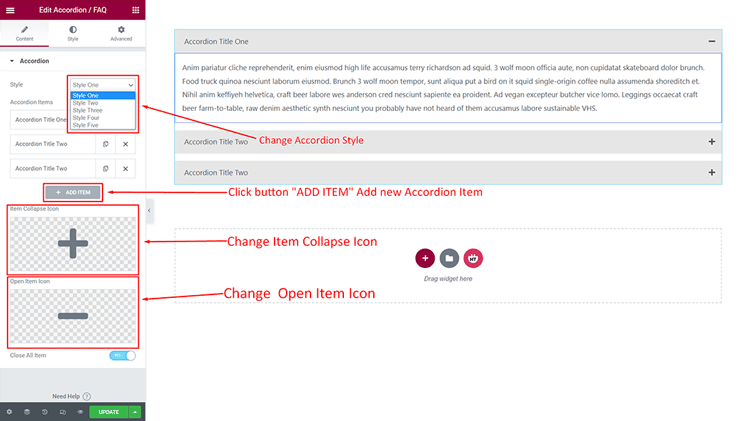
Accordion Items:
Title: You can customize the Title to your own specifications to suit whatever needs you to have.
Select Content Source: You have two options for the content source. Select an option that best suits your needs from the available options.
Accordion Content: With the Accordion content field, you can customize your content.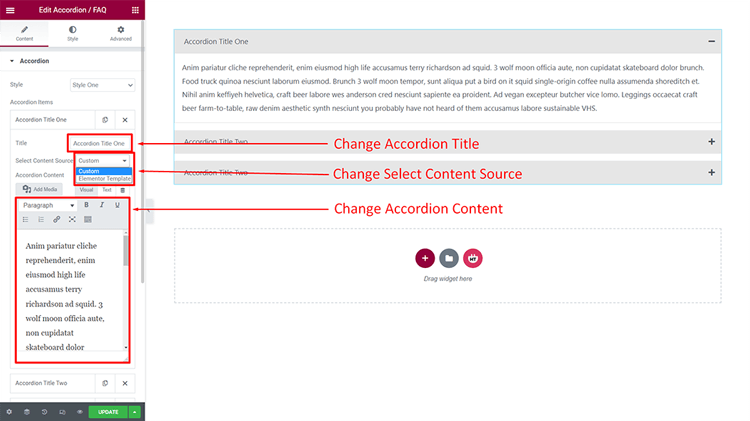
Modifying the Accordion Style to Create an Optimized User Experience
Accordion Item: You can design your spacing precisely as you desire.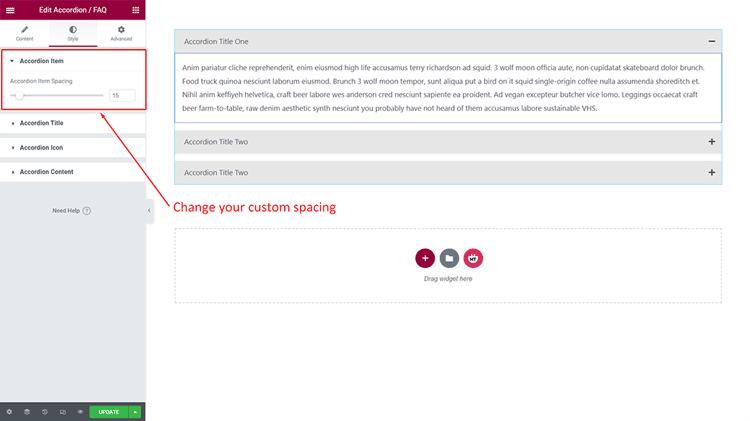
Accordion Title: Personalize the style of your Title to make it exactly how you want!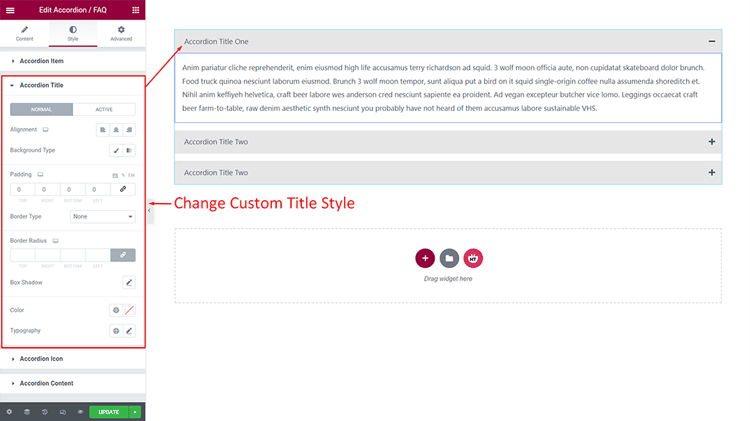
Accordion Icon: You can personalize your Icon to match your unique style.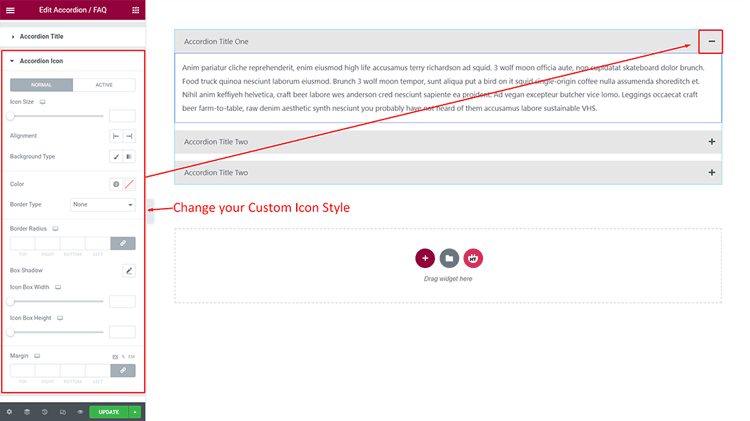
Accordion Content: Enhance the Content to your liking and get access to Unlimited Everything!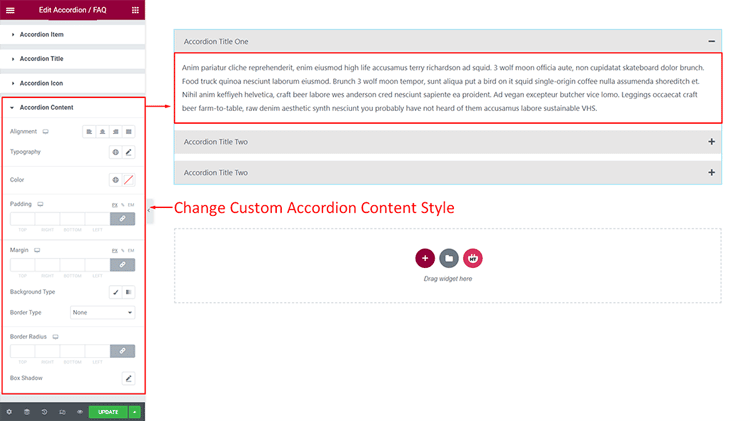
Frequently Asked Questions
Q: How can WordPress Accordion widgets help me?
A: WordPress Accordion widgets help WordPress users by allowing them to easily create and display accordions for their websites. You can use WordPress Accordion to organize your content into an attractive, easy-to-navigate layout that will make it easier for your visitors to find what they’re looking for.
Q: What is WordPress Accordion Plugin?
A: A WordPress Accordion plugin allows WordPress users to easily create and display accordions with just a few clicks. It supports various styling options with media integration and an icon library, making it perfect for websites that need to organize content in an attractive way.
Q: Is WordPress Accordion easy to use?
A: Yes! WordPress Accordion is very simple and straightforward to use. All you have to do is select the accordion style and set your needs, then click “Save,” and your WordPress Accordion will be ready. With the HT Mega Plugin, WordPress users can create beautiful WordPress Accordions without any coding skills.
Q: Are there any WordPress Accordion plugins available?
A: Yes! WordPress users can use popular WordPress accordion plugins like HT Mega, Move Addons, and other popular plugins to create accordions easily. These plugins offer a wide range of features and customization options for creating personalized accordions.
Q: Are WordPress Accordions mobile-friendly?
A: Absolutely! WordPress Accordions are fully responsive, meaning they work perfectly on all types of devices. WordPress users can be confident that their accordion will look great on any device. It ensures a smooth and responsive experience for visitors across various screen sizes and resolutions.
Can I create a custom accordion without a plugin in WordPress?
Yes, you can create a custom accordion in WordPress using custom HTML, CSS, and JavaScript. However, using a plugin like HT Mega makes it easier, with predefined styles and layouts, saving time and ensuring responsive design.
Are accordions mobile-friendly in WordPress?
Yes, most accordion plugins for WordPress, like HT Mega, are mobile-responsive. They automatically adjust to fit various screen sizes, ensuring that your accordion looks excellent on all kinds of devices.
Final Thoughts
Accordions are a powerful feature in WooCommerce that helps streamline product sorting. They allow users to organize products and product categories into collapsible sections, for easy navigation. This allows users to view details or switch between options without having to search through a lengthy list.
The accordion WordPress functionality significantly enhances the user experience. Using accordion plugin in WordPress reduces page scrolling for visitors.
This feature is handy on long web pages containing lots of information because it breaks that information into easily digestible chunks and implies the order of the content while allowing customers to expand or collapse each section based on their needs.
HT Mega Plugin is a powerful and versatile plugin that offers plenty of customization optionsfor creating the perfect accordion. With the HT Mega Plugin, you can easily design a great accordion by selecting predefined layouts or creating your own.
The WordPress accordion widget works across various themes. Many developers prefer accordion plugin for WordPress over custom solutions.
With the HT Mega Plugin, you’ll quickly gain access to a sleek, professional accordion for your WordPress site. Start using HT Mega today to enhance your website’s design and user experience. Don’t miss out, try it now and see the difference!