How to Build a High-Converting WooCommerce Sales Funnel with Elementor

Quick answer
A WooCommerce Sales Funnel with Elementor is a conversion-focused path that guides visitors from first click to completed purchase through a sequence of optimized pages: landing or shop page, product page, cart, checkout, thank-you page, and follow-up. Elementor gives you visual control over page layout and messaging, while ShopLentor helps you customize WooCommerce-specific templates like product, cart, checkout, and thank-you pages without custom code.
If you want better conversions, the core goal is simple: remove friction, make the next step obvious, and keep each page focused on moving shoppers forward. That matters because checkout friction, unclear product pages, and weak cart experiences often cause high-intent visitors to leave before they buy.
Moreover, if you already use WooCommerce and Elementor, you have most of the tools you need to build a high-converting sales funnel. In this guide, you’ll learn how to structure each stage of the funnel, optimize product, cart, and checkout pages, and use ShopLentor where it actually helps without overcomplicating your setup.
Table of Contents
What is a WooCommerce sales funnel?
A WooCommerce sales funnel is the step-by-step journey a shopper takes from discovering a product to completing a purchase and returning later. Instead of relying on a generic store structure, you intentionally shape each page so it answers the right question at the right moment: what is this, why should I trust it, and what should I do next?
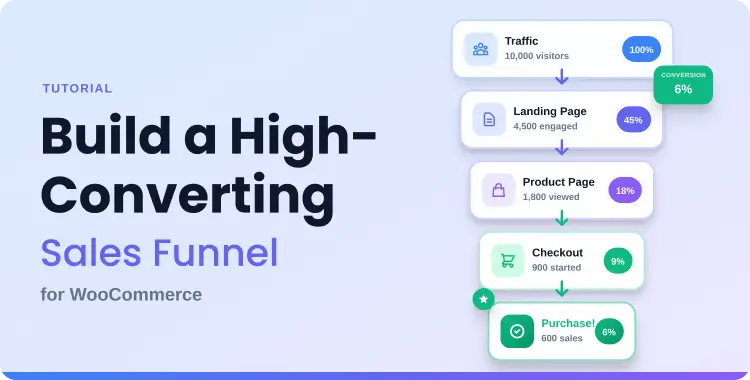
A typical WooCommerce funnel looks like this:
- Traffic source → landing page or focused shop page
- Landing/shop page → product page
- Product page → cart
- Cart → checkout
- Checkout → thank-you page
- Thank-you page → follow-up via email, remarketing, or helpful content
That structure is simple, but the performance depends on how well you remove friction between steps.
Why Elementor works well for funnel pages
Elementor is a strong fit for funnel building because it gives you visual control over page structure, content hierarchy, mobile layout, and reusable sections without touching code. If you are comparing tools or expanding your stack, this guide to the best Elementor addons for WooCommerce is a useful next read.
Elementor makes it easier to:
- Build campaign-specific landing pages
- Reuse trust blocks, FAQs, and CTAs across multiple pages
- Adjust important sections for mobile users
- Test different headlines, layouts, and content blocks faster
However, Elementor alone does not fully control WooCommerce templates like product, cart, checkout, and thank-you pages. For those areas, a WooCommerce builder such as ShopLentor becomes much more useful.
ShopLentor- WooCommerce Builder for Elementor & Gutenberg
A versatile page builder to build modern and excellent online stores with more than 100k+ Active Installations.
Where ShopLentor Fits in the Workflow
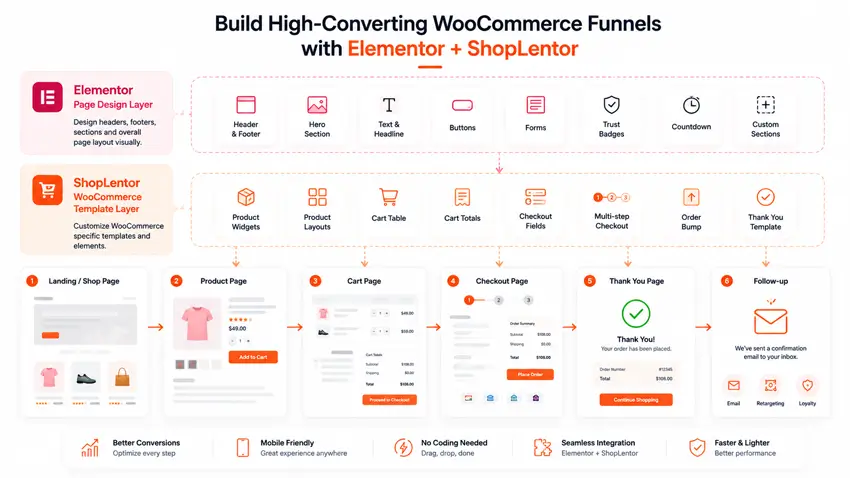
ShopLentor (formerly WooLentor) is a WooCommerce page builder and Elementor addon that helps you customize key WooCommerce pages more deeply than Elementor alone. If you want a broader overview before implementing anything, this review of the WooLentor WooCommerce builder plugin gives helpful context.
In this workflow, ShopLentor is useful when you need to:
- Create custom single product templates
- Customize the WooCommerce cart page with Elementor widgets
- Build a custom checkout page template
- Improve product discovery from shop or archive pages
- Keep the design of core WooCommerce pages consistent with the rest of the funnel
This is the right way to position ShopLentor in the article: not as a full funnel automation platform, but as a practical WooCommerce page-building and optimization tool that strengthens funnel pages built with Elementor.
The Main Funnel Stages and How to Optimize Them
Landing or shop page
Your first page should match the visitor’s intent immediately. If someone clicks from a search result, ad, or email, the page should confirm they are in the right place within seconds.
For this stage, focus on:
- A clear headline that matches the traffic source
- A short benefit-first intro
- One primary CTA
- Minimal distractions
- Relevant product groupings or featured products
If you want a more product-led top-of-funnel experience, create a focused category or shop entry layout instead of sending users to a generic store page. This tutorial on how to display products by category in WooCommerce can help you structure that entry point more effectively.
Product page
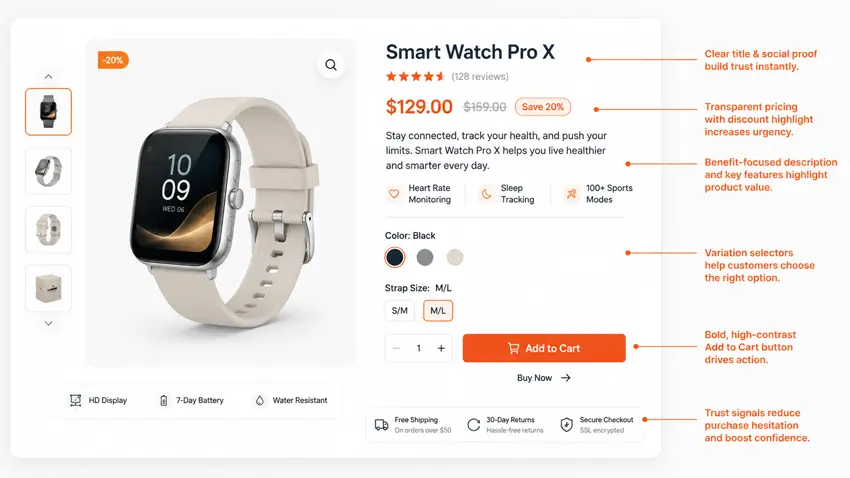
The product page is where most buying decisions happen. It needs to communicate value fast, reduce doubt, and keep the add-to-cart action easy to find.
Optimize product pages with:
- Clear title and short benefit summary
- Strong product imagery
- Scannable bullets for features and benefits
- Reviews, trust elements, and guarantees where relevant
- A visible Add to Cart button
- Sticky or always-available purchase CTAs where helpful
If you want more control over layout, use ShopLentor to build a dedicated product template. This guide on how to build a custom product template using WooLentor is especially relevant here. You can also review these WooCommerce sticky add to cart plugins if you want to keep the purchase CTA visible longer on mobile and long product pages.
For product discovery, quick-view functionality can reduce extra clicks and keep shoppers engaged in listing pages. These resources on WooCommerce quick view plugins and how to add quick view in WooCommerce are useful supporting reads.
Cart page
The cart page should reinforce the decision to buy, not interrupt it. Confusing layouts, weak CTAs, and unclear totals often push users away at this stage.
Keep your cart page focused by using:
- Clean item and pricing summaries
- Transparent cost information
- A clear Proceed to Checkout button
- Low visual clutter
- Trust reminders near the action area
If your current cart page feels generic, this tutorial on how to customize the WooCommerce cart page using Elementor and ShopLentor fits naturally into this step.
Checkout page
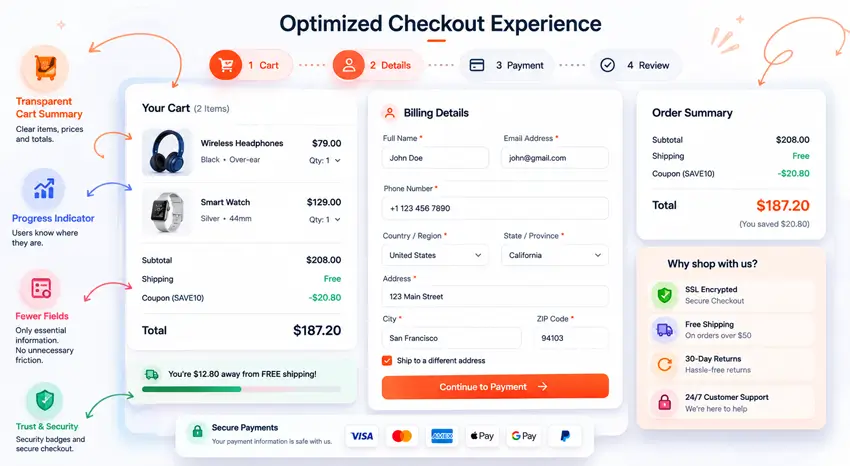
Checkout is the most sensitive part of the funnel because even high-intent buyers can drop off if the process feels slow, confusing, or too demanding.
To improve checkout conversions:
- Remove unnecessary fields
- Keep the layout clean and mobile-friendly
- Show total costs early
- Use reassurance text and payment trust elements
- Consider faster purchase options where appropriate
If you are testing different checkout structures, these guides on how to create multistep checkout for WooCommerce and how to build a Shopify-style checkout in WooCommerce are highly relevant.
Thank-you page
Most WooCommerce stores underuse the thank-you page. Instead of stopping at order confirmation, this page can guide the next step and increase post-purchase engagement.
A better thank-you page can include:
- Order confirmation and next steps
- Setup or onboarding guidance
- A link to helpful documentation or blog content
- A return-to-shop CTA
- A gentle recommendation for related products
If you have already customized product, cart, and checkout templates, the thank-you page should follow the same logic so the funnel feels complete and consistent.
Follow-up
A strong funnel continues after checkout. Follow-up emails, helpful blog content, and return-visit prompts can improve repeat purchases and long-term customer value.
For example, a store selling WooCommerce-related tools could send:
- A welcome or onboarding email
- A tutorial link
- A related product recommendation
- A helpful blog post that solves the next problem in the customer journey
How to Build a WooCommerce Sales Funnel with Elementor: Step-by-step
Step 1: Choose one offer and one audience
Start with a single product, bundle, or campaign instead of your whole catalog. Define the buyer, their main problem, and the one action you want them to take.
Step 2: Map the funnel before designing
Write the page sequence down first:
- Landing or focused shop page
- Product page
- Cart page
- Checkout page
- Thank-you page
- Follow-up
This keeps the funnel focused and stops Elementor from becoming just a design playground.
Step 3: Build the entry page in Elementor
Use Elementor to create a clean landing or shop entry page with:
- A headline aligned to the search intent or campaign promise
- A short supporting explanation
- Product benefits or featured products
- One primary CTA
Step 4: Build the product template with ShopLentor
Use ShopLentor’s product template builder to create a dedicated layout for the offer you want to push. This is where you shape the most important conversion page with product widgets, custom layout blocks, and trust signals.
Step 5: Customize the cart page
Use a custom cart layout if your default cart feels generic or cluttered. ShopLentor’s cart page customization workflow is a practical way to keep your cart page aligned with the funnel rather than leaving it as an afterthought.
Step 6: Simplify checkout
Use a cleaner checkout structure if your current checkout asks for too much information or feels visually heavy. In many stores, reducing friction here does more for conversions than redesigning the homepage.
Step 7: Improve the thank-you page
Add onboarding, links to helpful content, and relevant next steps so the purchase feels complete and the customer has a reason to stay engaged.
Step 8: Track performance and improve over time
Use eCommerce tracking to monitor conversion rate, average order value, purchases, and abandonment behavior. If you need help with measurement, this guide to Google Analytics ecommerce tracking is the most relevant internal resource to add here.
ShopLentor vs a Dedicated Funnel Plugin
Elementor and ShopLentor are a strong combination for page design and WooCommerce template control, but some stores still need a dedicated funnel plugin for offer logic, funnel analytics, or advanced post-purchase flows.Use case ShopLentor Dedicated funnel plugin Custom product, cart, checkout, and template design Strong fit Often secondary Elementor-based WooCommerce page building Strong fit Varies by plugin Advanced upsell or downsell flow logic Limited or depends on modules Strong fit Visual funnel flow management Not the main purpose Strong fit One-click order bumps and advanced funnel automation Not the main purpose Strong fit Best use case Improve WooCommerce funnel pages with Elementor Manage advanced funnel logic and monetization
The most practical setup for many stores is hybrid: use Elementor plus ShopLentor to design high-converting WooCommerce pages, then add a dedicated funnel plugin only if you need more advanced flow logic.
Build Better WooCommerce Funnel Pages with ShopLentor
If Elementor gives you the visual freedom you want but WooCommerce templates still feel limiting, ShopLentor is a practical next step. It helps you customize the pages that matter most in a funnel—product, cart, checkout, and thank-you pages—without forcing you into a full funnel-automation stack.
A sensible starting point is to optimize one funnel first, such as your best-selling product or most important campaign, then roll out successful templates to other products after you see what performs best.
Practical checklist
Use this checklist before publishing your funnel:
- One main offer selected
- One primary audience segment is defined
- Landing or focused shop entry page built
- Product template customized for the offer
- Cart page simplified
- Checkout friction reduced
- Thank-you page improved with a next step
- Mobile layout tested
- Funnel performance tracking is configured
- Internal links added to supporting WooCommerce or Elementor content
For a broader supporting resource, you can also link readers to these WooCommerce best practices and tips.
Common Mistakes to Avoid
Avoid these common funnel problems:
- Sending traffic to a generic homepage or broad shop page
- Using default WooCommerce templates unchanged
- Keeping too many distractions on product, cart, or checkout pages
- Asking for unnecessary checkout information
- Hiding shipping costs too late
- Ignoring mobile UX
- Measuring only overall sales instead of step-by-step funnel movement
Frequently Asked Questions
What is a WooCommerce Sales Funnel with Elementor?
A WooCommerce Sales Funnel with Elementor is a sequence of optimized pages built to move users from discovery to purchase using Elementor for layout and a WooCommerce builder like ShopLentor for deeper template customization.
Do I need ShopLentor if I already use Elementor?
If you only need basic landing pages, Elementor may be enough. If you want deeper control over product, cart, checkout, and WooCommerce templates, ShopLentor becomes much more useful.
Can ShopLentor replace a dedicated funnel plugin?
Not completely. ShopLentor is best positioned as a WooCommerce page builder and template customization tool. Dedicated funnel plugins are still better for complex upsells, downsells, order bumps, and advanced funnel logic.
Which funnel page usually improves conversions fastest?
For many stores, the fastest gains come from improving the product page and checkout page because these are the stages where buying intent is highest and friction has the biggest impact.
How do I measure whether my funnel is working?
Track product views, add-to-cart rate, cart-to-checkout progression, checkout completion, conversion rate, and average order value. Google Analytics eCommerce tracking is useful for monitoring these KPIs and spotting weak funnel steps.
Is multistep checkout better than single-page checkout?
It depends on the product and audience. Multistep checkout can feel less overwhelming because it breaks the process into smaller parts, while single-page checkout can reduce clicks. The best option is the one that removes the most friction for your buyers.
A high-converting WooCommerce sales funnel works best when each page has one clear job and one clear next step. Start with your most important product or campaign, improve the funnel one stage at a time, and test what actually helps shoppers move forward. If you want more control over WooCommerce funnel pages inside Elementor, ShopLentor is a practical solution worth exploring.